DL-V3
Proprietary Notice
Table of Contents
Edit Group Dgps ID Configuration 105
Oemv Family Receiver Performance DL-V3 Specifications
Extcontrol Disable Automatic Powerup Group
Control COM Power for a Group 103
116
Table of Contents
114
115
Bluetooth Configuration 195
Figures
198
197
199
Tables
136
Tables
126
134
Restrictions You may not
Software License
Software License
Standard Terms and Conditions of Sales
Terms and Conditions
Terms and Conditions
Warranty
FCC Notices
Actions to Mitigate Lightning Hazards
What is the hazard?
Lightning Protection Notice
Hazard Impact
DL-V3 Regulatory Testing
Electromagnetic Compatibility EMC and Safety
Description
RoHS Notice
Weee Notice
Oemv Firmware Upgrades
Customer Service
Prerequisites
Foreword
Congratulations
Scope
Foreword
Conventions
Chapter Introduction
Model Name Firmware Feature
DL-V3 Controller Models
GPS Positioning Modes of Operation
Chapter Introduction
Modes of Operation a DL-V3 Model RT20 L1/L2
DL-V3 Setup
Chapter Installation and Setup
Antenna Port
Chapter Installation and Setup
Ethernet Port
Installation and Setup Chapter
DB-9 Setup
Bluetooth Setup
Selecting a Gnss Antenna
Installing the PC Utilities
Models Frequencies Supported
Power Supply Requirements
Choosing a Coaxial Cable
NovAtel Gnss Antenna Models
Mounting Bracket
Connecting the Antenna to the Receiver
Applying Power to the Receiver
Enclosure Power Requirements
Receiver
Connecting Data Communications Equipment
DL-V3 Power Down and the Power Button
Default Serial Port Configurations
Strobes
DL-V3 COM3 Configuration
Universal Serial Bus USB
Power
Status Indicators
Status Communication Ports excluding COM3
Flash Card Memory
Positioning Mode
Satellite Tracking
Satellite Tracking LEDs
Position Mode Position Mode Detail a
Positioning Mode LEDs
Baseline Length LED Color
External Oscillator
Occupation Time
Occupation Time LEDs
DL-V3 Removable Compact Flash Memory Card
Antenna LNA Power
Data Logging
Access Door
Card Choice
Using CDU to Format the CF Card
Using HyperTerminal to Format the CF Card
Installation and Setup Chapter
Chapter Operation
Serial Port Default Settings
Starting the Receiver
Communicating Using a Remote Terminal
Communicating Using a Personal Computer
Communicating with the Receiver Using CDU
Chapter Operation
Transmitting and Receiving Corrections
Rover Base
Log port message trigger period
Base Station Configuration
Configuration Notes
Rover Station Configuration
Log Data from a Site to a File
Using the DL-V3
Edit the Site
Select the Group
Start the Data Logging
Stop the Data Logging
Enabling Sbas Positioning
Pass-Through Logging
Sync Option
Starting DL Explorer
Chapter DL Explorer
Receiver Groups
Exiting DL Explorer
DL Explorer Chapter
Logs Tab
Chapter DL Explorer
Trigger Description
Log Triggers
Position Tab
Preset Powerup Group
Site Tab
Position Tab
Site Tab
Interfaces Tab
Interfaces Tab
Ports Tab
Ports Tab
COM Parameters
Communication Parameters
Group Management
Upload Group from the PC/Laptop to the Receiver
Starting Groups
Log Transfer Dialog
Transfer a File from the DL-V3 to the PC/Laptop
File Details
Flight Recorder OFF
Flight Recorder
CF Card Status
CF Card Status
Oemv Family Receiver Performance
Appendix a
Color
DL-V3 Specifications
Baseline
LEDs Color
Length km Color
Dimensions
DL-V3 I/O Port Pin-Out Descriptions
DL-V3 Serial Port Pin-Out Descriptions
Oemv Firmware Reference Manual
DL-V3 Power Cable
2.1 12V Power Adapter Cable NovAtel part number
Reference Description
Null-modem Cable NovAtel part number
DL-V3 Straight Through Serial Cable
Straight Through Serial Cable NovAtel part number
2.4 I/O Strobe Port Cable NovAtel part number
Wiring Table
Message ID Ascii Command Description
DL-V3 Commands in Alphabetical Order
DL-V3 Commands in Order of their Message IDs
Message ID Ascii Command Description
Syntax Conventions
Dhcp OFF
Appcontrol COM3 Bluetooth/Ethernet Switch
BinaryASCII
Application Functions
Application Parameters
Binary
COM Serial Port Identifiers
Comvout Control COM Peripheral Power
COM Voltage Out Action
Default
Currentfile Specify File for FILEHDR/FILETRANSER Logs
Dump Mode
Currentfile Default Configuration
Parameter Power-On Freset Stored in NVM
Currentgroup Specify File for Groupdef Log
Currentgroup Default Configuration
Delete Target
DEL Delete Files from CF Card
CF Card Operation
Disk Format the CF Card
Extcontrol Disable Automatic Powerup Group
Freset Target
Freset Clear Selected Data from NVM and Reset
Group Create and Manipulate Groups
Action
Group Default Configuration
Groupantheight Edit Group Antenna Height
Groupantheight Default Configuration
Groupantsn Edit Group Antenna Serial Number
Groupantsn Default Configuration
Groupanttype Edit Group Antenna Type
Groupanttype Default Configuration
Groupcom Associate Port Configurations with a Group
101
Parameter Update
Handshaking
Parity
102
Example
Groupcomvout Control COM Power for a Group
104
Dgps Type, see on Page 165 and Table
Groupdgpstxid Edit Group Dgps ID Configuration
Field Power-On Freset Stored in NVM
Groupdgpstxid Default Configuration
106
Groupecutoff Edit Group Elevation Cut-Off Angle
Groupecutoff Default Configuration
Groupfixpos Default Configuration
Groupfixpos Configure Group to Fix Receiver Position
Groupinterfacemode Edit Group Interface Mode
Parameter Power-On Freseta Stored in NVM
Groupinterfacemode Default Configuration
110
Grouplog Edit Group Logging Specifications
112
Grouplog Default Configuration
Group Mode
Groupmode Configure Group Survey Type
Groupmode Default Configuration
Groupsave Default Configuration
Groupposave Configure Group Position Averaging
Groupsatlimit Limit Number of Satellites for Group
Groupsatlimit Default Configuration
Groupsitename Edit Group Site Name
Groupsitename Default Configuration
Groupsitenumber Edit Group Site Number
Groupsitenumber Default Configuration
Log hdrdst versionb command is issued
Groupuse Execute a Set of Commands
119
Group Action
LOG Request Logs from the Receiver
121
Factory Default
Description Field Name Value Type
122
123
Detailed Serial Port Identifiers
XCOM3
124
Logfile Open or Close File on CF Card
Log File Action
Logfile Default Configuration
Methumid Specify Air Humidity
Methumid Default Configuration
Metpress Specify Air Pressure
Metpress Default Configuration
Mettemp Default Configuration
Mettemp Specify Air Temperature
Project Add or Clear a Project
Project Default Configuration
Project Action
Rename Rename a File on the CF Card
Reset Perform a Hardware Reset
Satlimit Set Minimum Satellites in Position Solution
File Port Channel
Satlimit Default Configuration
Site Control Site Occupations
Site Default Configuration
Site Mode
Siteupdatenumber Default Configuration
Siteupdatenumber Set Occupied Site Number
Siteupdatename Default Configuration
Siteupdatename Set Occupied Site Name
Siteupdateantheight Default Configuration
Siteupdateantheight Set Occupied Site Height
Siteupdateanttype Default Configuration
Siteupdateanttype Set Occupied Site Antenna
Siteupdateattribute Default Configuration
Siteupdateattribute Set Occupied Site Attributes
Softpower
Softpower Simulate a Power-Button Off
Write Create User Data Logs
Writefile Create/Append Files on CF Card
Writefilehex Create/Append Data to CF Card
Writehex Create User Data Logs
Message ID Ascii Log Description
DL-V3 Logs in Alphabetical Order
Message Ascii Log Description
DL-V3 Logs in Order of their Message IDs
Type Size Description Range Offset
PDC Log Header
Port Identifier Description
Serial Port Identifiers
Serial Port Interface Modes
Binary Value Ascii Mode Name Description
Generic
152
Field Data Description Bytes Format Units Offset
Currentset CURRENTFILE/CURRENTGROUP Configuration
Dirent CF Card File List
155
Extlevels Extended Hardware Levels
Filechannel Log File Channel Configuration
Logfile Header
Filehdr
File Status Bit Description Bit=0 Bit=1
File Status
Filetransfer Log File Contents
Groupcomconfig COM Port Configuration Information
Status Bit Description Bit=0 Bit=1
Groupcomconfig Status Word
Groupdef Log Group Configuration
164
COM1/COM2 Interface Modes
Dgps Type
Dgps Type Description Binary
Group Status Bit Description Bit=0 Bit=1
Group Status1 Word
Group Status2 Word
Meteorological Log Status
Metdef Meteorological Parameters
Met Status Bit Description Bit=0 Bit=1
Projectdef
DL-V3 Voltage Parameter Logs
Pwrstatus Power and Status Settings Summary
Power Status Bits Description Bit =
Port Power Status
Auxiliary 2 Status Word
Rxstatus DL-V3 Status
AUX2 Bit Description Bit=0 Bit=1 Trigger
AUX3 Bit Description Bit=0 Bit=1 Trigger
Auxiliary 3 Status Word
174
Rxstatusevent DL-V3 Status Event Notification
Site Status
Site Configuration
SiteStatus Bit Bit Name Description Bit=0 Bit=1
Component Type
Version HW & SW Versions and Serial Numbers
Write User-Generated Information
Writehex User-Generated Information
Physical Set-Up
Appendix D
179
Configuration Overview
180
Enable Ethernet on the DL-V3 Receiver
181
182
183
184
185
Network Settings Configuration
186
Lantronix COM Redirector Manager
Add the DL-V3 Ethernet Device’s IP Address and Port
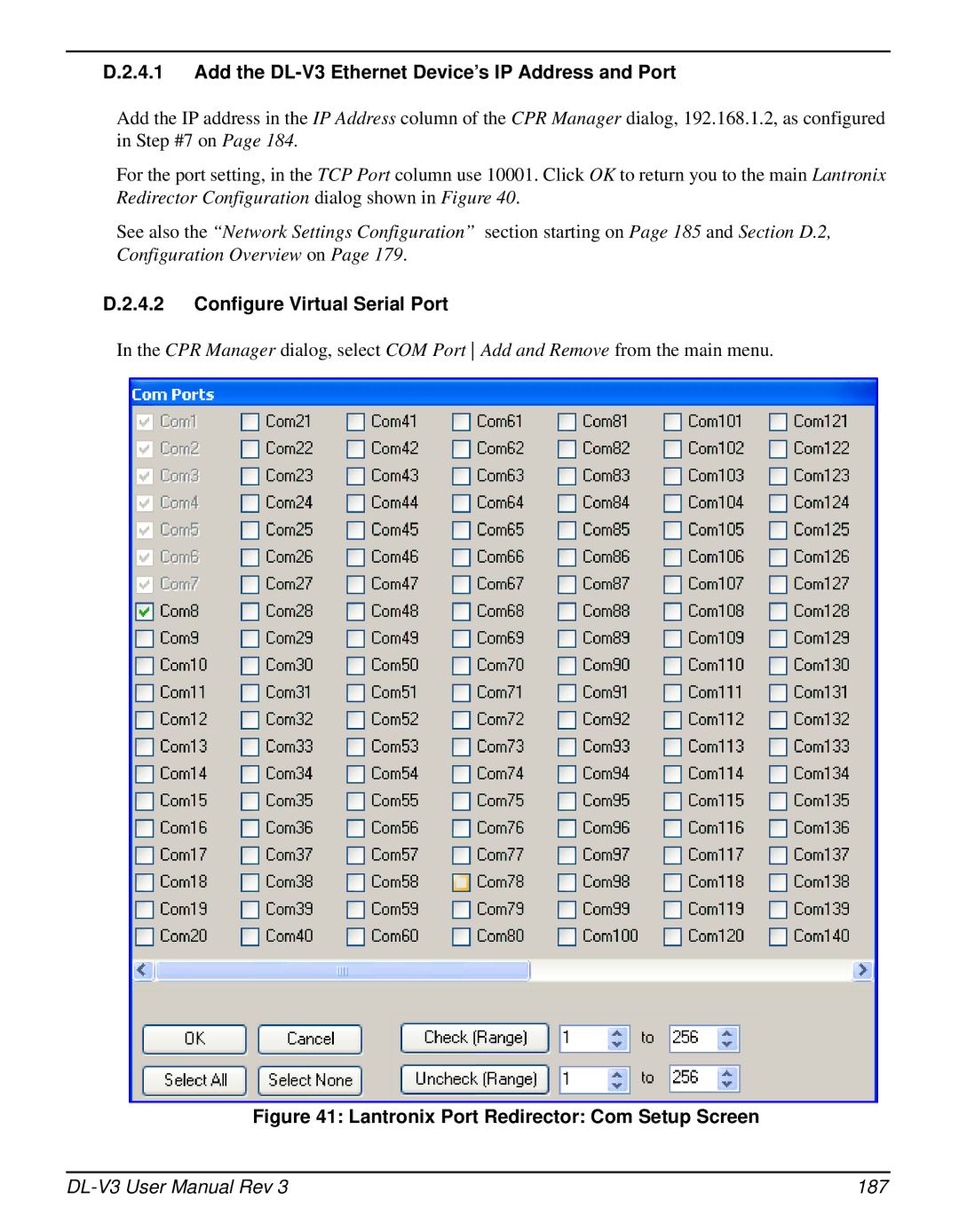
Configure Virtual Serial Port
187
Redirector Configuration Completion
Alternative Serial Configuration
188
Switch to Ethernet Device
HyperTerminal Default Parameters
190
Reset Ethernet
Establish Serial Command Mode in Ethernet
Establish a Communications Tunnel
191
Command Mode Example
192
Network Configuration in Command Mode
193
194
Set Up a PC/Laptop with a Bluetooth Adaptor
Enable Bluetooth on the DL-V3 Receiver
195
196
Locate a Bluetooth-Enabled DL-V3 in Range
Bluetooth PIN Code Request
Communicate with the DL-V3 Using Bluetooth
Bluetooth Connected Green
Stop Communicating with the DL-V3 Using Bluetooth
COM3 Disconnect?
Manufacturer’s Part Number
Accessories
200
201
Index
202
Index
203
CF card, 39, 41, 92 collect, 40, 51, 53
204
Bluetooth, 27
205
LED
206
Base, 47, 49
207
RTK, 24
OM-20000119 Rev 2009/07/22