Wireless Connecting To The Network
Installation
Configuration Tools
Configuration Tools
Configuration Using The Control Panel
Configuration Using The Control Panel
Configuration Tools
Page
Configuration Tools
Network Interfaces TCP/IP Routing Table
Ethernet Interface Verification
Ethernet Interface Verification
Control Panel
Wireless Ethernet Interface Configuration Using
IP Address Configuration
Signal Strength
Wireless Parameter Configuration
Operation Mode
Gateway Address
Minimum Transfer Rate
Configuration Tools Ssid Name
Channel
Antenna Diversity
Transmit Power
Power Management
International Mode
Authentication Method
Authentication Method
Encryption Key Configuration
WEP Key x Format
WEP Key x Width
Reset Kerb. Pwd
Kerberos Enable
Kerberos Parameters
Kerb. Pwd
Tckt Life Units
Configuration Tools Clock Skew Units
Clock Skew SEC
Renew Life SEC
Renew Life Units
Wireless Cisco Leap
Kerberos Enabled Wireless NIC Configuration
Wireless Kerberos Enabled Wireless NIC Configuration
Configuring the Print Server for Kerberos Authentication
Configuration Tools
Html Forms
Html Forms
Ethernet Interface Html Structure
Printer Status Screen
Printer Status Screen
Remote Shell
Configuration Alternatives
Telnet
Embedded Ethernet Interface Web
Configuration
Configuration
Configuration
TCP/IP Network
Network Configuration
Network Configuration
TCP/IP Network
Interface
Routing
Mode
802.11b
Network Name
Transmit Power
Power Management Mode
Speed
Channel
User
Default Key
Password
Workgroup Name
Windows Network NetBIOS TCP/IP
Windows Network NetBIOS TCP/IP
FrameType
Novell Network
File Server
Service Type
Pserver
Rprinter
Destination Settings
Print Path Configuration
Print Path Configuration
Name
Destination Settings
Services
Selected Model
Parameters
Current Model Settings
Printer Configuration
Current Log Path Settings
Selected Log Path
Log Path Type
Print Model Configuration
Print Model Configuration
Banner
Trailer String
Logpath Type
Log Path Configuration
Log Path Configuration
Logpath Port
TN5250/3270 Configuration
TN5250/3270 Configuration
Host IP
TN5250/3270 Configuration, TN3270 Mode
Resource Name
Port
Device Description
Message Queue Name
Wscst Name
Device Type
Wscst Library
Auto Connect
Snmp Configuration
Snmp Configuration
Snmp Manager Alert Posting Settings
Email Alert Posting Settings
Syslog Alert Posting Settings
Short E-mail Format
Email Address
Short E-mail Message Length
Send Test Message
Alert Groups
Snmp Alert Groups Configuration
Changing The Ethernet Interface Mode NDS and Bindery Setups
Changing The Ethernet Interface Mode NDS and Bindery Setups
Setting The Ethernet Interface NDS Context NDS Setups
Setting The Ethernet Interface Preferred NDS Tree NDS Setups
Novell Host Configuration 10/100Base-T
Novell Host Configuration 10/100Base-T
NDS Pserver Setup Netware 4.x/5.x
NDS Pserver Setup Netware 4.x/5.x
Novell Host Configuration 10/100Base-T
NDS Pserver Setup Netware 4.x/5.x
Bindery Pserver Setup Netware 3.x, Netware 4.x, and Netware
Load pserver .salesps.sales.microplex
Telnet to the print server telnet ipaddress 210
Ipaddressroot
Overview
Ndps Configuration Netware 4.11 and Above
Ndps Configuration Netware 4.11 and Above
Setup using Forward Jobs to a Queue Mode
Setup using LPR Mode
Setup Using Rprinter Mode
Pserver Setup
Troubleshooting 10/100Base-T
Pserver Setup
Pserver
Troubleshooting 10/100Base-T
Pserver Setup
RPRINTER/NPRINTER Setup
RPRINTER/NPRINTER Setup
Job Goes To The Queue But Nothing Prints
Printing Related
Printing Related
Job Prints Incorrectly
222
Developing Line Descriptions With Crtlineth
ISeries Configuration Ascii Printer
Example Ethernet Interface Line Description
Ssap
Configuring iSeries For Ascii Using TCP/IP
Configuring With Addtcpifc
Internet Address
Configuring iSeries For Ascii Using TCP/IP
None
Configuring a Local Domain And Hostname
Configuring a Router Definition With
Configuring a TCP/IP Host Table Entry
Configuring The iSeries For Printing
Setting Up Printing For Ascii Files
Remote Printer Queue name
To Use LPR Manually
YES NO, *YES
Curlib
NO, *YES
User
To Create An Automatic Remote Output Queue
SNA SNA, *IP, *USRDFN
Libl
YES YES, *NO
None NONE, *IMGA01
Remote System Rmtsys
Output Queue Outq
Destination Options Destopt
Writer to Autostart Autosrtwtr
Connection Type Cnntype
= Qsys
= *NONE
= *WSCSTCONT132
Verify Printing On iSeries Internet address Intnetadr
VDIAGNOSTICS Printer Tests E-net Test Enter
Verify Printing On iSeries
ISeries Ascii Troubleshooting
ISeries Ascii Troubleshooting
TCP/IP Access Problem
Arp -sipaddress MACaddress ping ipaddress
Web Browser/HTTP Problem
Printing AFP, IPDS, And SCS Files
Configuring On iSeries As An Ipds Printer
Configuring On iSeries As An Ipds Printer
Configuration Checklist
Control Panel Settings Menu
Requirements
Configuring An iSeries TCP/IP Interface With Addtcpifc
Configuring An iSeries TCP/IP Interface With
Normal
Configuring An Interface For Ethernet
Type of service
Configuring a TCP/IP Host Table Entry
Configuring AFP With Crtpsfcfg On V3R7 Or V4R1 Optional
Configuring PSF For Ipds On V3R7 Or V4R1
TCP/IP activation timer 170
Configuring PSF For Ipds On V3R7 Or V4R1
Remote location Name or address
TCP/IP port
Activate release timer Actrlstmr
PSF configuration Psfcfg
Release timer Rlstmr
Ipds pass through Ipdspasthr
Configuring PSF With Crtdevprt On V3R7 Or V4R1
Font
Port
Formfeed Cont
Acttmr
Remote Location Rmtlocname
Form Feed Formfeed Specify *CONT Activation Timer Acttmr
Crtdevprt
Configuring PSF for Ipds On V4R2 And Above
Configuring AFP with Crtpsfcfg on V4R3 and above Optional
Blank
Nomax
Libcrtaut
None NONE, *CHKFIRST, *CHKALL
YES
Remote Location name or address Rmtlocname
Configuring PSF for Ipds On V4R2 And Above
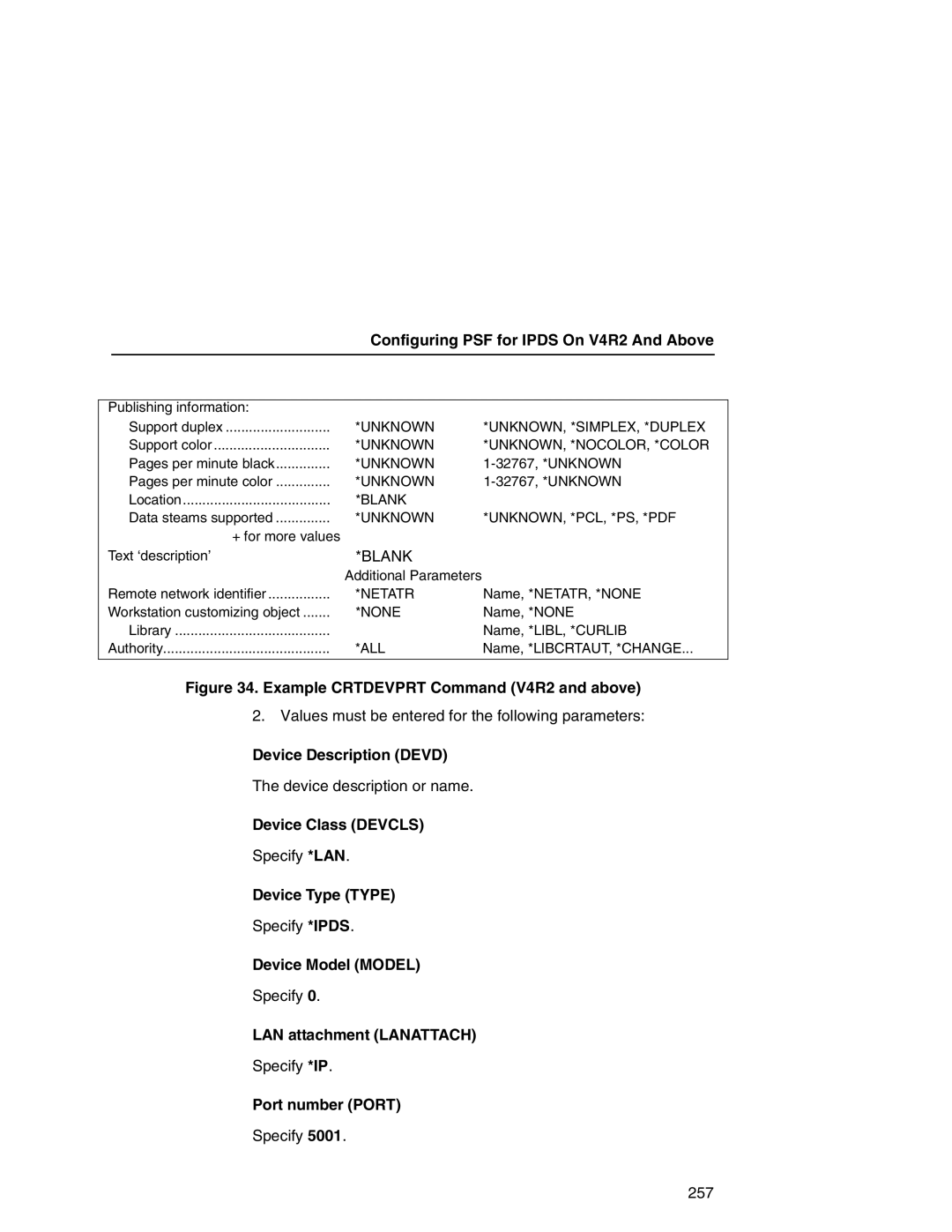
Configuring PSF with Crtdevprt On V4R2 and above
256
Device Class Devcls
Device Description Devd
Device Type Type
Device Model Model
Form Feed Formfeed
Configuring On iSeries As An Ipds Printer Font Font
Verifying The Ipds Configuration On iSeries
Verifying The Ipds Configuration On iSeries
Sharing The iSeries Printer On The Network
Sharing The iSeries Printer On The Network
Printer Sharing Parameters
Printer Sharing Parameters
Printer Sharing ISeries
Parameter
Cannot Ping The Printer
ISeries Troubleshooting
Crtdevprt Acttmr Nomax
Chgdevprt
Spooled Print File Remains In PND Status
PSF Terminates When Initialized
PSF Terminates When Initialized
Data Is Being Clipped
ISeries Troubleshooting
Spooled Files Disappear Without Printing
10 z/OS Configuration Ipds Printer
Configuration Checklist
Configuration Procedure
Configuring PSF for z/OS to Print Ipds Files
Configuration Procedure
Define the Communications Control Unit to z/OS
Configuring PSF for z/OS to Print Ipds Files
Modify the TCP/IP Profile in z/OS
Mvscp
Modifying TCP/IP Profile
Smalldatabufferpoolsize
Databufferpoolsize
Tinydatabufferpoolsize
Keepaliveoptions
Gateway
Verify the Printer Connection
JES3 Printer Definitions
Define the Printer to JES
JES2 Printer Definitions
Define the Printer to PSF
274
275
Ipaddr
Sample Psfproc procedure
Starting a TCP/IP-attached Printer
Verifying a TCP/IP-Attached Printer on z/OS
Stopping a TCP/IP-attached Printer
Verifying a TCP/IP-Attached Printer on z/OS
Sharing IBM 6500-v Printers on z/OS
Resolving Ipds Printing Problems
JES Spool Printer Sharing
Sharing IBM 6500-v Printers on z/OS
JES Spool Printer Sharing
Timeout
Mgmtmode
Failure
Port Switching Printer Sharing
Handling z/OS Connectivity Problems
Handling z/OS Connectivity Problems
Ping is Not Successful
Ping is Successful
Ping is Successful
282
HPRT100
OS Configuration For a TN3270E Printer
Coax Printer Support Fmid
Program Materials
Program Materials
PRT9 and Fssdef for
Courwtr Proc
JES2 TN3270E Vtam Major Node
Vtam Definitions For SCS and DSE TN3270E
Vtam Definitions For SCS and DSE TN3270E
Printer with SNA Character SET LU1
Tcpip Configuration With TN3270E
Tcpip Configuration With TN3270E
TN3270E
FSS
Printer Inventory Manager As Defined With TN3270E
FSA
Program Materials
VTAMSCS2 Ippw
VTAMDSE1
VTAMSCS1
Program Materials
Dest Prmode
Linect
FCB Segment
Threshld
Program Materials
Printer Inventory Manager As Defined With TN3270E
Program Materials
Configuration Screens
Configuration Screens
Configuration Forms
Configuration Html Forms
IBM
Active Prof Curr Conns 3 Records Displayed
RMT3 *PRINTER PPE LU3PRT
300
Setting Up TN5250 Print Queues on iSeries
ISeries Configuration TN5250
Setting Up a TN5250 Connection/Device Via a Telnet Session
Setting Up a TN5250 Connection/Device Via a Telnet Session
Command List
Using Telnet Commands for TN5250
Store Commands
User Supplied Values
TN5250/3270 Auto Connect Command
List Commands
Using Telnet Commands for TN5250
Getting Started
TN5250 Job Formatting
TN5250 Job Formatting
Devd
Online
Transform
Prtermsg Info
Mfrtypmdl Same
PPRSRC1 Mfrtypmdl
Wscst None
Font Identifier Font Help
Font Identifier Font Help
308
Device Class Devcls
Configuration Instructions
Device Type Type
Device Model Model
Activation Timer Acttmr
Printer Error Message Prterrmsg
Port number Port
Font Font =
Configuration Instructions
Inactivity Timer Inacttmr
Host Print Transform Transform
Manufacturer Type and Model Mfrtypmdl
Workstation Customizing Object Wscst
User-Defined Options Usrdfnopt
System Driver Program Sysdrvpgm
P6500
Configuration Example
LCL, *RMT, *VRT, *SNPT, *LAN
LEXLINK, *IP, *USRDFN
Ctld
INQ INQ, *INFO
‘9.5.208.46
DTAARA, *DTAQ, *FILE
Varying on the Printer
Varying on the Printer
Unknown UNKNOWN, *SIMPLEX, *DUPLEX
Unknown
Problem Areas for Consideration
Additional Information
Additional Information
318
Agent/Manager Model
Implementing Printer Management
Implementing Printer Management
Standards Of Network Printer MIBs
Components Of The Printer MIB
General Information About MIBs
Information Provided By The MIB
Getting The Latest MIB Information
MIB
Monitoring Tools
Monitoring Tools
Monitoring With AIX NetView/6000
Printer Management Utility Software PMU
Setting The Snmp Community Name
Setting The Snmp Community Name
324
IBM Network Printer Manager
IBM Network Printer Manager
Main npsh Command Prefixes
Command Shell Overview
Npsh Access Methods
Getting Command Help
Complete Command List
? Command
Command Prefixes
Store Commands
Store Commands
Define a auth-user-name to be used in the Leap operation
Set antenna type
Set the default key for Wlan encryption
Interoperability recommends that your system clock be
Configures the KDC realm portion
Command to change the print server name
Complete Command List
ADAPTER, Wireless
ADAPTER, Wireless Adapter
Store the subnet mask for the Ethernet Interface
Example store tcpip tcp opts zeroIPArp
Set all TCP/IP network settings back to factory defaults
Complete Command List
Store tn from defaultcurrent Example store tn from default
Set Commands
Set Commands
User
Job
Cksum
Printer
Xtab
Onlcr
Descramble
Set all model settings back to factory defaults 348
Flush the data in the parallel port input and output buffers
Set prn from stored