Multiserver
Multiserver
Trademarks
Table of Contents
Table of Contents
Getting Started
Bench Configuration and Testing
Link Configuration
Using Modems with the Interconnect Link
Testing Asynchronous Data Channels
Switching Configuration
Data-Channel Configuration
Administration
Diagnostics
Appendix a Worksheets
LCD/Keypad
Appendix C Defaults
Appendix B Cabling Diagrams
Appendix E Indicators
Appendix D Messages
Appendix F Device Applications
Multiserver 5000 Base Unit
Specifications
Performance Specifications
Physical Specifications
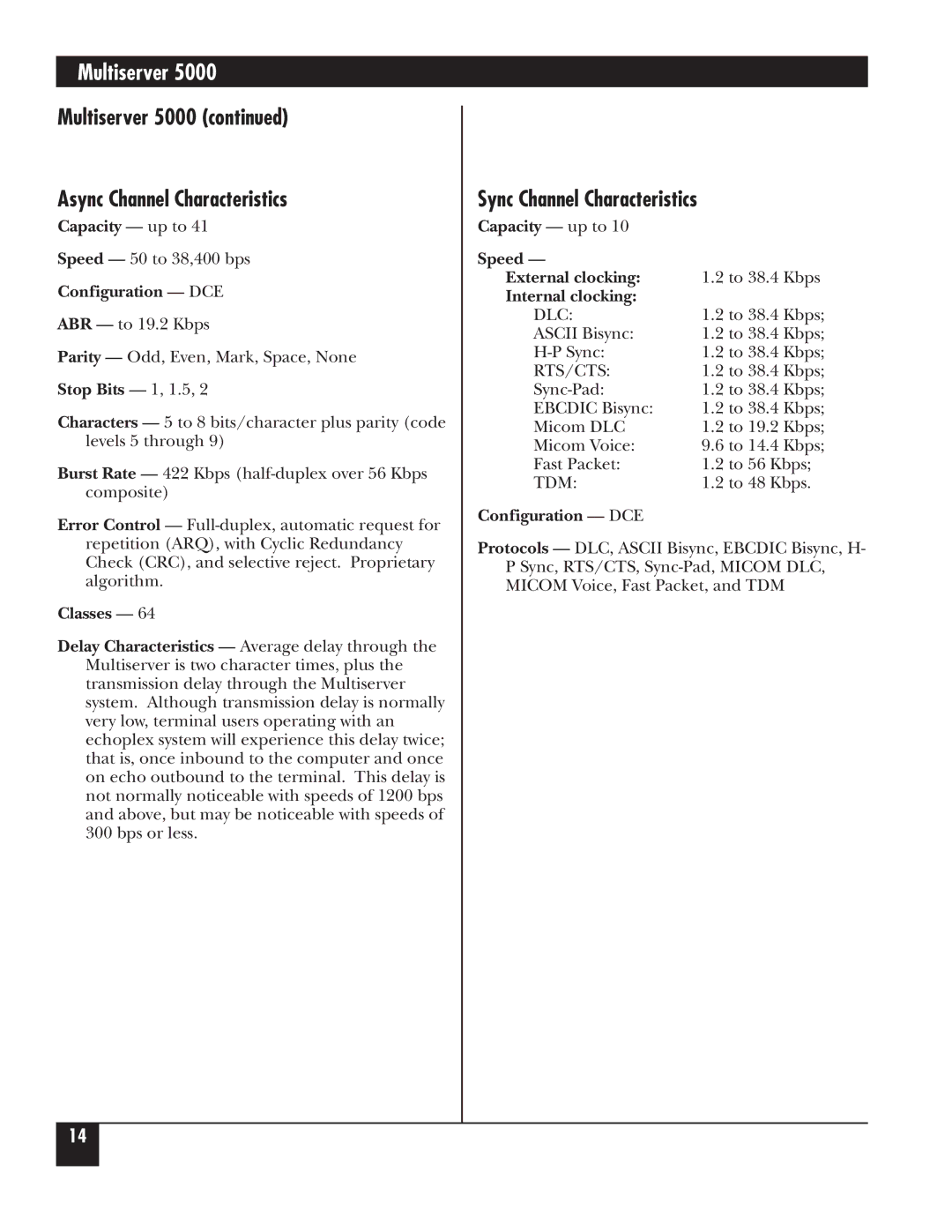
Sync Channel Characteristics
Multiserver Async Channel Characteristics
MX215C
Configuration DCE Speed
Expansion Modules MS5 Expansion Module Sync/Async
MS1 Expansion Module-Async Only
General Specifications
Analog Specifications
MS1 Voice/Fax Cards
Digital Specifications
Signaling Specifications
MS RLB Module
MS1 56K CSU/DSU Module
MS1 NMS Module
MS1 V.35 Converter/DCE
Converter/DCE
LAN
Introduction
Module
Feeder Muxes
LCN300A
MS1 56K CSU/DSU Module MT150C
CommPak
Expansion Modules
MS1 Voice/Fax Card
Documentation
MS1 NMS Module MX227C
MS1 V.35 Converter/DCE MX226
11 MS1 Rackmount Kit RM220
Bold
Manual Text Conventions
Multiserver
Initial Considerations
Network Design and Topologies
Syntax for Node Numbers and IDs
Default Node Numbers and Node IDs
Worksheets for the Network
Nodes and Hubs
Local Hub Group
Examples of Network Designs
Point-to-Point Switching Topology
Typical Point-to-Point, Dual Link with Load Balancing
Typical String Network
Typical Star Application
10. Typical Distributed-Star Application
Check Contents
Base-Unit Installation
Behind it
CommPak Cartridge Installation and Removal
Power Up the Unit
LCD Display
LCD/Keypad Information if you wish to stop
Checking the CCM Indicators
Channel numbers are assigned to all the ports on
CCM Indicator LEDs
Module and Channel Nomenclature
CCM Board. The front-panel of the unit is to the left
Module Stacking Order
Module Installation
Module-Location Switch Settings
Inter-module stacking connectors
Inter-Module Stacking Connectors
Blank Back Panel
Disassembly Procedures
Remove the cover after taking out four fastening screws
Remove any blank panels
CEM, VOICE/FAX CARD, or CSU/DSU Module
11. Installing the CCM
Installation Procedures
Ports
Asynchronous-Channel Switching Parameters, EIA
11. Asynchronous Channel Features
100
12. Asynchronous Channel Extended Features
Copy Channel Parameters
Review Data-Channel Configuration
104
Connecting Data Channels Cables
Data-Channel Configuration
Switching Configuration
Switching Control
Switching Control
107
108
All
Prompt From the Command Facility Main Menu, select
Disconnecting ranges, see .3, Force Connecting a Range
Force-Connecting a Range
Ports
Synchronous Connections
Asynchronous Connections
Classes, for class
Information
113
Matching Capability for Asynchronous Channels
Menu options is discussed in Table
Asychronous-Channel Switching Parameters
Asynchronous Channels, and -11, Asynchronous Channel
Switching Parameters
117
Local and Remote Hub Groups
Classes
119
Enter the primary class name selected. Press cr
User is connected to the class
Class Configuration
122
123
Connect Protocol Details
Initiated by device Device initiates
Disconnect Sequence
Call Completion Receiving port
Port Contention/Queueing
Configure the port for DTR and assign it to the class
10.11 X.21 Switching Considerations
128
Async Channel
Reset
Administration
Each type of reset is described in Table
Menu-flow diagram for LCD/Keypad resets
Reset Options
Command Mode
Command Mode menu will appear
Options of this menu are detailed in -2on the following
Selection of loopback tests. See .3, Async Channel Loopback
Command Mode
Administration
Configuring the Command Facility
Command Facility Configuration
137
138
139
Messages
Enter the node ID and channel number or range of channels
If the port or range selected is all async, the system
Special Message Characters
Dialog Messages
Max Option Default Char Description
143
Three menu options are detailed in -6, which is on the next
Network Security
Password Menu
Status/Statistics
Status/Statistics
147
148