Using Peer Cop with Modsoft
Completing the Configuration
Overview | To complete the configuration of the supervisory computer at Modbus Plus address | |
|
| 1, create a Peer Cop screen that accesses the CPU at address 3 and defines the |
|
| references for that CPU. |
Accessing |
| |
Using the AddNode command, create a new Peer Cop screen with a Link setting of | ||
Node 3 | 1 and a Node setting of 3. | |
Specifying |
| |
We know that this M1 CPU sends 16 words of specific output to the supervisor and | ||
References for | receive seven words of global data from the supervisor. Follow the steps in the | |
Node 3 | table below to define the registers that the supervisor will transmit to and receive | |
|
| from the M1 CPU at Modbus Plus address 3. |
|
|
|
|
| Step Action |
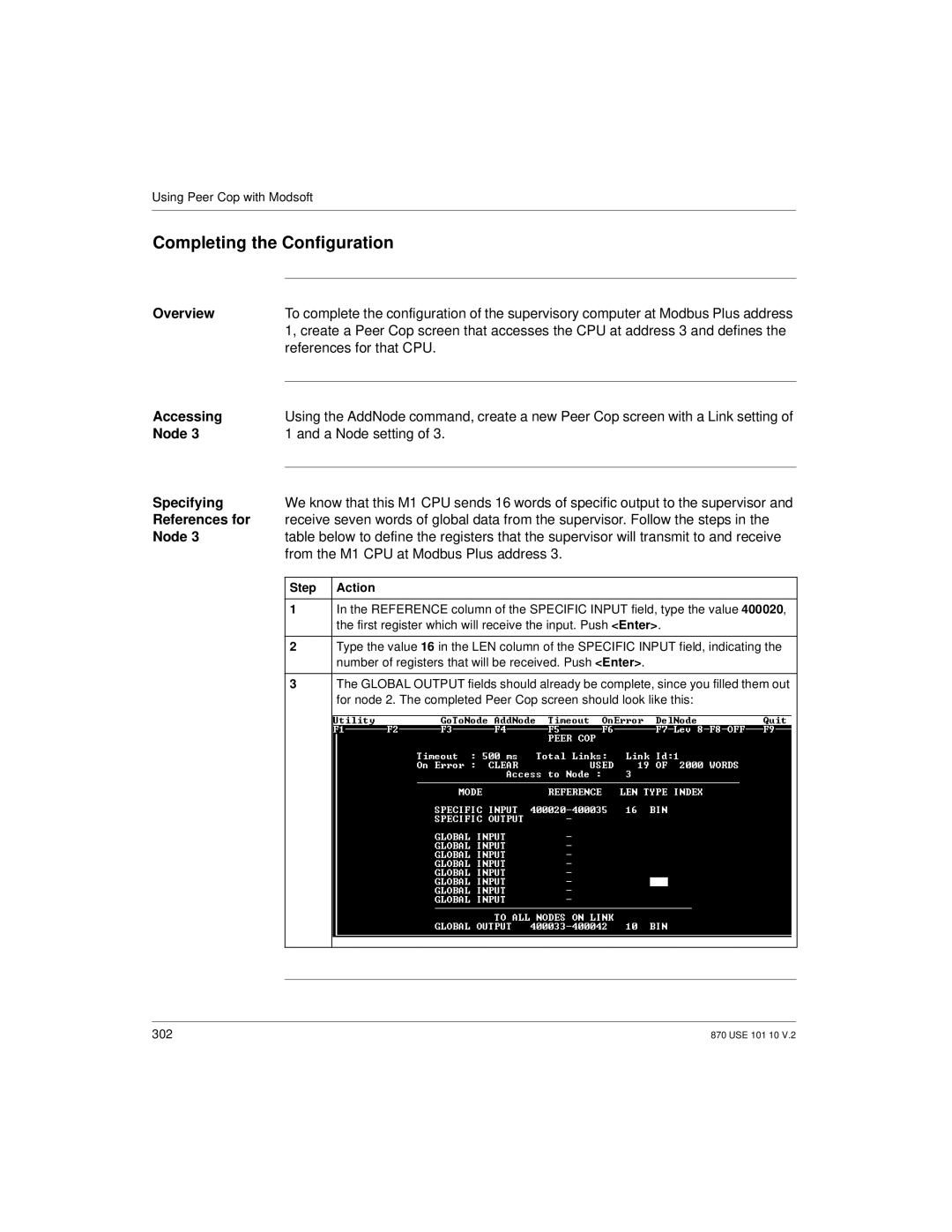
1In the REFERENCE column of the SPECIFIC INPUT field, type the value 400020, the first register which will receive the input. Push <Enter>.
2Type the value 16 in the LEN column of the SPECIFIC INPUT field, indicating the number of registers that will be received. Push <Enter>.
3The GLOBAL OUTPUT fields should already be complete, since you filled them out for node 2. The completed Peer Cop screen should look like this:
302 | 870 USE 101 10 V.2 |