Wsls
Internet Protocol
Telnet
User datagram protocol
Address resolution protocol
Transmission control protocol
Internet control message protocol
Addressing
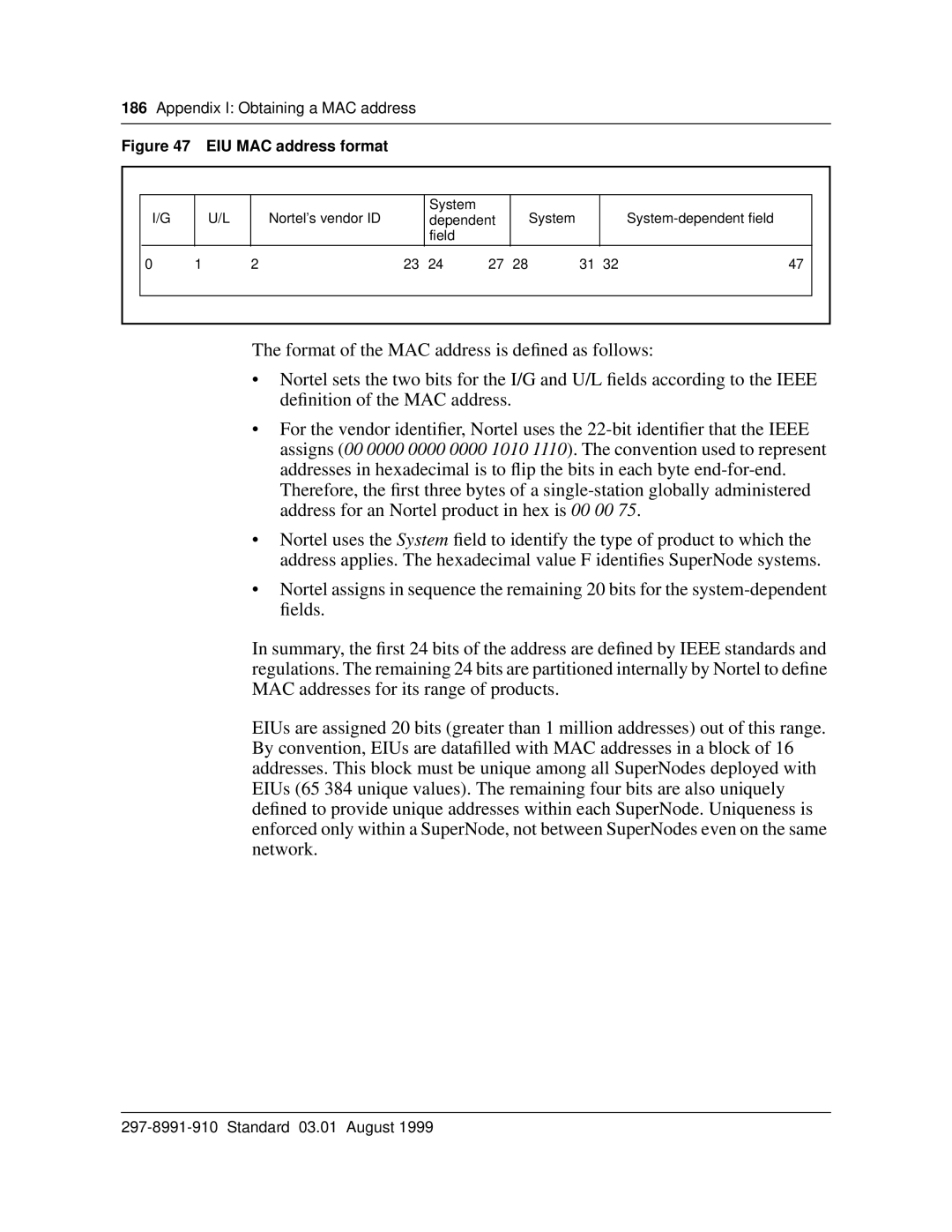
MAC addresses
Internet addresses
EIU messaging protocols
How to get IP addresses for SuperNode
What is the SuperNode network topology?
Routing
EIU messaging protocols
APX LMS
APUX10 LIU7
APUX20 LIU7
Routing tables
IP throttling
Protocol engineering
IP Screening
TCP connection management
EIU APU
UDP connection limits by SuperNode subsystem
Subsystem Maximum UDP connections
FTP session control
Protocol buffer engineering
Receive 1518 Icbm common pool 1024 128 Transmit TCP own
IP throttling
IP throttling for LPP
IP throttling for Sslpp
Application Sheet 2
EIU datafill
Interdependency and auto-configuration
Table Liuinv
Link interface unit name
Datafill sequence and implications
Table Liuinv datafill
Link interface unit type
Link interface unit number
Message switch card
Message switch port
Location
Processor information
Link interface slot
Software load name
Processor product engineering code
EIU MAC addresses
Sheet 4
Table Ipnetwrk
IP addresses
Sample datafill for table Liuinv
Datafill for table Ipnetwrk
Ipnetwrk
Ethernet interface unit. Enter EIU
Computing module Internet Protocol
Internet Protocol network subnet range
Ethernet interface unit range. Enter
Dfltgtwyip
Parm Scrnflag
Eiuinterface
Addr
Iomnum
Sample datafill for table Ipnetwrk
Gtwyipaddr
Packlet
Table Iprouter
Supplementary information
Datafill
Table Iphost
Ethernet address resolution protocol
Ethernet proxy address resolution
Sample datafill for table Iprouter
Nodeidx
Index
Index
Node index
Node name
Node
Transmission control Protocol
File processor index
Internet porotocol address SuperNode
Connections
Support Operating Switch
Application processor Unix index
Internet protocol host identification for
Cmindex
Computing module index
Internet protocol address for node
Eiuindex
Ethernet interface unit index
Lanaddr
Eliuindex
Second IP address for Eliu host
Nodename = MS
Apux
Sample datafill for table Iphost
Message switch index
Table Ipthron
Msindex
EIU datafill
Local message switch node
Transmit capacity
Receive capacity
Synchronized and matched node index
Option
SuperNode node
Application processor unit index
Field descriptions for table Ipthron for EIU datafill
Table Ipproto
Sample datafill for table Ipthron
Field Subfield or Entry Explanation and action Refinement
Sample datafill for table Ipproto
Iprsmtmo
Arprftmo
Sample datafill for table Ensites
Table Ensites
Table Entypes
Alphanumeric
Entype
Table Exndinv
Sample datafill for table Entypes
External node type
Pmloads
External node number
External node key
External node peripheral module type
External node name
Machine address
DMS boot protocol
Internet Protocol address
External node load file name
Bay position
Floor number
Row
External node information
External node alarm scan points
External node no-link alarm
External node one-link alarm
Critical alarm scan point
Sample datafill for table Exndinv
Major alarm scan point
Minor alarm scan point
Sheet 5
EIU maintenance
103
Out-of-service diagnostics
EIU diagnostics
In-service state
EIU MAP level
In-service diagnostics
In-service leaky bucket audit
EIU overload control
EIU sparing requirements
Automated system maintenance
EIU Eliu
Manual system maintenance
Logs relevant to EIU OA&M
OMs relevant to EIU OA&M
Appendix a EIU installation checklist
111
Consult the DMS-100 PM Software Release Document
Software
NTXF05AA EIU
Datafill
Appendix B EIU troubleshooting
113
Troubleshooting checklist
EIU troubleshooting checklist Problem Probable cause
Tools
Sheet 2
Appendix B EIU troubleshooting Standard 03.01 August
Appendix C Using FTP
117
What is FTP?
Automatic Record Length Detection
Where
DMS
FTP cookbook
Volume listing
FTP on the DMS-100 switch
File name conventions
DMS FTP client commands
FTP commands on the DMS-100 switch Command Description
Obtaining the IP address of the SuperNode host
Tutorial basic FTP operations
Procedure 1 Establishing an FTP session Step Action
Where Userid Is a valid userID for that host
Ftp ‘nnn.nnn.nnn.nnn ’
Page
Ftp cd ‘/team/bin’
Ftp dir
Ftp cd pathname
Ftp lcd pathname
Where Pathname Is a valid directory path Example
Tutorial moving files
If the file
Ftp lcd ‘/S00DTEMP’
If the filename
Ftp lrecl
Ftp get ‘file1.dmo ’
Ftp get ‘file1.txt54 ’
Ftp put ‘RECORDFILE’ ‘jan18.log’
Ftp cd ‘ /team/bin’
Ftp get ‘file1.bin’
Procedure 7 Showing the status of server sessions
Tutorial advanced operations
Ftp get ‘file1.bin1020’
Procedure 9 Remove a server userID and unreserve a session
Ftp svreserve
Ftpadduserinfo ‘johnh’ ‘johnh’ ‘/S00DTEMP’ y
Where Userid Is the userID Example
Procedure 10 Adding a userID with limited set of commands
Ftpdeluserinfo ‘johnh’
Ftp commandmask mkdir set
Procedure 11 Adding a userID with a new command timeout
Ftpcommandtimeout
Ftpcommandmask
FTP operations reference
WS cd /pathname
WS ftp IPaddress
WS pwd
WS lcd /directory
WS site Lrecl
WS ascii
WS get filename
WS put filename Newfilename
CM Ftpopen ‘IPaddress’
WSput filename.image Filename
WS put filename.sosimage Filenameunipl
CM FTP ‘IPaddress’
CM lcd
CM cd ‘pathname’
CM lcd ‘/PATHNAME’
CM ls
CM get ‘filename.load68k’
CM put filename
CM binary
CM get ‘filename.bin1020’
Appendix D Using telnet
141
Telnet access to a switch
Table Ipnetwrk
Appendix D Using telnet Standard 03.01 August
What is internetworking?
Appendix E Understanding IP and IP addressing
145
What is routing?
Routing and routed protocols
Planning overview
Mapping the network
Simple network map
Detailed network diagram
Choosing IP addresses
IP address structure
Class Range Description