Review your bolus deliveries
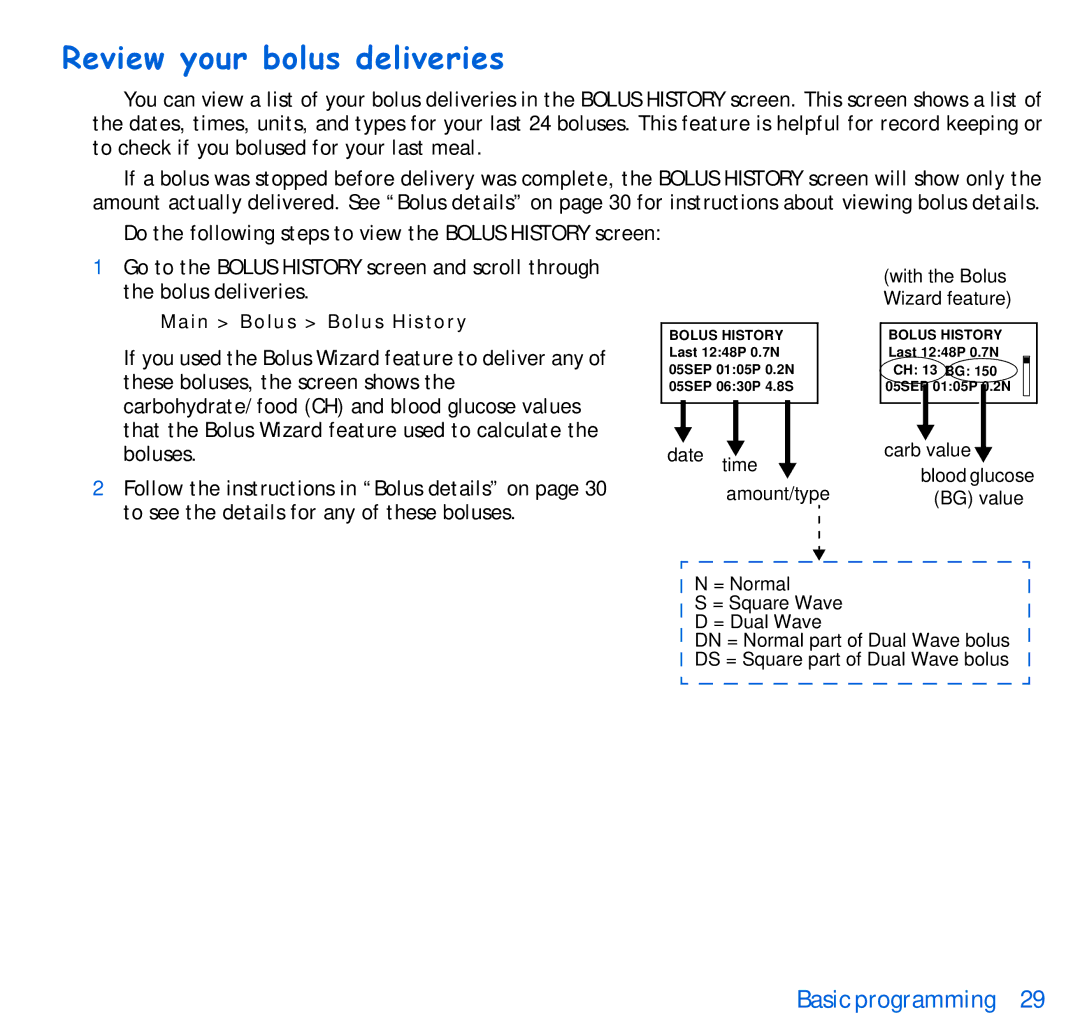
You can view a list of your bolus deliveries in the BOLUS HISTORY screen. This screen shows a list of the dates, times, units, and types for your last 24 boluses. This feature is helpful for record keeping or to check if you bolused for your last meal.
If a bolus was stopped before delivery was complete, the BOLUS HISTORY screen will show only the amount actually delivered. See “Bolus details” on page 30 for instructions about viewing bolus details.
Do the following steps to view the BOLUS HISTORY screen:
1Go to the BOLUS HISTORY screen and scroll through the bolus deliveries.
Main > Bolus > Bolus History
If you used the Bolus Wizard feature to deliver any of these boluses, the screen shows the carbohydrate/food (CH) and blood glucose values that the Bolus Wizard feature used to calculate the boluses.
2Follow the instructions in “Bolus details” on page 30 to see the details for any of these boluses.
BOLUS HISTORY Last 12:48P 0.7N 05SEP 01:05P 0.2N 05SEP 06:30P 4.8S
date time  amount/type
(with the Bolus Wizard feature)
BOLUS HISTORY
Last 12:48P 0.7N |
CH: 13 BG: 150 |
05SEP 01:05P 0.2N |
carb value |
blood glucose (BG) value
N = Normal
S = Square Wave D = Dual Wave
DN = Normal part of Dual Wave bolus DS = Square part of Dual Wave bolus