HP Jetdirect
Administrator’s Guide HP Jetdirect Embedded Print Server
Copyright Hewlett-Packard Development Company, L.P
Table of Contents
HP Jetdirect Configuration
Security Features
Troubleshooting the HP Jetdirect Print Server
FTP Printing
Network Connection
Identification
Product Number and Firmware Version
Network Printing Environments
Supported Network Protocols
Supported Network Protocols
Protocols
Security Protocols
Snmp IP and IPX
HP Support
Authentication
EAP/802.1X Server-Based Authentication
HP Online Support
Firmware Upgrades
Firmware Installation Tools
Product Registration
HP Support By Phone
HP Software Solutions Summary Introduction
Software Solutions 1
Operating Environment Function Remarks
TCP/IP, IPX/SPX
Software Solutions 2
HP-UX
2003
Software Solutions 3
Installation HP Jetdirect-connected Printers into Ndps
Ndps
HP Install Network Printer Wizard Windows
HP Jetdirect Printer Installer for
Requirements
HP Web Jetadmin
System Requirements
Installing HP Web Jetadmin
Configuring and Modifying a Device
Verifying Installation and Providing Access
Removing HP Web Jetadmin Software
Internet Printer Connection Software
HP-Supplied Software
HP Software Supported Proxies
Microsoft Supplied Software
HP Software System Requirements
Windows 2000/XP/Server 2003 Integrated Software
Novell Supplied Software
Windows Me IPP Client
Embedded print server with IP address
Features
HP IP/IPX Printer Gateway for Ndps
To Get the Software
Installing the Printer Software
HP LaserJet Utilities for Mac OS
Configuring the Printer
Verifying Network Configuration
Running the HP LaserJet Utility
Renaming the Printer
Selecting a Zone
Selecting Your Printer
If your printer is the only name listed
Dialog box, you must still select it. Your printer
Set Background Printing to on or OFF
Testing the Configuration
TCP/IP Configuration Introduction
Server-Based and Manual TCP/IP Configuration
Default IP Address
Default IP Address Will Not Be Assigned
Default IP Address Will Be Assigned
Default IP Address Configuration Options
Default IP Parameter Options
TCP/IP Configuration Tools
Dhcp Requests Enable/Disable
Linux and Unix systems For more information
Using BOOTP/TFTP
Why Use BOOTP/TFTP?
BOOTP/TFTP on Unix
Systems That Use Network Information Service NIS
Bootp broadcast packets may not be
Configuring the Bootp Server
HP recommends that the Bootp server be located
Properly configured
Bootptab File Entries
Tags Supported in a BOOTP/DHCP Boot file 1
2132 Option
Tags Supported in a BOOTP/DHCP Boot file 2
Description
Lease-time
Tags Supported in a BOOTP/DHCP Boot file 3
2132 Option T149
Tftp Configuration File Entries
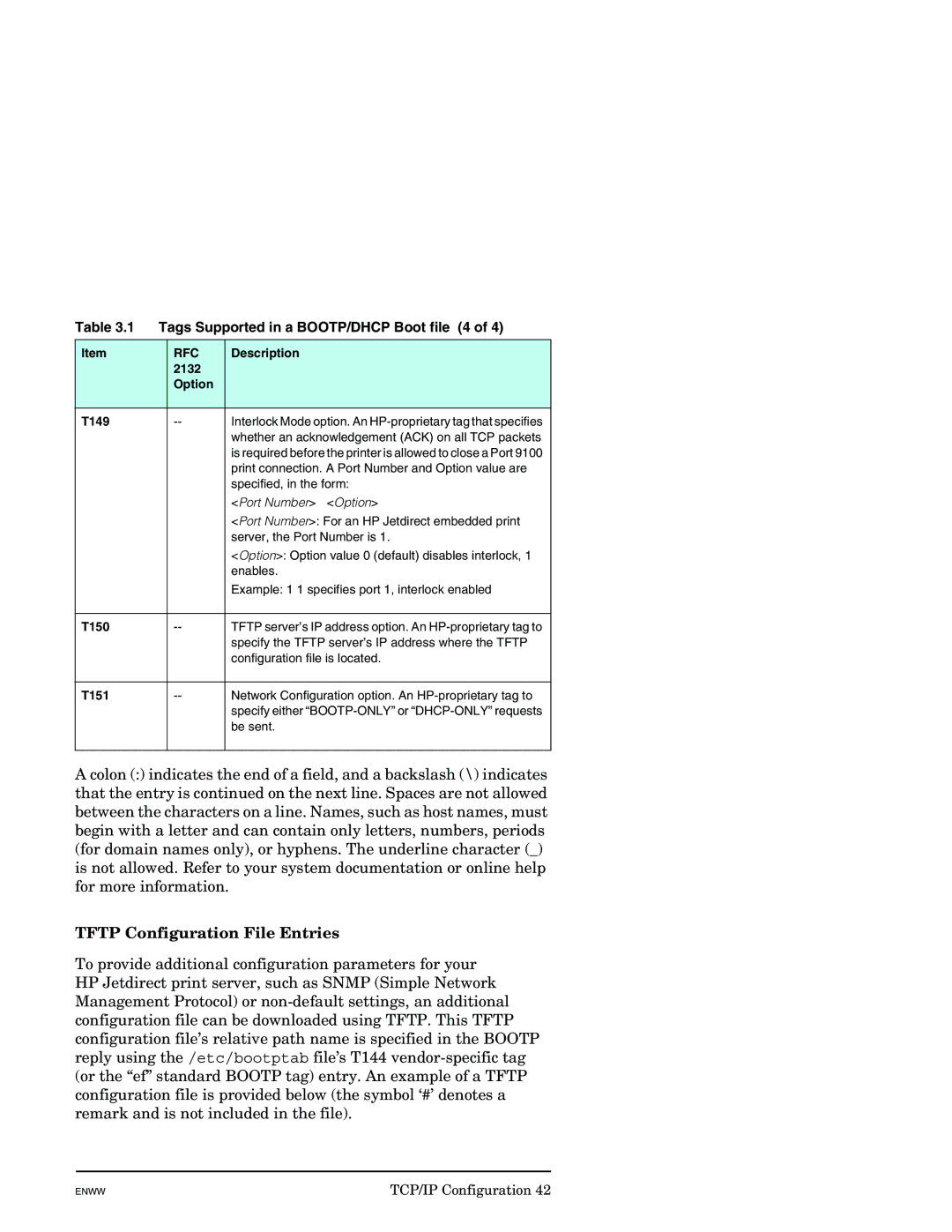
Tags Supported in a BOOTP/DHCP Boot file 4
T150
TCP/IP Configuration
List of Supported Tftp Commands 1
AppleTalk
List of Supported Tftp Commands 2
Other Settings
Support
Tftp Configuration File Parameters 1
Tftp Configuration File Parameters 2
Tftp Configuration File Parameters 3
Tftp Configuration File Parameters 4
Allow netnum mask
Tftp Configuration File Parameters 5
Be followed by a number to indicate that it is a duplicate
AppleTalk Settings
AppleTalk
Available zones
Snmp Settings 1
Snmp
Snmp v1/v2c is disabled, some port monitors or discovery
Other Settings
Snmp Settings 2
Utilities may not operate properly
Misc. Settings
Miscellaneous Settings 1
Miscellaneous Settings 2
Miscellaneous Settings 3
Miscellaneous Settings 4
Firmware Upgrade
Then click Upgrade Firmware LPD Queues
LPD Queue Parameters 1
LPD Queue Parameters 2
LPD Queue Parameters 3
Value
Support Info
Refresh Rate
Select Language
Privacy Settings
Settings
Status
Restore Defaults
Wizard
Wizard Security Levels 1
Security Level Description
Wizard Security Levels 2
Authorization
Admin. Account
Certificates
Using the Embedded Web Server
Certificate Options
Configuring Certificates
Certificate Configuration Screens 1
Choose from the options listed
Export the Jetdirect certificate and private key
Certificate Configuration Screens 2
Install Certificate
Certificate Validity
Certificate Configuration Screens 3
Common Name. Required
Certificate Configuration Screens 4
Install Certificate, or Install CA Certificate
Import Certificate and Private Key
Access Control
Examples. See the table of sample entries below
IP Address Mask Description
Mgmt. Protocols
Web Mgmt
Cipher suites support different levels of encryption
Other
Other Protocols 1
Other Protocols 2
Enable Device
If enabled checked, the print server will send
Multicast IPv4
802.1x Authentication
10 802.1X Configuration Settings
Who signed the authentication server’s certificate
Match checkbox is enabled
CA certificate must be issued by the Certificate Authority
To configure or install a CA certificate, click Configure
Configuration
Network Statistics
Protocol Info
Help
HP Web Jetadmin
Other Links
Support
Configuring for LPD Printing Introduction
LPD on Unix Systems
About LPD
LPD Programs and Protocols
Program Name Purpose of Program
LPD Setup Overview
Requirements for Configuring LPD
Setting Up IP Parameters
Setting Up Print Queues
Printing a Test File
Supported Queue Names
Configuring Print Queues for BSD-based Systems
LPD on Unix Systems
Example Printcap Entries for Ascii or Text Printers
Configuring for LPD Printing
Configuring Print Queues Using SAM HP-UX systems
For HP-UX systems, substitute lp -dfor lpr -P
Installing TCP/IP Software
LPD on Windows NT/2000/Server 2003 Systems
Configuring for LPD Printing
Select and enable Other Network File and Print Services
Add LPR compatible printer window
Configuring for LPD Printing
Configuring a Network Printer for Windows NT 4.0 Systems
Click Add Port
Printing from Windows Clients
Verifying the Configuration
LPD on Windows XP Systems
Adding Windows Optional Networking Components
Configuring a Network LPD Printer
Adding a New LPD Printer
Select OK Select Close and OK to close the Properties box
LPD on Mac OS Systems
Assigning an IP Address