90SuperSign Server
ENGLISH
Distribution
You can distribute content to players.
Distribution Window Layout and Functions
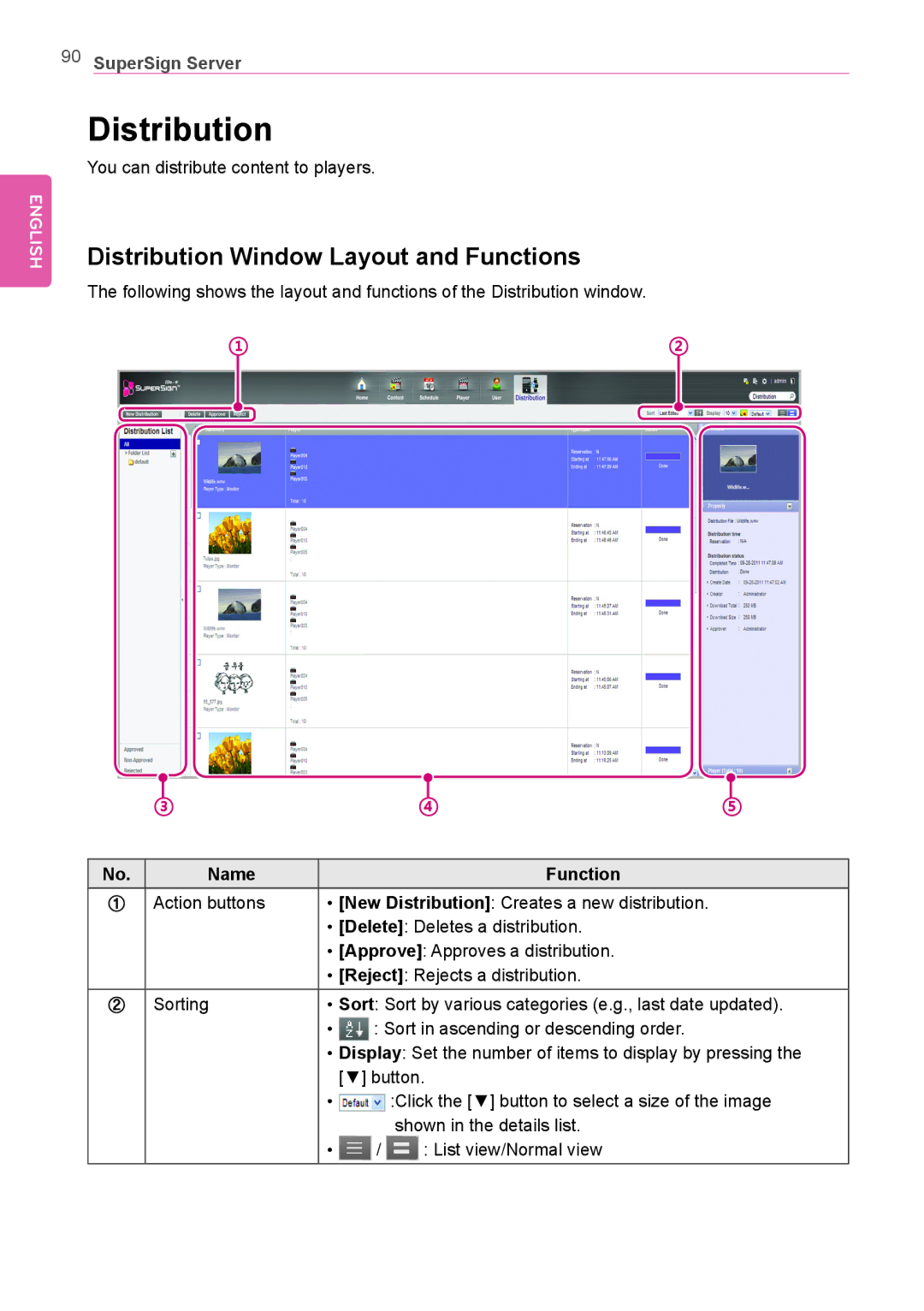
The following shows the layout and functions of the Distribution window.
①②
|
|
|
|
|
|
|
|
|
|
|
|
|
|
|
|
|
|
|
|
|
|
|
|
|
|
|
|
|
|
|
|
|
|
|
|
|
|
|
|
|
|
|
|
|
|
|
|
|
|
|
|
|
|
|
|
|
|
|
|
|
|
|
|
|
|
|
|
|
|
|
|
|
|
|
|
|
|
|
|
|
|
|
|
|
|
|
|
|
|
|
|
|
|
|
|
|
|
|
|
|
|
|
|
|
|
|
|
|
|
|
|
|
|
|
|
|
|
|
|
|
|
|
|
|
|
|
|
|
|
|
|
|
|
|
|
|
|
|
|
|
|
|
|
|
|
|
|
|
|
|
|
|
|
|
|
|
|
|
|
|
|
|
|
|
|
|
|
|
|
|
|
|
|
|
|
|
|
|
|
|
|
|
|
|
|
|
|
|
|
|
|
|
|
| ③ | ④ | ⑤ | ||||||||||||||||||
|
|
|
|
|
|
|
|
|
|
|
|
|
|
|
| ||||||||
No. | Name | Function | |||||||||||||||||||||
①Action buttons • [New Distribution]: Creates a new distribution.
•[Delete]: Deletes a distribution.
•[Approve]: Approves a distribution.
•[Reject]: Rejects a distribution.
② | Sorting | • Sort: Sort by various categories (e.g., last date updated). | |||
|
| • |
| : Sort in ascending or descending order. | |
|
| • | Display: Set the number of items to display by pressing the | ||
|
|
| [▼] button. | ||
|
| • |
|
| :Click the [▼] button to select a size of the image |
|
|
|
| ||
|
|
|
|
| shown in the details list. |
|
| • | / | : List view/Normal view | |