TriCoder
Page
Table of Contents
Page
Revision
How to Use this Manual
Data Security
TriCoder Quickstart
Xtra Statement
Program #0 Quickstart
Getting into Data Collection Mode
Collecting Data
Step
Uploading Data
Press T
Program #1 Quickstart
Begin of File HIT ANY KEY
Reviewing and Editing Data
HIT Status KEY
Tips on choosing a program for Data Collection
Uploading Data
Getting in and out of NON Portable mode
Non Portable Mode
First Time USB Use
Choose USB Interface PC USB Full Speed
Page
Full Speed USB Data Upload and PC Serial Interface
Using Integrated Hardware Utilities
Windows Users
PC Serial Interface
Nonportable Mode Press F1 to Exit
Hardware Utilities Serial Port Test Screen
Hardware Utilities Serial Settings
Uploading into Excel
Uploading Data
File Formats
Carriage Return Separated Files
DATA,DATACR data looks like
Comma Separated Files
Refer-back programming example
Flat File Formats
Flat File sample data
USB HID Keyboard Upload Windows PC Users
Uploading the data
Serial Upload
Port Settings
Windows Serial PC Users
TriCoder Connection
Testing Communication using NON Portable mode
USB HID Keyboard Interface PC and Mac
Serial Interface
Serial Installation on a PC
Serial Interface Communications Software
Using Setup Mode to change the TriCoder Setup
Configuring the TriCoder
USB HID Keyboard Interface
Configuring the TriCoder for USB HID Keyboard
Testing Communication using NON Portable mode
Using the keypad to setup the TriCoder
TriCoder Setup
Using the Hardware Utilities to change Setup Parameters
TriCoder Setup Parameters
Code 3 of 9 Code
Bar Code Setup
UPC-A/EAN-13
MSI/Plessey
5 Code
GS1-DataBar/ RSS-14 / Other Bar Codes
Code 93 / Code
Host Computer Interface
Settings
Full Speed USB Serial
Single Cycle Upload
Terminator Character
Baud Rate
Data Bits
Parity
Protocol
With 7 data bits
USB Enumeration Delay
USB ALT Output
Keypad Tone
Keypad Volume
Laser Options
Double Decode
Time
Date & Time Settings
Date
Date Format
Master Background Color
Brightness Timeout
Prompt Background Color
Prompt Text Color
To set a preamble or postamble
Preamble and Postamble
Select 1 for Preamble or 2 for Postamble
Preamble affects leading high order characters
EOF String
Characters
Reset Programs & Data
Reset Setups to Default
System Tools
Charging from USB
Installing the Hardware Utilities
Using the Integrated Hardware Utilities
Running the Hardware Utilities program
Page
Using the Table Editor
Serial Uploading
Uploading from TriCoder to your Computer
Data Files
Program Files
Clone Files
Click the TriCoder Manager Tab
Full Speed USB Uploading
Cloning your TriCoder
Serial Downloads
Downloading from the computer to your TriCoder
Program Download
Table Download
Program File Downloads
Full Speed USB Downloads
Table Downloads
Creating a Custom Program
Using KwikInventory
Program Statements
Program Name
Parts of the TriCoder programming screen
Programming
Prompt
Data
Entry Type
Branch
Go to statement 18 if an R is keyed/scanned
Date and Time Stamp
Question
Mmddyyhhmm if USA
Time Stamp
Xtra
Date Stamp
Data and Immediate Output
None
Compare
Printer Output
Copy Table Data to Prompt
Arithmetic
Here is how the c statement works
Prompt Text
Voice Message Numbers
Voice Message Frequency
Data ID
A1A
Table Validation
Maximum Data Length
Data Type
Table Lookup
Input Device
Minimum Data Length
Yes/Next Statement
No/End Statement
Identification of a field
Upload Prefix
Trimming data from a field
Upload Suffix
Invalid STMT. # HIT ANY KEY
Finishing and checking your program
Reviewing and Modifying programs
Creating TriCoder Programs on your Windows PC
Installing the Hardware Utilities
Page
Page
Tips for Using Voice Prompts
Why Use Voice Messages and Prompts?
Accessing Voice Message Operations
Voice Messages
Voice Message Options
Recording and Playback of Voice Messages
Cloning Voice Messages from TriCoder to TriCoder
Default Voice Messages
Data Validation using Tables
Why Use Tables?
Data validation table file format
06000000000EXAMPLE1
Preventing duplicate entry of data
Downloading a table to the TriCoder
08000000000EXAMPLE2 11111111
33333xxx 44444444
Display and Error Messages
Troubleshooting
Fatal Entry Type Cannot
Table Format Error
USB won’t upload
General Troubleshooting
Serial won’t upload
TriCoder won’t read your bar codes…
Sometimes I get long beeps and sometimes short beeps…
Poor read rates…
TriCoder reads one bar code and stops reading after that…
USB troubleshooting for Windows Users
What cable are you using?
Serial mode troubleshooting
Can’t communicate with my RS-232 port on the host…
TriCoder transmits a few messages then hangs…
Error messages for special consideration
Program troubleshooting
My uploaded data has the old data followed by my new data…
Want to read more than one length I 2of 5 bar code…
Planning for success…
If you have a problem…
Fail-safe Re-initialization Procedure
Battery Power and Wall Power
Powering the TriCoder
Wall Power
Turning the TriCoder on and OFF
To change the Li-ion battery
Battery Power
Storing the TriCoder
Mm/dd/yy hhmm nnnk Bytes Free BAT - - 50%
How to Update
Firmware Upgrades
Page
Page
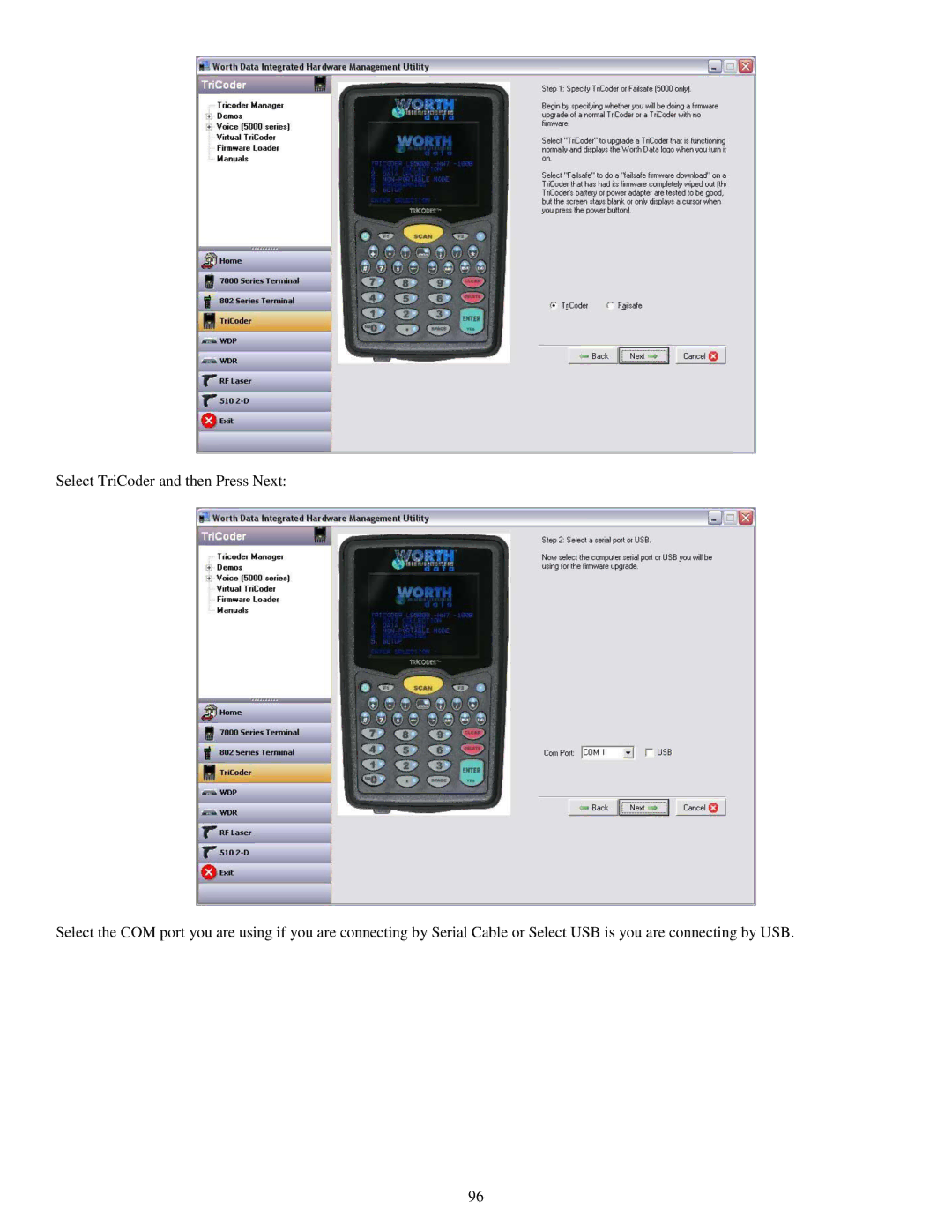
Failsafe Firmware Update
Practice Scanning
Appendix a How to scan a bar code
Table L-1. Laser Comparison Chart
Special Laser Settings
Appendix B Laser Scanner Options
C24 DB9 Serial Cable Pin-outs
Appendix C Cable Pin-outs
C22 USB Cable Pin-outs
C49 TTL Laser Cable Pin Outs Pin-outs
Table I-5. I/O Connector Pin-outs Remember
Connector Pin-outs
Following are the features available for the TriCoder
Appendix D Optional Features
Incorrect driver installation is unlikely to happen however
Appendix E USB Driver Installation Recovery
Manually Updating TriCoder High Speed USB Driver on Windows
Check the Only Specify a Location check-box
Manually Updating Tricoder USB Driver on Windows 98/Me
Win98/ME
Windows 7, Vista & XP
Win2000
USB Enumeration Please Wait…
Appendix F Specifications for Code
Mod 43 Check Character
Code 39 Advanced Features and Functions
Table A-1. Mod 43 Check character calculation for Code
Table A-2. Full Ascii Table
Full Ascii Extension to Code
Table A-3. C39 Keyboard Support for IBM and Mac
Function/Control Key Support in HID Keyboard Mode
Special key sequences for USB
Table A-4. Function and Control Key Support with Portkey
Function/Control Key Support with PortKey
Accumulate Mode
GS1-128/UCC-128/ EAN-128
Appendix G Code 128 Specifications
Start C/Function Code
GS Function Code 1 as a variable string terminator
Interleaved 2 of 5 Mod 10 check digit calculation
Appendix H Interleaved 2 of 5 Code
Isbn Specifications
Appendix I UPC Specifications
UPC 2 and 5-character supplemental codes
UCC/EAN Extended Coupon Code
Checksum calculation for UPC-A, EAN-13 and EAN-8
UPC/EAN checksum character
1234500006
UPC-E Checksum Calculation
01234500006
01234565
Codabar start/stop transmission
Appendix J Codabar Specifications
MSI Mod 10 check digit is calculated as follows
Appendix K MSI/Plessey Specifications
MSI Mod 11 check digit is calculated as follows
Appendix L Code 93 Specifications
Appendix M Ascii Code Equivalent Table
Table N-1. RS-422 Multi-drop cable
Appendix N RS-422
Program Name
TriCoder Coding Form
Full Ascii Menu
Items in parentheses are transmitted in keyboard wedge mode