HP 10Gb Ethernet BL-c Switch
Legal notices
Contents
100
Statistics Menu
101
102
103
105
163
164
165
168
Index 224
Connecting to the switch
Introduction
Additional references
Setting an IP address
Establishing a console connection
Parameter Value
Telnet 10GbE switch IP address
Establishing a Telnet connection
Establishing an SSH connection
3DES
Accessing the switch
You will then be prompted to enter your password
# ssh user@10Gb switch IP address
Idle timeout
User account Description and tasks performed
Typeface or Meaning Example Symbol
Typographical conventions
AaBbCc123
Address
Main Menu
Menu summary
Global commands
Following table describes the global commands
Command Action
Or print
Traceroute host name IP address max-hops msec delay
Exit or Quit
Verbose n
Telnet hostname IP address port -m-mgt-d-data
Command line history and editing
Option Description
Command line interface shortcuts
Command stacking
Command abbreviation
Tab completion
Configuration Menu is displayed
Main# /cfg
Setting passwords
Configuring Simple Network Management Protocol support
Changing the default administrator password
Use the following command to enable Snmp
Enter the current administrator password at the prompt
Enter the new administrator password at the prompt
Enter the new administrator password, again, at the prompt
System Menu is displayed
Changing the default user password
Changing the default operator password
Enter the new operator password at the prompt
Enter the new operator password, again, at the prompt
Enter new operator password
Re-enter new operator password
Command /info
Command Usage
Menu overview
Following table describes the Information Menu options
Command /info/sys
System Information Menu
Command /info/sys/snmpv3
SNMPv3 Information Menu
Command /info/sys/snmpv3/usm
Command /info/sys/snmpv3/view
SNMPv3 USM User Table information
SNMPv3 View Table information
SNMPv3 Access Table information
Command /info/sys/snmpv3/access
Following table describes the SNMPv3 View Table information
Command /info/sys/snmpv3/group
Command /info/sys/snmpv3/comm
SNMPv3 Group Table information
SNMPv3 Community Table information
Command /info/sys/snmpv3/taddr
Command /info/sys/snmpv3/tparam
SNMPv3 Target Address Table information
SNMPv3 Target Parameters Table information
Command /info/sys/snmpv3/notify
SNMPv3 Notify Table information
NameTag V1v2trapv1v2trap
Command /info/sys/snmpv3/dump
SNMPv3 dump
Command /info/sys/gen
System information
Command /info/sys/log
Show last 100 syslog messages
Command /info/sys/user
Cfg/sys/access/user/uid command
System user information
Following table describes the User Name information
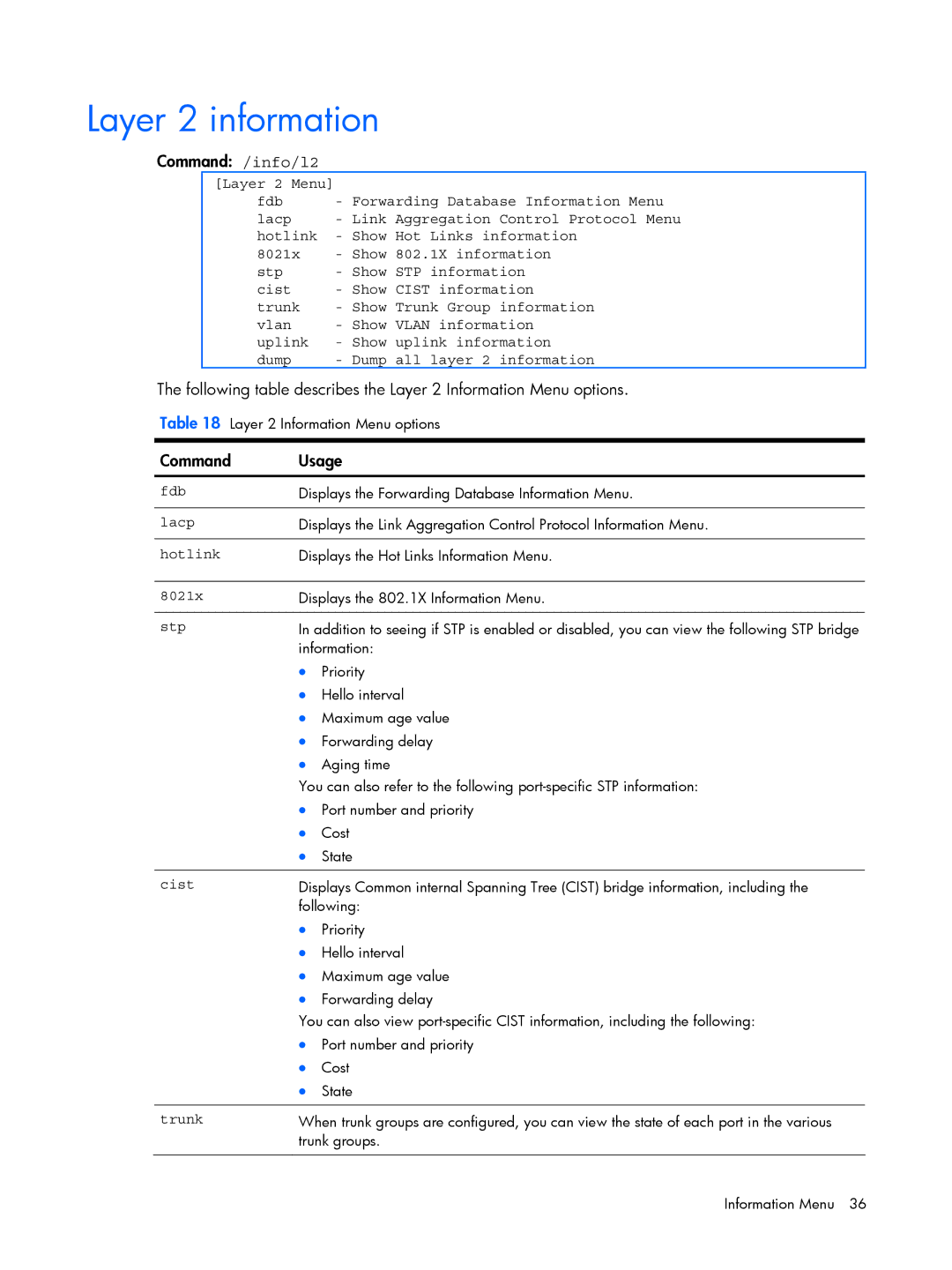
Command /info/l2
Layer 2 information
Command /info/l2/fdb
FDB information menu
Find MAC address Vlan
Port port number
Command /info/l2/fdb/dump
Command /info/l2/lacp
Link Aggregation Control Protocol information
Show all FDB information
Command /info/l2/lacp/dump
Command /info/l2/hotlink/trigger
Hot Links Trigger information
Lacp dump
Command /info/l2/8021x
802.1X information
Following table describes the Ieee 802.1X parameters
Authenticator PAE State
Backend Auth State
Command /info/l2/stp
Spanning Tree information
Parameters Description
Rapid Spanning Tree / Multiple Spanning Tree information
Desg 8017 P2P2,Edge
Desg 8018
Parameter Description
Command /info/l2/cist
Common Internal Spanning Tree information
Following table describes the Cist parameters
Cist Root
Command /info/l2/trunk
Command /info/l2/vlan
Trunk group 1, Enabled port state STG 1 forwarding
Trunk group information
Command /info/l2/uplink
STP uplink fast mode disabled
STP uplink fast mode
Fast Uplink Convergence status
Command /info/l3
Layer 3 information
Command /info/l3/route
Command /info/l3/route/dump
Route information
Show all IP Route information
Following table describes the Type parameter
Following table describes the Tag parameter
Command /info/arp
Command /info/arp/dump
ARP information
Show all ARP entry information
Command /info/arp/addr
Command /info/l3/ospf
Ospf information
ARP address list information
Command /info/l3/ospf/general
Command /info/l3/ospf/if
Ospf general information
Ospf interface information
Command /info/l3/ospf/dbase
Ospf Database information menu
Command /info/l3/ospf/routes
Ospf route codes information
Rtr adv-rtr A.B.C.D
Linkstateid A.B.C.Dself
RIP user configuration
Routing Information Protocol information
RIP Routes information
Command /info/l3/ip
IP information
Command /info/l3/igmp
Timer information
Command /info/l3/igmp/dump
Igmp multicast group information
Igmp multicast router information
4094
Command /info/l3/vrrp
Vrrp information
Command /info/l3/sm/port
Server Mobility Port information
Command /info/qos
Command /info/qos/8021p
QoS information
802.1p information
Command /info/acl
ACL information
Command /info/rmon
Command /info/rmon/hist
Rmon Information Menu
Rmon history information
Rmon alarm information
Command /info/rmon/alarm
Command /info/rmon/event
Trap, both
Command /info/link
Link status information
Command /info/port
Command /info/transcvr
Port information
Transceiver status
Command /info/ufd
Command /info/dump
Uplink Failure Detection information
Information dump
Command /stats
Menu information
Following table describes the Statistics Menu options
Ntp clear
Command /stats/port port number
Port Statistics Menu
Sfd clear
Command /stats/port port number/8021x
802.1X statistics
Statistics Port
BackendNonNakResponsesFromSupplic ant
Command /stats/port port number/brg
Bridging statistics
Statistics Description
Command /stats/port port number/ether
Ethernet statistics
Dot3StatsInternalMacTransmitErrors
Dot3StatsCarrierSenseErrors object
Dot3StatsMultipleCollisionFrames
Dot3StatsSingleCollisionFrames object
Command /stats/port port number/if
Interface statistics
Errors-IfHCIn
Errors-IfHCOut
Octets-IfHCOut
UcastPkts-IfHCOut
Command /stats/port port number/ip
Command /stats/port port number/link
Internet Protocol IP statistics
Link statistics
Command /stats/port port number/rmon
Port Rmon statistics
EtherStatsFragments
EtherStatsJabbers
EtherStatsCollisions
EtherStatsPkts64Octets
Command /stats/l2/fdb
Command /stats/l2/lacp port number
Layer 2 statistics
FDB statistics
Command /stats/l2/hotlink
Hot Links statistics
Following table describes the Hot Links statistics
Statistic Description
Command /stats/l3
Layer 3 statistics
Arp clear
Igmpgrps
Command /stats/l3/geal3
Command /stats/l3/geal3/dump
GEA Layer 3 statistics menu
GEA statistics
Command /stats/l3/ip
IP statistics
Following table describes the IP statistics
ARP statistics
DNS statistics
Route statistics
Command /stats/l3/icmp
Icmp statistics
Command /stats/l3/tcp
TCP statistics
Semantics of the Ubound quantity described in RFC
Command /stats/l3/udp
Command /stats/l3/igmp Vlan number
UDP statistics
Igmp Multicast Group statistics
Command /stats/l3/ospf
Ospf statistics menu
Following table describes the Ospf statistics menu options
Command /stats/l3/ospf/general
Ospf global statistics
Following table describes the Ospf global statistics
Rx ls Updates
Tx ls Updates
Rx ls Acks
Tx ls Acks
Timers Kickoff Hello
Nbr change
Command /stats/l3/vrrp
Vrrp statistics
Following table describes the Vrrp statistics
Command /stats/l3/rip
RIP statistics
Command /stats/mp/pkt
Management Processor statistics
Packet statistics
Command /stats/mp/tcb
Command /stats/mp/ucb
Access Control List ACL statistics menu
CPU statistics
ACL statistics
Command /stats/snmp
Snmp statistics
NoSuchName
Command /stats/ntp
NTP statistics
Command /stats/ufd
Uplink Failure Detection statistics
Following table describes the NTP statistics
Primary Server
Command /stats/dump
Statistics dump
Command /cfg
Following table describes the Configuration Menu options
Viewing, applying, reverting, and saving changes
Viewing pending changes
Applying pending changes
Reverting changes
Saving the configuration
Reminders
Cfg/sys/reminders dis
# save
System configuration
Command /cfg/sys
System host log configuration
Address. The default value is enabled
Command /cfg/sys/syslog
Multi-line to end
Command Description
Console disableenable
Log featureall enabledisable
Host IP address
Secure Shell Server configuration
Command /cfg/sys/sshd
Intrval
Sshport TCP port number
Radius server configuration
Command /cfg/sys/radius
TACACS+ server configuration
Command /cfg/sys/tacacs+
Cmap enabledisable
Useroperadminnone
Port TCP port number
NTP server configuration
Command /cfg/sys/ntp
Mgtdata
System Snmp configuration
Command /cfg/sys/ssnmp
SNMPv3 configuration
Command /cfg/sys/ssnmp/snmpv3
Wcomm 1-32 characters
User Security Model configuration
Command /cfg/sys/ssnmp/snmpv3/usm
V1v2 disableenable
SNMPv3 View configuration
Command /cfg/sys/ssnmp/snmpv3/view
Name 1-32 characters
Characters
View-based Access Control Model configuration
Command /cfg/sys/ssnmp/snmpv3/access
Rview 1-32 characters
Wview 1-32 characters
SNMPv3 Group configuration
SNMPv3 Community Table configuration
Command /cfg/sys/ssnmp/snmpv3/group
Command /cfg/sys/ssnmp/snmpv3/comm
SNMPv3 Target Address Table configuration
Command /cfg/sys/ssnmp/snmpv3/taddr
SNMPv3 Target Parameters Table configuration
Command /cfg/sys/ssnmp/snmpv3/tparam
AuthPriv
Snmpv1snmpv2csnmpv3
System Access configuration
SNMPv3 Notify Table configuration
Command /cfg/sys/ssnmp/snmpv3/notify
Command /cfg/sys/access
Management Networks configuration
Command /cfg/sys/access/mgmt
User Access Control configuration
User ID configuration
Command /cfg/sys/access/user
Command /cfg/sys/access/user/uid
Https Access configuration
Command /cfg/sys/access/https
Access enabledisable
Port configuration
Command /cfg/port port number
Port link configuration
Command /cfg/port port number/gig
Temporarily disabling a port
Port ACL/QoS configuration
Command /cfg/port port number/aclqos
Port Pvrst configuration
Command /cfg/port port number/stp
Edge enabledisable
Link autop2pshared
Layer 2 configuration
Command /cfg/l2
Enabledisable
Bpdugrd enabledisable
802.1X configuration
Command /cfg/l2/8021x
802.1X Global configuration
Command /cfg/l2/8021x/global
CommandDescription
802.1X Port configuration
Command /cfg/l2/8021x/port port number
802.1X Port Configuration Menu
Applies the global 802.1X parameters to the port
Command /cfg/l2/mrst
Rev
Rstpmstppvrst
Common Internal Spanning Tree configuration
Following configurations are unsupported
Following configurations are supported
Command /cfg/l2/mrst/cist
Cist bridge configuration
Command /cfg/l2/mrst/cist/brg
Cist port configuration
Command /cfg/l2/mrst/cist/port port number
Cost
Spanning Tree configuration
Command /cfg/l2/stp
Edge disableenable
Bridge Spanning Tree configuration
Command /cfg/l2/stp/brg
Spanning Tree port configuration
Command /cfg/l2/stp 1-128/port port number
Fastfwd disableenable
Forwarding Database configuration
Static FDB configuration
Command /cfg/l2/fdb
Command /cfg/l2/fdb/static
Trunk configuration
Command /cfg/l2/trunk
Add port number
Rem port number
IP Trunk Hash configuration
Layer 2 IP Trunk Hash configuration
Command /cfg/l2/thash
Command /cfg/l2/thash/set
Link Aggregation Control Protocol configuration
Lacp Port configuration
Command /cfg/l2/lacp
Command /cfg/l2/lacp/port port number
Vlan configuration
Command /cfg/l2/vlan
Def list of port numbers
Protocol Vlan configuration
Command /cfg/l2/vlan x/pvlan
Pty Ether2SNAPLLC
Ethernet type
Private Vlan configuration
Command /cfg/l2/vlan x/privlan
Tagpvl enabledisable
Type primaryisolatedcommunity
Hot Links configuration
Command /cfg/l2/hotlink
Bpdu enabledisable
Sndfdb enabledisable
Hot Links Trigger configuration
Hot Links Master configuration
Command /cfg/l2/hotlink/trigger
Command /cfg/l2/hotlink/trigger 1-4/master
Hot Links Backup configuration
Command /cfg/l2/hotlink/trigger 1-4/backup
Following table describes the Hot Links Backup Menu options
Layer 3 configuration
Command /cfg/l3
Gw 1-4
IP interface configuration
Command /cfg/l3/if
Relay disableenable
Addr IP address
Default Gateway configuration
Command /cfg/l3/gw 1-4
Arp disableenable
IP Static Route configuration
Address Resolution Protocol configuration
Command /cfg/l3/route
Command /cfg/l3/arp
Static ARP configuration
IP Forwarding configuration
Command /cfg/l3/arp/static
Command /cfg/l3/frwd
Network Filter configuration
Route Map configuration
Command /cfg/l3/nwf
Command /cfg/l3/rmap
IP Access List configuration
Command /cfg/l3/rmap 1-32/alist
Type 12none
Metric 1-16777214none
Routing Information Protocol configuration
Command /cfg/l3/rip
Current Display current RIP configuration
Off Globally turn
RIP Interface configuration
Command /cfg/l3/rip/if
RIP Route Redistribution configuration
Command /cfg/l3/rip/redist fixedstaticospfeospf
Add 1-32 1-32all
Remove 1-32 1-32all
Open Shortest Path First configuration
Command /cfg/l3/ospf
Md5key 1-255 characters
Osfp Area Index configuration
Command /cfg/l3/ospf/aindex
Auth nonepasswordmd5
Areaid IP address
Ospf Interface configuration
Ospf Summary Range configuration
Command /cfg/l3/ospf/range
Command /cfg/l3/ospf/if
Key key stringnone
Mdkey 1-255none
Ospf Virtual Link configuration
Command /cfg/l3/ospf/virt
Key password
Nbr IP address
Ospf Host Entry configuration
Ospf Route Redistribution configuration
Command /cfg/l3/ospf/host
Command /cfg/l3/ospf/redist fixedstaticrip
Ospf MD5 Key configuration
Command /cfg/l3/ospf/md5key key ID
Export 1-16777215 12none
Key 1-16 characters
Igmp configuration
Igmp snooping configuration
Command /cfg/l3/igmp
Command /cfg/l3/igmp/snoop
Flood disableenable
Aggr disableenable
Ports
Igmpv3
IGMPv3 Snooping configuration
Command /cfg/l3/igmp/snoop/igmpv3
Igmp static multicast router configuration
Igmp filtering configuration
Add port number 1-4094
Remove port number
Igmp filtering port configuration
Command /cfg/l3/igmp/igmpflt/filter
Command /cfg/l3/igmp/igmpflt/port port number
Igmp filter definition
Domain Name System configuration
Bootstrap Protocol Relay configuration
Command /cfg/l3/dns
Command /cfg/l3/bootp
Server Mobility configuration
Command /cfg/l3/sm
Filter enabledisable
Nsmrelay enabledisable
Server Mobility port configuration
Command /cfg/l3/sm/port port number
Addback port number
Remback port number
Virtual Router Redundancy Protocol configuration
Command /cfg/l3/vrrp
Cur Display current Vrrp configuration
Vrrp Virtual Router configuration
Command /cfg/l3/vrrp/vr
Vrrp Virtual Router Priority Tracking configuration
Command /cfg/l3/vrrp/vr 1-250/track
Preem disableenable
Switch ports
Vrrp Virtual Router Group configuration
Command /cfg/l3/vrrp/group
Vrs disableenable
Ifs disableenable
Virtual Router Group Configuration Menu options
Vrrp Virtual Router Group Priority Tracking configuration
Vrrp Interface configuration
Command /cfg/l3/vrrp/group/track
Command /cfg/l3/vrrp/if
Vrrp Tracking configuration
Command /cfg/l3/vrrp/track
Quality of Service configuration
QoS 802.1p configuration
Command /cfg/qos
Command /cfg/qos/8021p
Access Control configuration
Access Control List configuration
Command /cfg/acl
Command /cfg/acl/acl
ACL Ethernet Filter configuration
Command /cfg/acl/acl 1-384/ethernet
ACL IP Version 4 Filter configuration
Command /cfg/acl/acl 1-384/ipv4
Sip IP address IP mask
Dip IP address IP mask
ACL TCP/UDP Filter configuration
Command /cfg/acl/acl 1-384/tcpudp
Filtering TCP/UDP Menu
Sport 1-65535 port mask
ACL Meter configuration
ACL Re-mark configuration
Command /cfg/acl/acl 1-384/meter
Command /cfg/acl/acl 1-384/re-mark
ACL Re-mark In-Profile configuration
ACL Re-mark In-Profile Update User Priority configuration
Command /cfg/acl/acl 1-384/re-mark/inprof
Command /cfg/acl/acl 1-384/re-mark/inprof/up1p
ACL Packet Format configuration
ACL Re-mark Out-of-Profile configuration
Command /cfg/acl/acl 1-384/re-mark/outprof
Command /cfg/acl/acl 1-384/pktfmt
ACL Group configuration
Command /cfg/acl/group
Add acl
Rem acl
Remote Monitoring configuration
Rmon history configuration
Command /cfg/rmon
Command /cfg/rmon/hist
Rmon event configuration
Command /cfg/rmon/event
Following table describes the Rmon Event Menu options
Owner 1-127 characters
Rmon alarm configuration
Command /cfg/rmon/alarm
Oid 1-127 characters
Rlimit -2147483647 to
Command /cfg/pmirr
Mirror disableenable
Port mirroring
Monport port number
Command /cfg/pmirr/monport port number
Port-based port mirroring
Add mirrored port inoutboth
Rem mirrored port
Uplink Failure Detection configuration
Failure Detection Pair configuration
Command /cfg/ufd
Command /cfg/ufd/fdp
Link to Monitor configuration
Command /cfg/ufd/fdp/ltm
Removes a Lacp admin key from the LtM
Addport port number
Link to Disable configuration
Addport port number Remport port number
Addtrunk
Remtrunk Addkey Remkey Cur
Saving the active switch configuration
Restoring the active switch configuration
Command /cfg/ptcfg FTP/TFTP server filename
Command /cfg/gtcfg FTP/TFTP server filename
Command /oper
Command /oper/port port number
Operations-level port options
Following table describes the Operations Menu options
Command /oper/port port number/8021x
Rmon disableenable
Operations-level port 802.1X options
Command /oper/vrrp
Vrrp Operations Menu Back Set virtual router to backup
Operations-level Vrrp options
Updating the switch software image
Downloading new software to the switch
Command /boot
Enter the password for the FTP server if prompted
Enter the hostname or IP address of the FTP or Tftp server
Enter the name of the new software file on the server
Enter the port type to use for the file transfer
Uploading a software image from the switch
Selecting a software image to run
New choice
System prompts you for information. Enter the desired image
Selecting a configuration block
Resetting the switch
Boot Options# conf
Boot Options# reset
Accessing the Iscli
Boot Options# mode iscli
Switch# boot cli-mode aos
Maintenance Menu
Command /maint
System maintenance options
Command /maint/sys
System Maintenance Menu Flags Set Nvram flag word
Flags new Nvram flags word as
Command /maint/fdb
Command /maint/debug
Forwarding Database options
Debugging options
Command /maint/arp
ARP cache options
MP trace buffer at 132815 Fri May 25, 2002 mask 0x2ffdf748
Command /maint/route
Command /maint/igmp
IP Route Manipulation options
Igmp Multicast Group options
Command /maint/igmp/snoop
Command /maint/igmp/mrouter
Igmp Snooping options
Igmp Mrouter options
Uuencode flash dump
FTP/TFTP system dump put
Clearing dump information
Panic command
Command /maint/panic
Enter y to confirm the command
Unscheduled system dumps
Index
Page
Rmon
Snmp
Vrrp