TROUBLESHOOTING
5.1TROUBLESHOOTING INFORMATION
The information in this chapter makes troubleshooting easier to perform by listing various problems that can occur and providing possible solutions.
Note: For this printer, no special tools are necessary for troubleshooting to the unit level, with the exception of a digital
5.1.1 Error Messages
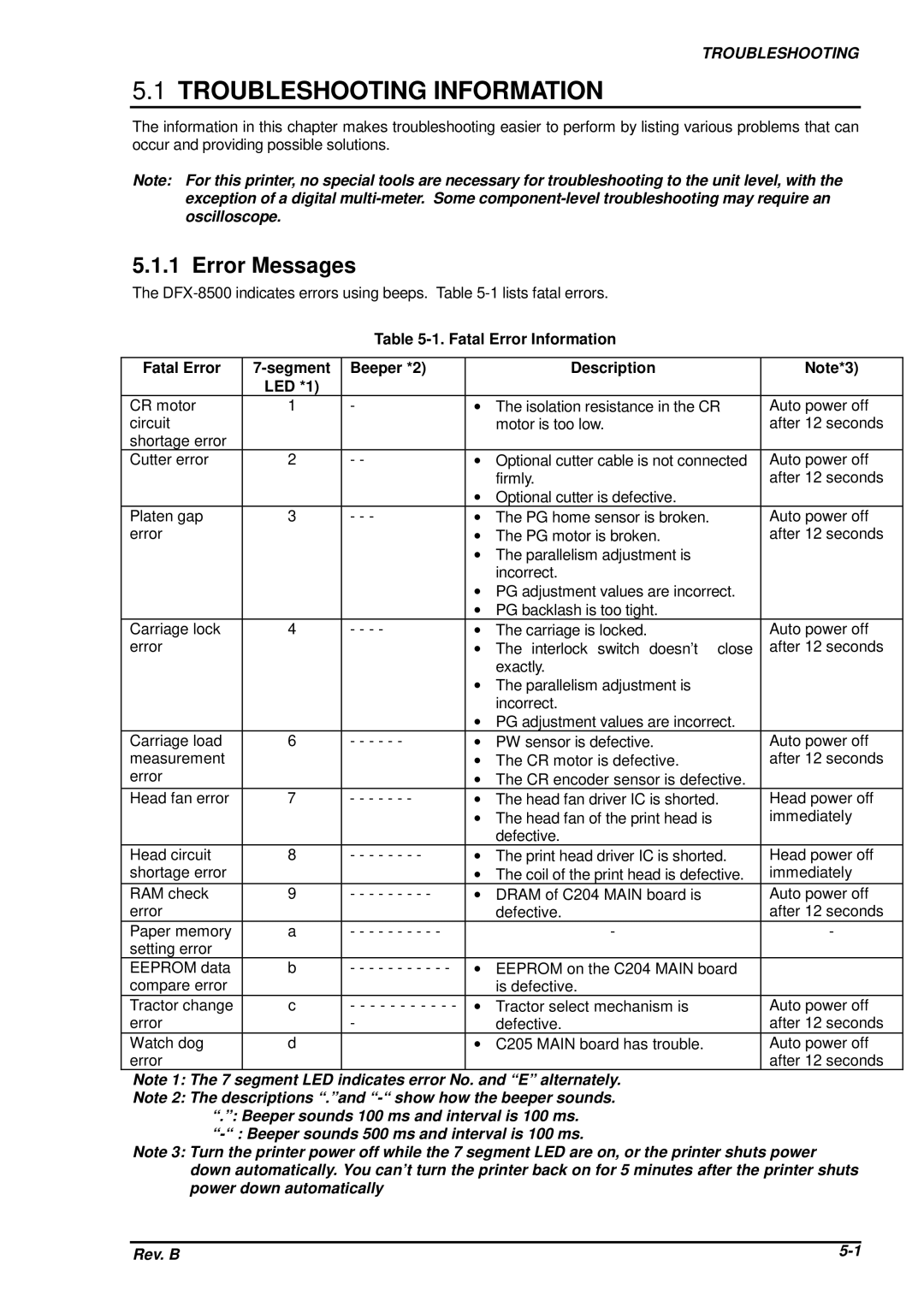
The
Table
Fatal Error | Beeper *2) |
| Description | Note*3) | |
| LED *1) |
|
|
|
|
CR motor | 1 | - | ∙ | The isolation resistance in the CR | Auto power off |
circuit |
|
|
| motor is too low. | after 12 seconds |
shortage error |
|
|
|
|
|
Cutter error | 2 | - - | ∙ | Optional cutter cable is not connected | Auto power off |
|
|
|
| firmly. | after 12 seconds |
|
|
| ∙ Optional cutter is defective. |
| |
Platen gap | 3 | - - - | ∙ | The PG home sensor is broken. | Auto power off |
error |
|
| ∙ | The PG motor is broken. | after 12 seconds |
|
|
| ∙ The parallelism adjustment is |
| |
|
|
|
| incorrect. |
|
|
|
| ∙ PG adjustment values are incorrect. |
| |
|
|
| ∙ PG backlash is too tight. |
| |
Carriage lock | 4 | - - - - | ∙ | The carriage is locked. | Auto power off |
error |
|
| ∙ | The interlock switch doesn’t close | after 12 seconds |
|
|
|
| exactly. |
|
|
|
| ∙ The parallelism adjustment is |
| |
|
|
|
| incorrect. |
|
|
|
| ∙ PG adjustment values are incorrect. |
| |
Carriage load | 6 | - - - - - - | ∙ | PW sensor is defective. | Auto power off |
measurement |
|
| ∙ | The CR motor is defective. | after 12 seconds |
error |
|
| ∙ | The CR encoder sensor is defective. |
|
Head fan error | 7 | - - - - - - - | ∙ | The head fan driver IC is shorted. | Head power off |
|
|
| ∙ | The head fan of the print head is | immediately |
|
|
|
| defective. |
|
Head circuit | 8 | - - - - - - - - | ∙ | The print head driver IC is shorted. | Head power off |
shortage error |
|
| ∙ | The coil of the print head is defective. | immediately |
RAM check | 9 | - - - - - - - - - | ∙ | DRAM of C204 MAIN board is | Auto power off |
error |
|
|
| defective. | after 12 seconds |
Paper memory | a | - - - - - - - - - - |
| - | - |
setting error |
|
|
|
|
|
EEPROM data | b | - - - - - - - - - - - | ∙ | EEPROM on the C204 MAIN board |
|
compare error |
|
|
| is defective. |
|
Tractor change | c | - - - - - - - - - - - | ∙ | Tractor select mechanism is | Auto power off |
error |
| - |
| defective. | after 12 seconds |
Watch dog | d |
| ∙ | C205 MAIN board has trouble. | Auto power off |
error |
|
|
|
| after 12 seconds |
Note 1: The 7 segment LED indicates error No. and “E” alternately.
Note 2: The descriptions “.”and
Note 3: Turn the printer power off while the 7 segment LED are on, or the printer shuts power down automatically. You can’t turn the printer back on for 5 minutes after the printer shuts power down automatically
Rev. B |