4Printing: Beyond the Basics
Printing and using the color sampler charts
You can print color sampler charts from your printer to see how the colors, as specified from within an application, will look when printed. Having a
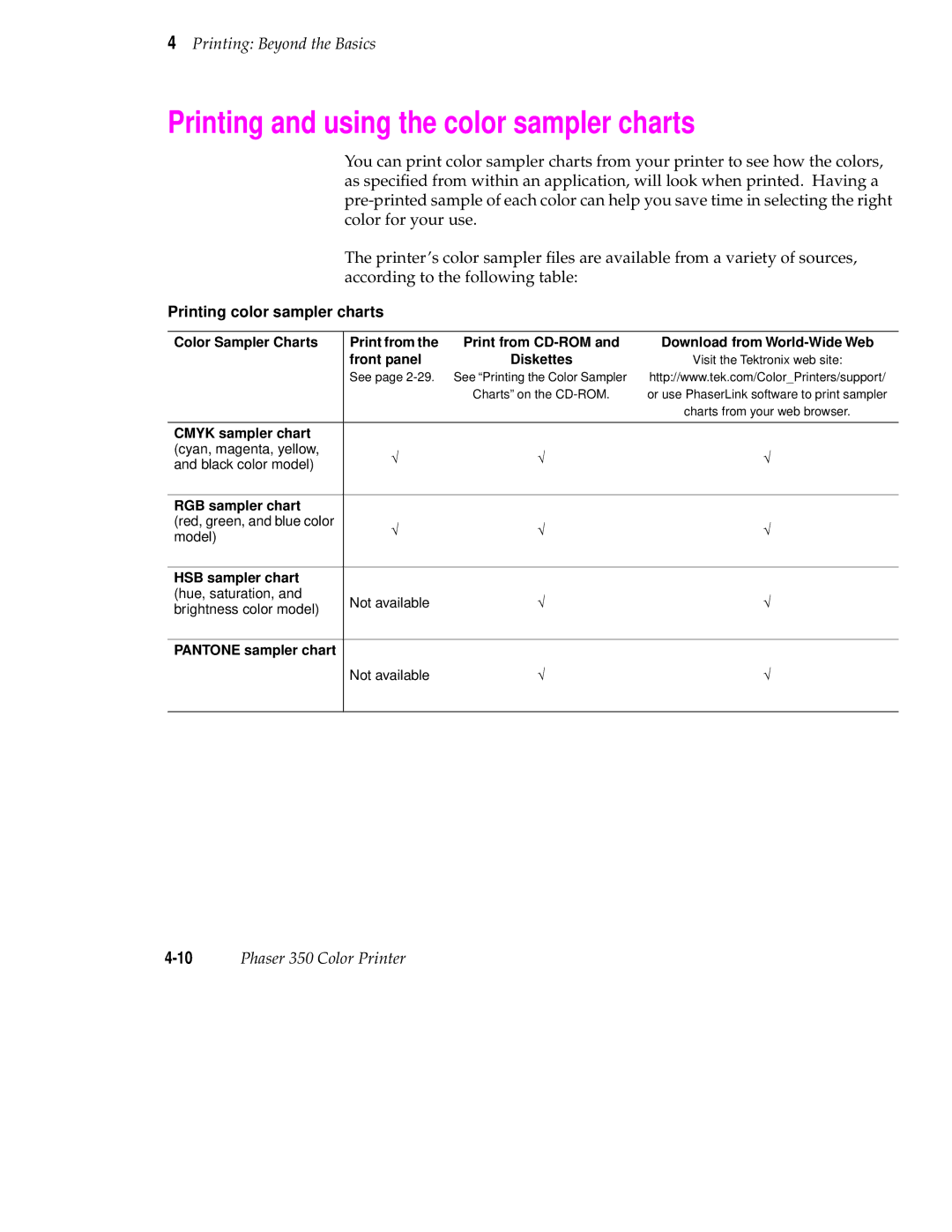
The printer’s color sampler files are available from a variety of sources, according to the following table:
Printing color sampler charts
Color Sampler Charts | Print from the | Print from | Download from | |
| front panel | Diskettes | Visit the Tektronix web site: | |
| See page | See “Printing the Color Sampler | http://www.tek.com/Color_Printers/support/ | |
|
| Charts” on the | or use PhaserLink software to print sampler | |
|
|
| charts from your web browser. | |
|
|
|
| |
CMYK sampler chart |
|
|
| |
(cyan, magenta, yellow, | √ | √ | √ | |
and black color model) | ||||
|
|
| ||
|
|
|
| |
RGB sampler chart |
|
|
| |
(red, green, and blue color | √ | √ | √ | |
model) | ||||
|
|
| ||
|
|
|
| |
HSB sampler chart |
|
|
| |
(hue, saturation, and | Not available | √ | √ | |
brightness color model) | ||||
|
|
| ||
|
|
|
| |
PANTONE sampler chart |
|
|
| |
| Not available | √ | √ | |
|
|
|
|