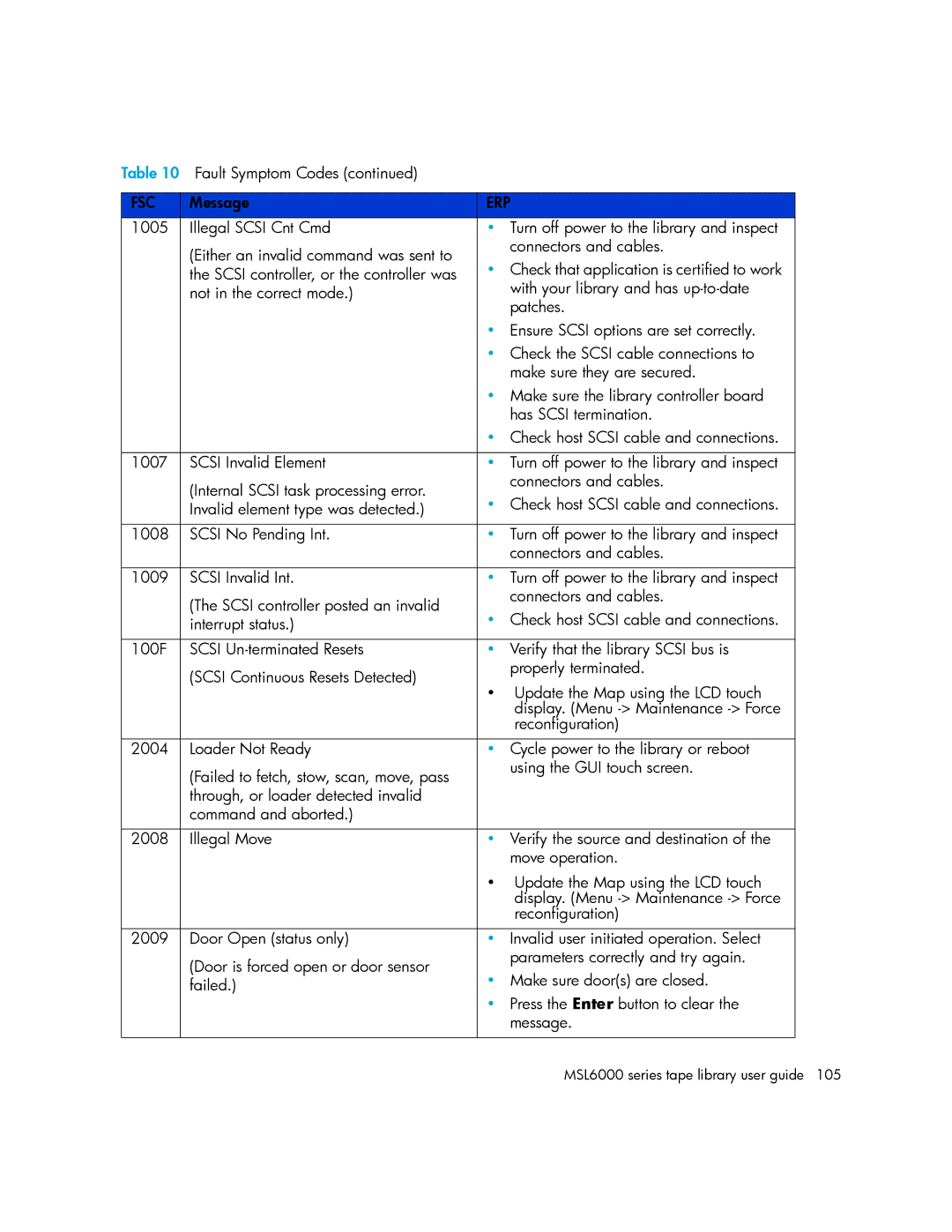
Table 10 Fault Symptom Codes (continued) |
| |
|
|
|
FSC | Message | ERP |
1005 | Illegal SCSI Cnt Cmd | • Turn off power to the library and inspect |
| (Either an invalid command was sent to | connectors and cables. |
| • Check that application is certified to work | |
| the SCSI controller, or the controller was | |
| not in the correct mode.) | with your library and has |
|
| patches. |
|
| • Ensure SCSI options are set correctly. |
|
| • Check the SCSI cable connections to |
|
| make sure they are secured. |
|
| • Make sure the library controller board |
|
| has SCSI termination. |
|
| • Check host SCSI cable and connections. |
|
|
|
1007 | SCSI Invalid Element | • Turn off power to the library and inspect |
| (Internal SCSI task processing error. | connectors and cables. |
| • Check host SCSI cable and connections. | |
| Invalid element type was detected.) | |
|
|
|
1008 | SCSI No Pending Int. | • Turn off power to the library and inspect |
|
| connectors and cables. |
|
|
|
1009 | SCSI Invalid Int. | • Turn off power to the library and inspect |
| (The SCSI controller posted an invalid | connectors and cables. |
| • Check host SCSI cable and connections. | |
| interrupt status.) | |
|
|
|
100F | SCSI | • Verify that the library SCSI bus is |
| (SCSI Continuous Resets Detected) | properly terminated. |
| • Update the Map using the LCD touch | |
|
| |
|
| display. (Menu |
|
| reconfiguration) |
|
|
|
2004 | Loader Not Ready | • Cycle power to the library or reboot |
| (Failed to fetch, stow, scan, move, pass | using the GUI touch screen. |
|
| |
| through, or loader detected invalid |
|
| command and aborted.) |
|
|
|
|
2008 | Illegal Move | • Verify the source and destination of the |
|
| move operation. |
|
| • Update the Map using the LCD touch |
|
| display. (Menu |
|
| reconfiguration) |
|
|
|
2009 | Door Open (status only) | • Invalid user initiated operation. Select |
| (Door is forced open or door sensor | parameters correctly and try again. |
| • Make sure door(s) are closed. | |
| failed.) | |
|
| • Press the Enter button to clear the |
|
| message. |
|
|
|
Page 105
Image 105