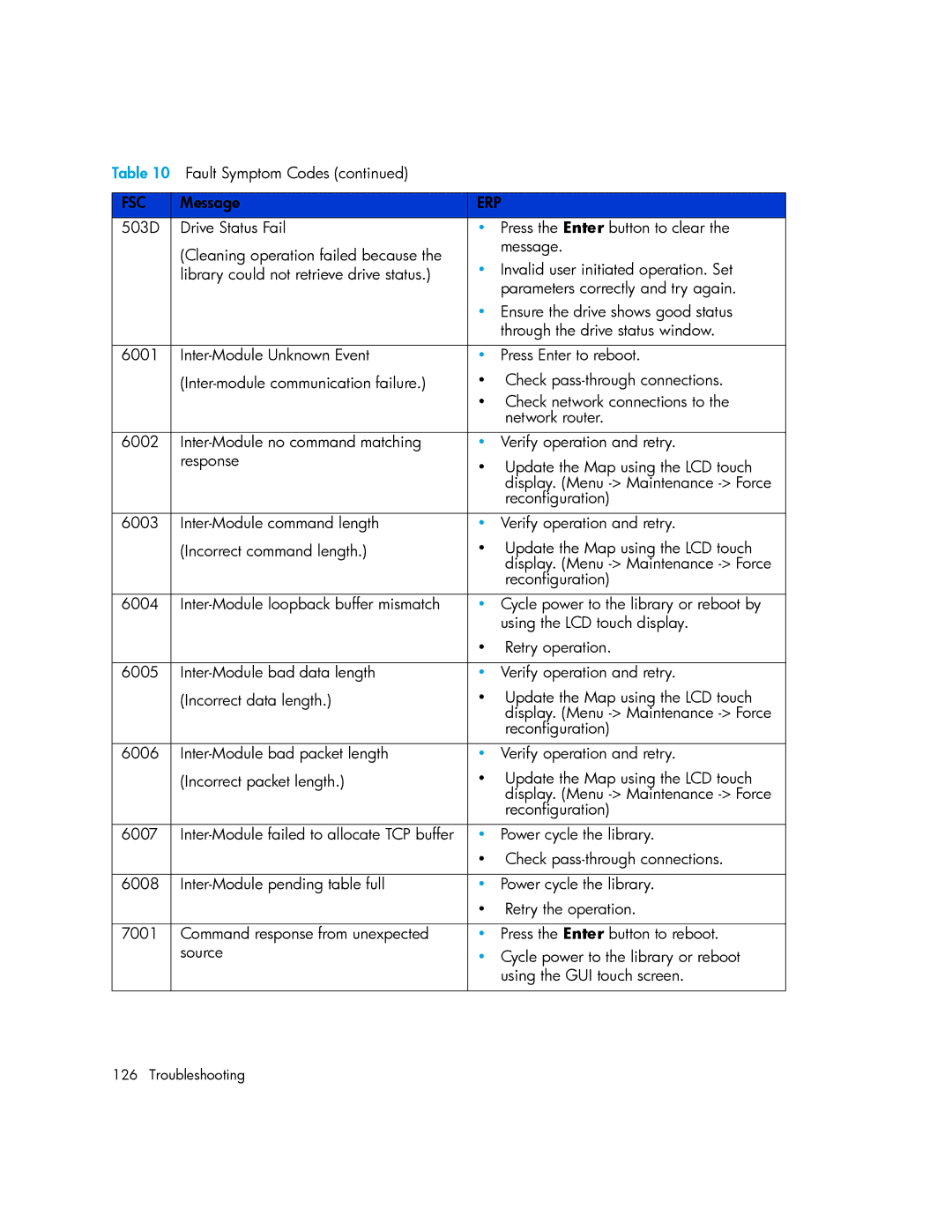
Table 10 Fault Symptom Codes (continued) |
|
| |
|
|
| |
FSC | Message | ERP | |
503D | Drive Status Fail | • | Press the Enter button to clear the |
| (Cleaning operation failed because the |
| message. |
| • | Invalid user initiated operation. Set | |
| library could not retrieve drive status.) | ||
|
|
| parameters correctly and try again. |
|
| • Ensure the drive shows good status | |
|
|
| through the drive status window. |
|
|
|
|
6001 | • | Press Enter to reboot. | |
| • | Check | |
|
| • Check network connections to the | |
|
|
| network router. |
|
|
|
|
6002 | • | Verify operation and retry. | |
| response | • | Update the Map using the LCD touch |
|
|
| display. (Menu |
|
|
| reconfiguration) |
|
|
|
|
6003 | • | Verify operation and retry. | |
| (Incorrect command length.) | • | Update the Map using the LCD touch |
|
|
| display. (Menu |
|
|
| reconfiguration) |
|
|
|
|
6004 | • | Cycle power to the library or reboot by | |
|
|
| using the LCD touch display. |
|
| • | Retry operation. |
|
|
|
|
6005 | • | Verify operation and retry. | |
| (Incorrect data length.) | • | Update the Map using the LCD touch |
|
|
| display. (Menu |
|
|
| reconfiguration) |
|
|
|
|
6006 | • | Verify operation and retry. | |
| (Incorrect packet length.) | • | Update the Map using the LCD touch |
|
|
| display. (Menu |
|
|
| reconfiguration) |
|
|
|
|
6007 | • | Power cycle the library. | |
|
| • Check | |
|
|
|
|
6008 | • | Power cycle the library. | |
|
| • | Retry the operation. |
|
|
|
|
7001 | Command response from unexpected | • | Press the Enter button to reboot. |
| source | • | Cycle power to the library or reboot |
|
|
| using the GUI touch screen. |
|
|
|
|
126 Troubleshooting