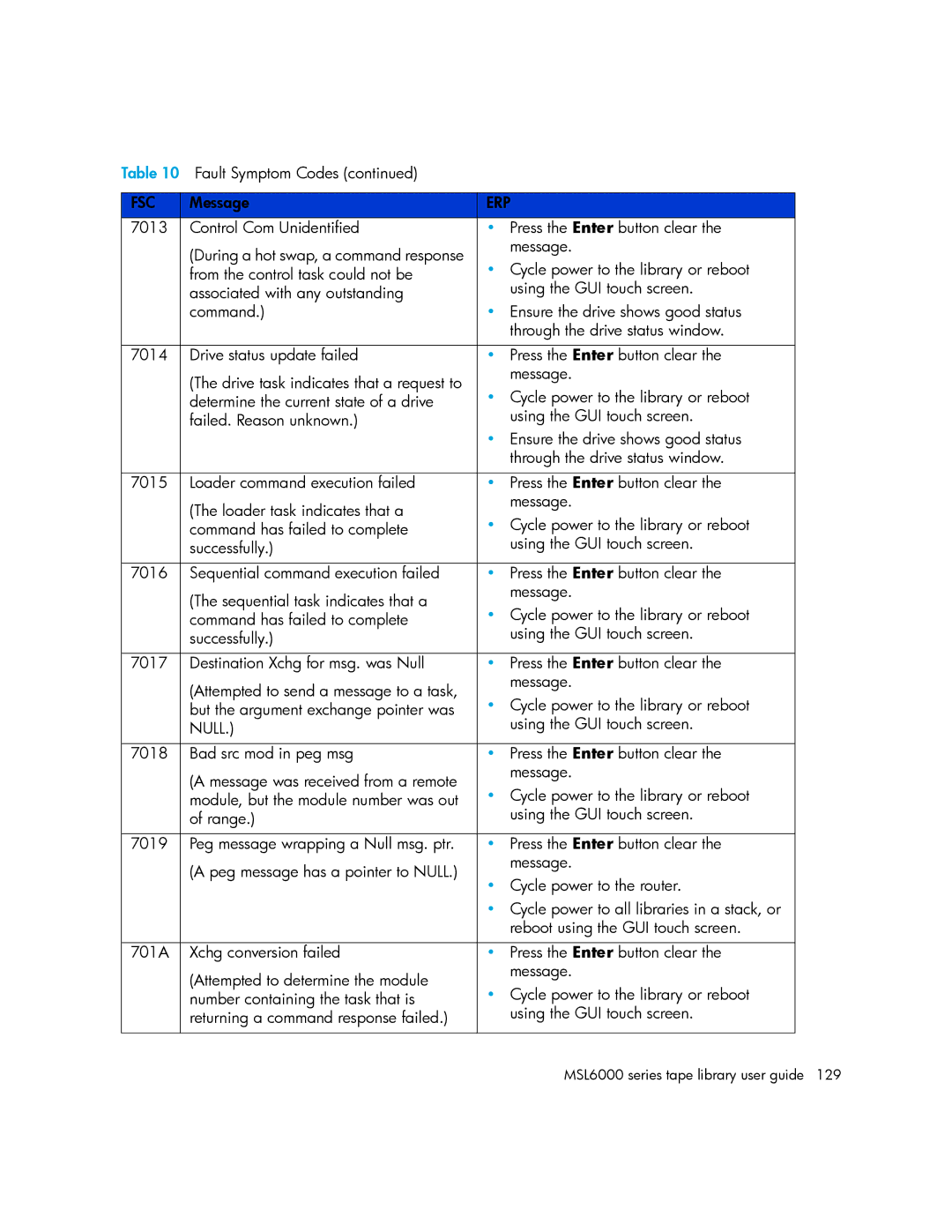
Table 10 Fault Symptom Codes (continued) |
| |
|
|
|
FSC | Message | ERP |
7013 | Control Com Unidentified | • Press the Enter button clear the |
| (During a hot swap, a command response | message. |
| • Cycle power to the library or reboot | |
| from the control task could not be | |
| associated with any outstanding | using the GUI touch screen. |
| command.) | • Ensure the drive shows good status |
|
| through the drive status window. |
|
|
|
7014 | Drive status update failed | • Press the Enter button clear the |
| (The drive task indicates that a request to | message. |
| • Cycle power to the library or reboot | |
| determine the current state of a drive | |
| failed. Reason unknown.) | using the GUI touch screen. |
|
| • Ensure the drive shows good status |
|
| through the drive status window. |
|
|
|
7015 | Loader command execution failed | • Press the Enter button clear the |
| (The loader task indicates that a | message. |
| • Cycle power to the library or reboot | |
| command has failed to complete | |
| successfully.) | using the GUI touch screen. |
|
|
|
7016 | Sequential command execution failed | • Press the Enter button clear the |
| (The sequential task indicates that a | message. |
| • Cycle power to the library or reboot | |
| command has failed to complete | |
| successfully.) | using the GUI touch screen. |
|
|
|
7017 | Destination Xchg for msg. was Null | • Press the Enter button clear the |
| (Attempted to send a message to a task, | message. |
| • Cycle power to the library or reboot | |
| but the argument exchange pointer was | |
| NULL.) | using the GUI touch screen. |
|
|
|
7018 | Bad src mod in peg msg | • Press the Enter button clear the |
| (A message was received from a remote | message. |
| • Cycle power to the library or reboot | |
| module, but the module number was out | |
| of range.) | using the GUI touch screen. |
|
|
|
7019 | Peg message wrapping a Null msg. ptr. | • Press the Enter button clear the |
| (A peg message has a pointer to NULL.) | message. |
| • Cycle power to the router. | |
|
| |
|
| • Cycle power to all libraries in a stack, or |
|
| reboot using the GUI touch screen. |
|
|
|
701A | Xchg conversion failed | • Press the Enter button clear the |
| (Attempted to determine the module | message. |
| • Cycle power to the library or reboot | |
| number containing the task that is | |
| returning a command response failed.) | using the GUI touch screen. |
|
|
|
Page 129
Image 129