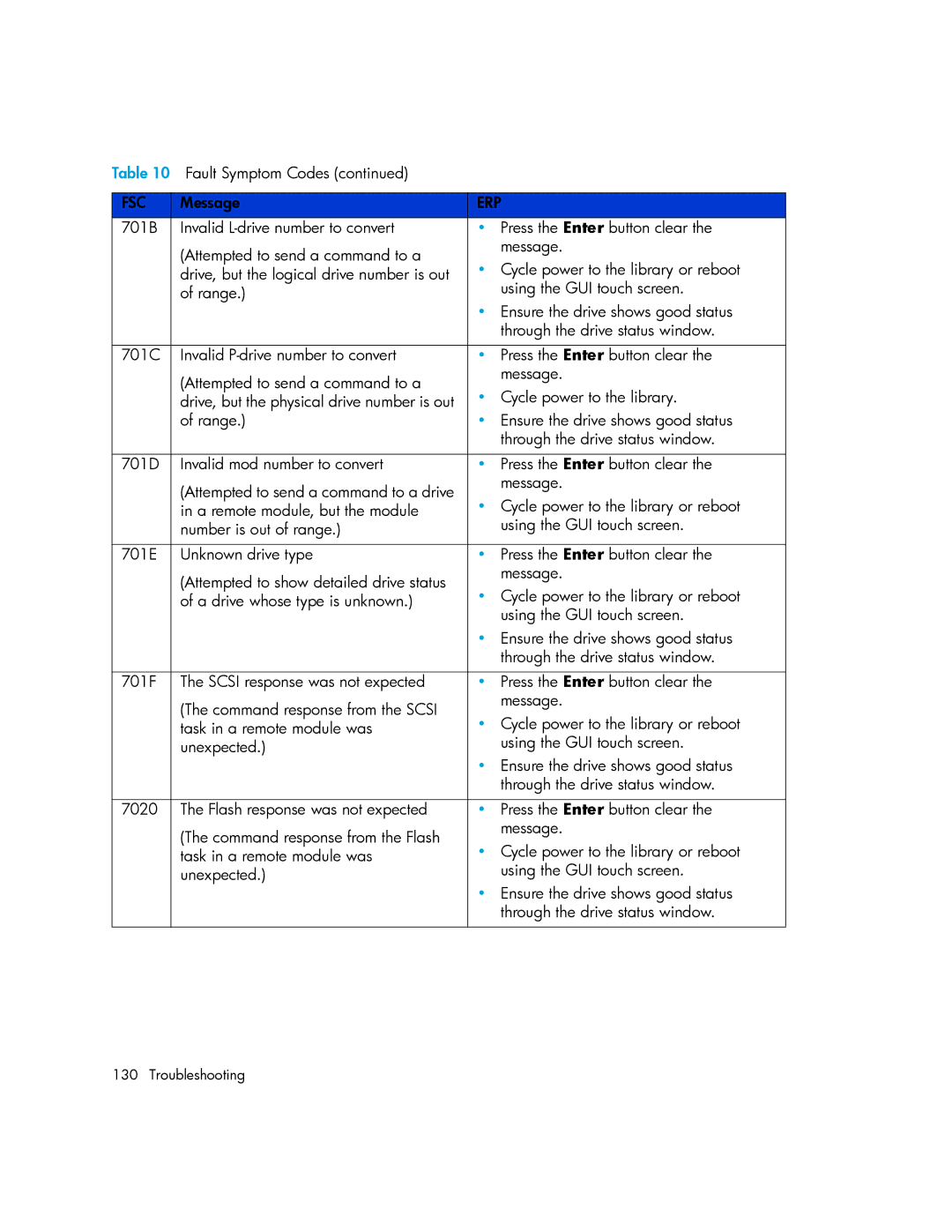
Table 10 Fault Symptom Codes (continued) |
| |
|
|
|
FSC | Message | ERP |
701B | Invalid | • Press the Enter button clear the |
| (Attempted to send a command to a | message. |
| • Cycle power to the library or reboot | |
| drive, but the logical drive number is out | |
| of range.) | using the GUI touch screen. |
|
| • Ensure the drive shows good status |
|
| through the drive status window. |
|
|
|
701C | Invalid | • Press the Enter button clear the |
| (Attempted to send a command to a | message. |
| • Cycle power to the library. | |
| drive, but the physical drive number is out | |
| of range.) | • Ensure the drive shows good status |
|
| through the drive status window. |
|
|
|
701D | Invalid mod number to convert | • Press the Enter button clear the |
| (Attempted to send a command to a drive | message. |
| • Cycle power to the library or reboot | |
| in a remote module, but the module | |
| number is out of range.) | using the GUI touch screen. |
|
|
|
701E | Unknown drive type | • Press the Enter button clear the |
| (Attempted to show detailed drive status | message. |
| • Cycle power to the library or reboot | |
| of a drive whose type is unknown.) | |
|
| using the GUI touch screen. |
|
| • Ensure the drive shows good status |
|
| through the drive status window. |
|
|
|
701F | The SCSI response was not expected | • Press the Enter button clear the |
| (The command response from the SCSI | message. |
| • Cycle power to the library or reboot | |
| task in a remote module was | |
| unexpected.) | using the GUI touch screen. |
|
| • Ensure the drive shows good status |
|
| through the drive status window. |
|
|
|
7020 | The Flash response was not expected | • Press the Enter button clear the |
| (The command response from the Flash | message. |
| • Cycle power to the library or reboot | |
| task in a remote module was | |
| unexpected.) | using the GUI touch screen. |
|
| • Ensure the drive shows good status |
|
| through the drive status window. |
|
|
|
130 Troubleshooting