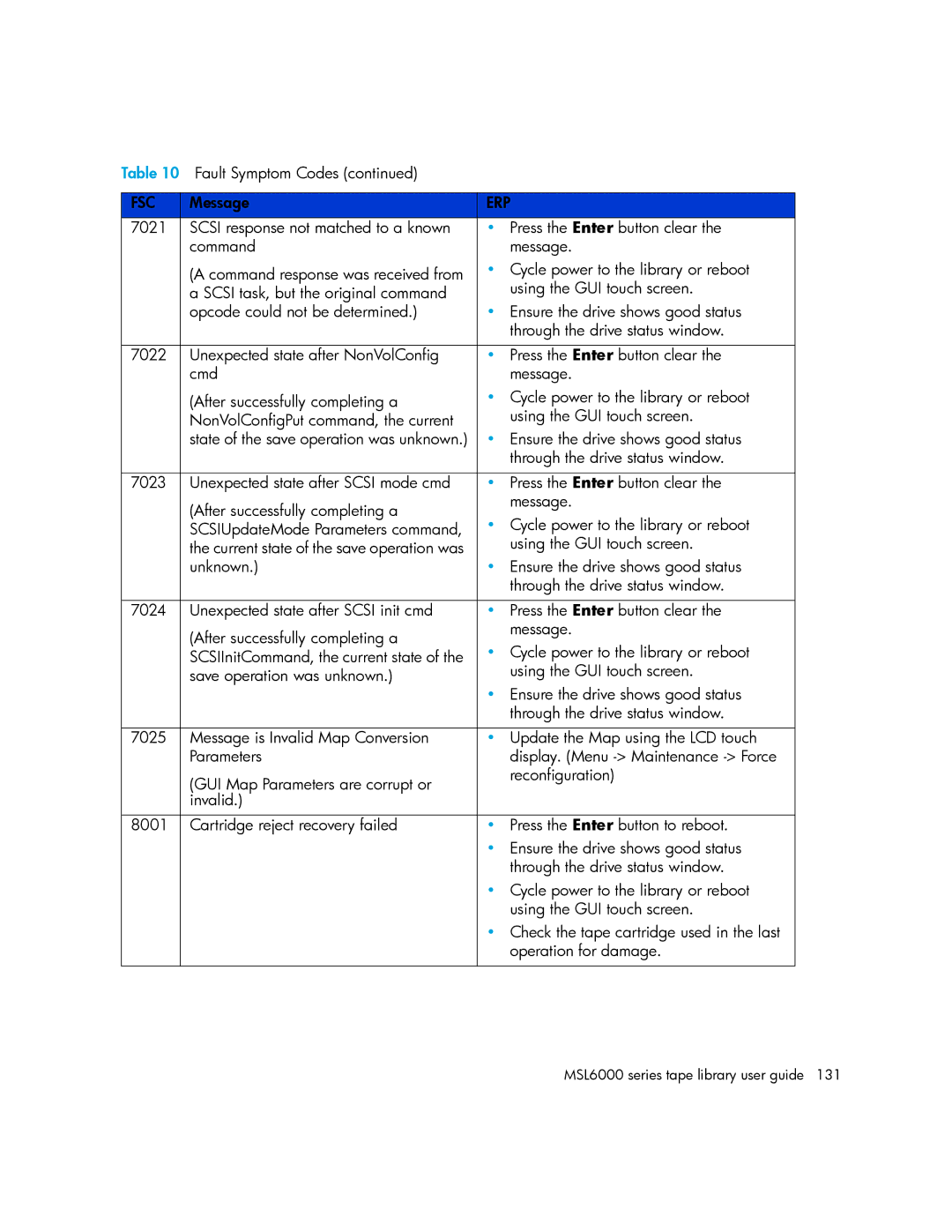
Table 10 Fault Symptom Codes (continued) |
| |
|
|
|
FSC | Message | ERP |
7021 | SCSI response not matched to a known | • Press the Enter button clear the |
| command | message. |
| (A command response was received from | • Cycle power to the library or reboot |
| a SCSI task, but the original command | using the GUI touch screen. |
| opcode could not be determined.) | • Ensure the drive shows good status |
|
| through the drive status window. |
|
|
|
7022 | Unexpected state after NonVolConfig | • Press the Enter button clear the |
| cmd | message. |
| (After successfully completing a | • Cycle power to the library or reboot |
| NonVolConfigPut command, the current | using the GUI touch screen. |
| state of the save operation was unknown.) | • Ensure the drive shows good status |
|
| through the drive status window. |
|
|
|
7023 | Unexpected state after SCSI mode cmd | • Press the Enter button clear the |
| (After successfully completing a | message. |
| • Cycle power to the library or reboot | |
| SCSIUpdateMode Parameters command, | |
| the current state of the save operation was | using the GUI touch screen. |
| unknown.) | • Ensure the drive shows good status |
|
| through the drive status window. |
|
|
|
7024 | Unexpected state after SCSI init cmd | • Press the Enter button clear the |
| (After successfully completing a | message. |
| • Cycle power to the library or reboot | |
| SCSIInitCommand, the current state of the | |
| save operation was unknown.) | using the GUI touch screen. |
|
| • Ensure the drive shows good status |
|
| through the drive status window. |
|
|
|
7025 | Message is Invalid Map Conversion | • Update the Map using the LCD touch |
| Parameters | display. (Menu |
| (GUI Map Parameters are corrupt or | reconfiguration) |
|
| |
| invalid.) |
|
|
|
|
8001 | Cartridge reject recovery failed | • Press the Enter button to reboot. |
|
| • Ensure the drive shows good status |
|
| through the drive status window. |
|
| • Cycle power to the library or reboot |
|
| using the GUI touch screen. |
|
| • Check the tape cartridge used in the last |
|
| operation for damage. |
|
|
|
Page 131
Image 131