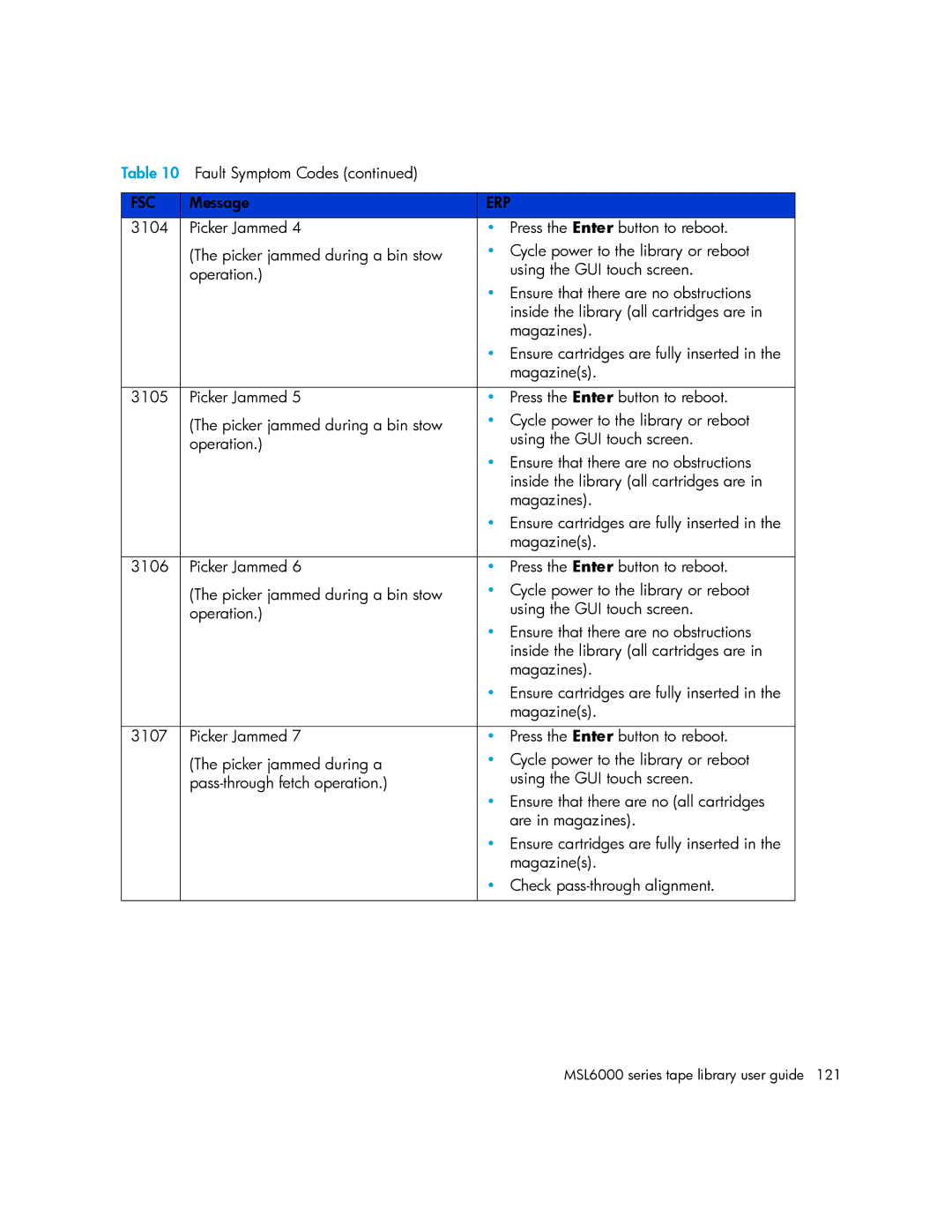
Table 10 Fault Symptom Codes (continued) |
| |
|
|
|
FSC | Message | ERP |
3104 | Picker Jammed 4 | • Press the Enter button to reboot. |
| (The picker jammed during a bin stow | • Cycle power to the library or reboot |
| operation.) | using the GUI touch screen. |
|
| • Ensure that there are no obstructions |
|
| inside the library (all cartridges are in |
|
| magazines). |
|
| • Ensure cartridges are fully inserted in the |
|
| magazine(s). |
|
|
|
3105 | Picker Jammed 5 | • Press the Enter button to reboot. |
| (The picker jammed during a bin stow | • Cycle power to the library or reboot |
| operation.) | using the GUI touch screen. |
|
| • Ensure that there are no obstructions |
|
| inside the library (all cartridges are in |
|
| magazines). |
|
| • Ensure cartridges are fully inserted in the |
|
| magazine(s). |
|
|
|
3106 | Picker Jammed 6 | • Press the Enter button to reboot. |
| (The picker jammed during a bin stow | • Cycle power to the library or reboot |
| operation.) | using the GUI touch screen. |
|
| • Ensure that there are no obstructions |
|
| inside the library (all cartridges are in |
|
| magazines). |
|
| • Ensure cartridges are fully inserted in the |
|
| magazine(s). |
|
|
|
3107 | Picker Jammed 7 | • Press the Enter button to reboot. |
| (The picker jammed during a | • Cycle power to the library or reboot |
| using the GUI touch screen. | |
|
| • Ensure that there are no (all cartridges |
|
| are in magazines). |
|
| • Ensure cartridges are fully inserted in the |
|
| magazine(s). |
|
| • Check |
|
|
|
Page 121
Image 121