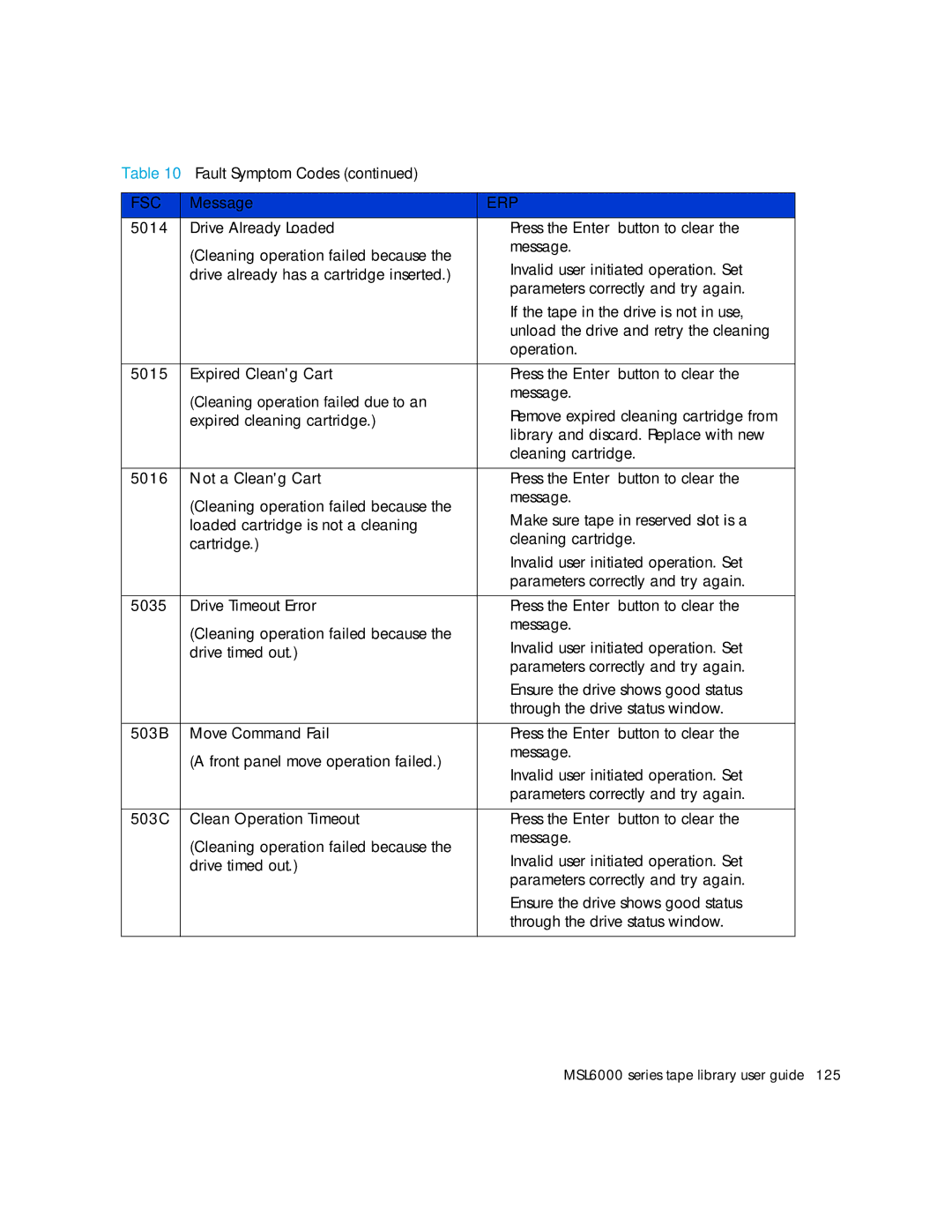
Table 10 Fault Symptom Codes (continued) |
| |
|
|
|
FSC | Message | ERP |
5014 | Drive Already Loaded | • Press the Enter button to clear the |
| (Cleaning operation failed because the | message. |
| • Invalid user initiated operation. Set | |
| drive already has a cartridge inserted.) | |
|
| parameters correctly and try again. |
|
| • If the tape in the drive is not in use, |
|
| unload the drive and retry the cleaning |
|
| operation. |
|
|
|
5015 | Expired Clean'g Cart | • Press the Enter button to clear the |
| (Cleaning operation failed due to an | message. |
| • Remove expired cleaning cartridge from | |
| expired cleaning cartridge.) | |
|
| library and discard. Replace with new |
|
| cleaning cartridge. |
|
|
|
5016 | Not a Clean'g Cart | • Press the Enter button to clear the |
| (Cleaning operation failed because the | message. |
| • Make sure tape in reserved slot is a | |
| loaded cartridge is not a cleaning | |
| cartridge.) | cleaning cartridge. |
|
| • Invalid user initiated operation. Set |
|
| parameters correctly and try again. |
|
|
|
5035 | Drive Timeout Error | • Press the Enter button to clear the |
| (Cleaning operation failed because the | message. |
| • Invalid user initiated operation. Set | |
| drive timed out.) | |
|
| parameters correctly and try again. |
|
| • Ensure the drive shows good status |
|
| through the drive status window. |
|
|
|
503B | Move Command Fail | • Press the Enter button to clear the |
| (A front panel move operation failed.) | message. |
| • Invalid user initiated operation. Set | |
|
| |
|
| parameters correctly and try again. |
|
|
|
503C | Clean Operation Timeout | • Press the Enter button to clear the |
| (Cleaning operation failed because the | message. |
| • Invalid user initiated operation. Set | |
| drive timed out.) | |
|
| parameters correctly and try again. |
|
| • Ensure the drive shows good status |
|
| through the drive status window. |
|
|
|
Page 125
Image 125