Setup Options- Alarms | V1.98 21/06/06 |
|
|
12.0 ALARMS
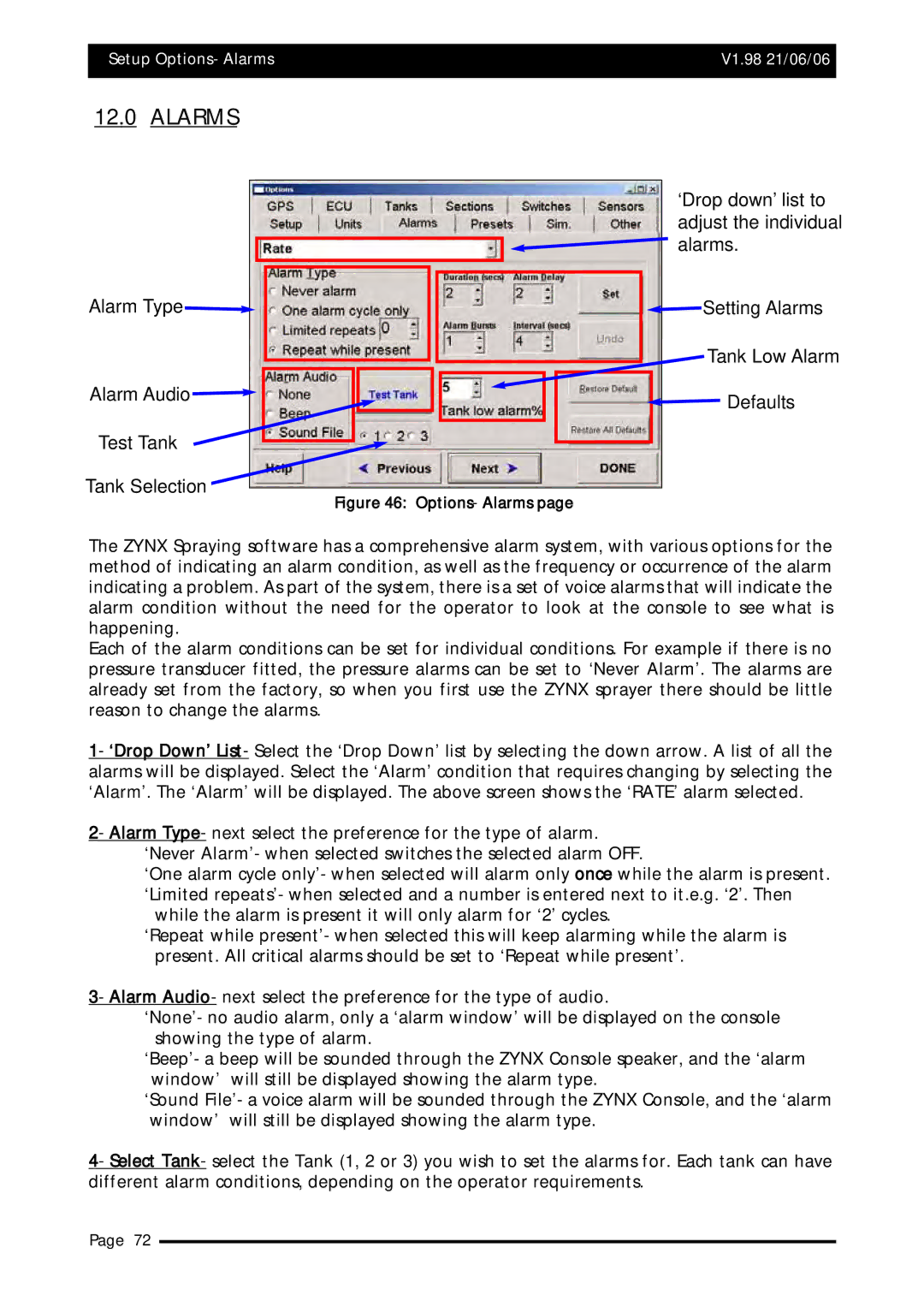
Alarm Type
Alarm Audio
Test Tank
Tank Selection
‘Drop down’ list to adjust the individual

 alarms.
 Setting Alarms
Tank Low Alarm
 Defaults
Figure 46: Options- Alarms page
The ZYNX Spraying software has a comprehensive alarm system, with various options for the method of indicating an alarm condition, as well as the frequency or occurrence of the alarm indicating a problem. As part of the system, there is a set of voice alarms that will indicate the alarm condition without the need for the operator to look at the console to see what is happening.
Each of the alarm conditions can be set for individual conditions. For example if there is no pressure transducer fitted, the pressure alarms can be set to ‘Never Alarm’. The alarms are already set from the factory, so when you first use the ZYNX sprayer there should be little reason to change the alarms.
1- ‘Drop Down’ List- Select the ‘Drop Down’ list by selecting the down arrow. A list of all the alarms will be displayed. Select the ‘Alarm’ condition that requires changing by selecting the ‘Alarm’. The ‘Alarm’ will be displayed. The above screen shows the ‘RATE’ alarm selected.
2- Alarm Type- next select the preference for the type of alarm. ‘Never Alarm’- when selected switches the selected alarm OFF.
‘One alarm cycle only’- when selected will alarm only once while the alarm is present. ‘Limited repeats’- when selected and a number is entered next to it.e.g. ‘2’. Then
while the alarm is present it will only alarm for ‘2’ cycles.
‘Repeat while present’- when selected this will keep alarming while the alarm is present. All critical alarms should be set to ‘Repeat while present’.
3- Alarm Audio- next select the preference for the type of audio.
‘None’- no audio alarm, only a ‘alarm window’ will be displayed on the console showing the type of alarm.
‘Beep’- a beep will be sounded through the ZYNX Console speaker, and the ‘alarm window’ will still be displayed showing the alarm type.
‘Sound File’- a voice alarm will be sounded through the ZYNX Console, and the ‘alarm window’ will still be displayed showing the alarm type.
4- Select Tank- select the Tank (1, 2 or 3) you wish to set the alarms for. Each tank can have different alarm conditions, depending on the operator requirements.
Page 72