726+,%$
DK Admin/DK Backup Release User Guide
Publication Information
Contents
Using DKAdmin/DKBackup
Iii
Backup Menu DKBackup
Appendix B DK424 RCTUE/F Upgrade Using DKAdmin
Organization
Introduction
Screen Variations
Conventions
Viii
Related Documentation
How To Use This Manual
How To Use This Manual
Capabilities
Grand Tour
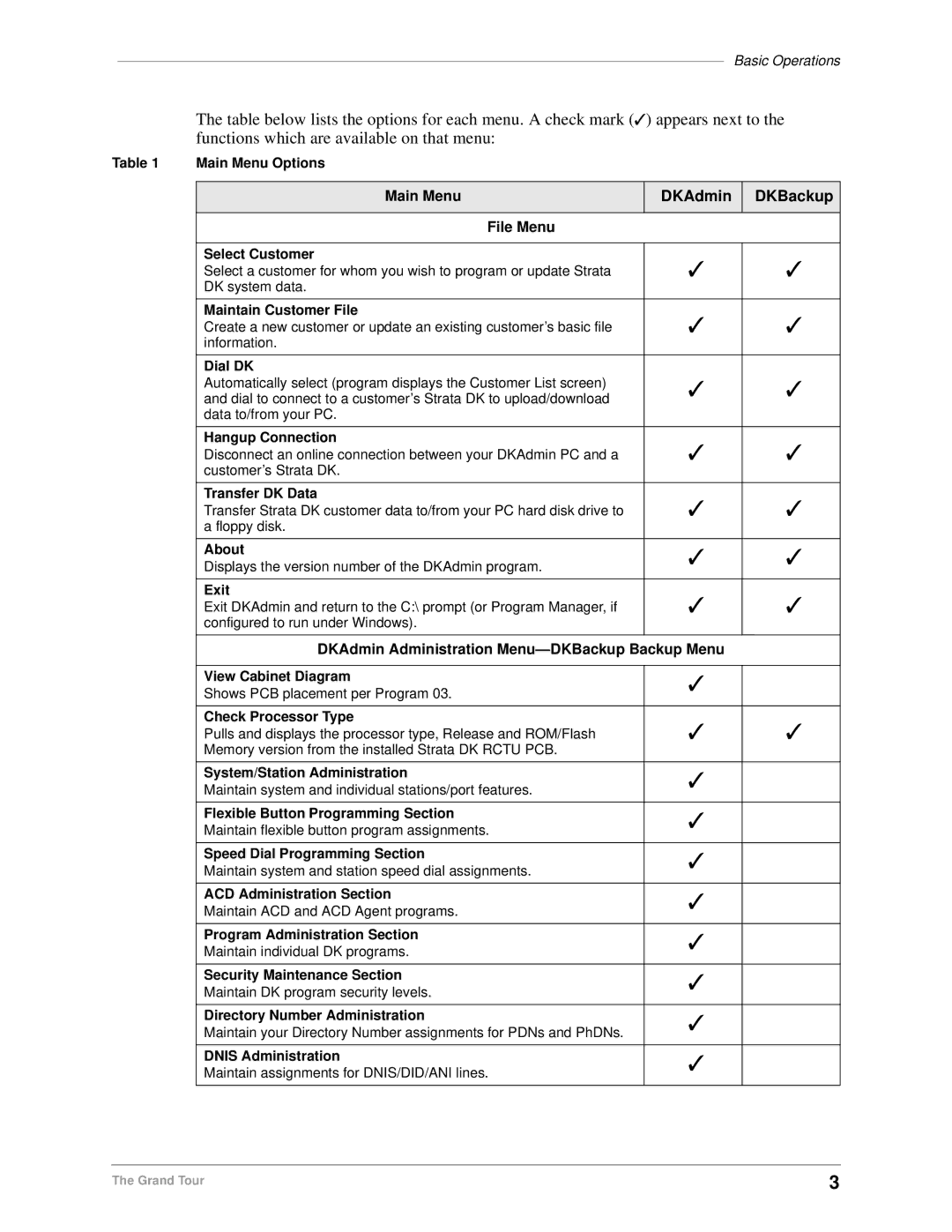
Basic Operations
DKAdmin DKBackup
Main Menu DKAdmin DKBackup File Menu
Screen Conventions
Main Menu DKAdmin DKBackup
Screen Conventions
Screen Conventions
Check System Requirements
Installing DKAdmin
DKAdmin Hardware Connections
Power Up DKAdmin PC
From Windows
Optional Make Installation Floppy Disks
From DOS Only PC
Type copy *.* a or B and press Enter
Windows PC from CD-ROM
Install DKAdmin
Windows PC from Floppy Disks
DOS Only PC from Floppy Disks
DOS Only PC from CD-ROM
Start-up DKAdmin under Windows 98, 95 or Windows NT
Run DKAdmin Program
Start-up DKAdmin in MS-DOS
Run DKAdmin
Cmd line C\280ADMIN\DKADMIN.BAT Working C\280ADMIN
Set Windows DKAdmin Program Properties
Usage Full-screen
Display toolbar Restore settings on startup
Fast ROM emulation Dynamic memory allocation
Connect to the Strata DK Telephone System
Connect to the Strata DK Telephone System
Installing DKBackup
DKBackup Hardware Connections
Power Up DKBackup PC
Optional Make Installation Floppy Disks
Install DKBackup
Enter
Start-up DKBackup under Windows 3.11, 95, 98 or Windows NT
Run DKBackup Program
Start-up DKBackup in MS-DOS
Run DKBackup
Cmd line C\280BCKUP\DKBCKUP.BAT Working C\280BCKUP
Set Windows DKBackup Program Properties
Usage Full-screen
Connect to the Strata DK Telephone System
Connect to the Strata DK Telephone System
DKAdmin
Using DKAdmin/DKBackup
To log on to DKAdmin
Before You Start
Logging On
DKAdmin Main Menu Options
To log on to DKBackup
DKBackup
Esc
Keyboard Conventions
Up/Page Down
Error Messages
Using the Pull-Down Menus
System Messages
On-Line Help
Logging Off
To exit the DKAdmin/DKBackup system
Logging Off
File Menu
Quick-start Procedures for Using DKAdmin
For an Existing Customer
To access the Maintain Customer File option
To quickly use DKAdmin with a new installation of Strata DK
Maintain Customer File
For a New Customer
Message Record exists
Wmau
Select Customer
Settings
To modify a customer record
To delete a customer record
Dial DK
To dial a Strata DK to upload/download data
To access the option
Transfer DK Data
Hangup Connection
About
Exit
Administration Menu DKAdmin
System/Station Administration
View Cabinet Diagram
To view cabinet diagram
Check Processor Type
System/Station Administration
Programming/Updating System
To program or update the entire system or an individual port
Printing Port/Station Information F3
Reset To Default Values. Go Ahead?
To print port and station information
To set or change available system speed dial numbers
System Speed Dial Number F7
System LCD Messages F8
To program or update individual station port attributes
Station Port Attributes Ctrl Enter
To set or change available system LCD messages
See Appendix a Connecting to Strata DK
HS-OCA
Directory
Ports 000 to
To copy a range of attributes
Copy PRG38/PRG39-Flexible Key Assignments Also?
To copy selected keys to selected ports
To view or change flexible button assignments
To assign speed dial assignments
To view CO line assignments
To assign system messages
Saving/Uploading Programmed Data F9
To upload programmed data
Printout Examples
Customer Name PCB Placement Per Program 03 Assignments
Did
Intercom 202/Port 002 Attributes for Brian No
Intercom 202/Port 002 Personal Messages for Brian No
Flexible Button Programming Section
To access flexible button assignments
Telephone Flexible Button Assignments
To change an assigned button
DN Does Not Exist. Please Refer to Program *04
No Ports Have Add-on Modules. Do You Want To Add a Port?
Add-On Module Button Assignments
To make assignments to another port
Port does not have add-on module. Add?
To change an assigned feature
To copy the features from one port to another
Current template copied from port
To clear the port
DSS Console Button Assignments
To reset all keys and return them to their default settings
To assign more than one speed dial number
To make assignments to another console or console group
Attendant Console Flexible Button Assignments
To edit your attendant console flexible button assignments
Are you sure you want to reset flexible keys?
To make assignments to another attendant console
Speed Dial Programming Section
To access speed dial assignments
System Speed Dial Numbers
To edit system speed dial number assignments
To edit station speed dial number assignments
Station Speed Dial Numbers
To access ACD administration
ACD Administration
ACD Programs
To edit ACD programs
To use the Strata DK’s program files to edit
To view notes on a program
To edit ACD agent programs
ACD Agent Programs
Auto Answer and No Auto Answer
To access a Strata DK program
Program Administration Section
Return to the originally selected program screen
View All Programs Download, Edit, Upload
To pull the program data from the DK
This operation will modify DN numbers. Go ahead?
To edit a program
To print programs
Prgall
To limit the Strata DK programs a user may edit
Security Maintenance Section
Strata DK Program Security Security Level Program Title
Program Security Default Levels
Strata DK Program Security
Strata DK Program Security
Auto Attendant Prompt/Station Assignments
Automatic Preference
LCR Schedule Assignments for LCR Plans
CO/Line/Station Ringing Assignments DAY 2 12-Second Delay
Directory Number Administration
To set or change detailed information for the PDNs/PhDNs
Ahead?
To specify your ringing options
To set/change CO Line flexible key assignments
DNIS/DID/ANI Line Assignments
Dnis Administration
To set/change your DNIS/DID/ANI line assignments
Field Selection
Dnis Number/Name/Ringing/VM-ID Assignments
To set/change the Dnis address reference numbers
Dnis Network Table Assignments
All ports will be reset to default values. Go ahead?
To set/change passwords for station port numbers
Distributed Hunt Group Administration
Dnis Tenant Lock Assignments
Upload modified programs to DK now?
To set/change the call forward assignments
Call Forward Assignments
E911/CAMA Trunk Programs R4 Only
To edit E911/CAMA trunk programs
Follow ~ of To edit E911/CAMA trunk programs above
Isdn Programs R4 Only
To access Isdn Programs
To edit Isdn programs
View/Print Data
Backup/Restore Data
Backup Menu DKBackup
100
Backup Data
To check processor type
Prior to backing up
DK System Program File
101
To restore upload a customer’s database
Restore Data
102
Prior to restoring data
103
Important! These messages display
104
Baud Rate Selection
105
You will send data to the DK. Are you sure?
106
Strata DK Processor PCB Upgrade
Upgrade
Upgrading a Customer’s Processor
107
108
To upgrade the processor
109
110
111
112
Pull Program 03 from DK to Update Customer Database?
113
114
Please select
115
To view and print a customer program
To print a customer program
116
Options Menu
System Installation
Company General Information
117
Screen Mode
Screen Type/Color Installation
Reset Colors
Color/Monochrome
119
Printer Type Selection
To change the color of an item
120
System Miscellaneous Variables
121
User Password Level Setup
122
To add users and assign passwords
123
Password Level Menu Access File Menu Password Access Level
To change user or password information for an existing user
Communications Setup
To delete a user from the DKAdmin/DKBackup system
124
System Utilities
To display the communication settings
ReIndex Files
125
126
System Connection Configurations
Connecting to Strata DK
Hardware Requirements
To check the DKAdmin/DKBackup communications setup
PIOU/PIOUS/RSSU/RSIU Setup
128
To call Strata DK using the dialer
Calling Strata DK Using the Dialer
130
Direct Connection to Strata DK
Connection to Strata DK Via Toshiba Data Interface Units
Customer Dialer Setup
To Make Connection
DIU String ATS2=43~~~ATDDYYY
Remote Modem Connection to External Modem/TTY Port
Communication Setup
132
133
134
Remote Modem Connection to Modem Pool
Modem pool configuration
136
Voice Call First, then Modem to Modem Connection
PC DIU/DIU Modem Pool Connection to Strata DK Modem
138
DIU string ATS2=43~~~ATDDXXX
DIU to DIU Connection, then Modem to Modem Connection
140
141
PDIU-DS Modem Pool Installation
142
External Maintenance Modem Installation
ATS0=1 S2=43 E0 Q0 &C1 &D2 V1 &W0 &Y0 CR See Note 1 above
143
144
Off-site Upgrade
DK424 RCTUE/F Upgrade Using DKAdmin
Upgrading to RCTUE/F
145
To do an on-site upgrade
On-Site Upgrade
146
147
148
149
Upgrading Strata DK Systems to DK424 Release
150
DK424 Release 4.0 Upgrade Procedure
151
Upgrading Strata DK Systems to DK424 Release
Label
152
ROM Removal
153
154
DK424 Release 4.0 Upgrade Programming Example
155
Before the Upgrade After the Upgrade
156
System/Station Administration
157
Program Changes Before/After Release 4.0 Upgrade
Programs *04, 05
158
159
Program *33
160
161
Index
162
163
164
42-1,160 42-2,160
165
10-1,158 10-2,158 10-3,158 10-4,158 33, 159 38/39
71-0,108
166
TTY port, 105, 108, 129, 132, 141
Page
Item Number 4 0 1 6 1 5 Part Number D K a U G a D B K P V C