Comdial
Table of Contents System Overview
Table Of Contents IMI 66-r
Installation
System Programming
Class of Service Programming
Data Communications with the Digitaltelephone System
FCC Rules and Regulations
System OPERATlNG Characteristics
System Operating Procedures -l
Station Operation -l
Attendant Station Operation
List of Tables
List of Illustrations
System Overview
Systemoverview
Related Publications
Section Publications Overview Manual Scope
System Overview IMI
General Information
Station Description
Common Equipment DESCRlPTlON
Model CO/PBX Station Capacity
Spkr Hold Itcm
Available in both monitor and speakerphone versions
+-I
Ggt cnzm
System Overview
D33 System Overview
Park Orbits Speed Dials System Station Autodials
Section General Specifications
KEY System
Dysrem Overview
Description of System Features
Automatic Hold for Intercom
Automatic Dialing
Automatic Hold Transfer to Intercom Answer Hold
Automatic Hold Transfer to Line
Block Programming
Battery BACK-UP CHASSIS, CABLE, and Batteries
Background Music External Music Source RE 6 Uired
Call Announce with Handsfree Answerback
Call Forwarding Personal
Call Forwarding on ALL Calls
Call Park
Call Pickup Directed
Class of Service Programming Video Display Terminal
Class of Service Programming From Main Station
Class of Service Program Printout
Call Transfer Unscreened
Default Toll Restriction
Default Functional Program
Delayed Ringing
Conferencing ADD-ON
Dial 0 for System Al-l-ENDANT
DESIGNATtIK?d&AMMABLE
Direct Inward Station Dialing Disd
Ion Of System Features
Do not Disturb
Exclusive Hold SYSTEM-WIDE ENABLE/DISABLE
END-TO-END Signalling On Intercom
Feature Inhibit
Flexible Station and Line Class of Service Control
Intercom Line Timeout
Programmability of Features
Flexible Station Numbering Plan
Handsfree Answer Inhibit
Line Answer from ANY Station Night Mode
Line Access Restriction
LCD Messaging
LCD Support
MUSIC-ON-HOLD SYSTEM-WIDE ENABLE/DISABLE
Modular Wiring and JACKSR- or Conductor Wire System
Pooled Line Access Group Line Access
Power Failure Transfer
Saved Number Redial
Secure OFF-HOOK Voice Announce Sohva Groups
Originate BUlTON
Blocked
Any other station port hrrt be m tothem
Service Observing
Self Diagnostics
SQUARE/NON-SQUARE Configuration
Speakerphone Support
Tenant Service
System Alarm Reports
Toll Restriction Night Mode
Subdued Ringing Timed Hold Recall
Unanswered Call Transfer Recall Timing
Tone or Voice Signalling Intercom
Voice Announce Blocking
Voice Mail Transfer on Busy
Section Standard Installation Details
Installation
Mounting Procedure
Mounting Considerations
Mounting Dimensions
Battery BACK-UP
AC Power Connection
System Grounding
= 1 + 0 N
Fuse
External Ibattery
~COMDIAL
Station Connections
Line Connections
Cable Clips
TIP
Spare Ports
J-l Statlon Connections Line, &Station Base Unit
Wire Color PAI STA
Spare Ports
Iii Ii0
Connections
I32
Line Station Base Unit
WfKJi
Installat
Line Group Including Dial Access
KEY SYSTEM/HYBRID Configuration
111 z 442 r ,I z
Clip Terminals
Installa
Power Failure Station Connections
Power Failure Terminals on Station Connector Block
Ilon
AtJXILIARY Equipment Interface
Flgurs 3-8. Auxiliary Interface Connections
Directly to the 117VAC Line
Common Audible and Auxiliary Ringinginterface
Overrides the ring pattern closure provided
Aon IMI
Special transformer-isolated paging port is used to
AndRlV
External Paging Interface Line Port
IMI Installa
MDlvIaJJK 6-fosrrlom
Send Data
Order
Base Unit
None
Installat
Itrion
Music Interface
Music Source
For Music on tii&DFND Background
IMI Instalk
Section ADD-ON Expansion Modules Introduction
Line Connections 408 Expansion Module No Connection
3%STATIONS
Installation
Statlon Connections 408 Expansion Module
Mstallat/$n
Installation
Pull module down to latch in place
To install a cartridge
Installation
Section
To remove a cartridge
16. Software Cartridge lnstallatlon and Removal
Installation
Section Data Communications with Digital Telephone System
Communication Procedures
Equipment Required
Position
Common Equipmen
Flgure 3-17. Data Communlcatlons Interconnection Diagram
Telephone Jack Data Jack
Interconnect Cable
Initial Condition
Section System Checkout and Failure Isolation
Check OUT
Failure Isolation
No.004-000-00345-4
Section General Information
System Programming
Programming Overlays
Typical Feature Programming Sequence
Section Class of Service Programming
Dial a feature code to select a programming parameter
System’Programming
Base Level The first step in any
Dial + # 7 4 6 +k COW/G. Mode
Master Clear n
CONFIG. Mode
System Defaults
System Default
Line Default
Description
Systemconfiguration
Iystem Defauft The system
Fnanswered Call Transfer Recall
Feature Description Entry Code and Prompting Display
Reference Record
AccountingSMDArecordsby
Delete Statlon Message Detall
Xxxxxxxx w
Never Recall
EATUFlE Description
Press Spkr to end
System Alarm Reportlng Special
Randem Attendant When this
Alarm Report
Default = Disable
Default = ALL Enabled
Zone Paglng
Press Itcm +k # 7 4 6 +k for base level
‘A Options
Feature
Rlnglng Tracking Relay
Press Itcm +K # 7 4 6* for base level
Line Default
Line Configuration
Line PROG. Buttons Keypad Buttons
Al4 15,16 Hold plus Al A8 17-24
Idefault = no Line Names Assigned
Feature Description
Hxlliaty Llnes a line port can be Dial
Portientr
Group 3 = Dial
Line groups are
Group 4 = Dial
Line Groups on next
Code Prompting Display Reference Record
‘EATURE Description
NE Group
Pulse Dial
Default = 50 Msec
Feature Description
Hold Release
Department
Assign Logicauphys
Privacy Release
Phys Latch
LOG/CAL Line
BLK Programming
Block Programmlng
Select model line port with keypad
Model Line
Iii
Statlon Default The station
Station Configuration
STA Keypad Buttons
Description Entry Code and Prompting Display
Assign EXT. NUM
Access Code
DEPT. Calling
Deptx WYY
FNTRY Code and Prompting Display
3EFERENCE Record
An be provided with busy override. This
Port Entry
FIT
Station FEATURES’
Iport IRY! PQ
5YS SPD Toll RST
Default = not Assigned
Dial+N for next station feature
Ports to be programmed
Station 10 57 Dial 10
Select station ports to be programmed Station 10 57 Dial 10
Ring Line Pref
Press Itcm % # 7 4 6 +# for base level
Station Features
Wtomatlc
Auto Hold
‘EATURE Description Entry Code and Prompting Display
Headset Mode
Ringing Tone
147
Ntercom
Press Itcm ++ # 7 4 6 % for base level
Press Spkr to end
Press Itcm ++ # 7 4 6 % for base level
Features
Direct Department Calllng Stations
= None Assigned
Entry Code and Prompting Display Reference Record
Iefault = no
Call Forward On BusylRlng No
Assigned WitIon Message Detail Account
Default = Sohva Enabled AT ALL STA
Isohva Dlsable The Sohva feature
Off-Hook Voice Announce
Secure Off-Hook Voice Announce
Port Entry !PORT! Fntryi
Default = not Assigned
312
Eature
Not Assigned
Ill-Call
Stailine Config
Station Features
Prime Line
3a. Assign prime line
Code and Prompting Display Eference Record
Delay Ring
Ring
Station Ports 10
Access Deny
Stmine Config
Press Itcm +k # 7 4 6 +k for base level
Wvacy Release a line can be made Dial
‘EATURE Description
Press Itcm +k # 7 4 6 ++ for base level
Origination Deny
Idle Llne Preference With idle line
System hogramming
STATION/LINE Configuration Record
‘EATURE Description Entry Code and Prompting Display
Eature Description
Pr Y Itcm % # 7 4 6 ++ for base level
Lnes To Buttons
Press Al A14, Bl
Button Mapping ’
See Chart on
Assign 2ND Itcm ’
BU77ON Mapping ’
Page
Page
Page
Page
Jne Group Queue Button a station
Press Itcm % # 7 4 6 + for base level
PressAl A14, Bl
Code Button Press
NON Square System Reference Record
IMI System Programming z
Station Namf Station Location
I36
Default = Logical Same AS Physical
Jport 10 = STA 10, ETC
PressSPKR10end.J
Dial 10 Dial +k for configuration mode
On a per station basis Select station ports to be disabled
Default = no Stations Disabled
Disable STATION!3
Base Level The first step in any
Direct Inward Station Dialing Disd
Dlal Tlme
SFC
Default = STA IO DAY and Night
Default = 0 Rings
Disd Assist DAY STA Mght STA UMS AS 1 GM2
Disd Assist Nite
Analogterminalinterface
Voice Mall Llne ID When ExecuMail
Press Itcm 3F # 7 4 6 t for base level
Transfer of Voice Mall
Lolce Mall Transfer on Busy When
Press Itcm ++ # 7 4 6 +k for base level
Thru
ATI
Voice Mall Port Connect
Default = not Enabled
ATI Dlstlnctlve Rlnglng Intercom
I57
System, list them on one or two tables
Toll Restriction Table Configuration
Several tables
Press Itcm Dial t # 7 4 6 +k
Default Toll
Allow Table Y
Xxxxx Table Y
Deny Table Y
Xxxxxx
Dial 01 16 for toll tables 1-16 to be as’gnd to sta
Sign Toll Table To Station Dial
Assign TOLL-NITE
None AS’GND
Toll Restriction Programming Reference Tables
S t e m Pronramrriina ’
Data Printer Service
Exception Tables Local Calls and Long Distance Calls
Integrated Call Costing
Office Code Band Tables Local Calls
Zone Call Band Tables Long Distance Calls
Area co& band tables are the m
Area Code Band Table Long Distance Calls
Call Rate Tables Local and Long Distance Calls
Discard Digits
11 Costing Diagram
To entries in the call cost
3ase Level The first step in any PresslTCM%#7466
Dial 1 to assign the call rate table Anbe made
Dial 01- 33 for call rate table number
Press Itcm ++ # 7 4 6* for base level
Press Itcm * # 7 4 6 % for base level
Last
Cost T&U
Resort
Icharge R2RATF Surcharge
Ratf Surcharge
Smda Programming
Dial Time
Answer Time
Deptx Yyyy
Press Itcm ‘Ik # 7 4 6 * for base level
Worded. An account code can be a
Lat category or grouping can be
Three numbers and a
Eight numbers
Press Itcm +k # 7 4 6 ‘Ik for base level
Disable Outgoing
Account Codes
MAXACCT. Code
Ro program Smdr cost repoftlng
‘EATURE Description
XXXXXXXCOST/NG
To program for Smdr prlntout
Attendant Configuration
Iystem Speed Dial
Press Itcm +k #I 7 4 6 % for base level
Entry Code and Prompting Display Ieference Record
Dial 91 94 for line group l-4
System Speed Dial Record
LCD Messaglng a message can be
Feature Description Entry Code and Prompting DISPLAY’
Statlon Names
# 7 4 6 t for base level
Xxxxxx
Xxxxxxx Yyywyy
Section Video Display Terminal Programming
VDT Programming Procedure
Introduction
Introduction
Installation
Procedure
Remote Programming
Typical PC Operation
Type 2 then press Enter
Up-Load COS Data From Computer To Common Equipment
Press page UP
’3. Remote Programming Block Diagram
IMI System Programming s
Menu Descriptions
Main Menu Selections
System COS Menu Selections
Line COS Menu Selections
Line C.O.S. Programmlng
Assign Area Codes / Prefixes to Bands
COlPABX Typical line connection
Station COS Menu Selection
Station C.O.S. Programming
AC . . . . . . .... All Call
Toll Restriction Table Administration
A10 Al2 Al? All Bl8283
Station 10 Programming Overlay
Station 10 Programming Overlay
All
PPOl3-100 A10
66 B7
Station Operation Answering Calls
Systemoperatingprocedures Section
Outside Line Calling
Line Group Access
Intercomcalling
Voice Calling
Speed Dialing
Automaticdialing
Automatic Redialing
Transferring Calls
Holding Calls
Messaging
Conferencing
Unscreened Transfer
FIVE-PARTYCONFERENCE
Line Monitoring
Voice Announce Blocking
Paging
RECALL/FLASH
Mute / Handsfree Answer Inhibit
PULSE/TONE Switching
Personal Ringing Tones
Background Music
Automatic CALL-BACK
Call Forward
Call Waiting
Call Forward ALL
Executive Override
Service Observing
Account Code Operation
Outgoing Call
Departmental Station Operation
Speakerphone Operation
Station User Programming
Autodial Programming
Direct Station SELECTION/BUSY Lamp Field Dswblf Programming
Station Speed Dial Programming
Programming Automatic Redial Button
Programming Response Message Button
Programming Secure OFF-HOOK Voice Announce Originate Bull-ON
Programming Assist BUlTON Press Itcm 4+ ++
System Speed Dial Programming
System Clock
System Bperation
Press Itcm Dial +l+ # 0
Music on Hold
On when music on hold is provided and turn off
LCD Messaging
Station Names
Character Codes
Station Message Detail Accounting Smda Printout
System Alarm Reporting
Direct Inward Station Dialing
Controls and Indicators
Feature Dialing Code Numbering Plan Dialing Codes
Section System Operating Characteristics
HarmuP
Rm4,Ext
Numbering Plan
Feature Dialing Codes
Saved Number
BktCk BbCk
Status Indicators and Tone Sequences
Ringer Volume Control
To adjust the display Intensity
Display Intensity
Sjlstem Gperation
Heard through handset receiver or over monitor speaker
Continuously Nlgnttransfer feature Not allowed
Ohva
Line Select Lights
Message Wafting Continuous flash 560 msec. on 560 msec. off
Continuous flutter Msec. on 70 msec. off
Steady on with wink off Sec. on 70 msec. off Auto
Active Messaging
IMI System OpeWion
Technical AS~M&tAt$E and Repair
Maintenance
Comdiai
Wall Plate Or-#10 Screws 15/l
Maintenance
Index
Publication Index
DSS/BLF
Index
IMI Index
Jmspeed~
Index
Readers Comment Form
Charlottesville VA
Comdial Technical Publications Department
Postage will be Paid by Addressee
Base Unit Product Code
Feature and Benefit
Smda Reporting
Programmlng Per-Station Smda
VDT COS Progrw
Feature Benefits
TAB
Featurebenefits
Account Code Message Display Time
Account Codes and Emergency Numbers
Benefits Account Codf Featu
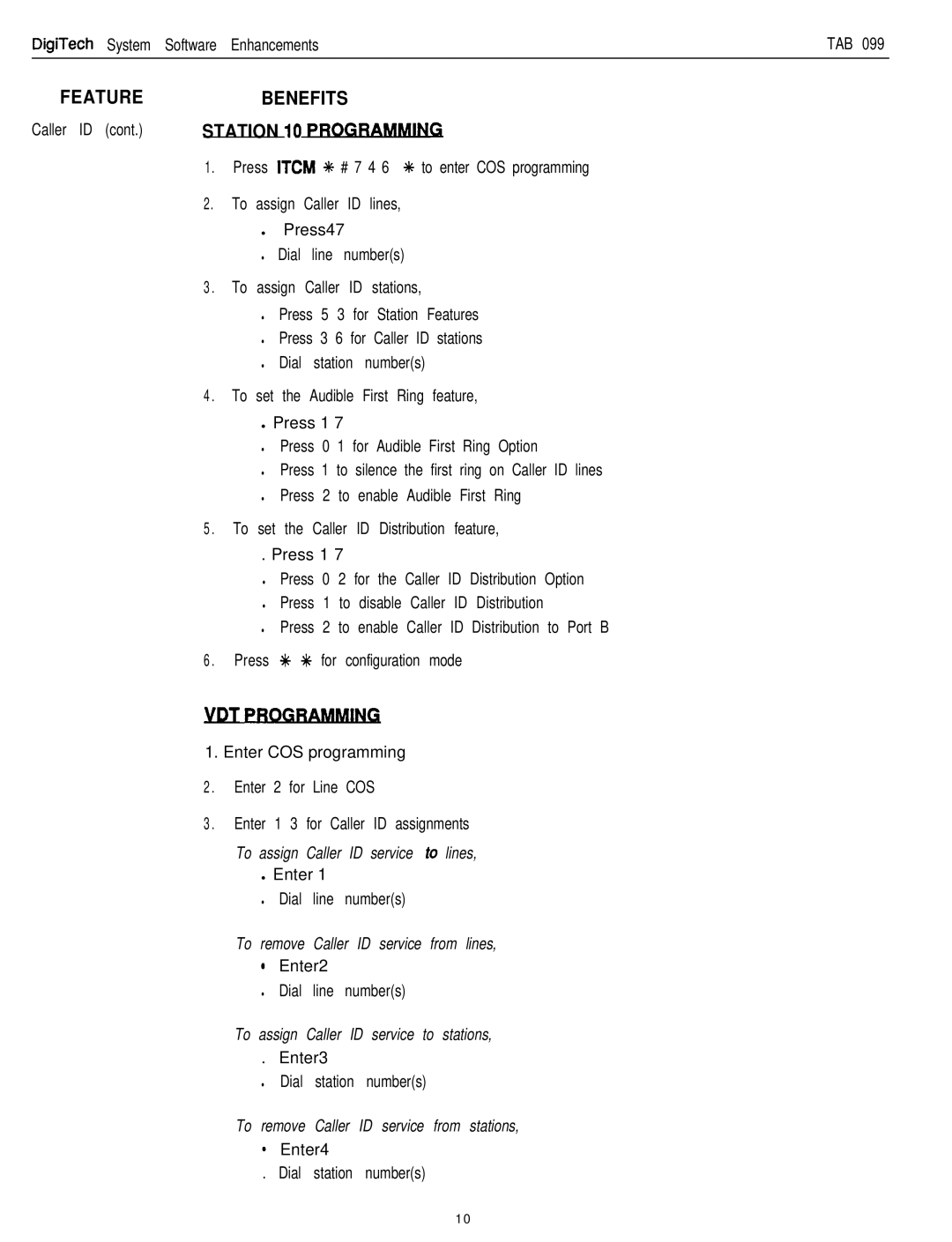
Station 10 Programming !caSJ
Dta
Benefits VDT COS Progrb
Feature
Enter COS programming
T C O S P R O
Ount Des
Benefits
Account Codes Support for Caller ID Service
To display a list of stored emergency numbers
To return to the previous menu during programming
Cross Connects
Feature Benefits
DIgiTech CommonEquipmeni
Caller ID Unit
YDT PROGRAMMlW
Benefits Station 10 PRO
Er ID cont. VDT Progr
Featurebenefits
Noans
Software release 10 provides the following enhancements
Feature and Benefit
Benefit
Enhanced automatic call back
666/571 Hz @ 23 Hz warble
Hz @ 16 Hz warble
@ 23 Hz warble
Simplified hybrid operation
Featurebenefit
Automatic AlTENDANT Optlon
Voice MAlL Port
Stmine
Direct Ring
Support for ExecuMall voice processing system
Feature
Benefit
‘qlpport for
Feature Benefit
Voice Mail Line ID Optlon
Press Spkr to end Voice Mail Transfer on Busy Optlon
PPO13-100
Date Juiy
Ksue T a B 0 8
48-49
38-39
BENEFITt
Console Feature
DigiTech Software Enhancement
Benefit Station 10 Programming
VDT Programming
Programming Clarification
Clarificationdescription
PAMD-PORT
Programming OVERLAY, DD32X
Paired Port Console Spare
Programmed