Page
Page
Page
Preface
Page
Table of Contents
Parameters
Troubleshooting
Keypad and Start Up
Appendix a Specifications Appendix B Accessories
Fault Code Information and Maintenance
Appendix C How to Select the Right AC Motor Drive
Introduction
Nameplate Information
Receiving and Inspection
Model Explanation
Series Number Explanation D007M23A0 T 5
External Parts and Labels
RST Side UVW Side
Remove Instructions Remove Keypad Remove Front Cover
Minimum Mounting Clearances
Preparation for Installation and Wiring Ambient Conditions
50 mm 150mm
Model Name
Dimensions
This page intentionally left blank
Installation and Wiring
L1 NFB
Basic Wiring Diagram
Excellent
Good Not allowed
Appendix a
External Wiring
Mains power terminals R/L1, S/L2, T/L3
Terminal Symbol
Main Circuit Main Circuit Connection
Explanation of Terminal Function
Output terminals for main circuit U, V, W
Terminals B1, B2 for connecting external brake unit
AWG
Main Circuit Terminals
RB-RC
Control Terminal Wiring Factory Settings
RA-RC
ACI
AVI
AFM
M0~M5-GND
MCM
MO1
Analog inputs AVI, ACI
Digital outputs MO1
General
Keypad Description of the Digital Keypad
Keypad and Start Up
Displayed Message
How to Operate the Digital Keypad LC-M02E
LED
LC-M02E
Keypad and Start Up
Trial Run
Operation Method
Check following items
Parameters
Setting
Summary of Parameter Settings
Parameter Explanation Settings Factory
Parameter Explanation Settings Factory
01 M0 RUN/STOP, M1 REV/FWD
Reset
00 M0 FWD/STOP, M1 REV/STOP
Second Source for Frequency Command
FLA
Parameter Explanation Settings Factory
CFA
PLC FWD/REV
Only
Input positive PID feedback, PV from AVI
Parameter Explanation Settings Factory
Parameter Explanation Settings Factory
Multi-step Operation Applications Purpose Functions
Parameter Settings for Applications
DC Braking before Running Applications Purpose Functions
Wire
Two-wire/three-wire Applications Purpose
Operation Command Applications Purpose
Overheat Warning Applications Purpose
Parameters
Parameters
Parameters
Parameters
Pr.00 Source of Frequency Command
Description of Parameter Settings
Pr.01
Pr.02 Stop Method
Pr.04
Pr.03
Pr.07
Pr.06
Pr.08
Pr.09
Commonly used V/F Setting General Purpose
Pr.11
Pr.10
Pr.12
Pr.13
Pr.16
Pr.14
Pr.15
Pr.18
Pr.17
Pr.19
Pr.20
Pr.26
Pr.24 Reverse Operation Inhibition
Pr.28
Pr.27
Pr.31
Pr.29
Pr.30
Pr.35
Pr.33
Pr.34
Pr.37
Pr.36
Explanations
Pr.38
Pr.39
Settings Function Description
Pr.40
Pr.42
Settings Function Description
GND
First or Second
Mx Close Run PLC
Parameter value 18 programs Multi-Function Input Terminal
Contact N.C. is reverse, once this function is set
Pr.44
Pr.43 Analog Output Signal
Pr.46
Pr.45
MO1
Pr.47
Pr.51 Potentiometer Reverse Motion Enable
Pr.48
Pr.49
Example
Max Output Pr.03 Freq 60Hz Bias 10Hz Pr =
FWD
Pr.53
Pr.52
Pr.54
Pr.55
Pr.59
Pr.58
Pr.61
Pr.60
Pr.62
Pr.64
Pr.66
Pr.65
Pr.68
Pr.67
Pr.69
Pr.70
Pr.75 Third Most Recent Fault Record
Pr.73 Present Fault Record Pr.74
Pr.77
Pr.76 Parameter Lock and Configuration
Pr.78 PLC Operation Mode
Program input off and then back on
Example 3 Pr.78 = 03 Execute one cycle step by step
Example 2 Pr.78 = 02 Continuously executes program cycles
REV
Application Note
Weights =Forward =Reverse Bit
Pr.81
Pr.80
Pr.82
Pr.83
Computer Control
Pr.89 Transmission Speed Baud rate
Pr.92 Communication Protocol
Data Format
+15V 2 GND SG- 4 SG+ 6 for communication
Communication Protocol
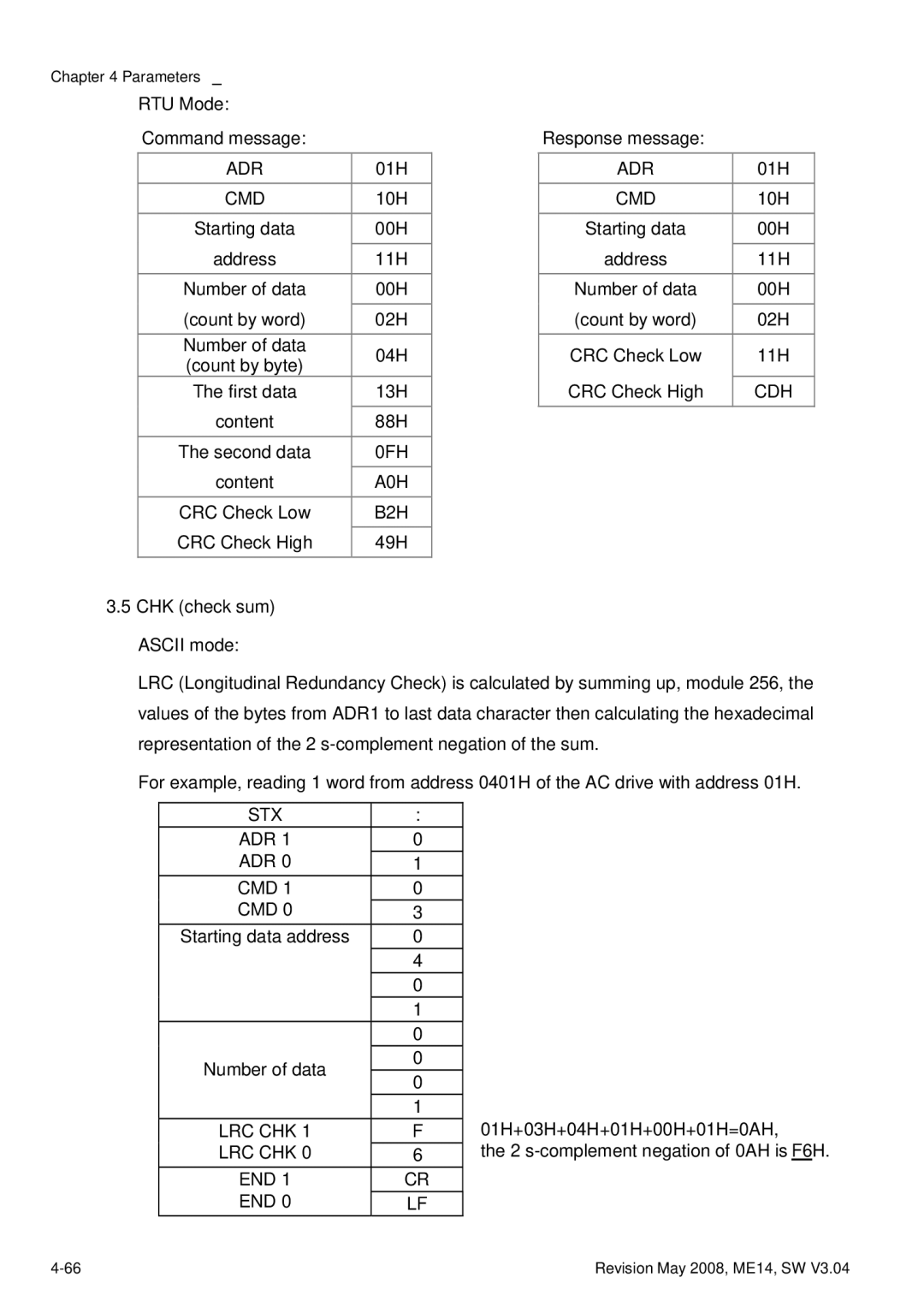
Ascii mode
Start
RTU mode
ADR
END
LRC CHK
STX ADR
6FH
F7H
‘6’
Starting data address ‘0’ ‘1’