Viewing LUN Information
LUN Information contains details about the selected LUN. To view the LUN information:
1. Do one of the following:
•From the menu bar, click View, then click Sort by Host Name.
• From the toolbar, click the Sort by Host Name button: | . |
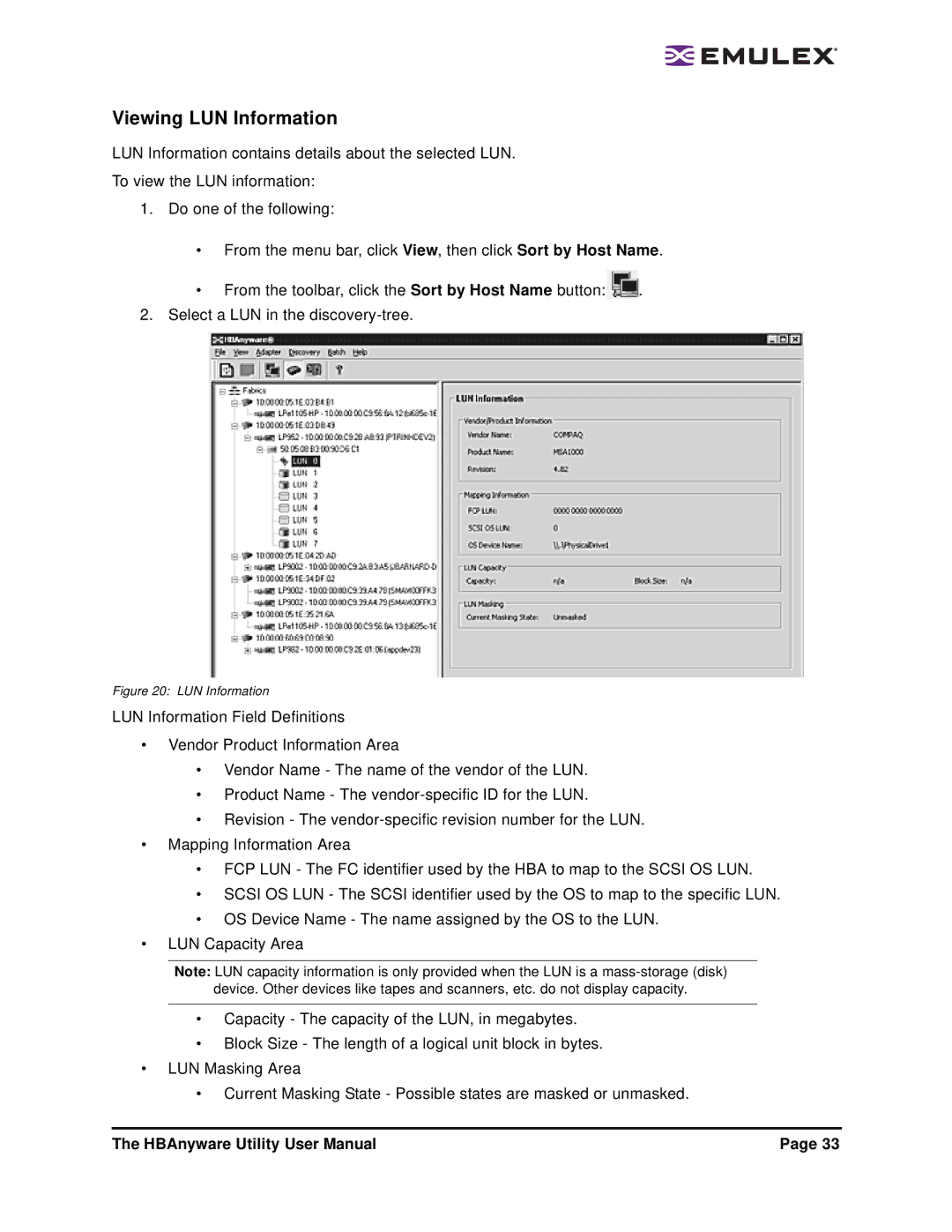
2. Select a LUN in the |
|
Figure 20: LUN Information
LUN Information Field Definitions
•Vendor Product Information Area
•Vendor Name - The name of the vendor of the LUN.
•Product Name - The
•Revision - The
•Mapping Information Area
•FCP LUN - The FC identifier used by the HBA to map to the SCSI OS LUN.
•SCSI OS LUN - The SCSI identifier used by the OS to map to the specific LUN.
•OS Device Name - The name assigned by the OS to the LUN.
•LUN Capacity Area
Note: LUN capacity information is only provided when the LUN is a
device. Other devices like tapes and scanners, etc. do not display capacity.
•Capacity - The capacity of the LUN, in megabytes.
•Block Size - The length of a logical unit block in bytes.
•LUN Masking Area
•Current Masking State - Possible states are masked or unmasked.
The HBAnyware Utility User Manual | Page 33 |