Performance Testing Examples
Mapping and Masking
Automapping Scsi Devices Windows
Mapping and Masking Defaults Windows
Mapping and Masking Window Defaults
Field Function Default Description Window
Select the Target Mapping tab. All targets are displayed
#vi /kernel/drv/sd.conf
Adding New Targets Using sd.conf for Solaris
Introduction
Creating the Access Control Group
Access Control Groups
Designating a Master Security Client
Introduction
Access Control Group tab on an MSC System
Access Control Group Tab on the MSC
ACG Icons
Access Control Group Tab on a Non-MSC
Deleting a Server from the ACG
Adding a Server to the ACG
Removing Security from all Servers in the ACG
Generating New Security Keys
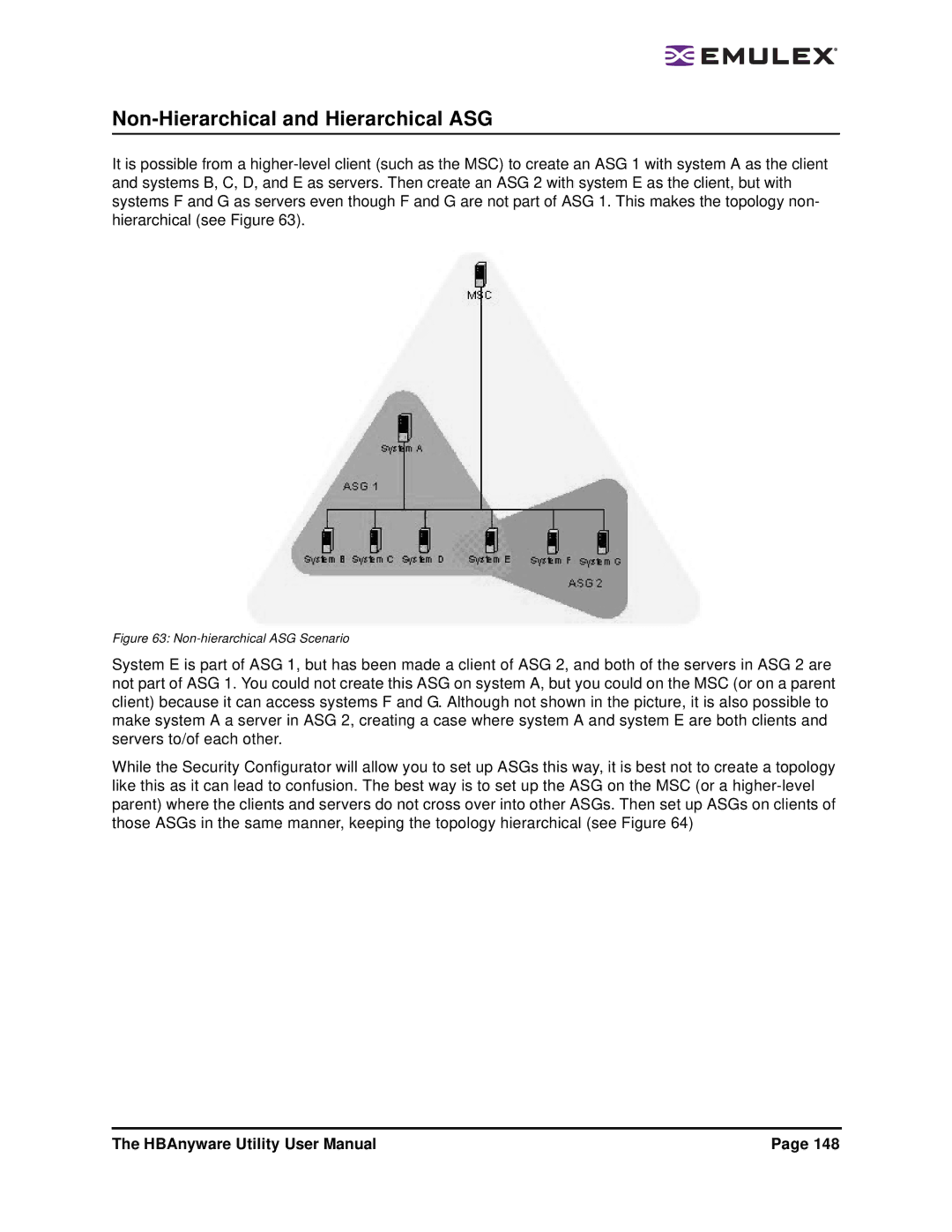
Access Sub-Groups
Restoring the ACG to Its Last Saved Configuration
Accessing a Switch
Click the Access Sub-Groups tab
ASG Icons
Creating an ASG
Reserved Indices Examples
New Access Sub-Group dialog box
Adding a Server to an ASG
Restoring an ASG to Its Last Saved Configuration
Deleting an ASG
Editing an ASG
Click Edit. The Edit Access Sub-Group dialog box appears
About Offline ASGs
Access Sub-Groups tab Client System Offline
Backup Master Eligible Systems
Backup Masters
Creating a Backup Master
Backup Master Tab and Controls
Backup Master Warning dialog box
Reassigning a Backup Master as the New MSC from the Old MSC
Page
Performing Diagnostic Tests
Diagnostics
Running a Power On Self Test Post
Using Beaconing
Running a Quick Test
Diagnostic Dump dialog box
Creating Diagnostic Dumps
Displaying PCI Registers and Wakeup Information
Running Advanced Diagnostic Tests
Error Action
Running Loopback Tests
Loopback Test Combinations
Test Cycles
Procedure
Test Pattern
Test Status
Select Echo Test Target window
Running End-to-End Echo Tests
Example of DiagTestLog window
Saving the Log File
Syntax Rules
Using the CLI Client
Help
CLI Client Command Reference
Version
ListHBAs
HBAAttributes
SaveConfig
PortAttributes
PortStatistics
TargetMapping
Reset
Download
GetLunList
RescanLuns
GetLunUnMaskbyTarget
SetLunMask
AllNodeInfo
PersistentBinding
SetPersistentBinding
RemoveAllPersistentBinding
BindingCapabilities
RemovePersistentBinding
BindingSupport
SetBindingSupport
GetDriverParams
DriverConfig
GetDriverParamsGlobal
SetDriverParam
SetDriverParamDefaults
SetBootBios
GetAuthConfig
SetAuthConfig
SetPassword
DeleteAuthConfig
PCIData
InitiateAuth
Wakeup
LoopMap
PostTest
SetBeacon
EchoTest
Loopback
GetRetentionCount
Dump
SetRetentionCount
GetDumpDirectory
General Situations
General Situations
HBAnyware Security Configurator
Situation Resolution SAN Management Workstation Does Not
Software package will not install. An error
Cannot access formerly accessible
Emulex Driver for Windows and HBAnyware Situations
Emulex Driver for Solaris Lpfc and HBAnyware Situations
Emulex Driver for Linux and HBAnyware Situations
Supplied combined firmware/OpenBoot
Situation Resolution Some cases, after loading an OEM
Image you will not be able to enable
BootBIOS from the lputil Boot Bios
System panics when booted with a failed
Situation Resolution Loading lpfc or lpfcdfc driver on Sles
HBA installed Lpfc driver unload on Sles 9 causes
No module lpfc found for kernel error
LUNs when more are present
Situation Resolution HBAnyware software package will not
Emulex driver for Linux does not load
Ramdisk for a custom built kernel
Situation Resolution Cannot See Other HBAs or Hosts
Unwanted Remote Servers Appear
HBAnyware
Security Configurator Situations Access Control Groups ACG
Security Configuration Situations Access Sub-Groups ASG
Access Control Groups Situations
Tab, one or more of the names of the ASGs
Situation Resolution ASG tree of the Access Sub-Groups
Is displayed as ASG Client Offline
Not All Servers are available to an ASG
HBAnyware Security Configurator Backup Masters Situations
HBAnyware Security Configurator Situations Backup Masters