10.27
10.33
Troubleshooting
Over Current OC
Ground Fault
Over Voltage OV
Low Voltage Lv
Over Heat OH1
Overload
Phase Loss PHL
Keypad Display is Abnormal
Motor cannot Run
Motor Speed cannot be Changed
Motor Stalls during Acceleration
Motor does not Run as Expected
Electromagnetic/Induction Noise
Environmental Condition
Affecting Other Machines
Fault Code Information
Common Problems and Solutions
Fault Fault Descriptions Corrective Actions Name
Over current
CC current clamp OV hardware error
GFF hardware error OC hardware error
Overheating
Low voltage
Fault Descriptions Corrective Actions Name
External Fault
Phase error
OV or LV Temperature sensor error
Communication Error
Analog signal error
PID feedback signal error
Phase Loss
Reset
Maintenance and Inspections
Daily Inspection
Periodic Inspection
Voltage Maintenance Check Items Methods and Criterion
Main circuit Maintenance Check Items Methods and Criterion
Keypad Maintenance Check Items Methods and Criterion
Change of copper plate
One
Year
Daily
Appendix a Specifications
Appendix a Specifications
Enviromental
This page intentionally left blank
Appendix B Accessories
All Brake Resistors & Brake Units Used in AC Motor Drives
Appendix B Accessories
VFD Series
Dimensions and Weights for Brake Resistors
Order P/N BR500W030, BR500W100, BR1KW020, BR1KW075
Appendix B Accessories
No Fuse Circuit Breaker Chart
Phase Recommended Model
Breaker a
Recommended no-fuse breaker
Fuse Specification Chart
AC Reactor AC Input Reactor Recommended Value
AC Output Reactor Recommended Value
~5% impedance
Impedance
Applications
M1 reactor AC motor drive Motor
Silicon Controlled Rectifier
Diagram a
Zero Phase Reactor RF220X00A
Diagram B
Remote Controller RC-01
5 4 16 15 14 13 11 RC-01Terminal block
PU06 Description of the Digital Keypad VFD-PU06
Explanation of Display Message
Operation Flow Chart
XX-XX
Wiring and Settings
Setting baud rate
Switch Baud Value Rate
Setting MAC addresses
LEDs Display
Power Supply
LonWorks Communication Module CME-LW01 B.8.2.1 Introduction
Specifications
LED Indications
Profibus Communication Module CME-PD01 Panel Appearance
Parameters Settings in VFD-EL
Profibus Address
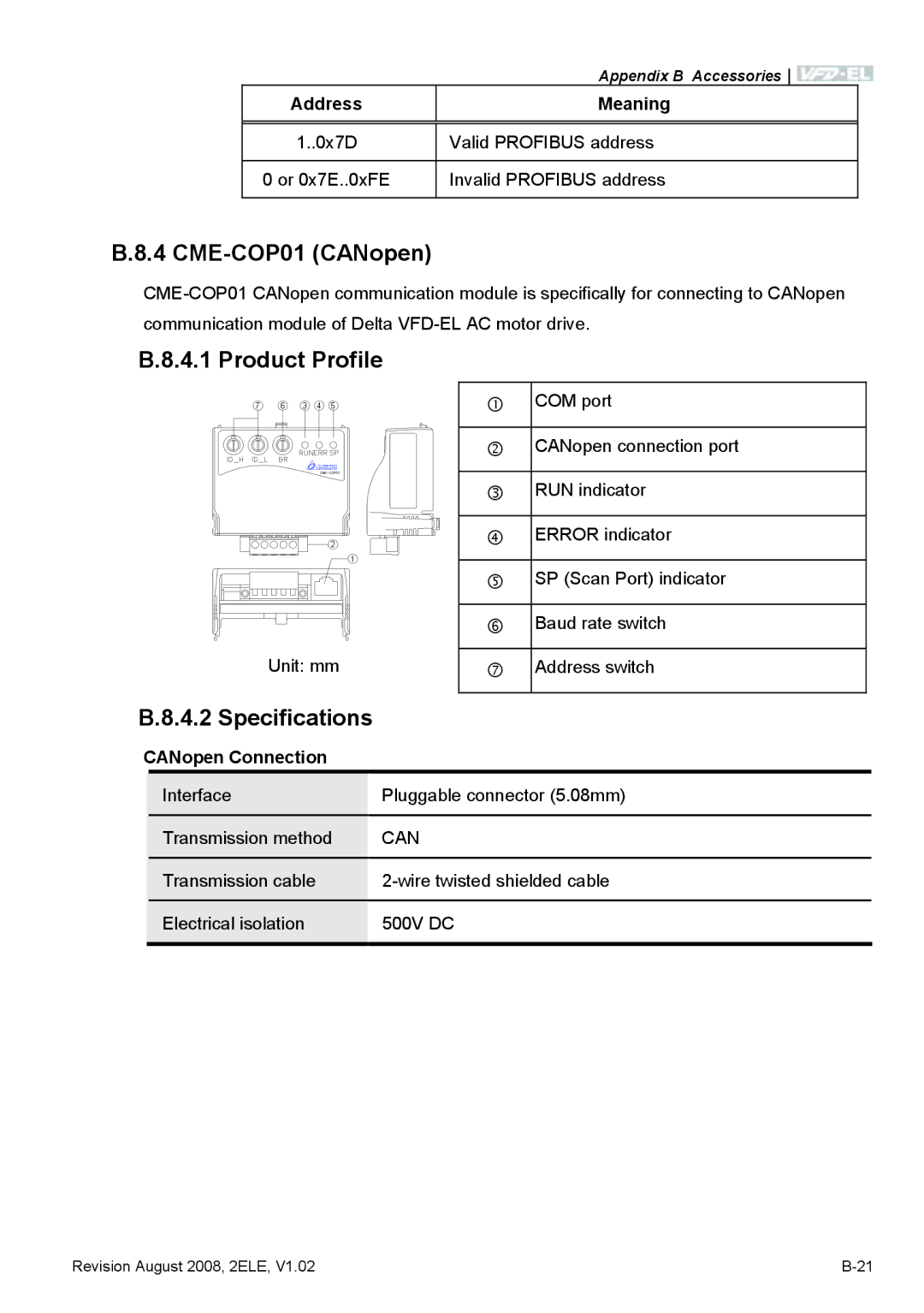
CME-COP01 CANopen
Product Profile
Address Meaning
CANopen Connection
Environmental Specifications
Components
Communication
Pin Definition on CANopen Connection Port
LED Indicator Explanation & Troubleshooting
MAC ID Setting
Error LED
MKE-EP & DIN Rail