The following items are in this menu:
vDrive Interface - use this to assign a SCSI ID to a SCSI drive or to assign a Port Speed, Port Type, and Loop ID to a Fibre Channel drive. SAS drives do not require user configuration. For more information on drive interfaces, refer to “Host Interfaces” on page
vControl Paths - use this to enable the drive as a control path drive. Each logical library must have a control path drive; however, all drives in a logical library can be designated as control path drives.
Configure: Network
Configure
Network
IP Stack
|
| |
|
|
|
IP Address
Netmask
Gateway
Ethernet
DHCP-OFF
IP Address
a77ug043
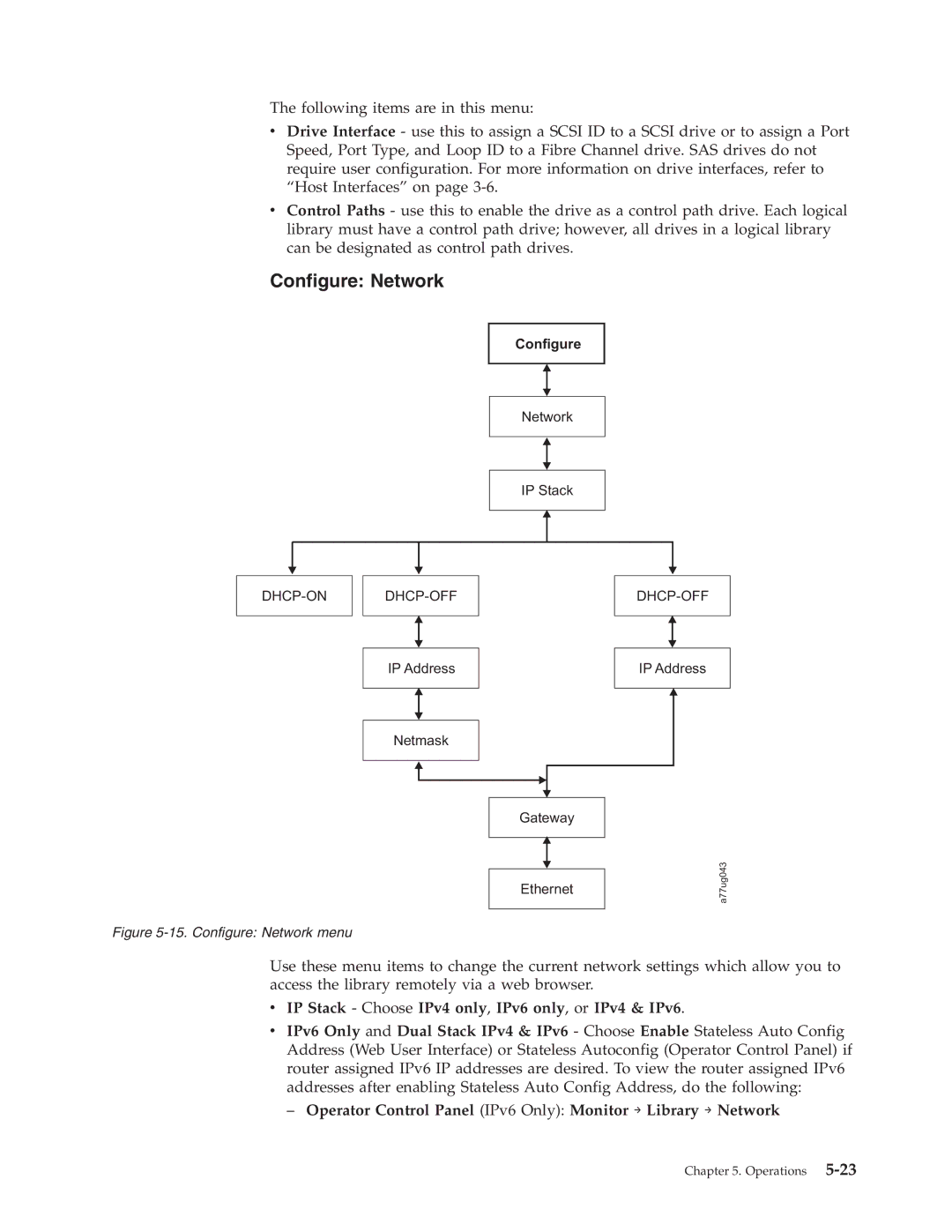
Figure 5-15. Configure: Network menu
Use these menu items to change the current network settings which allow you to access the library remotely via a web browser.
vIP Stack - Choose IPv4 only, IPv6 only, or IPv4 & IPv6.
vIPv6 Only and Dual Stack IPv4 & IPv6 - Choose Enable Stateless Auto Config Address (Web User Interface) or Stateless Autoconfig (Operator Control Panel) if router assigned IPv6 IP addresses are desired. To view the router assigned IPv6 addresses after enabling Stateless Auto Config Address, do the following:
– Operator Control Panel (IPv6 Only): Monitor → Library → Network
Chapter 5. Operations