Connecting the Host Interface Cable
To connect the host interface cables to the library:
1.It is recommended that you shut down and turn OFF the associated server. Turn OFF all attached devices. Remove the power cables from the server and all attached accessories.
Important: Failure to remove the power cords from these devices before connecting the host interface cable could result in damage to the library.
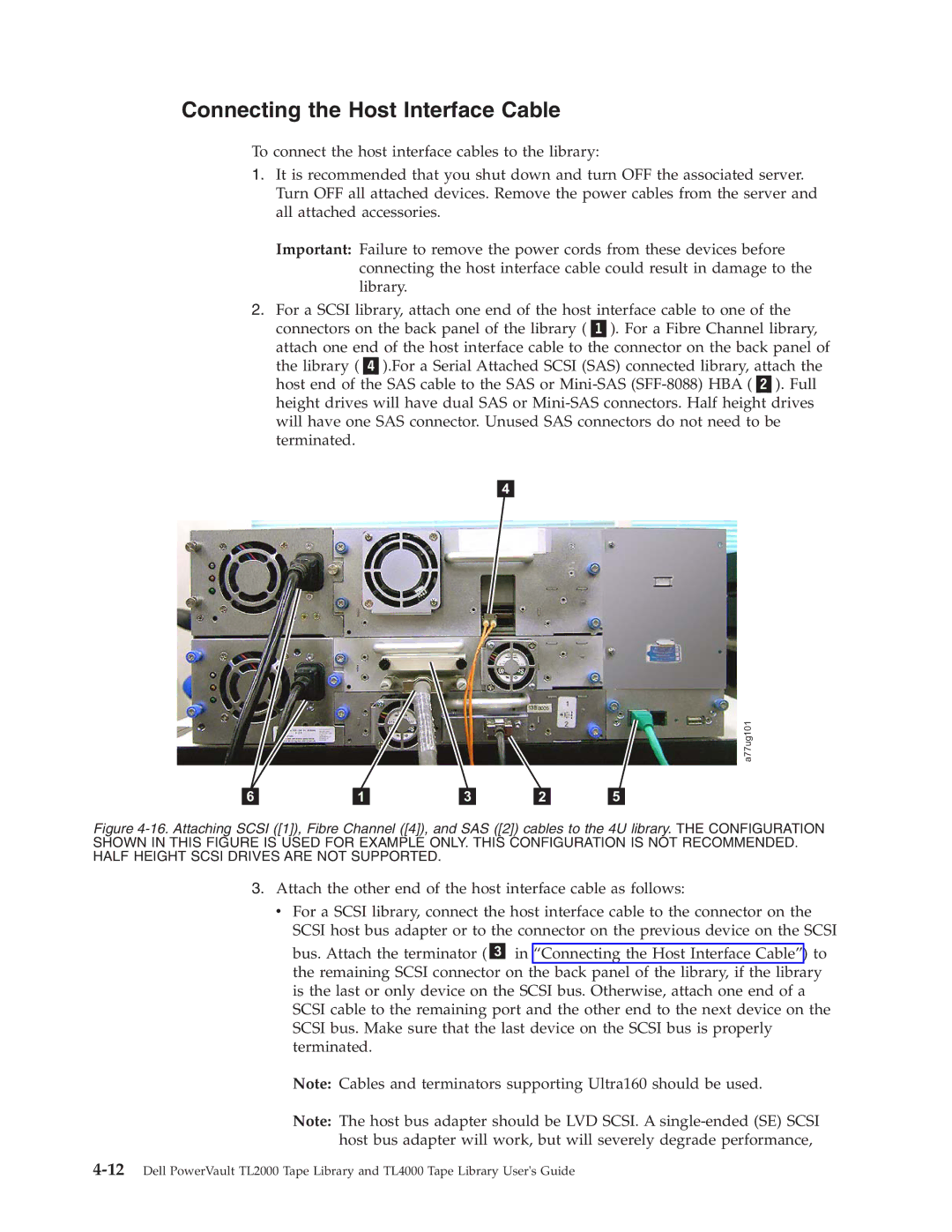
2.For a SCSI library, attach one end of the host interface cable to one of the
connectors on the back panel of the library ( ). For a Fibre Channel library, attach one end of the host interface cable to the connector on the back panel of the library ( ).For a Serial Attached SCSI (SAS) connected library, attach the host end of the SAS cable to the SAS or
4
a77ug101
6 |
| 1 |
| 3 |
| 2 |
| 5 |
Figure 4-16. Attaching SCSI ([1]), Fibre Channel ([4]), and SAS ([2]) cables to the 4U library. THE CONFIGURATION SHOWN IN THIS FIGURE IS USED FOR EXAMPLE ONLY. THIS CONFIGURATION IS NOT RECOMMENDED. HALF HEIGHT SCSI DRIVES ARE NOT SUPPORTED.
3.Attach the other end of the host interface cable as follows:
v For a SCSI library, connect the host interface cable to the connector on the SCSI host bus adapter or to the connector on the previous device on the SCSI
bus. Attach the terminator ( 3 in “Connecting the Host Interface Cable”) to the remaining SCSI connector on the back panel of the library, if the library is the last or only device on the SCSI bus. Otherwise, attach one end of a SCSI cable to the remaining port and the other end to the next device on the SCSI bus. Make sure that the last device on the SCSI bus is properly terminated.
Note: Cables and terminators supporting Ultra160 should be used.
Note: The host bus adapter should be LVD SCSI. A