User’s Guide
Page
User’s Guide
Page
Read this First
Minimum Firmware Levels for Common Library Features
Feature Minimum Firmware Levels Required
Contacting Dell
Page
Figures Vii
Appendix B. TapeAlert Flags
Figures
10-14
Tables
Page
Safety and Environmental Notices
If the symbol is It means
Performing the Safety Inspection Procedure
Laser Safety and Compliance
Class I Laser Product
Rack Safety
Page
Preface
Related Publications
Page
Product Description
Front Panel
Front panel of a 4U library
Number Description
Rear Panel
Rear panel of a 2U library with a Scsi drive
A77ug100
Internal View of Library
Internal view of the library
Bar Code Reader
Encryption
Product Description
Maximum Library Storage Capacity and Data Transfer Rate
Supported Internet Protocols
Snmp Messaging
Tape Drive Model Host Interface
Ultrium Tape Drives
Speed Matching
Channel Calibration
Physical Specifications
Power Management
Library Specifications
Power Specifications
Operation Specifications
Environmental Specifications
Http//support.dell.com
Product Environment
Supported Device Drivers
Humidity
Page
Operator Control Panel
User Interfaces
Operator Control Panel Philosophy
Power-ON Display
Power-ON Screens
Input Modes
Selecting Predefined Values
Toggling Values
Power ON/OFF
Web User Interface
Entering Numerical Values
Login
Web User Interface login
System Status
Web User Interface Help Pages
Logging out of the Web User Interface
Page
Basic Guidelines
Installation Planning
Determining the Number of Logical Libraries
Library Sharing
Using Multiple Control Paths
Using Multiple Logical Libraries for Library Sharing
Using Multiple Control Paths for Path Failover
Partitioning of 2U Libraries
Configuration of a 1 Partition System
Library Partitioning and Element Addressing
Partitioning of 4U Libraries
Configuration of a 2 Partition System
Configuration of a 3 Partition System
Configuration of a 4 Partition System
Scsi Element Addressing
Scsi Interface
Logical Unit Number LUN Scanning
Host Interfaces
Drive Scsi LVD Ultra
Using Multiple Scsi Buses
Physical Characteristics of the Scsi Interface
Type of Interconnection
Terminating the Bus
SAS Interface
Fibre Channel Interface
Scsi Differential LVD
Cables and Speeds
Using Zoning to Isolate Devices and Enhance Security
Sharing on a Storage Area Network
Page
Using the Library Configuration Form
Installation and Configuration
Installing Your Library
Choosing a Location
Unpacking the Library
Verifying the Shipment
Installation and Configuration
Installing foot pads on the bottom of the library enclosure
Removing and Storing the Shipping Lock
Shipping lock and label
Rackmounting the Library for Rack Installation only
Rack Kit Mounting hardware
Rear view of a rack showing the narrow part of the rail
Front view of a rack showing the rails installed
12. Sliding the 2U library into the rack
14. Securing the 2U library to the rack
Connecting the Host Interface Cable
Connecting a Power Cord
17. Removing the protective label from the power receptacle
Configuring Your Library
Choosing Your Configuration Method
Entering Network Settings using the Operator Control Panel
Using Factory Defaults as Your Configuration
Configuring Your Library using the Web User Interface
Default Setting
Page
Logging on to the Web User Interface
Verifying/Updating Firmware
Choosing General Library Settings
Click Upgrade Firmware
19. The 2U library Configure Library General screen
20. Example The 4U library Configure Library General screen
Choosing the Number of Logical Libraries for Your Library
Entering Path Failover Feature Activation Key
Setting Up Encryption
Setting a Drive’s Method of Encryption
24. Feature Activation Key screen
Choosing Drives Interface Identification/Settings
26. The Configure Library Drive screen
Entering Library Network Settings
Enter IPv4 settings if applicable
Enter IPv6 settings if applicable
Enter Snmp settings
Entering Date and Time using the Web User Interface
29. The Configure Library User Access screen
Configuring Logs and Traces using the Web User Interface
30. The Configure Library Date and Time screen
32. The Configure Library Event Notification screen
Logging out of the Web User Interface
Preparing the Host
Setting the Operator Control Panel Access PIN using
Navigate to Configure → Set Access PIN
Verifying the Connection
Cartridge Magazines
2U Library Cartridge Magazines
2U Library I/O Station
4U Library Cartridge Magazines
4U Library I/O Station
37 U library right magazines
Populating the Library with Data Cartridges
39. Finger Holes on back side of 4U library I/O Station
Inserting the Cleaning Cartridge
Installation and Configuration
Page
Operations
Defaults
Configure → Restore Defaults
Configure Library → Restore
Configure → Drive → Control
Service → Run Tests
Key Path Diagnostics
Service → Library Verify
Service → Display Contrast
Identity → Data Compression
Service → Service → Drive Power
Service Library → Save Drive
Monitor → Drive → Identity →
Monitor → Library → Error log
Configure → Drive → Ethernet Configure Library → Ethernet
Configure Library → Event
Service Library → View logs
Configure → Library
Service Library → Upgrade
Configure → Network →
Configure → Network → IP
Configure Library → Path
Configure → Network
Configure → Path Failover
Service Library → Reboot
Active Slots
Service → Telnet Service Port
Slots Empty
Operator Control Panel Navigation
Control Description Keys
Operator Control Panel Menu Tree
Monitor Menu
Monitor Library
Status Identity Error Log Network
Monitor
This menu item displays drive information and settings
Monitor Drive
Monitor Drive menu
Monitor Inventory
Example of a 4U Monitor Inventory menu
Control Menu
Control Open I/O Station
Control Move Cartridges
Control Magazine
Configure Logical Libraries
Configure Menu
Control Re-Inventory
12. Configure Logical Libraries menu
Configure Library
Mode
Starting Sequential Mode v Autoload Option
Configure Drive
Scsi ID
Configure Network
IP Stack Choose IPv4 only, IPv6 only, or IPv4 & IPv6
Configure Set Access PIN
Configure Restore Defaults
User Access
Configure Set Date and Time
Restored Item Default Setting Comments
Drives
Configure Path Failover
Service Menu
Service Library Verify
Service Run Tests
Service Service Drives
22. Service Service menu
Service Telnet Service Port
Service Display Contrast
Web User Interface Menus
Monitor Library Library Identity
Monitor Library Menu
Menu Item Description
Menu Item Description 2U Library 4U Library
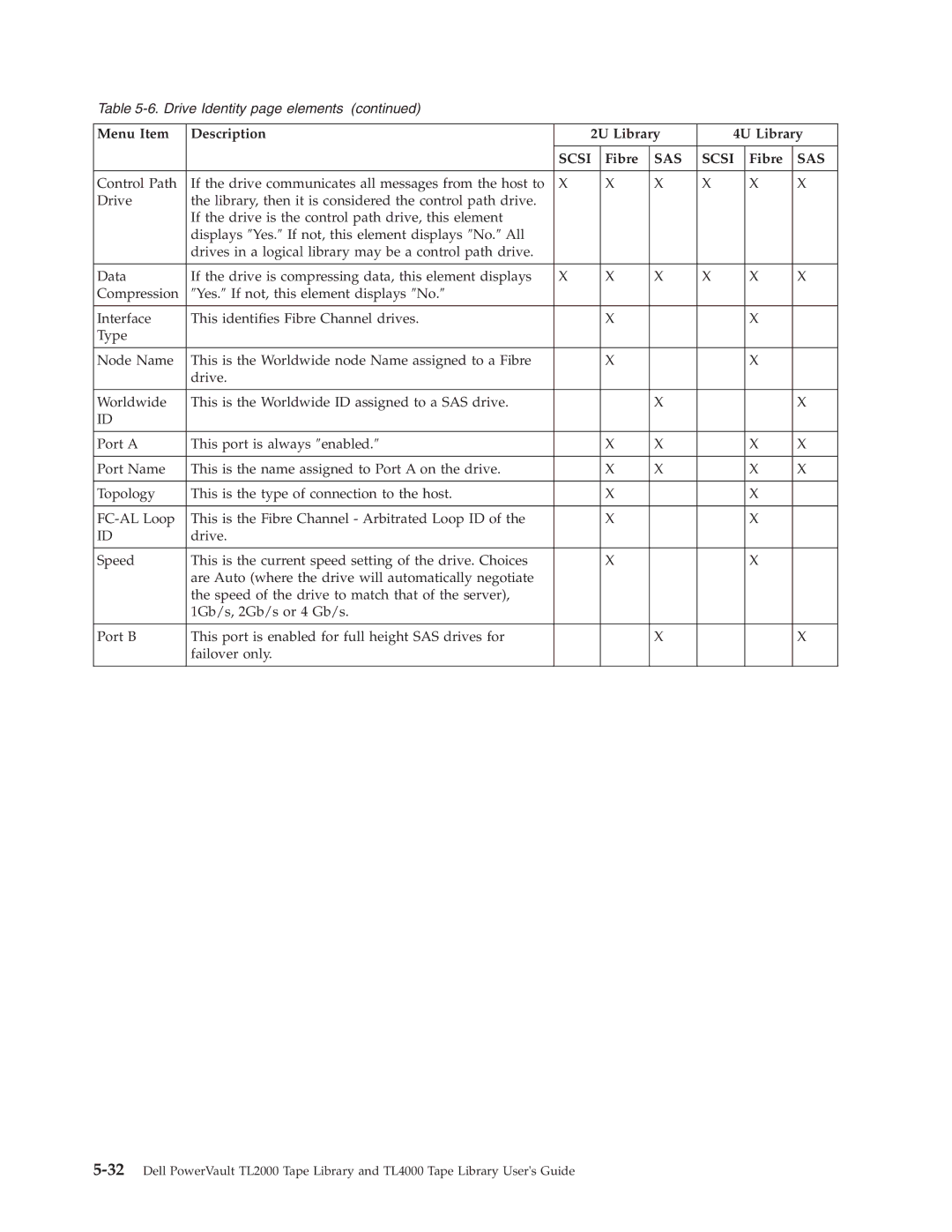
Monitor Library Drive Identity
Fibre
Scsi
Monitor Library Library Status
Monitor Library Drive Status
27. The 4U library Monitor Library Library Status
Scsi
Term Definitions
28. The 4U library Monitor Library Drive Status
Magazine Inventory
Monitor Library Inventory
Configure Library Menu
Configure Library General
Configure Library General page elements
Configure Library Logical Libraries
Configure Library Path Failover
Setting or Changing a Drive’s Method of Encryption
Configure Library Encryption
Click Encryption
35. Feature Activation Key screen
Configure Library Drives
Configure Library Network
37. The Configure Library Drive page for a 4U library
38. Configure Library Network
Configure Library User Access
Configure Library Date & Time
Notify Errors
Configure Library Logs & Traces
Configure Library Event Notification
Notify Warnings
Manage Library Move Media
Configure Library Restore Defaults
Manage Library Menu
Mail Domain
Manage Library Perform Inventory
Service Library Menu
Service Library Clean Drive
Manage Library Release Magazine
View Logs
Advanced Diagnostics for Service Personnel Only
View Drive Logs
Service Library Perform Diagnostics
Save Drive Dump
Click Service, then Key Path Diagnostics
Service Library Perform Key Path Diagnostics
Click Start Tests
Service Library Upgrade Firmware
54. The 2U library Service Library Upgrade Firmware
Import and Export Media during Normal Library Operation
Service Library Reboot
Import Media
Export Media
Go to Configure Library-General
Configuring I/O Stations and Reserving Slots
Dedicated Cleaning Slot
Reserving Slots
Page
Type Color
Using Ultrium Media
Data Cartridges
Type Native Data Capacity Recording Format
Cartridge Compatibility
Worm Write Once, Read Many
Worm Media
Worm Media Errors
Cleaning Cartridge
Data Security on Worm Media
Bar Code Label
Cartridges
Guidelines for Using Bar Code Labels
Write-Protect Switch
Provide Training
Handling the Cartridges
Ensure Proper Packaging
Provide Proper Acclimation and Environmental Conditions
Perform a Thorough Inspection
Handle the Cartridge Carefully
Checking for gaps in the seams of a cartridge
120F
Page
Troubleshooting
Installation Problems
Maintenance Problems
Problem Solution
Library → View Logs
Error Codes
Front Panel LEDs
Or Web User Interface Configure Library → Restore Defaults
Cartridge Movement Problems
Release Magazines
Drive ID SCSI, SAS, or Fibre Channel Loop
Customer Replaceable Units CRU and Service Spares
Library Recovery Problem Determination
Other Problems
A 250w power supply with LEDs
A 80w power supply without LEDs Power Supply LED Meanings
Isolating Drive Sled Problems
Isolating Web User Interface Problems
Isolating Host Attachment Interface Problems
Isolating Accessor Scanner Problems
Identifying a Suspect Cartridge
Troubleshooting
Page
Example Error Code
Error Codes
Preparing to Resolve an Error Code
Error Code Description User Action
BCR
Error Code Description User Action
Error Code Description User Action
Error Code Description User Action
Error Code Description User Action
Error Code Description Robotics
Error during rotation to drive position
Error first sled init, move to sensor failed
Error during sled movement to rotation position
Error slider init, get range failed
Error during first slider movement
Error during sled movement in FLMoveSled function
Error during sled positioning without sensor
Error during first gripper movement
Movement of I/O slot failed
Sled movement to home sensor position failed
Sled movement to transport position failed
Sled movement to sensor failed
Page
Removing Cartridges from Magazine Slots
Service Procedures
Releasing the Magazines Manually
Access holes for the left magazine
Access holes for the right magazine
Left Magazines pulled out of the 2U library
Http//support.dell.com
Page
Electrostatic Discharge
Check, Adjust, Remove, and Replace
Tools Required
Relocating Your Library
Shipping lock and label storage location
Replacing a Tape Drive Sled
Scsi cable
A77ug027
A77ug028
Replacing a Power Supply
2U Library
Replacing a Library Controller Card
Read Me before Continuing
Removal and Replacement
10. a Library Controller Card being removed from the library
Replacing Cartridge Magazines
Preparing the Defective Library for Replacement
Replacing the Library Enclosure
A77ug101
Unpacking and Preparing the Replacement Library Enclosure
A77ug085
A77ug195
Swapping Library Controller Cards
Important Read ME Before Continuing
16. Removing a Library Controller Card from the library
Installing Your Drives in the Replacement Library Enclosure
17. Library Front Panel LEDs
A77ug027
19. Drive sled taping diagrams
Swapping Cartridge Magazines
20. Access hole for the left magazine facing rear of library
A77ug024
Swapping Power Supplies
Installing the Replacement Library Enclosure
23. a power supply being removed from a library
Rack Installation
Desktop Installation
Returning the Defective Library
Page
Left Magazine Library Right Magazine
Appendix A. Scsi Element Types and Addresses
Element Type Element Address Range
Rear Panel
Slot Drive
Lower Left Magazine Lower Right Magazine Slot
Figure A-1. Configuration of a One Partition System
Figure A-2. Configuration of a Two Partition System
Figure A-4. Configuration of a Four Partition System
Page
Appendix B. TapeAlert Flags
TapeAlert Flags Supported by the Library
Page
TapeAlert Flags Supported by the Drive
Flag Number Description Action Required
Flag Number Description Action Required
Interface Manage Library →
→ Service → Drive Power or
Panel Control → Move
Move Media
Page
Library Sense Data
Appendix C. Sense Data
Sense Key
ASC Ascq
Appendix C. Sense Data C-3
ASC Ascq
Appendix C. Sense Data C-5
Drive Sense Data
Bit Address or Name Byte
Table C-2. LTO Tape Drive Sense Data
Table C-2. LTO Tape Drive Sense Data
Table C-2. LTO Tape Drive Sense Data
Sense Key 4 Hardware Error
Sense Key 5 Illegal Request
Sense Key 6 Unit Attention
Sense Key 7 Data Protect
Table C-2. LTO Tape Drive Sense Data
Appendix C. Sense Data C-13
Page
Appendix D. Enabling LUN Support in Linux
Red Hat Enterprise Linux
Enabling LUN Support in Netware
Appendix D. Enabling LUN Support in Linux D-3
Page
Browser connectivity to a global unicast IPv6 address
Windows 2003/XP
Browser connectivity to a link-local IPv6 address
Windows 2008/Vista
″http//hostname
Appendix F. Library Configuration Form
Scsi Drive
Settings
SAS Drive
User Accounts
Trademarks
Page
Numbers
Glossary
Beginning of Partition. See BOP
Page
Differential. See High Voltage Differential HVD
Page
LCD. See liquid crystal display
Page
Picker. See Accessor
Secure Sockets Layer. See SSL Segment. a part
Telnet. See Telnet Service Port
Page
Index
ASC C-1 Ascq
LUN
Worm
Page