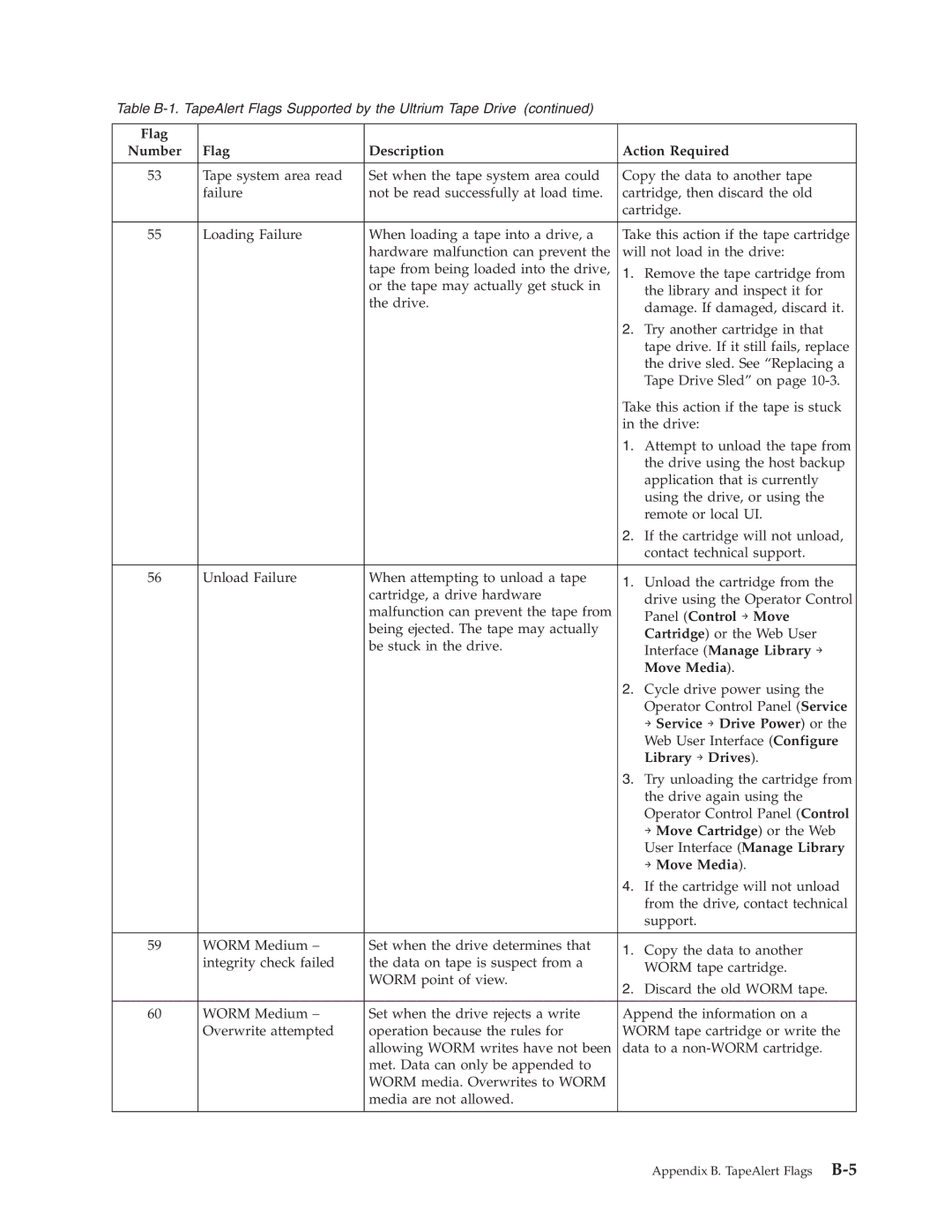
Table
Flag |
|
|
|
Number | Flag | Description | Action Required |
|
|
|
|
53 | Tape system area read | Set when the tape system area could | Copy the data to another tape |
| failure | not be read successfully at load time. | cartridge, then discard the old |
|
|
| cartridge. |
|
|
|
|
55 | Loading Failure | When loading a tape into a drive, a | Take this action if the tape cartridge |
|
| hardware malfunction can prevent the | will not load in the drive: |
|
| tape from being loaded into the drive, | 1. Remove the tape cartridge from |
|
| or the tape may actually get stuck in | the library and inspect it for |
|
| the drive. | |
|
| damage. If damaged, discard it. | |
|
|
| |
|
|
| 2. Try another cartridge in that |
|
|
| tape drive. If it still fails, replace |
|
|
| the drive sled. See “Replacing a |
|
|
| Tape Drive Sled” on page |
|
|
| Take this action if the tape is stuck |
|
|
| in the drive: |
|
|
| 1. Attempt to unload the tape from |
|
|
| the drive using the host backup |
|
|
| application that is currently |
|
|
| using the drive, or using the |
|
|
| remote or local UI. |
|
|
| 2. If the cartridge will not unload, |
|
|
| contact technical support. |
|
|
|
|
56 | Unload Failure | When attempting to unload a tape | 1. Unload the cartridge from the |
|
| cartridge, a drive hardware | |
|
| drive using the Operator Control | |
|
| malfunction can prevent the tape from | |
|
| Panel (Control → Move | |
|
| being ejected. The tape may actually | |
|
| Cartridge) or the Web User | |
|
| be stuck in the drive. | |
|
| Interface (Manage Library → | |
|
|
| |
|
|
| Move Media). |
|
|
| 2. Cycle drive power using the |
|
|
| Operator Control Panel (Service |
|
|
| → Service → Drive Power) or the |
|
|
| Web User Interface (Configure |
|
|
| Library → Drives). |
|
|
| 3. Try unloading the cartridge from |
|
|
| the drive again using the |
|
|
| Operator Control Panel (Control |
|
|
| → Move Cartridge) or the Web |
|
|
| User Interface (Manage Library |
|
|
| → Move Media). |
|
|
| 4. If the cartridge will not unload |
|
|
| from the drive, contact technical |
|
|
| support. |
|
|
|
|
59 | WORM Medium – | Set when the drive determines that | 1. Copy the data to another |
| integrity check failed | the data on tape is suspect from a | |
| WORM tape cartridge. | ||
|
| WORM point of view. | |
|
| 2. Discard the old WORM tape. | |
|
|
| |
|
|
|
|
60 | WORM Medium – | Set when the drive rejects a write | Append the information on a |
| Overwrite attempted | operation because the rules for | WORM tape cartridge or write the |
|
| allowing WORM writes have not been | data to a |
|
| met. Data can only be appended to |
|
|
| WORM media. Overwrites to WORM |
|
|
| media are not allowed. |
|
|
|
|
|
Appendix B. TapeAlert Flags