STUDIO160/200/250
Toshiba TEC Corporation
All rights reserved
Service of Machines
Installation
Transportation
Main Service Parts for Safety
Disposition of Consumable Parts/Packing Materials
Contents
Troubleshooting Based on Error Code
Maintenance Performed Every 81,000 e-STUDIO160/200 Series
Other service call Troubleshooting of Image
Wire Harness Connection Diagrams
Page
Adjustment Items
Error Code List
EA2
Radf
EA1
EA3
December 2002 Toshiba TEC STUDIO160/200/250 Adjustment Items
Radf
CB1
CA1
CA2
CB2
Self-Diagnosis Modes
Maintenance
After entering Service Mode
Function
INT
Turn on the power switch
Power OFF Turn on the power switch
Press the Interrupt key
SET Start
Adjustment value Enter code
Cancel Adjustment value
Display messages
Adjust Mode 05 Items
Process unit adjustment
Scanning adjustment
Printer adjustment
Scan image processing parameter 600 DPI
Use of default value Larger the intensity Text/Photo mode
System Mode 08 Items
Setting value Enter code
Cancel
Setting value
Maint
Mode 375
Print
NON Sort 1 Staple 2 Sort
Completed
Auto Test
SET
Individual Test
Program
SET CIS
Test Result List
Select Test Mode
Select Test Result List Use or keys
OPE. Panel Test Print Test
Following tests can be conducted in the Function test mode
Modem Test *1 Factory test
OPE Panel Test
Cursor moves from the upper left to the lower right
Digital Keys Select paper cassette C
Digital Keys Print setup 1 T
Digital Keys Print setup 2 B
Print code
Test Print 02 Items
BIT
Display selection Cancel Display messages
Sensor Test
12 S1
PFC
Display is switched using the or key Status display example
IO4 Bit2
IO1 IO1
PWA
With bits 4 and 5 of IO1 Bit7 Bit6
Sensor Test 04 Items
MEM1DET
Bucs
16MBDET
Sizpfu
EXIT-SW
Cancel Display messages
Function Test 06.DRAM Test 07.CLOCK IC Test 08.SCANNER Test
Select test menu
Digital Keys Enter test mode Test code
Test start Test stop
Output Test 10 Items
Page
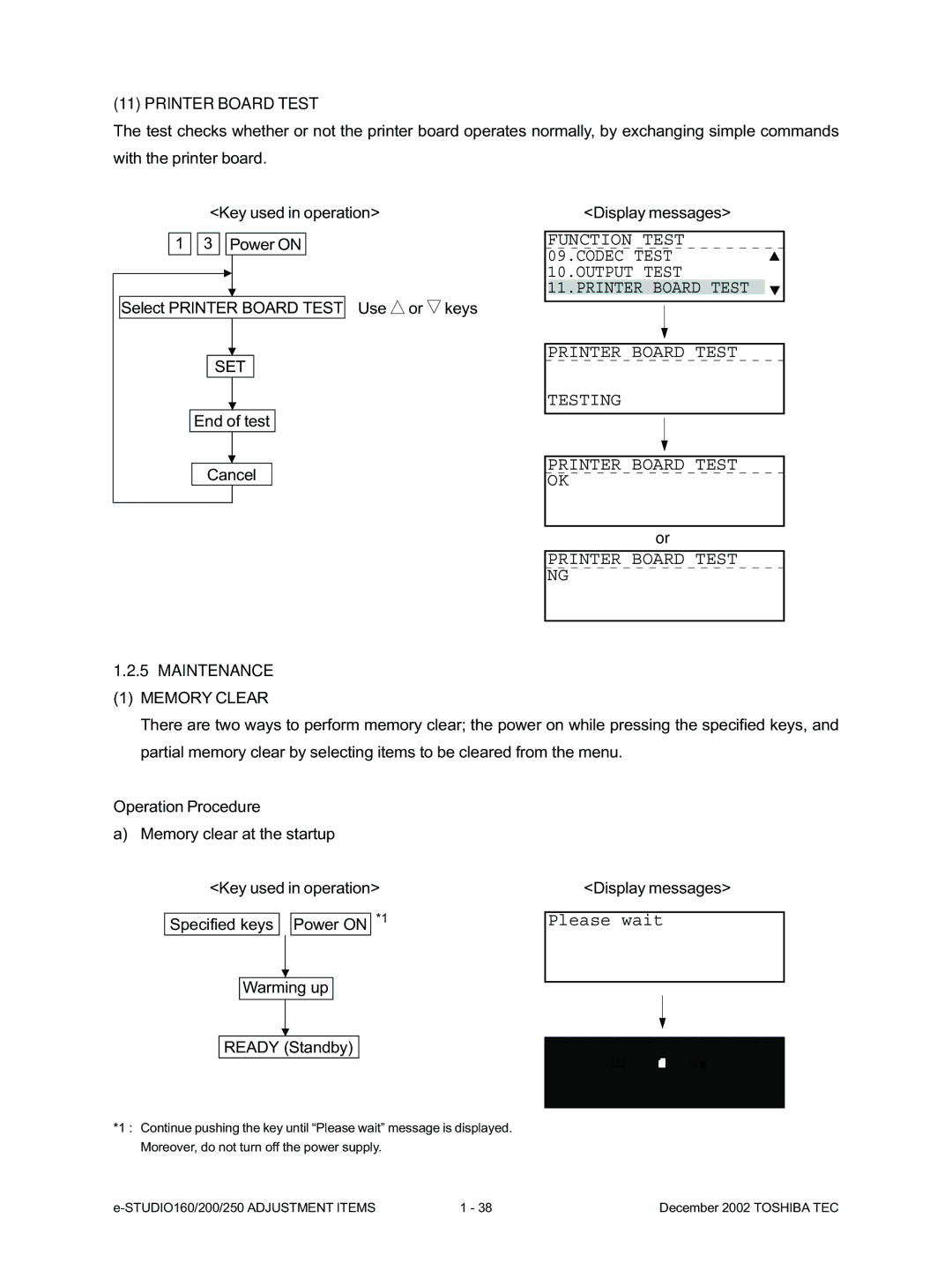
Printer Board Test
End of test Cancel Display messages
Maintenance Memory Clear
Warming up Ready Standby
Select Memory Clear Use or keys
Select Maintenance Use or keys
Item selection from menu Key used in operation
Select menu
RAM clear table
Func
December 2002 Toshiba TEC STUDIO160/200/250 Adjustment Items
SET Function
Cancel SET
Error Counter Shift
Memory Write
Protocol Trace *1 Total Errors *1
Service List
Drum History
COUNTRY/REGION
Total Errors
Protocol Trace
Country/Region code
Drum Counter
Current Counter
Total Print
History
Memory dump start address. The last digit is always 0. *1
Memory Dump List
Address
HEX Ascii
Select Function Use or keys
Select Lists
Print list
Paper JAM
JAM Counter
Document
TYPE1 JAM
NAD
ASD/AUD/CND/SAD/MJD
Test Mode PA
Adjust the volume Use Keys
Select Default Setting Use Keys
Select Machine Default Use Keys
Use Keys
SET Cancel
Adjust the document guide to the widest Enter code
SET INT Start
Image Quality Control
Code Set the value Test print
Copy Image Dimension Adjustment
Power on Code
Digital Keys SET INT Start INT Set the value or Test copy
04FUNCTION Test SET 02PRINT Test
Interrupt Program 05TEST Mode SET
Main Menu Interrupt SET
Main Menu Interrupt
5C15
Registration Adjustment order
Adjust the installed option units
LCF
443
Copy movement direction 100
Copied scale Copy movement direction Actual scale
01-04-10
Code Set the value Test copy
Power on Code Set the value
Code Default value 620 621 622
Sharpness HPF Adjustment
Enter code Set the value
Gamma Slope Correction
High-Voltage Adjustment
000
Door switch jigs Door switch jig Large Door switch jig Small
Start Cancel
Current entried adjustment value
SET Value YYY after adjustment is stored to SRAM. or
Return to other adjustment mode Power OFF
December 2002 Toshiba TEC STUDIO160/200/250 Adjustment
Copy trailing edge
Copy leading edge Copy trailing edge
Adjusting the Scanner Section
Tab Stopper Original glass
Scanner motor
Roller Holding part Lamp cable Carriage
057-3-1
Wire Scanner drive shaft
Rear Side Front Side
Relationship between wound turns and wire holder jigs
CCD unit Replacing the CCD unit
CCD Jig CCD unit
065-04-2
065-04-3
Adjusting the main drive gear assembly
Release the jam lever of the fuser
Main motor Gear Fuser Jam lever
Plate Screw a Main drive gear assembly Collar
Initial Setup Date & Time
Main PWA replacement procedure
CND SET
December 2002 Toshiba TEC STUDIO160/200/250 Adjustment Items
Display messages and measurement methods
Output Test SET Start Cancel
Measurement of Transfer Guide Bias
Enter the Transfer Guide Bias ON/OFF code
From preceding
CLEAR/STOP Cancel
Power OFF To measure on the paper guide plate
Turn the transfer guide bias OFF End the output test
Adjustment of the doctor-sleeve gap
Preventive Maintenance Check List
Symbols used in the check list
Page
Main Rear view
Fuser unit Pressure roller
Check
Doctor blade cleaning jig Magnetic roller
Drive gear
HR drive gear Boss
Page
MY-1015
MD-0101
MJ-5002
MY-1016
MR-3011
MJ-5001
MR-2012
KD-1009
KD-1010
PM Kit
List of Adjustment Tools
List of Grease
Precautions for Storing & Handling Supplies
Precautions for Storing Toshiba Supplies
Checking and Cleaning of the Pressure Roller
Checking and Cleaning of the Cleaning Roller
Checking and Cleaning of the Heat Roller
Checking and Replacing of the Transfer Guide Roller
Checking and Cleaning of the Photoconductive Drum
Checking and Cleaning of the Drum Cleaning Blade
Troubleshooting
Troubleshooting Based on Error Code
YES
YES
YES
YES
YES
YES
YES
YES
Open- or short-circuited
PWA CN205 is disconnected
PWA CN36 is disconnected
Replace the 2nd feed roller clutch
YES
YES
YES
YES
YES
YES
YES
YES
YES
YES
YES
Set only one-size originals Is the separation pad stained?
Replace the rollers
YES
YES
Clean the rollers Is the reverse flapper working properly?
EA2
Remove the paper Is the finisher connected to the main unit?
EA5
EA7
STUDIO160/200/250 Troubleshooting December 2002 Toshiba TEC
YES
YES
YES
YES 1
YES
YES
YES
YES
YES
STUDIO160/200/250 Troubleshooting December 2002 Toshiba TEC
Replace the main PWA
STUDIO160/200/250 Troubleshooting December 2002 Toshiba TEC
December 2002 Toshiba TEC STUDIO160/200/250 Troubleshooting
YES
YES
Radf
December 2002 Toshiba TEC STUDIO160/200/250 Troubleshooting
STUDIO160/200/250 Troubleshooting December 2002 Toshiba TEC
YES
YES END
CC8
CC9
CCA
CCB
YES
STUDIO160/200/250 Troubleshooting December 2002 Toshiba TEC
December 2002 Toshiba TEC STUDIO160/200/250 Troubleshooting
Uneven pitch and blur Symptoms
Troubleshooting of Image
Feeding direction
Replace registration roller
Blurred image Feeding direction
Re-install transfer charger unit securely
Solid copy Feeding direction
White banding in feeding direction Feeding direction
Minals main body stained? Transfer charger unit
Black banding in feeding direction Feeding direction
Main charger Formed? Or charger wire
White Spots Feeding direction
Uneven image density Feeding direction
Blotched image Feeding direction
Poor image transfer Feeding direction
Poor cleaning Feeding direction
Hvps
Background Fogging Feeding direction
Toner offset
Poor fusing Feeding direction
Defect of image density/Gray balance
Moire/lack of sharpness Feeding direction
Lack of sharpness
Uneven light distribution Feeding direction
Skew inclined image Feeding direction Moire
Image dislocation in feeding direction Feeding direction
Jittering image Feeding direction
Updating the Firmware
Outline
Using the Recovery PWA
Turn off the power Remove the rear cover
Main PWA Main recovery PWA CN10
Page
Connector Scanner recovery PWA
Remove the blind plate
Page
Using the Batch File
MKRPCDSK.BAT DISK.EXE
Type mkrpcdsk and press the Enter key
MS-DOS prompt screen shows the following
Press the Enter key. Formatting of Disk 1 begins
Press the Enter key Type n and press the Enter key
When formatting is completed, the following screen appears
Download program is copied to Disk
Press the Enter key Formatting of Disk 2 begins
05-03-014
05-03-016
When copying is completed, the following screen appears
05-03-019
LCD display on the copier
05-03-022
05-03-023
When downloading ends, the following screen appears
Using the Toshiba Viewer
Page
Page
Page
Wire Harness
Wire Harness Connection Diagrams
Connector Table
PFU PFP LCF
Appendix A. Specifications
LT-R
LD ST-R, COM
STUDIO200 series Less than 7.0 seconds A4/LT, the Upper cas
STUDIO160 series Less than 7.9 seconds A4/LT, the Upper cas
Sette, 100%, original placed manually
STUDIO250 series Less than 7.0 seconds A4/LT, the Upper cas
Weight
Appendix B. Accessories
Appendix D. Replacement Units/Supplies
Appendix C. Options
Appendix E. System List
Fig. E-1
Appendix F. Power Supply Unit
+24 24VFU2 24VFU1 12V +12
24VSW
5VPS
Kanda NISHIKI-CHO, CHIYODA-KU, TOKYO, 101-8842 Japan

 or
or  keys
keys
 Power ON *1

 A4
A4