(3) Separation
Items to Check before Adjustment
Defective separation from the drum also occurs in other than separation output adjustment de- fects. If this happens, check the following items. If an error is not found after carrying out the following checks, adjust the output.
•Is the charger wire out of position or dirty?
•Are the developer magnetic brushes contacting with the drum? Is the process unit rotating during copying? Is the toner low?
•Is the copy paper bending as it is being fed in? Is the copy paper abnormally moist?
•Is the alignment roller rotating normally?
•Is the main charger outputting?
•Is the transfer output deviating from the set value?
•Is the transfer/separation charger case earthed? Is the transfer/separation transformer earthed?
Caution during Adjustment
When defective separation occurs:
Increase the separation output value under the following conditions. However, note that if the separation output value is raised too far, pockmarks will occur, and separation performance will be reduced. (Adjustment code = 233)
•If defective separation occurs even though the charger wire is not dirty.
•If thin paper is frequently used.
When defective transfer occurs:
• Lower the separation output value when defective transfer occurs. However, note that if the separation output value is lowered too far, the separation performance also will be reduced.
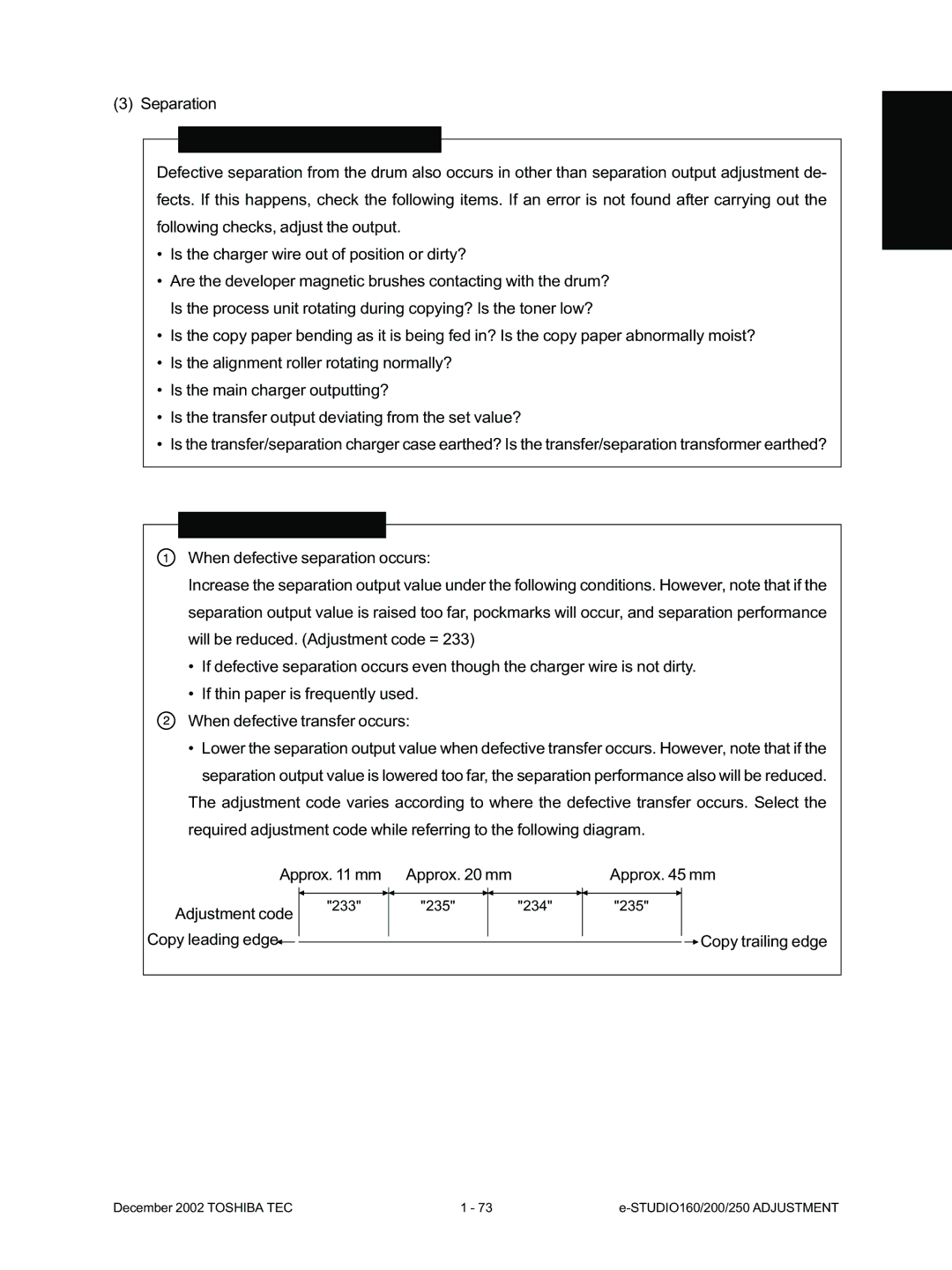
The adjustment code varies according to where the defective transfer occurs. Select the required adjustment code while referring to the following diagram.
Approx. 11 mm | Approx. 20 mm |
| Approx. 45 mm | ||||||||
|
|
|
|
|
|
|
|
|
|
|
|
|
|
|
|
|
|
|
|
|
|
|
|
Adjustment code | "233" | "235" |
| "234" | "235" |
|
|
|
| ||
|
|
|
|
|
|
|
|
| |||
Copy leading edge |
|
|
|
|
|
|
|
|
|
| Copy trailing edge |
|
|
|
|
|
|
|
| ||||
|
|
|
|
|
|
|
| ||||
December 2002 TOSHIBA TEC | 1 - 73 |