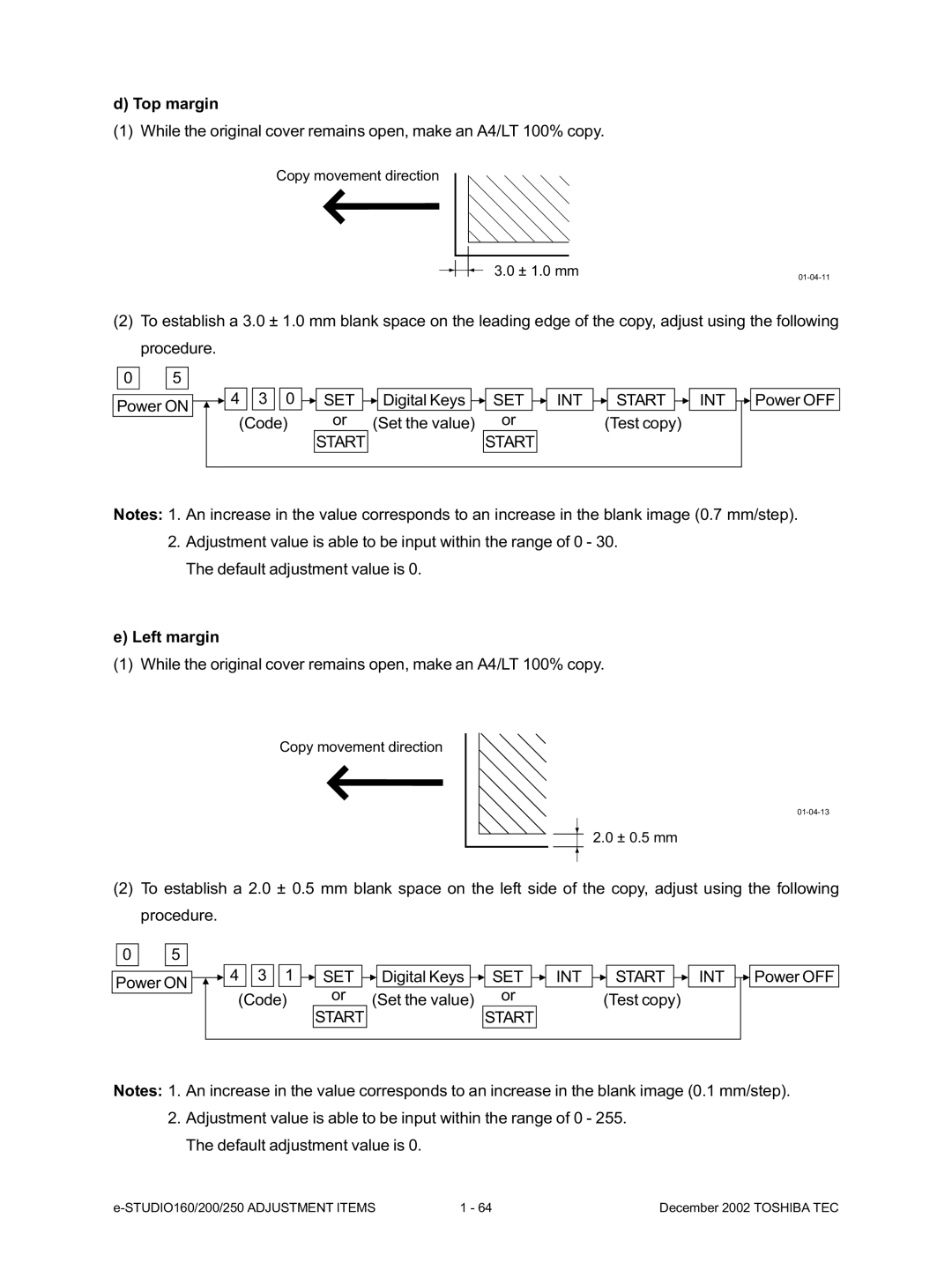
d) Top margin
(1)While the original cover remains open, make an A4/LT 100% copy.
Copy movement direction
3.0 ± 1.0 mm
(2)To establish a 3.0 ± 1.0 mm blank space on the leading edge of the copy, adjust using the following procedure.
0 | 5 |
|
|
|
|
|
|
|
|
|
|
|
|
|
|
|
|
|
|
|
|
|
|
|
|
|
|
|
|
|
|
|
|
|
|
|
|
| 4 |
| 3 |
| 0 |
|
| SET |
|
|
| Digital Keys |
|
| SET |
|
|
| INT |
|
| START |
|
| INT |
|
|
| Power OFF |
Power ON | |||||||||||||||||||||||||||||||||
|
|
|
|
| (Code) | or | (Set the value) |
| or |
|
| (Test copy) |
|
|
|
|
| ||||||||||||||||
|
|
|
|
|
|
|
|
|
|
|
| START |
|
|
|
|
| START |
|
|
|
|
|
|
|
|
|
|
|
| |||
|
|
|
|
|
|
|
|
|
|
|
|
|
|
|
|
|
|
|
|
|
|
|
|
|
|
|
|
|
|
|
|
|
|
Notes: 1. An increase in the value corresponds to an increase in the blank image (0.7 mm/step).
2.Adjustment value is able to be input within the range of 0 - 30. The default adjustment value is 0.
e)Left margin
(1)While the original cover remains open, make an A4/LT 100% copy.
Copy movement direction
2.0 ± 0.5 mm
(2)To establish a 2.0 ± 0.5 mm blank space on the left side of the copy, adjust using the following procedure.
0 |
| 5 |
|
|
|
Power ON
4 | 3 | 1 | SET | Digital Keys | SET | INT | START | INT | Power OFF |
(Code) | or | (Set the value) | or |
| (Test copy) |
|
| ||
|
|
|
|
| |||||
|
|
| START |
| START |
|
|
|
|
Notes: 1. An increase in the value corresponds to an increase in the blank image (0.1 mm/step).
2.Adjustment value is able to be input within the range of 0 - 255. The default adjustment value is 0.
1 - 64 | December 2002 TOSHIBA TEC |