Configuring Spanning Tree Parameters
Spanning Tree Operating Modes
OmniSwitch 6600 Family Network Configuration Guide
April 2006
page 5-11
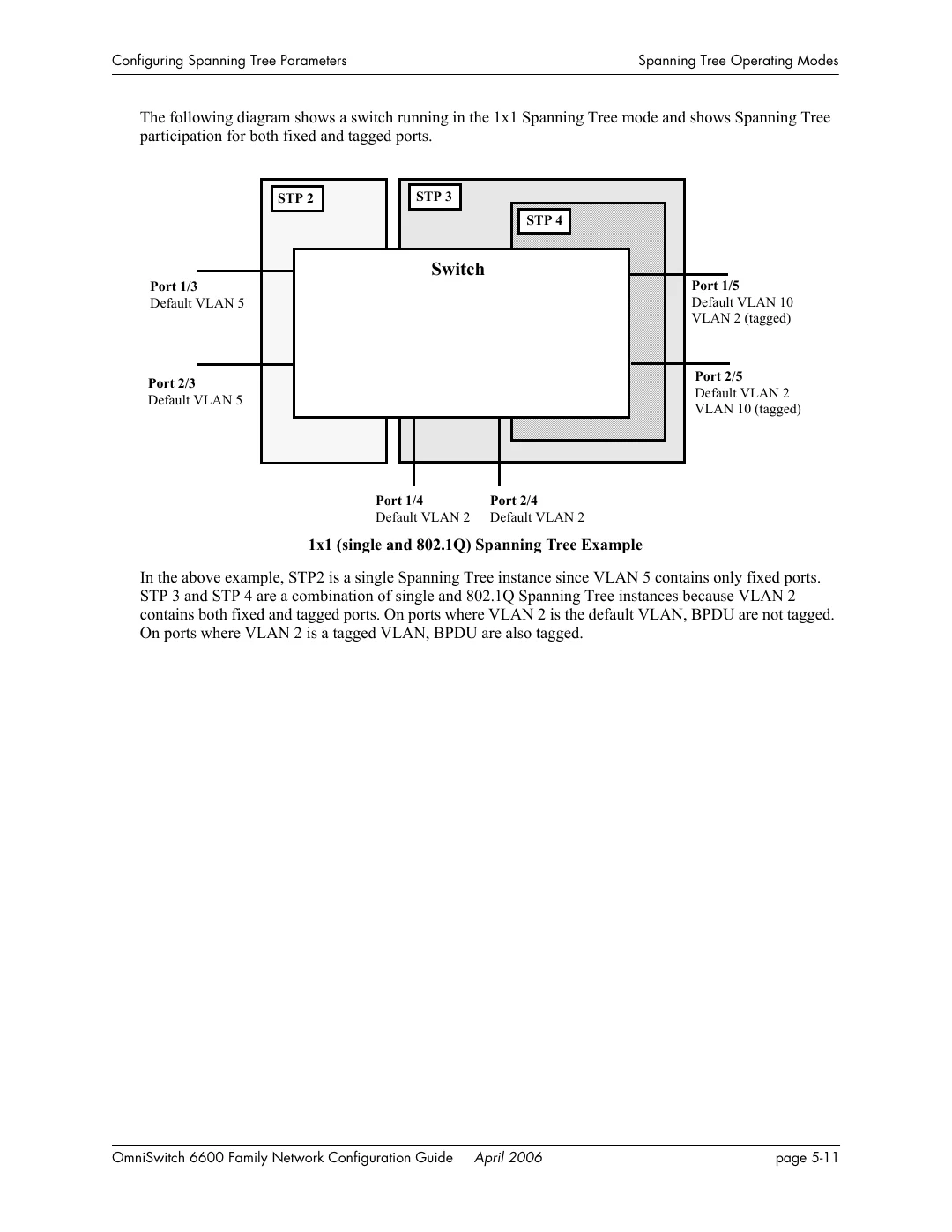
The following diagram shows a switch running in the 1x1 Spanning Tree mode and shows Spanning Tree
participation for both fixed and tagged ports.
1x1 (single and 802.1Q) Spanning Tree Example
In the above example, STP2 is a single Spanning Tree instance since VLAN 5 contains only fixed ports.
STP 3 and STP 4 are a combination of single and 802.1Q Spanning Tree instances because VLAN 2
contains both fixed and tagged ports. On ports where VLAN 2 is the default VLAN, BPDU are not tagged.
On ports where VLAN 2 is a tagged VLAN, BPDU are also tagged.
STP 2
STP 3
STP 4
Switch
Port 1/5
Default VLAN 10
VLAN 2 (tagged)
Port 2/5
Default VLAN 2
VLAN 10 (tagged)
Port 2/4
Default VLAN 2
Port 2/3
Default VLAN 5
Port 1/3
Default VLAN 5
Port 1/4
Default VLAN 2