Quick Steps for Configuring MSTIs
Using 802.1s Multiple Spanning Tree
page 6-16
OmniSwitch 6600 Family Network Configuration Guide
April 2006
Quick Steps for Configuring MSTIs
By default the Spanning Tree software is active on all switches and operating in the 1x1 mode using the
standard 802.1D STP. As a result, a loop-free network topology is automatically calculated based on
default 802.1D Spanning Tree switch, bridge, and port parameter values.
Using Multiple Spanning Tree (MST) requires configuration changes to the default Spanning Tree values
(mode and protocol) as well as defining specific MSTP parameters and instances.
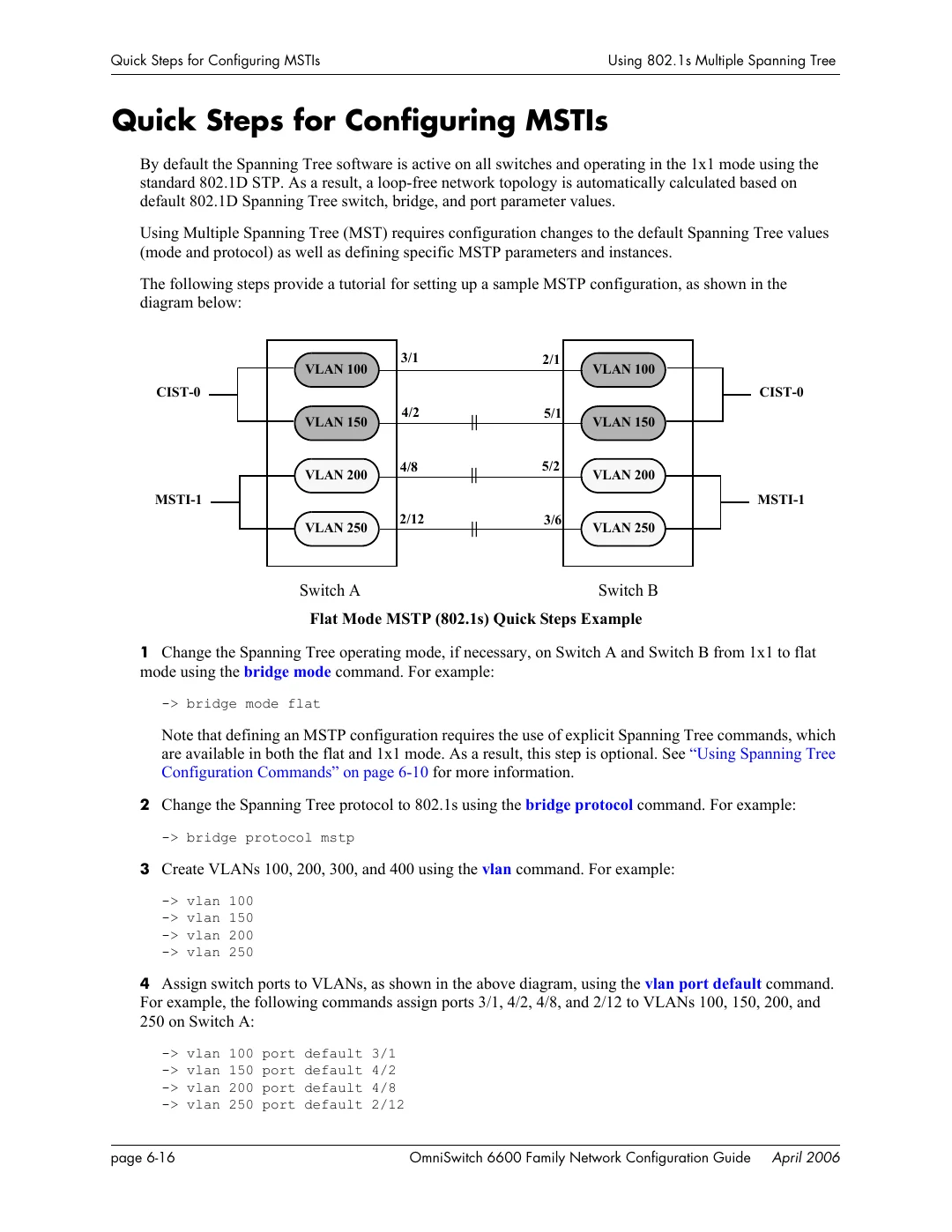
The following steps provide a tutorial for setting up a sample MSTP configuration, as shown in the
diagram below:
Flat Mode MSTP (802.1s) Quick Steps Example
1
Change the Spanning Tree operating mode, if necessary, on Switch A and Switch B from 1x1 to flat
mode using the
command. For example:
-> bridge mode flat
Note that defining an MSTP configuration requires the use of explicit Spanning Tree commands, which
are available in both the flat and 1x1 mode. As a result, this step is optional. See
Configuration Commands” on page 6-10
for more information.
2
Change the Spanning Tree protocol to 802.1s using the
bridge protocol
command. For example:
-> bridge protocol mstp
3
Create VLANs 100, 200, 300, and 400 using the
command. For example:
-> vlan 100
-> vlan 150
-> vlan 200
-> vlan 250
4
Assign switch ports to VLANs, as shown in the above diagram, using the
For example, the following commands assign ports 3/1, 4/2, 4/8, and 2/12 to VLANs 100, 150, 200, and
250 on Switch A:
-> vlan 100 port default 3/1
-> vlan 150 port default 4/2
-> vlan 200 port default 4/8
-> vlan 250 port default 2/12
2/1
3/1
4/2
4/8
5/2
5/1
||
VLAN 100
VLAN 250
MSTI-1
VLAN 200
VLAN 150
CIST-0
VLAN 100
VLAN 250
MSTI-1
VLAN 200
VLAN 150
CIST-0
||
2/12
3/6
||
Switch A
Switch B