UsingYour Keyboard
Get & Put Buttons
Drag & Drop Options
Editing a Tone
Bundle Files Backup & Restore your Tones
Variax Options POD X3 Live/Pro
Variax Acoustic sliders
To follow are the GearBox Variax panel options
Variax Electric knob
Variax Bass knobs
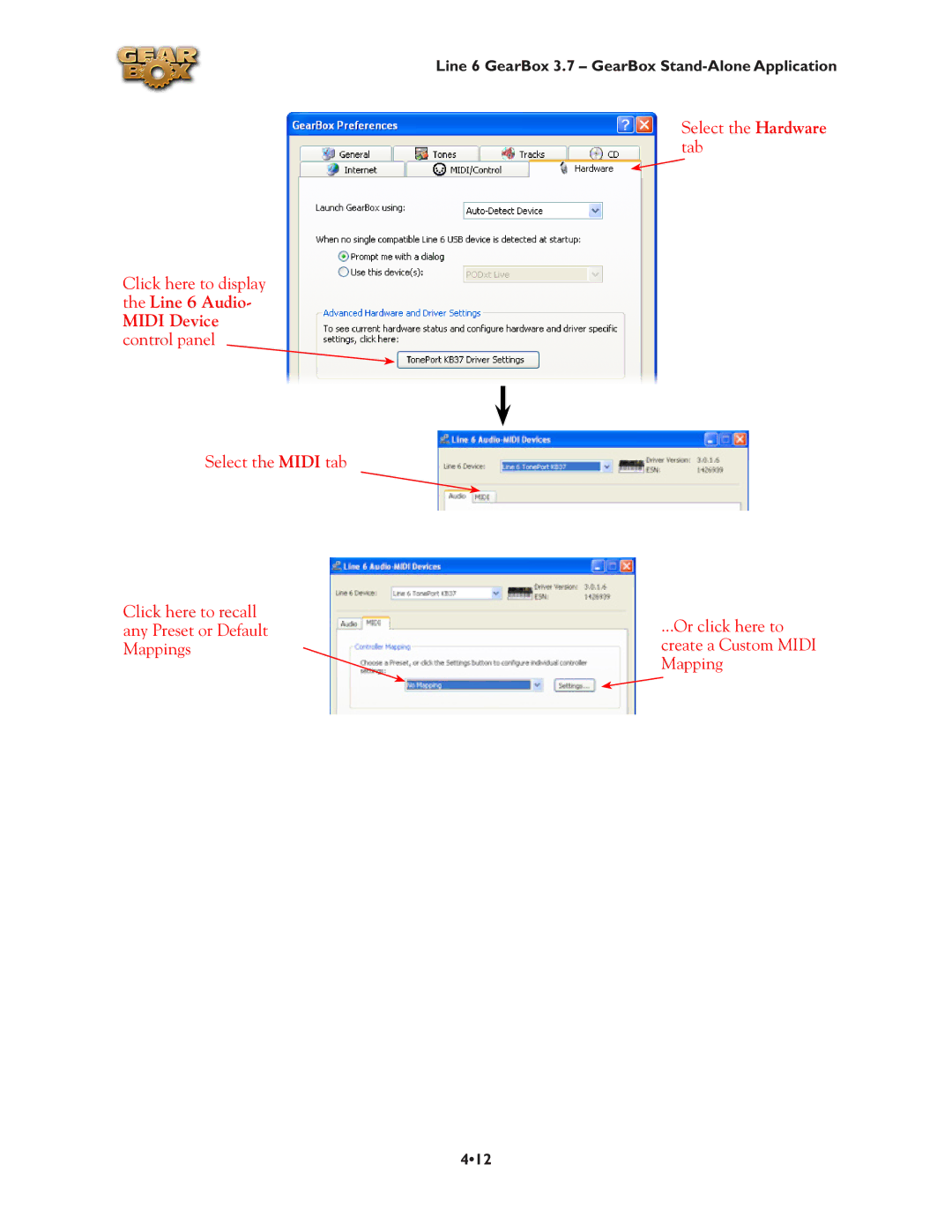
POD X3 Live & Pro Midi Control
GearBox How To
Line 6 GearBox 3.7 GearBox How To
How to show/hide all Tone controls
How to turn GearBox’s software knobs
How to fine-tune GearBox’s knobs and Model or Tone menus
Basic Operation
How to resize the GearBox program window
How to show/hide the Browser
How to show/hide the Effect control panel
Use the Tuner
Tuning String
Metronome Tips
Presets
Metronome Controls
Change and Save Tones
How to initialize a Tone
Building a Beat
How to Save a Dual Tone POD
How to Save a Tone
How to change the factory Preset Tones
How to set the De-Esser
How to use the Wah and Volume effects
Hardware Setup
How to select hardware for GearBox to use
611
How to connect your Hardware to a guitar amp
How to select your Preferred Audio Device
Stay Up To Date
How to purchase Model Packs
How to register your Line 6 Hardware purchase
How to use your Model Packs with GearBox
614
How to purchase the GearBox Plug-In
GuitarPort Online & Player Operation
How to disable Download Accelerators
How to connect to the Internet
How to find FAQs
Windows
Mac
How to load an MP3,WAV or Aiff file
How to join GuitarPort Online
How to load a Track from an Audio CD
619
620
How to load a Track file from GuitarPort Online
How to load a Track file from your hard disk
How to load GuitarPort’s Tutorial Track
How to set the Loop start and end points
How to share your Tones with other GuitarPort users
624
How to show/hide the Track sections display
Click here
Windows 64 Bit Support
Midi Remote Control and Plug-In Automation
Quickie Plug-In Primer
Plug-In Formats
Obtaining the GearBox Plug-In
Launch Line 6 Monkey
Grab any available updates Login to your Line 6 account
Purchasing the GearBox Plug-In
Activating the Plug-In
TonePort UX8 & DI Customers
GearBox Plug-In Controls and Operation
Program Files\Common Files\Digidesign\DAE\Plug-Ins\Line
Where Can I Find the GearBox Plug-In On My Computer?
On Windows
Library Application Support Digidesign Plug-Ins Line
Model Gallery
824
Line 6 Insane
Guitar Amp & Cab Models
Line 6 Chemical
Line 6 Piezacoustic
Small Tweed
Line 6 Spinal Puppet
Line 6 Treadplate
Tweed B-Man
Blackface ‘Lux
Class A-30 Top Boost
Plexi Lead
Plexi Jump Lead
Jazz Clean
Brit J-800
Solo 100 Head
Treadplate Dual
Citrus D-30
Brit Gain
Tube Instrument Preamp
Guitar Cab Models
Rock Classic
Bass Amp & Cab Models
Flip Top
Silverface Bass
Adam and Eve
Eighties
Hot Key Assignments Command Action Windows Mac
What is the Hum Reducer?
What is the Info Bar?
What is MIDI?
What is the Loaded Track Menu?
What is the Loop Button?
Midi Pedals and Controllers
What are Model Packs?
What is Mod?
Midi Channel
What is a Preferred Audio Device?
What are the numbers shown in some tracks?
What is Re-Amping
What is a Record Send?
What is a Rotary Drum + Horn?
What is the Reference control in the Tuner?
What are Sends?
What is Stomp?
What is a Soundcard?
What is Tap Tempo?
What are Tone Changes on GuitarPort Online Tracks?
What is a Tone?
Replacing Tones in Tracks
What is the Tone Library?
What is the Tone Locker?
Computer List
Online List
Memory List PODxt only
Delete Tones
Navigating Folders
F5 or Right-click to Refresh lists
Copy
Selected
Bundle and Bundle
What is the Track Level?
What is the Track Sections Display?
What is the Transfer Manager?
What is a USB hub?
What is Tremolo?
What is Variax?
What is Verb Reverb?
What is Vol?
What is Wah?
What is the ! Warning Triangle?
What is Windows 64 Bit?
Online Help & Support