Published July
Legal Notice
Contents
Archives
Best Practices
Vi Contents
Preface
About this guide
Audience
Typographical conventions
Subscription service
Related documentation
Support
Support
When calling support
Preface
Overview
Migration
Release
Recall
FMA components
Cluster operation
Overview
Creating a technical user account
Installation
Backing up managed volumes
Configuring backup management applications to work with FMA
Ensuring interoperability with FMA
Backing up archives
Restoring data
Installing FMA on file servers Prerequisites
Minimum requirements
Technical user
Compatibility issues
Restrictions
First steps
To install FMA
Installation
Installation
Installation
Installation
To configure FMA in a cluster environment
Installing FMA in a cluster configuration
To create an Active/Active Cluster configuration
Installation
Upgrading FMA
Configuring FMA
Evicting a node from a cluster
Adding a new node to a cluster
To upgrade FMA on a file server
To update a cluster
Migrating a Windows 2003 cluster
Downgrading FMA
To migrate an FMA cluster to
To downgrade from 2.5 to
Removing the Explorer plugin
Uninstalling FMA
Enter FMA license keys
Licensing
FMA License Information Cluster License
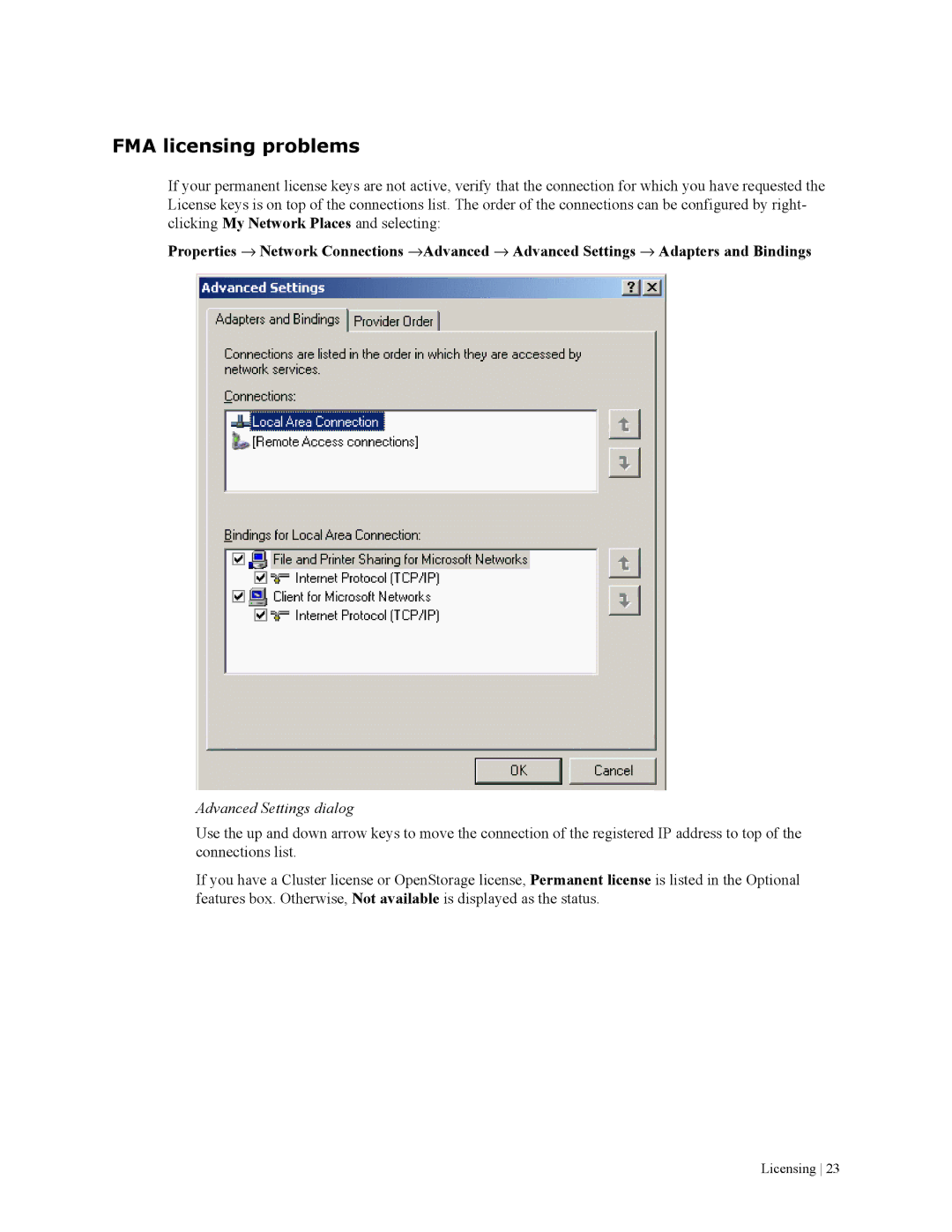
Advanced Settings dialog
FMA licensing problems
Licensing
Primary and secondary configuration
Archives
Storage descriptors
Ignore Security and Data Stream Only
Ignore System Name and Ignore Volume Serial
To view the list of archives
Viewing archives
Adding archives to FMA in a cluster environment
To configure the Ntfs permissions on the archive share
Creating Cifs archives
Preparing Cifs archives for FMA
To configure a Cifs archive
Configuring Cifs archives
Archives
Preparing FTP archives for FMA
Creating FTP archives
To set up a new group and user
Configuring Vsftpd on SuSE Linux
To configure Vsftpd
To take ownership of the PartitionRoot
To configure Vsftpd on Red Hat
Configuring Vsftpd on Red Hat
Enter the following to start vsftpd
To configure an FTP archive
Configuring FTP archives
Archives
Pack
Using FmaFileUtil to work with FTP archives
Option Description
Syntax
Options Description
Unpack
Examples
Creating HP Integrated Archive Platform archives
Configuring computers on which FMA is installed
Configuring IAP devices
Configuring IAP archives
Preparing IAP archives for FMA
Archives
Archives
To edit archive properties
Editing archive properties
Deleting archives
Removing deleted files from archives
To delete an archive
Managed Volumes
Viewing managed volumes
To view the list of volumes on the file server
Icon Status Description
To view information about a particular volume
Creating managed volumes
To create a managed volume
To create a managed volume in a cluster environment
Releasing files using disk space policies
Setting disk space watermarks
To set watermarks for disk use
To set retention periods
Setting retention periods
To exclude files from release based on disk space
Excluding files from release based on disk space
Migrating and releasing files using file policies
Creating file policies
To create a file policy
Select File Size
Managed Volumes
Scheduling file policies
To schedule file policies
To run policies manually
Editing file policies
Enabling and disabling file policies
Deleting file policies
Migrating and releasing files with the Explorer plugin
To view FMA file properties
To migrate one or more files or a folder
To release one or more files or a folder
To recall files or folders using the Explorer plugin
Moving files to another managed volume
To move files to another managed volume
Recalling files
Stopping volume management
Moving a large number of files
To move a large number of files
Removing volume management
Restarting volume management
To stop managing a volume
To start managing a volume
Best Practices
FMA RSA-FTP Configuration dialog
Best Practices
FMA archive configuration for an Linux FTP archive
Best Practices
Best Practices
Best Practices
FMA archive configuration for a CIFS-based NAS device
Best Practices
FMA archive configuration for IAP
Best Practices
Create file policies
Create a new managed volume
Best Practices
Create disk usage monitoring
Determine FMA software version
Release files
Migrate files
Recall files
Schedule FMA commands
Set a high-watermark for migration or releases
Verify data files
Schedule FMA jobs
Backup/restore concept for FMA managed volumes
Relocating data procedure
Relocating data to another FMA managed volume
Relocating a large number of files
Command Line Interface Reference
FMA commands
Command Description Only
Displays information about available volumes
Displays the result of the verification process
Displays FMA version and build information
Activate
Syntax
Description
--logfile -L option
Options
Example
Archive
Fmacli arc
Synopsis
Cleanup
Erase
Displays Online Help for the erase command