Service addendum
Page
Service addendum
Quick reference service PIN code
Table of contents
Maintenance
Removal and replacement
Troubleshooting
Index
Table of contents C9148-90909
List of figures
List of figures C9148-90909
List of tables
List of tables C9148-90909
Product Information
Product configurations
Introduction
HP LaserJet 4100mfp C9148A
HP LaserJet 4101mfp C9149A
Product features
Product speed and throughput
Image quality
Paper handling
Product specifications
Performance Category Specification
Expandable design
Scan unit only
ADF/flatbed-unit acoustical specifications
Category Specification
Testing per International Standard Organization ISO
Skew specifications
Media specifications
Supported paper sizes and weights for the ADF
Size Dimensions Weight
Special considerations for ADF documents
Model and serial numbers
Product overview
Front view
Back view
Product parts back view
Product Information C9148-90909
Service approach
Service approach
Major assemblies
HP service agreements
Contact HP
World Wide Web
HP support assistant CD-ROM
Service approach C9148-90909
Operation
General guidelines for using the ADF unit
Using the ADF unit
Using the ADF
General guidelines for using the glass
Using the glass
Using the glass
Layout and operation
Using the control panel
Control panel
Walk-up copy display
Navigation
Status bar
Configure device, diagnostic, and service menus
Menus
Menu map
MFP menu map 1
MFP menu map 2
Maintenance
Cleaning the product
General guidelines
Running the cleaning
Cleaning the ADF delivery guide clear mylar strip
Remove the clear plastic sheet
Replace the clear, plastic sheet
User-replaceable parts MFP Item Procedure Interval
User-replaceable parts
Processor board on
See Back view on
Back view on
Downloading a remote firmware update
Installing the update
RFU installation messages
Updating product firmware
Using HP Web JetAdmin single update
Using HP Web JetAdmin multiple or unattended update
Windows parallel connection local printer
Windows parallel connection network printer
Troubleshooting RFU installation
RFU installation error messages
Cold Reset
Performing hard-drive disk initialization
Configuration page see Evaluate the information pages on
Nvram initialization
Calibration
Performing automatic Calibration
Lead adjustment for the ADF
Performing manual calibration
Optical-unit drive gear/motor assembly
Remove the optical-unit cover plate
Remove the optical-unit drive gear/motor assembly
Scan-unit power supply
Remove the power-supply shield
Remove the power supply
Remove the inverter PCB
Unplug the connectors
Scanner controller PCB
Grasp the scanner controller PCB
Intake fan
Remove the fan mounting screws
Remove the intake fan
Removal and replacement C9148-90909
Troubleshooting
Wiring diagrams Troubleshooting C9148-90909
Troubleshooting process
Primary steps for troubleshooting
Installation conditions
Preliminary operating checks
Media condition
Unit condition
Basic troubleshooting process flow
Basic troubleshooting flowchart
Basic troubleshooting
Basic troubleshooting
Is Power On
Successful?
Is the copy function
Operational?
Power-on defects
Power malfunctions Solution
Troubleshooting with the control panel
Control-panel display
Event log
Print the event log
Interpret the event log
Sample MFP event-log
Display the event log
Control-panel display of the event log
Control-panel messages
Troubleshooting with the copy processor
Update on
See Formatter cage on
Board on
Connectors on
Diagnostic tests on
Unit intake fan on
See Scanner controller board
Scanner controller board connectors on
See Inverter PCB on
Jams on
Freely see ADF components on
Troubleshooting with the copy processor board
Copy processor board LEDs Troubleshooting C9148-90909
See Basic troubleshooting on
114 and Power-on defects on
Supply on page 63 and Power-on
Defects on
User-level and service-level diagnostics
Diagnostic tests
To perform a diagnostic test
ADF paper-path test
Service-level diagnostics
Service menu
To access the service menu PIN code
Service menu Description
General ADF jam troubleshooting Cause Solution
Jam troubleshooting
Jams
Clearing repeated ADF jams
Creating a customer print job
Configuration-page elements
Configuration
Evaluate the information pages
Sample configuration
JetDirect
JetDirect-page elements
Supplies status
Supplies-page elements
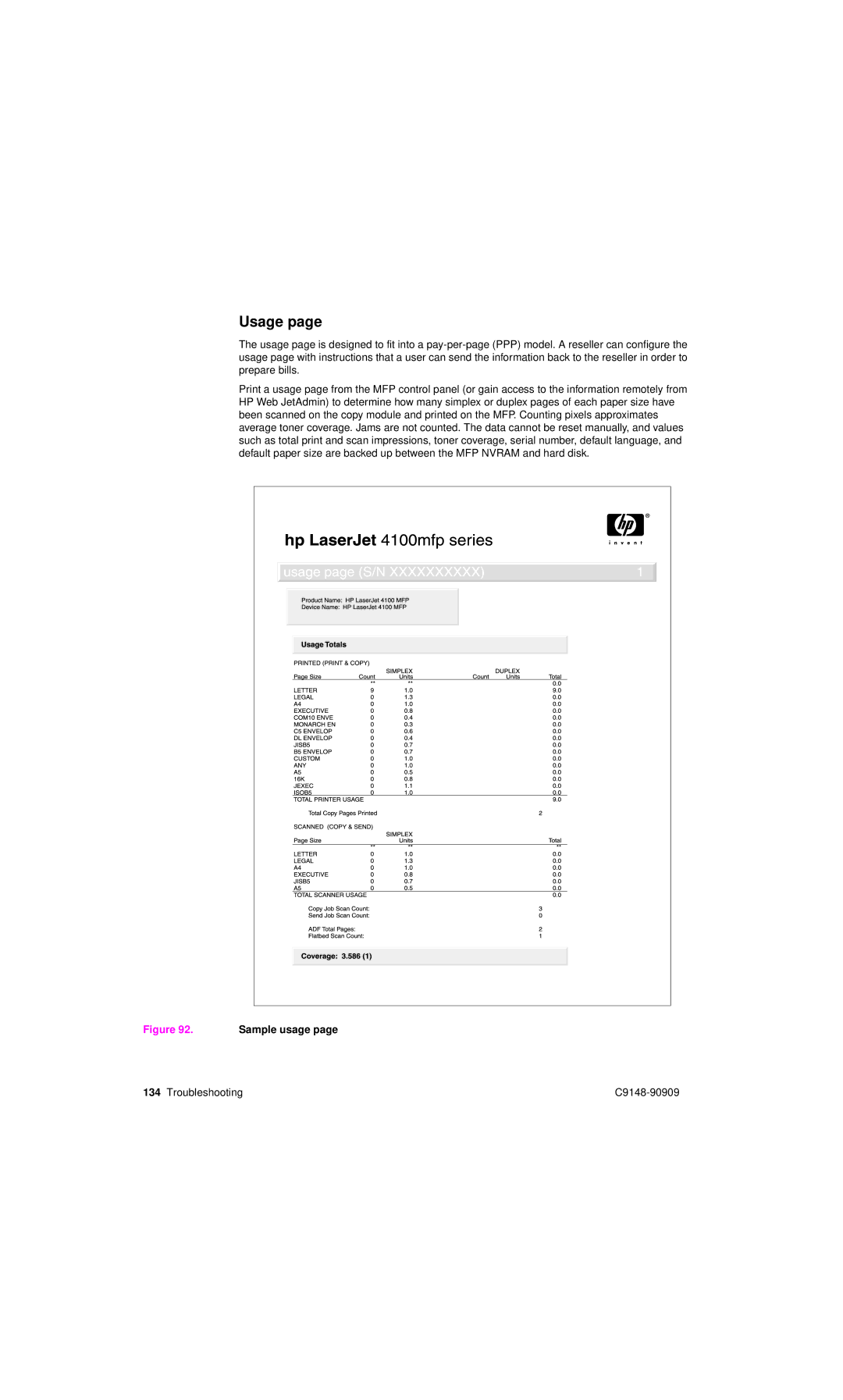
Usage
Sample usage
File directory
File-directory-page elements
Image-formation troubleshooting
Image-quality checks
Image-quality checks Action
Standards?
Checking the print cartridge
EconoMode
Image defects Problem Condition Solution
Image-defect tables
See Cleaning the ADF delivery guide
Strip. See Cleaning the product on
Clear mylar strip on
Vertical lines
Media troubleshooting
Isolate a paper path
Isolate a media brand
Isolate a media type
Wiring diagrams
Parts and diagrams
Ordering parts, supplies and getting support
Parts
Related documentation and software
Support
Accessories and supplies Description Product no
Accessories
Consumables Description Product no
See Top-cover assembly on
Common hardware
HP Laserjet 4100 differences
Screws used in the ADF unit and scan unit Description
How to use the parts lists and diagrams
Parts lists and diagrams
Covers