Polycom RMX 2000/4000 Administrator’s Guide
Version 5.0.1 January 2010 DOC2518C
Patent Pending
Regulatory Notices
RMX 2000 complies with IDA standards G0916-07
Table of Contents
Table of Contents
Entry Queues, Ad Hoc Conferences and SIP Factories
Iii
Address Book
Operator Assistance & Participant Move
Conference and Participant Monitoring
Vii
Call Flows 15-1
Viii
RMX Manager Application 16-1
RMX Administration and Utilities
ISDN/PSTN
17-56
Xii
Ad Hoc Conferencing and External Database Authentication
Xiii
Connecting to the Alternate Management Network
Procedure 2 Configure the Modem
Xiv
Setting Value
LPR
Meeting Rooms
Entry Queue
Conferencing Modes
Standard Conferencing
Supported resolutions
Supplemental Conferencing Features
Viewing Profiles
To list Conference Profiles
RMX Management pane, expand the Rarely Used list
Click the Conference Profiles button
Profile Toolbar
Button Descriptions Name
Defining Profiles
To define a new Profile
Field/Option Description
Click the Advanced tab
New Profile Advanced dialog box opens
Define the following parameters
At the End When Last Participant Remains
At the End After Last Quits All the participants
Click the Video Quality tab
New Profile Video Quality dialog box opens
People Video Definition
Content Video Definition
Guide, H.239 on
Click the Video Settings tab
New Profile Video Settings dialog box opens
Is set to Flexible Mode
YES
Number of Video Participants Auto Layout Default Settings
Number Available Video Layouts Video Windows
Conference Profiles
Select one of the Skin options
Field/Option Description
Modifying an Existing Profile
To modify the Profile Properties
Parameter Description
Deleting a Conference Profile
To delete a Conference Profile
Conference Profile is deleted
Dynamic Continuous Presence CP Mode
Video Session Modes
High Definition Video Switching Mode
Continuous Presence CP Conferencing
Video Resolutions in CP
CIF
2CIF/WCIF
Additional Video Resolutions in MPM+ Mode
Additional Intermediate Video Resolutions
352 x 288 pixels at 50 fps
512 x 288 pixels at 50 fps
Setting the Maximum CP Resolution for Conferencing
Video Display with CIF, SD and HD Video Connections
A 1X1 Video Layout
HD1080
CP Conferencing with H.263 4CIF
263 4CIF Guidelines
High Definition Video Switching
Guidelines
Enabling HD Video Switching
Modifying the HD Video Switching Threshold Bit Rate
Creating a High Definition Video Switching Profile
To Modify the HD Video Switching Threshold
To Create an HD Enabled Profile
Select the High Definition Video Switching check box
Monitoring High Definition Video Switching Conferences
Content Transmission Modes
239
Content Protocol
Endpoint Capabilities
Defining Content Sharing Parameters for a Conference
Entry Queues
Cascade Links
5H.239 Content Options
Sending Content to Legacy Endpoints
Guidelines for Sending Content to Legacy Endpoints
Interoperability with Polycom CMA and DMA
Content Display on Legacy Endpoints
Enabling the Send Content to Legacy Endpoints Option
Legacyepcontentdefaultlayout
To modify system flags
Layout Flag Value
Stopping a Content Session
Click OK Flag is updated in the Mcmsparameters list
To end the current Content session
Layout Flag Value
Lecture Mode
Enabling Lecture Mode
Enabling the Automatic Switching
Restricting Content Broadcast to Lecturer
To enable Lecture Mode for the Conference
Selecting the Conference Lecturer
Lecture Mode Monitoring
When enabled, the following rules apply
To control the Lecture Mode during an Ongoing Conference
Polycom RMX 2000/4000 Administrator’s Guide
MPM and MPM+ Card Configuration Modes
Closed Captions
Closed Captions Guidelines
New Flag field enter Enableclosedcaption
Enabling Closed Captions
To change the flag value
Media Encryption
Media Encryption Guidelines
Conference Access
Setting Permitted
Conference Participant
Encryption Connection
Entry Queue Access
YES
Encryption Flag Settings
Move Guidelines
To modify the Encryption flag
To enable encryption at the conference level
Enabling Encryption in the Profile
Enabling Encryption at the Participant Level
To enable encryption at the participant level
Monitoring the Encryption Status
LPR Lost Packet Recovery
Lost Packet Recovery
Packet Loss
Causes of Packet Loss
Lost Packet Recovery Guidelines
Enabling Lost Packet Recovery
Monitoring Lost Packet Recovery
Polycom RMX 2000/4000 Administrator’s Guide
Telepresence Mode
RMX Telepresence Mode Guidelines
System Level
Conference Level
Room Participant/Endpoint Level
RPX and TPX Video Layouts
TPX RPX
Number of Endpoints Layouts
2RPX and TPX Room System connected using RMX 2000/4000
Enabling Telepresence
To configure a participant/endpoint for Telepresence
Select the required video layout
Saving an Ongoing Conference as a Template
Any conference that is ongoing can be saved as a template
To save an ongoing conference as a template
RPX TPX
Starting an Ongoing Conference From a Template
To start an ongoing conference from a Template
Cascading Conferences Star Topology
3Cascaded Conferences Star Topology
Conference a Conference B
4Video Layouts in Cascaded Conferences
Creating the Cascade-enabled Entry Queue
Creating the cascade-enabled Entry Queue
Creating a cascade-enabled Dial-out link
To define a Cascade-Enabled Entry Queue
Additional Conferencing Information
Creating the Dial-out Cascaded Link
To define the Dial-out Cascaded Link
For Example 78485#24006#1234
Polycom RMX 2000/4000 Administrator’s Guide
Enabling Cascaded Conferences without Password
To enable cascaded links to connect without a password
Monitoring Cascaded Conferences
Conference a Linked Conference
Conference B Destination Conference
Additional Conferencing Information
Cascading Conferences H.239-enabled MIH Topology
MIH Cascading Levels
MIH Cascading allows
MIH Cascading Guidelines
Master and Slave Conferences
Video Session Mode, Line Rate and Video Settings
Conference B Conference C
Content Sharing
Level
Setting up MIH Cascading Conferences
Conf Kbps 128 256 384 512 768 1024 1472 1920 Mode
RMX to RMX Cascading
Dialing RMX 2000 Level Direction
Creating a Cascade Enabled Entry Queue
Dialing RMX 2000 Level Direction
Master RMX
Additional Conferencing Information
Creating a Cascade Enabled Dial-out Participant Link
Creating the Cascaded Conferences
To define the dial-out cascade participant link
17New Participant Dial-out Cascade Link
GatekeeperPrefix CascadeEnable
Additional Conferencing Information
MGC to RMX 2000 Cascading
MGC to
Setting the flags in the MGC
To MGC
Click OK If you changed the flags, reset the MCU
Defining the Cascading Entry Queue in the MGC
Participant Properties Identification dialog box, enter a
Participant Name
For Example 1002##12001##1234
For Example
Setting the Flags on the RMX
H263ANNEXT=YES default
FORCE1X1LAYOUTONCASCADEDLINK CONNECTION=YES default
Click OK Reset the MCU to apply the changes
Defining the Cascade Enabled Entry Queue on the RMX
For more details, see the RMX 2000 to RMX 2000 Cascading
Defining the Cascading Conferences
Defining the Dial-out Participant on the RMX
EQ ID
MCU Prefix as Password
Starting and Monitoring MIH Cascading Conferences
Monitoring Participants in an MIH Cascaded Conference
To monitor cascading enabled conferences
Viewing Participant Properties
To view the linked Participant Properties
Additional Conferencing Information
Meeting Rooms
Meeting Room Name Default Line Rate
Meeting Rooms List
To list Meeting Rooms
Meeting Rooms button
Meeting Rooms List is displayed
Meeting Room List columns include
Meeting Room Toolbar & Right-click Menu
Toolbar Right-click Description Button Menu
Creating a New Meeting Room
To create a new meeting room
Entry Queues, Ad Hoc Conferences and SIP Factories
Entry Queues
Default Entry Queue properties
Parameter Value
Polycom RMX 2000/4000 Administrator’s Guide
Defining a New Entry Queue
To define a new Entry Queue
RMX Management Rarely Used pane, click Entry Queues
Option Description
Option Description
ISDN/PSTN
Listing Entry Queues
Click OK New Entry Queue is added to the Entry Queues list
To view the list of Entry Queues
Setting a Transit Entry Queue
Modifying the EQ Properties
Transit Entry Queue
To modify the EQ
To cancel the Transit Entry Queue setting
RMX Management Rarely Used pane click Entry Queues
Ad Hoc Conferencing
Gateway to Polycom Distributed Media Application DMA
SIP Factories
Creating SIP Factories
To create a new SIP Factory
RMX Management Rarely Used pane, click SIP Factories
New Factory Properties
Click OK New SIP Factory is added to the list
Entry Queues, Ad Hoc Conferences and SIP Factories
Address Book
Viewing the Address Book
Displaying and Hiding the Address Book
Click the tab to re-open the Address Book
Adding a Participant to the Address Book
Adding a new participant to the Address Book Directly
To add a new participant to the Address Book
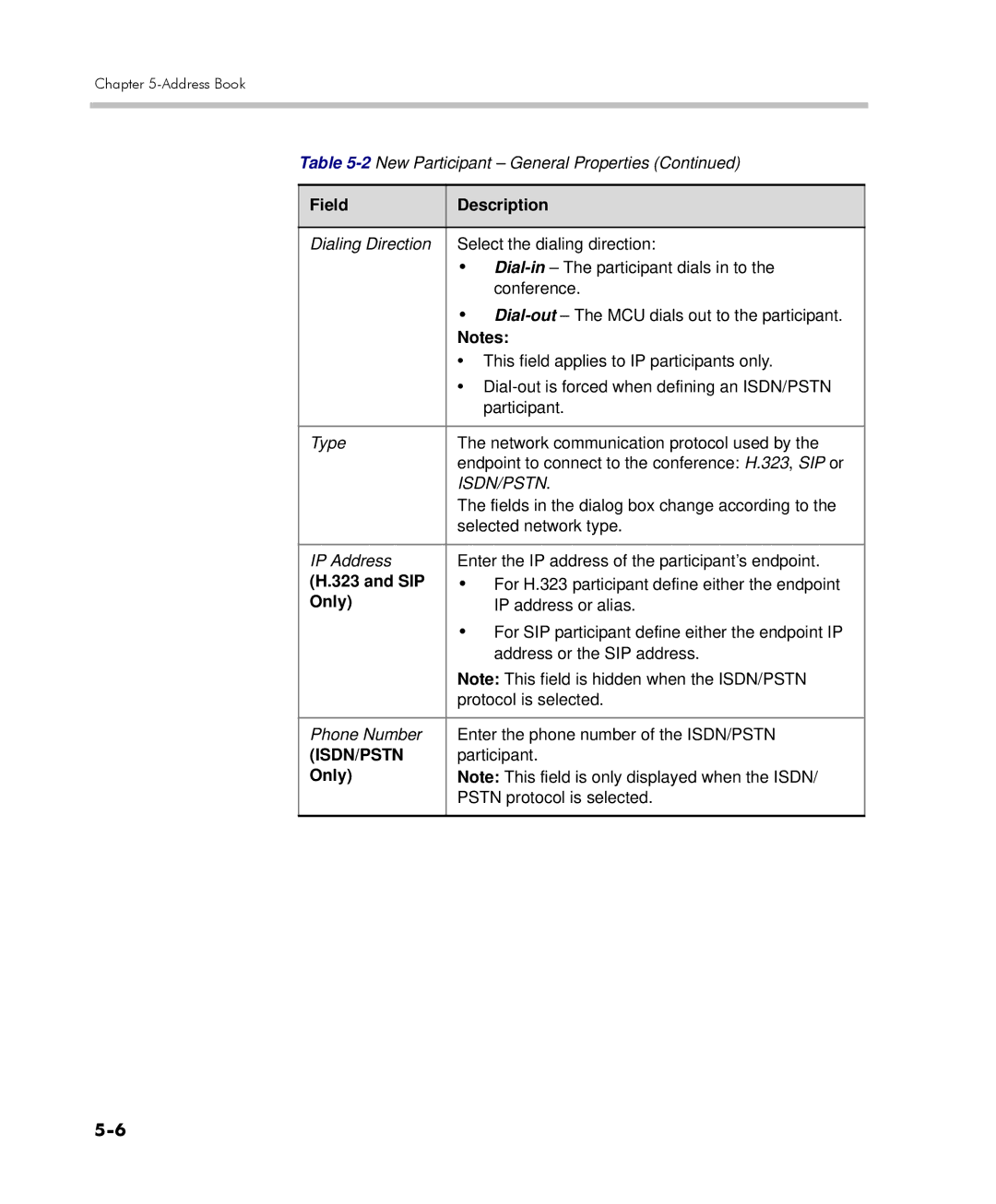
Define the following fields
Ascii
SIP
Only
Address, first select the type of alias and then enter
Field Description
SIP Only
Define the following Advanced parameters
IP Only
AGC
Cascaded Link If this participant is used as a link between
Participant Properties window opens
Click the Add to Address book button
When required, you can modify the participant’s properties
Modifying Participants in the Address Book
To modify participant properties in the Address Book
Participant’s Properties window appears
Deleting Participants from the Address Book
Searching the Address Book
To delete participants from the Address Book
To search for participants in the Address Book
Filtering the Address Book
To filter an address book field
To clear the filter and display all entries
Participant Groups
Adding a New Group to the Address Book
To define a New Group
Deleting a Group from the Address Book
To delete a Group
Modifying a Group in the Address Book
To Modify a Group
Importing and Exporting Address Books
Exporting an Address Book
To Export an Address Book
Importing an Address Book
To Import and Address Book
RMX Side On the RMX menu, click Setup System Configuration
Integrating the Polycom CMA Address Book with the RMX
CMA Address Book Integration Guidelines
Content
System Flags Mcmsparametersuser dialog box opens
Flag Description
External
Contentip
Password External
Http//IP address of the CMA server
User
Address Book
Guidelines
System
Resources
Reservations
Reservations
Using the Reservation Calendar
To open the Reservation Calendar
RMX Management pane, click the Reservations button
Reservations Views
Toolbar Buttons
Toolbar buttons functions are described in Table
Button Description
Week View
Day View
Today View
Single day is displayed
List View
Changing the Calendar View
To change between Week and Day views
To view Today the current date
To change to List View
Scheduling Conferences Using Reservation Calendar
Creating a New Reservation
To return to Calendar View
Method III To interactively define the duration
To create a new reservation
Open the Reservations
2New Reservation Reserved Resources
Click the Schedule tab
3New Reservation Schedule Tab
Day 1-31 of every 1-12 months
First, second,...,last Sun-Sat
Click the Participants tab
Field Description
Example
Conference Template name Sales
Display Name for single scheduled occurrence Sales
If 3 recurrences of the reservation are created
Using the Week and Day views of the Reservations Calendar
Reservations can be accessed and managed via all the views
Managing Reservations
Viewing and Modifying Reservations
To move the Reservation to another time slot
To change the Reservation’s Start time
To change the Reservation’s End time
Deleting Reservations
To delete a single reservation
Click the Delete Reservation button. or
To delete all recurrences of a reservation
Searching for Reservations using Quick Search
Select Delete the series
Click OK All occurrences of the Reservation are deleted
Reservations by Display Name
To clear the search and display all reservations
Clear the Quick Search field
Click Search
All Reservations are displayed
Operator Assistance & Participant Move
Operator Conferences
Operator Conference Guidelines
Defining the Components Enabling Operator Assistance
New Conference IVR Service Welcome dialog box opens
Click the Conference Chairperson tab
Click the Conference Password tab
New Conference IVR Service General dialog box opens
New Conference IVR Service Roll Call dialog box opens
Click the Video Services tab
New Conference IVR Service Dtmf Codes dialog box opens
Click the Operator Assistance tab
Polycom RMX 2000/4000 Administrator’s Guide
New Entry Queue IVR Service Welcome dialog box opens
New Entry Queue IVR Service Conference ID dialog box opens
New Entry Queue IVR Service Video Services dialog box opens
Defining a Conference Profile for an Operator Conference
1New Profile General Parameters
Line rate and use HD video
2New Profile Advanced Parameters
Recording link which is not considered a participant
3New Profile Video Quality Parameters
Content Settings
Defining an Ongoing Operator Conference
To start a conference from the Conference pane
4New Conference General Options
Comma, colon and semicolon characters cannot
Be used in the Routing Name
Field Description
New Conference Participants dialog box opens
Saving an Operator Conference to a Template
To save an ongoing Operator conference as a template
Right-click and select Save Conference to Template
Starting an Operator Conference from a Template
Click the Start Conference from Template button. or
Right-click and select Start Conference from Template
Requesting Help
Icon Status indication Description
Audible Alarms
Using Audible Alarms
Participant Alerts List
Moving Participants Between Conferences
Move Guidelines
Moving Participants
Using drag and drop
Moving a Participant Interactively
Operator Assistance & Participant Move
Guidelines
Conference Template
Conference Templates
Using Conference Templates
Clicking the tab opens the Conference Templates list
Conference Template toolbar includes the following buttons
Conferences List toolbar includes the following button
Creating a New Conference Template
Creating a new Conference Template from Scratch
To create a new Conference Template
Click the New Conference Template button
Modify the fields of the General tab
New Template Participants dialog box opens
New Participant General tab opens
New Participant Advanced tab opens
Optional. Click the Information tab
New Participant Information tab opens
New Conference Template Information tab opens
Saving an Ongoing Conference as a Template
Polycom RMX 2000/4000 Administrator’s Guide
Starting an Ongoing Conference From a Template
Starting an Operator Conference from a Template
Scheduling a Reservation From a Conference Template
Reservation
To schedule a Reservation from a Conference Template
Right-click and select Schedule Reservation from Template
Conference Template and Reservation Name
Deleting a Conference Template
Series number 0000n of each reservation is appended to its
Display Name
To delete Conference Templates
Conference and Participant Monitoring
General Monitoring
Conference Level Monitoring
To view the parameters of an ongoing conference
Following information appears in the General tab
Same line rate and use HD video
Conference Properties Advanced dialog box opens
Following information appears in the Advanced tab
Conference Properties Video Quality dialog box opens
Following information appears
Click the Video Settings tab to list the video parameters
Selecting a lecturer enables the Lecture Mode
Requesting Help
Icon Status indication Description
Participant Alerts List
Participant Level Monitoring
Displaying Participants Properties
Participant Properties Media Sources dialog box opens
IP Participant Properties
Field Description
Participant Status
Capabilities used for the connection
Channels
Columns
Maximum network jitter since the channel was
Field Description
Click the Gatekeeper Status tab to view its parameters
11Participant Properties Gatekeeper Status Parameters
Monitoring ISDN/PSTN Participants
Bit Rate
Audio
Algorithm
To view the participant’s properties during a conference
Participant Properties Media Sources dialog box is displayed
Field Description
14Participant Properties H.221 Parameters
Polycom RMX 2000/4000 Administrator’s Guide
15ISDN/PSTN Participant Properties Connection Status
16ISDN/PSTN Participant Properties Channel Status
Participant Phone Number In a dial-in
MCU
Configuring the RMX to enable Recording
Defining the Recording Link
10-1
To define a Recording Link
Click OK Recording Link is added to the RMX unit
10-2
Enabling the Recording Features in a Conference IVR Service
Conference IVR Service Properties dialog box is displayed
10-3
To enable recording for a conference
Enabling the Recording in the Conference Profile
10-4
Recording Link Encryption
10-5
Recording Link Settings
Recording Link Encryption Guidelines
See Enabling the Recording in the Conference Profile on
10-6
Profile Setting RSS Setting Flag Setting Recording Link
10-7
Using the RMX Web Client to Manage the Recording Process
To manage the recording process using the right-click menu
Managing the Recording Process
10-8
10-9
Name Description
Using Dtmf Codes to Manage the Recording Process
10-10
Conference Recording with Codian IP VCR
Monitoring the recording participant
10-11
10-12
Users, Connections and Notes
11-1
Listing Users
To view the users currently defined in the system
11-2
Administrators can add new users to the system
Adding a New User
11-3
Deleting a User
11-4
Changing a User’s Password
Click OK User’s password is changed
11-5
To disable a user
Disabling a User
11-6
To enable a user
Enabling a User
Renaming a User
To rename a user
11-8
Connections
Viewing the Connections List
To list the users who are currently connected to the MCU
11-9
User and Connection Management in Enhanced Security Mode
Managing the user login process includes
Managing RMX users includes
Controlling the user sessions includes
Managing the RMX Users
User Types
Disabling/Enabling Users
Renaming Users
Managing the User Login Process
Implementing Strong Passwords
Password Character Composition
11-12
Implementing Password Re-Use / History Rules
Password Length
11-13
Defining Password Aging
Defining Password Change Frequency
11-14
Forcing Password Change
Temporary User Lockout
User Lockout
11-15
User Login Record
User Lockout is an Audit Event
11-16
Connection Timeout
Controlling RMX User Sessions
Management Sessions per System
Sessions per User
Session Timeout
Erase Session History After Logout
11-18
Using Notes
To create a note
11-19
To open or edit a note
To delete a note
11-20
Network Services
12-1
IP Network Services
Two IP Services are defined for the RMX
Management Network Default IP Service Conferencing Service
Management Network Primary
Default IP Service Conferencing Service
To view or modify the Management Network Service
Modifying the Management Network
12-3
Management Network Properties IP dialog box opens
Modify the following fields
12-4
12-5
12-6
12-7
Click the Routers tab Modify the following fields
12-8
12-9
Click the DNS tab Modify the following fields
12-10
DNS
RMX 2000 only Click the LAN Ports tab
12-11
View or modify the following fields
12-12
Modifying the Default IP Network Service
Fast Configuration Wizard
To view or modify the Default IP Service
12-13
Default IP Service Networking IP dialog box opens
12-14
12-15
12-16
Click the Gatekeeper tab Modify the following fields
12-17
12-18
12-19
12-20
12-21
12-22
12-23
12-24
TOS
Click the SIP Servers tab Modify the following fields
12-25
12-26
Send Certificate
12-27
Username@domain name
Click the Security tab Modify the following fields
12-28
Ethernet Settings RMX 4000 Only
12-29
Modify the following field
12-30
To monitor signaling status
2IP Network Services Properties RMX CS IP
IP Network Monitoring
12-31
12-32
3IP Network Services Properties H.323
Click the H.323 tab H.323 tab displays the following fields
12-33
12-34
4IP Network Services Properties SIP Servers
12-35
Default Management Network Service
IPv6 Guidelines
RMX Internal Addresses
External Entities
12-37
Network Security
Network Separation
RMX
12-38
To enable Network Separation
Enabling Network Separation
12-39
Enter the Default Router IP Address
12-40
12-41
Click Login
RMX Web Client Welcome screen is displayed
12-42
ISDN/PSTN Network Services
Supported Capabilities and Conferencing Features
Non Supported Capabilities and Conferencing Features
12-43
Adding/Modifying ISDN/PSTN Network Services
Obtaining ISDN/PSTN required information
12-44
To Add an ISDN/PSTN Network Service
12-45
Click Next
12-46
12-47
12-48
Click Next Span Definition dialog box is displayed
12-49
12-50
Click Save & Continue
12-51
12-52
Modifying an ISDN/PSTN Network Service
Move the slider to the required setting
To Modify an ISDN/PSTN Network Service
Click Save & Close
Span Definition
Phones
Spans
12-54
12-55
12-56
IVR Services
13-1
IVR Services List
To view the IVR Services list
13-2
IVR Services Toolbar
13-3
Button Button Name Descriptions
Conference IVR Services list, click the Add Supported
Adding Languages
To add a language
Languages button
To upload messages to the MCU
13-5
13-6
Message Message Type Category
13-7
13-8
Defining a New Conference IVR Service
Defining a New Conference IVR Service
To define a new Conference IVR Service
13-9
13-10
IVR
13-11
13-12
13-13
13-14
13-15
13-16
Message Type Description
13-17
13-18
13-19
13-20
Roll Call Record
13-21
Roll Call Description Message
Ivrrollcallusetonesinsteadof
Video Description Services
13-22
13-23
13-24
Operation Dtmf String Permission
13-25
13-26
Entry Queues IVR Service
Defining a New Entry Queue IVR Service
To set up a new Entry Queue IVR Service
New Entry Queue IVR Service Global dialog box opens
13-28
13-29
Select the voice messages
13-30
13-31
To select the default Conference IVR Service
IVR Service button
To select the Default Entry Queue IVR Service
13-32
Service
To modify the properties of an IVR Service
13-33
Install Music File window opens
Replacing the Music File
Adding a Music File
To replace the Music file
13-35
To define the format settings for audio messages
Creating Audio Prompts and Video Slides
Recording an Audio Message
13-36
Attributes list, select 16.000 kHz, 16Bit, Mono
13-37
To record a new audio message
13-38
13-39
Creating a Welcome Video Slide
To record additional messages, repeat steps 1 to
To create a welcome video slide
13-40
Default IVR Prompts and Messages
13-41
Message Type Message Text File Name
13-42
13-43
13-44
NID
Volume Control of IVR Messages, Music and Roll Call
To control the volume of IVR music, messages and Roll Call
Ivrmusicvolume
Ivrmessagevolume
Ivrrollcallvolume
13-46
Call Detail Record CDR Utility
14-1
CDR File
CDR File Formats
14-2
CDR File Contents
14-4
Viewing, Retrieving and Archiving Conference Information
Viewing the Conference Records
To open the CDR utility
14-5
Refreshing the CDR List
To refresh the CDR list
14-6
Retrieving and Archiving Conference CDR Records
To retrieve and archive CDR records
14-7
Menu Option Button Action
14-8
Call Flows
Direct Dialing
15-1
Dialing from H.323 Endpoints
15-2
Dialing string
15-3
Dialing from SIP Endpoints
15-4
Gateway IVR
Optional
15-5
Dialing from ISDN/PSTN Endpoints
15-6
MCU prefix in Gkgw Profile ID
15-7
Interoperability with CMA
15-8
Connection Indications
15-9
Gateway Functionality
15-10
15-11
Configuring the Gateway Components on the RMX
Defining the IVR Service for Gateway Calls
To define a new Conference IVR Service for gateway calls
15-12
15-13
15-14
15-15
Defining the Conference Profile for Gateway Calls
To define a Conference Profile for Gateway Sessions
15-16
Define the required settings for Encryption and LPR
Defining the Gateway Profile
To define a new Gateway Profile
RMX Management Rarely Used pane, click Gateway Profiles
15-18
15-19
15-20
Displaying the Connection Information System Configuration
Click OK New Gateway Profile is added to the list
15-21
Monitoring Ongoing Gateway Sessions
Gateway Session Parameters
15-22
Connected Participant Parameters
15-23
Dialing to Polycom DMA
15-24
To set up the Meeting Room for direct dialing
15-25
15-26
Installing the RMX Manager
16-1
Click the Install RMX Manager link
16-2
16-3
16-4
Starting the RMX Manager Application
To use the browser
To use the Windows Start menu Click Start Programs
Click All Programs Polycom RMX Manager
Connecting to the MCU
16-6
To connect the RMX Manager to an MCU
16-7
16-8
RMX Manager Main Screen
16-9
MCUs Pane
16-10
Conferences Pane
MCUs Toolbar
MCUs toolbar contains the following buttons
16-11
RMX Management
Conferences list toolbar contains the following buttons
Monitoring conferences
Starting a new conference
List Pane
Status Bar
System Alerts
16-13
Address Book
Participant Alerts
Port Usage Gauges
MCU State
Adding MCUs to the MCUs List
Conference Templates
To add an RMX unit
16-15
16-16
MCU IP
443
16-17
FieldDescription
Administrator’s Guide, Meeting Rooms on
Starting a Conference
Starting a Conference from the Conferences Pane
Start a Reservation
New Conference General dialog box opens
16-19
Starting a Reservation
To start a conference from the Reservation Calendar
Reservation Calendar is displayed
Click the New Reservation button
16-21
Monitoring Conferences
16-22
Grouping the Participants by MCU
16-23
Start Monitoring/Stop Monitoring
16-24
Modifying the MCU Properties
To view and/or modify the MCU Properties
16-25
Disconnecting an MCU
Removing an MCU from the MCUs Pane
To disconnect an MCU
To Remove an MCU from the list
Changing the RMX Manager Language
MCU icon is removed from the MCUs pane
To select a language
16-27
Installing RMX Manager for Secure Communication Mode
To install the RMX Manager
RMX Management pane, click IP Network Services
16-28
Clear the Secured RMX Communication check box
Click OK Click the DNS tab
Enter the Local Domain Name
16-29
Create a Certificate Request
16-30
Set the RMX to Secure Communication Mode
16-31
16-32
Using an Internal Certificate Authority
16-33
Certificate Export Wizard is displayed
Select Base-64 encoded X.509 .CER
16-34
16-35
Successful export message is displayed Click the OK button
16-36
System and Participant Alerts
17-1
System Alerts
To view the System Alerts list
17-2
17-3
Participant Alerts
To view the Participants Alerts list
17-4
System Configuration
Modifying System Flags
17-5
Mcmsparameters tab, the following flags can be modified
17-6
17-7
Externaldblogin
17-8
Version 4.x and earlier enter the IP
Externaldb
17-9
17-10
17-11
17-12
17-13
17-14
17-15
17-16
Manually Adding and Deleting System Flags
To add a flag
17-17
Following flags can be manually added to
17-18
Flag and Value Description
17-19
17-20
17-21
17-22
17-23
17-24
17-25
17-26
17-27
To delete a flag
17-28
Sendwideresto
Legacyepcontentdefaultlayout Flag Values
17-29
17-30
Range Default Network Security
Jitcmode System Flag
17-31
Flag
Alive Timeout Session
Windowin Minutes Lastlogin YES Attempts User
17-32
Timoutin Minutes Userlockout YES
Range Default Password Management
Force YES YES/NO Strong Password Policy Minpassword
17-33
Auto Layout Configuration
Customizing the Default Auto Layout
Default Auto Layout is controlled by 11 flags
17-34
Default Value Possible Values
17-35
CPLAYOUT1X1 CPLAYOUT1X2 CPLAYOUT1X2HOR
CPLAYOUT1X2VER
17-36
17-37
Predefined
AUTOLAYOUT5
RMX Time
Altering the clock
To Alter the RMX Time
17-38
17-39
Resource Management
Resource Capacity
17-40
Resource Capacity Modes
17-41
Resolution/fps Video Resources Used
Resource Usage
Continuous Presence
17-42
17-43
WCIF/25 WSIF/30
WVGA/30 WVGA/25
High Definition Video Switching
Voice
17-44
WSIF/60 WCIF/60
Video/Voice Port Configuration
Flexible Resource Capacity Mode
Fixed Resource Capacity
17-45
Configuring the Video/Voice Resources in MPM Mode
17-46
Configuring the Video/Voice Resources in MPM+ Mode
To allocate Audio Only ports in MPM+ mode
RMX menu, click Setup Video/Voice Port Configuration
Flexible Resource Capacity
To allocate resources in Fixed Resource Capacity mode
17-48
Resource Type Maximum
Audio Only
17-49
17-50
Forcing Video Resource Allocation to CIF Resolution
17-51
To cancel the forcing of CIF resource
To force CIF resource
17-52
Main toolbar, click Administration Resource Report
Resource Report
Displaying the Resource Report
17-53
Resource Report Display in Flexible Resource Capacity Mode
Example An RMX 2000 in Flexible Resource Capacity Mode has
17-54
Column Description
Resource Report is displayed as follows
Port Gauges
17-55
Resource Report in Fixed Resource Capacity Mode
Example An RMX 2000 in Fixed Resource Capacity Mode has
17-56
ISDN/PSTN
17-57
Setting the Port Usage Threshold
Port Usage
To Set the Port Usage Threshold
17-58
SIP Dial-in Busy Notification
17-59
Port Usage Gauges
17-60
Port Gauges in Flexible/Fixed Capacity Modes
Audio Ports Gauge
Video Ports Gauge
17-61
System Information
To view the System Information properties box
17-62
17-63
RMX
17-64
Snmp Simple Network Management Protocol
Detailed Description
MIB Management Information Base Files
Private Mibs
Alarm-MIB
Support for MIB-II Sections
MIB H.341 H.323
Standard MIBs
17-67
320MCU-MIB
Traps
17-68
Status Trap Content
17-69
To enable Snmp option
Defining the Snmp Parameters in the RMX
17-70
17-71
Click the Traps tab
RMX-SNMP Properties Traps dialog box opens
17-72
17-73
RMX-SNMP Properties Security dialog box opens
17-74
Accepted Host IP Address dialog box opens
RMX Snmp Properties Security dialog box, click OK
17-75
Audible Alarms
Using Audible Alarms
Audible Alarm Permissions
17-76
Configuring the Audible Alarms
When selected all audible alarms are immediately stopped
Stop Repeating Message
User Customization
User Customization window opens
17-78
Replacing the Audible Alarm File
Download Audible Alarm File window opens
17-79
17-80
Multilingual Setting
Customizing the Multilingual Setting
To customize the Multilingual Setting
17-81
Banners Configuration dialog box opens
Banner Display and Customization
Customizing Banners
17-82
Login Screen Banner
Banner Display
Customize the banners by modifying the following fields
17-83
17-84
Main Screen Banner
17-85
Backup and Restore Guidelines
Software Management
17-86
Using Software Management
Backup Configuration dialog box opens
Browse to the Backup Directory Path and then click Backup
17-87
Browse to the Install Path and then click Install
17-88
Using Ping
Ping RMX
To Ping a network entity from the RMX
17-89
Modify or complete the following fields
17-90
Notification Settings
To configure the notifications
17-91
Following notification options are displayed
17-92
Logger Diagnostic Files
17-93
Following tasks can be performed
File name structure
File name format
Retrieving the Logger Files
Viewing the Logger File contents
Auditor
Auditor Files
Auditor Event History File Storage
17-96
Retrieving Auditor Files
Auditor Files dialog box is displayed
17-97
To retrieve files for storage on a workstation
Click Retrieve Files
To open the file in the Auditor File Viewer
17-98
Auditor File Viewer
Auditor File Viewer is displayed
17-99
Following fields are displayed for each event
17-100
17-101
GET Http
PUT Http
Mkdir Http
Alerts and Faults
Lists Alerts and Faults that are recorded by the Auditor
Audit Events
To open an auditor event file stored on the workstation
17-103
Transactions
Lists Transactions that are recorded by the Auditor
17-104
17-105
Installing ActiveX
ActiveX Bypass
17-106
17-107
Resetting the RMX
To reset the RMX
17-108
17-109
Viewing the Status of the Hardware Components
18-1
18-2
HW Monitor Pane Toolbar
18-3
Button Name Description
Viewing Hardware RMX 2000 Component’s Properties
Hardware Properties dialog box has the following structure
18-4
To view the MCU Properties
18-5
18-6
18-7
To view the Card Properties
18-8
18-9
To View the Supporting Hardware Components Properties
Backplane Properties
18-10
Field Description General Settings
FAN Properties
18-11
Fans
LAN 0, LAN 1, LAN 2 Properties
18-12
Viewing Hardware RMX 4000 Component’s Properties
18-13
18-14
18-15
18-16
18-17
18-18
Backplane+ Properties
18-19
18-20
18-21
Diagnostic Mode
18-22
Performing Diagnostics
To run Diagnostics on a Hardware Component
18-23
18-24
Click the Run Selected Tests button
18-25
Diagnostics Monitoring
MCU Monitor
18-26
Cards Monitor
18-27
Error Buffer
18-28
Appendix a
IP Disconnection Causes
Appendix A-Disconnection Causes
Disconnection Cause Description
Not wish to take the call at this time
Disconnection Cause Description
Returned
Disconnection Cause Description
Disconnection Cause Description
Disconnection Cause Description
Isdn Disconnection Causes
Disconnection Cause Number Summary Description
Disconnection Cause Number Summary Description
Status
Enquiry
CUG
Disconnection Cause
Number Summary Description
Suspended a Resume message cannot be executed by
100
Message with
Appendix A-Disconnection Causes
Alarms
Appendix B
Alarm Code Alarm Description
CPU slot ID not identified
Encryption Server Error. Failed to
Alarm Code Alarm Description
Free space percentage% free space Blocks
Alarm Code Alarm Description
GUI System configuration file is invalid
Alarm Code Alarm Description
Alarm Code Alarm Description
Polycom RMX 2000/4000 Administrator’s Guide
Produce a Redalarm Alert
Adding the appropriate flag is the system configuration
DNS
System has been configured for Jitc
User Name Support cannot be used
Appendix C
Appendix C-CDR Fields Unformatted File
Conference Summary Record
Field Description
Event Records
Standard Event Record Fields
Event Types
Event Code Event Name Description
23 H323 Participant Connected
NEW
Undefined
Billing Code
SIP
Recording
Link
SIP Private
Party Continue IPV6 Address
Terminate
User ADD
User Delete
User Update
Reconnect
User SET END
Time
Attend Party
Operator Move Party from
Back to
Continue
Continue 1, User Update
Update Participant Continue
Participant Disconnected
2101, 2105 Defined Participant
Table C-35, Event Fields for Event
Conference Start Continue
On page C-22
Event Specific Fields
Polycom RMX 2000/4000 Administrator’s Guide
Field Description
Time the conference starts, without any participant
Maximum number of participants that can connect to
Automatic switching between participants is enabled
Table C-6
Any other number Unknown
NTI FX
NTI TIE Trunk
ATT Accunet
Field Description
Table C-10Event fields for Event 4 ISDN/PSTN Channel
Field Description
Field Description
Field Description
User Update Participant
Field Description
A dial-out connection, participant phone numbers are
323
SIP URI
Tel URL
User Update Participant Continue
Table C-17Event fields for Event 15 H323 Call Setup
Field Description
Field Description
Field Description
SIP
MCU
SIP URI
Name sent by the end point
Table C-23Event Fields for Event 22 Dtmf Code Failure
Verified by authentication
Table C-28
Polycom RMX 2000/4000 Administrator’s Guide
Destination Conf
Field Description
MCU
Isdn
Terminal
SIP URI
Table C-35
VIP
Disconnection Cause Values
Value Call Disconnection Cause
191 H323 call close. Remote busy
Value Call Disconnection Cause
Value Call Disconnection Cause
MGC Manager Events that are not Supported by the RMX
Following MGC Manager events are not supported by the RMX
Appendix C-CDR Fields Unformatted File
Ad Hoc Conferencing without Authentication
Appendix D
Ad Hoc Conferencing without Authentication
Starting a conference uses the following method
Ad Hoc Conferencing with Authentication
Network
Polycom RMX 2000/4000 Administrator’s Guide
Conference Access with External Database Authentication
Conference Access Validation All Participants Always
Network
Page
Conference Access Validation Chairperson Only Upon Request
Network
Page
Ad Hoc Settings
Authentication Settings
External Database Application Settings
To set the System Configuration flags
Flag Description and Value
Externaldb
Set the External Server Authentication field to Numeric ID
Enabling External Database Validation for Conferences Access
Set the External Server Authentication field to
Appendix E
Field Description
Out of Order
Number of packets arriving out of order. The fol
Field Description
Switching to Secure Mode
Purchasing a Certificate
Table F-1Create Certificate Request
Installing the Certificate
To install the certificate
Click Send Details
Appendix F-Secure Communication Mode
Enabling Secure Communication Mode
When Secure Communications Mode is enabled
Creating/Modifying System Flags
Securityprotocol
Alternate Management Network
Securing an External Database
Appendix F-Secure Communication Mode
Management Network Primary
Alternate Management Network
Configuring the Workstation
Logged in on the Management Network
Separation on
To modify the workstation’s IP addresses
Polycom RMX 2000/4000 Administrator’s Guide
Appendix G-Configuring Direct Connections to RMX
Example IP address near 192.168.1.nn
IP Address
Connecting to the Management Network
To connect directly to the RMX
Appendix G-Configuring Direct Connections to RMX
Connecting to the Alternate Management Network
To connect to the Alternate Management Network
Connecting to the RMX via Modem
Procedure 1 Install the RMX Manager
Procedure 2 Configure the Modem
Configure the modem as follows
Procedure 3 Create a Dial-up Connection
To create a dial-up connection
Appendix G-Configuring Direct Connections to RMX
Polycom RMX 2000/4000 Administrator’s Guide
Appendix G-Configuring Direct Connections to RMX
Polycom RMX 2000/4000 Administrator’s Guide
Procedure 4 Connect to the RMX
To Connect using the RMX Manager To use the browser
To use the Windows Start menu
Click All Programs
Appendix H
Configuring the OCS for RMX 2000/4000
Setting the Trusted Host and Static Route for RMX
To set the RMX as trusted and define Static Routes in OCS
Open the OCS Management application
Expand the Enterprise Pools list
Pool Front End Properties dialog box opens
Click the Host Authorization tab
To add RMX to the Routing Roles
Page
To create the TLS certificate in the OCS
Delayed or Immediate Request window appears
Available Certificate Tasks window appears
Select Create a New Certificate and click Next
Name and Security Settings window appears
Select the Mark cert as exportable check box
Organization Information window appears
Your Server’s Subject Name window appears
Geographical Information window appears
Choose a Certification Authority window appears
Assign Certificate Task window appears
Certificate Wizard Completed window appears MS R2
Click Finish MS R2
Select Export a certificate to a *.pfx file and click Next
Available Certificates window appears
Export Certificate Password window appears
Certificate Wizard Completed window appears
To create the certPassword.txt file
Load Front End Properties dialog box opens
Page
Service
DNS Servers Addresses
Defining a SIP Network Service in the RMX
To configure the RMX IP Network Service
Page
Polycom RMX 2000/4000 Administrator’s Guide
Page
Polycom RMX System Flag Configuration
Default IP Service Networking IP dialog box, click OK
Flag Name Value and Description
Sipfreevideoresources
Sipfastupdateinterval
ENV
Dialing to an Entry Queue, Meeting Room or Conference
To dial in directly to a conference or Entry Queue
Enter the conferencing entity SIP URI in the format
Conferencing entity routing name@domain name
Active Alarms and Troubleshooting
Active Alarms
OCS
Troubleshooting
Known Issues