SmartWare Release
Patton Electronics Company, Inc
Summary Table of Contents
SmartWare Software Configuration Guide
Table of Contents
Command line interface CLI
Copying configurations to and from a remote storage location
IP context overview
11 NAT/NAPT configuration
Serial port configuration
PRI port configuration
Isdn Overview
Basic IP routing configuration
Snmp configuration
Dhcp configuration
CS context overview
VPN configuration
CS interface configuration
FXO interface configuration
SIP interface configuration
Table of Contents
524
45 H.323 gateway configuration
Pstn profile configuration
Location Service
Terms and definitions
List of Figures
SmartWare Software Configuration Guide
List of Tables
About this guide
How to read this guide
Audience
Structure
About this guide
About this guide
Precautions
Typographical conventions used in this document
General conventions
Garamond bold type
SmartWare Software Configuration GuideAbout this guide
Service and support
Mouse conventions
Patton support headquarters in the USA
Fax +1 253
RMA numbers
Warranty coverage
Patton Electronics Company
Chapter contents
System overview
Introduction
Circuit Switch
SmartWare embedded software
VoIP Gateway
IP Router
Applications
Carrier networks
Enterprise networks
WAN
LAN telephony
Typical LAN telephony system with a SmartNode gateway
Configuration concepts
Configuration concept overview
Contexts and Gateways
Context
Example
Gateway
Interfaces, Ports, and Bindings
Interfaces
Ports and circuits
Bindings
Use Commands
Profiles and Use commands
Profiles
Command line interface CLI
CLI prompt
Command modes
Operator exec mode, the system prompt is displayed as
Command editing
Command help
Command completion
Navigating the CLI
Command history
Command Editing Shortcuts
Accessing the CLI
Accessing the SmartWare CLI task list
If desired
Console port procedure
Accessing via the console port
Ending a Telnet or console port session see
Accessing via a Telnet session
Telnet Procedure
Using an alternate TCP listening port for the Telnet server
Disabling the Telnet server
Selecting a secure password
Login display
Password encryption
Factory preset administrator account
Configuring operators and administrators
Creating an operator account
Creating an administrator account
Name and password password
Opening a secure configuration session over SSH
Nodecfg#copy running-config startup-config
Displaying the CLI version
Mode Enable
Displaying account information
Switching to another account
Checking identity and connected users
Node# who
Node who
Used in operator execution mode
Command index numbers
Accessing the CLI
Showing command default values
Ending a Telnet or console port session
System image handling
System image handling
Memory regions in SmartWare
System image handling task list
Local Persistent Volatile Flash
Copying system images from a network server to Flash memory
Displaying system image information
Show version
Step Command Purpose
Upgrading the software directly
Explanation
Auto provisioning of firmware and configuration
Here’s an example for configuration provisioning
To use and debug provisioning
Boot procedure
Boot procedure
Factory configuration
Default Startup Configuration
IP Addresses in the Factory Configuration
Configuration file handling
Understanding configuration files
Configuration file handling
Configuration file handling task list
Sample configuration file
Copying configurations within the local memory
Local Memory Regions
Node# copy nvram backup startup-config
Backup already present in flash memory
Name nvramtarget-name
Name into the local memory
Copying configurations to and from a remote storage location
Remote memory regions for SmartWare
Nodecfg# copy tftp//ip-addressport
Displaying configuration file information
New-startupnvramstartup-config
Modifying the running configuration at the CLI
Node#copy running-config tftp//node-ip
Modifying the running configuration offline
Node#reload
Example Modifying the running configuration offline
Deleting a specified configuration
Example Deleting a specified configuration
Delete the configuration named minimal explicitly
CLI copy command copy tftp//host/path config-file
Encrypted file download
Encrypted Configuration Download
Auto provisioning
Install a custom encryption key optional
Use Cases
Download an encrypted configuration file
Encrypt a configuration file
Upload an encrypted configuration file
Basic system management
Basic system management configuration task list
Managing feature license keys
Downloads the license key file and install
Node cfg#copy tftp//tftp-server/path/file
Name licenses Licenses
Setting system information
Setting the system banner
System banner with message to operators
Setting time and date
Display clock information
Display time since last restart
Configuring the Web server
Determining and defining the active CLI version
De en
Restarting the system
Displaying the system logs
Displaying reports
Controlling command execution
Unit
Ctrl-zsuspend active command
Show the currently running commands
Ctrl-cterminate current command
Bring job 0 to foreground
Timed execution of CLI command
Mode System
Some examples
Displaying the checksum of a configuration
Name sys#no terminal idle-time
Radius Client Configuration
AAA component
Authentication procedure with a Radius server
General AAA Configuration
Nodecfg#profile authentication name
Nodepf-authname#server-timeout
Authentication profile-name
Nodecfg#show profile authentication
Radius configuration
Configuring Radius clients
Example Configure the Radius clients as shown in figure
Configuring Radius accounting
Vendor
109
Configuring the Radius server
Attributes in the Radius request message
Configuring the local database accounts
Attributes in the Radius accept message
Example Create an administrator and an operator account
Word password
Password
Base. The no form removes an existing account
Storing call logs with quality information
IP context overview
IP context and related elements
IP context overview configuration task list
Planning your IP configuration
Configuring physical ports
Creating and configuring IP interfaces
IP interface related information
Configuring static IP routing
Configuring Napt
Configuring RIP
Configuring access control lists
Configuring quality of service QoS
IP interface configuration
IP interface configuration task list
Creating an IP interface
Nodectx-iprouter#interface name
Nodeif-ip name#
Deleting an IP interface
Setting the IP address and netmask
Configuring a Napt DMZ interface
Name if-ip if-name# no napt
Inside
Icmp redirect messages
Icmp message processing
Router advertisement broadcast message
Nodeif-ipname#tcp adjust-mss
Defining the MTU and MSS of the interface
Example Defining the MTU of the interface
MTU packet size value must be in the range from
Configuring an interface as a point-to-point link
Displaying IP interface information
Testing connections with the ping command
Displaying dynamic ARP entries
Flushing dynamic ARP entries
Processing gratuitous ARP requests
Mode Either operator or administrator execution
Ber timeout seconds
IP link supervision
Node#ping address num
Check connectivity of an IP link
Show IP link status
Debug connectivity
Debug ARP
Traceroute
Example Debug ARP output
Configuring the Igmp Proxy
Example Display the ARP information
NAT/NAPT configuration
Dynamic Napt
Static Napt
Tftp because the SmartNode might become inaccessible
Dynamic NAT
Static NAT
Napt traversal
NAT/NAPT configuration task list
Creating a Napt profile
Node cfg#profile napt name
Optional
Configuring a Napt DMZ host
Defining Napt port ranges
Optional Ahespgreipv6 localip
AH, ESP, GRE, or IPv6 respectively directed to
Defining the UDP Napt type
Preserving TCP/UDP port numbers in Napt
Name pf-napt pf-name# udp-handling symmetricaddress
Activate NAT/NAPT
Displaying NAT/NAPT configuration information
Node cfg#context ip router
Node cfg#show profile napt
Example Display NAT/NAPT configuration information
Mode profile napt pf-napt
Configuring NAT static protocol entries
Ethernet port configuration
Ethernet port configuration task list
Entering the Ethernet port configuration mode
Configuring medium for an Ethernet port
Configuring Ethernet encapsulation type for an Ethernet port
Binding an Ethernet port to an IP interface
Nodeprt-eth slot/port#encapsulation ip
Configures the encapsulation type to IP
Multiple IP addresses on Ethernet ports
Nodeprt-eth slot/port#bind interface name router
Configuring a Vlan
Nodeconfig#port ethernet slot port
Nodeprt-ethslot/port#vlan id
Nodevlanid#encapsulation ippppoemulti
Nodevlanid#bind interface name router
Example Adding a receive mapping table entry
Adding a receive mapping table entry
Nodeprt-eth slot/port#cos rx-map layer
Adding a transmit mapping table entry
Closing an Ethernet port
Using the built-in Ethernet sniffer
Nvramethernet-0-slot-port.cap
Following is an example of how the sniffer is normally used
Nvramethernet-0-0-1.cap
Link scheduler configuration
Using traffic classes
Applying scheduling at the bottleneck
Weighted fair queuing WFQ
Introduction to Scheduling
Priority
Shaping
Burst tolerant shaping or wfq
Hierarchy
Setting the modem rate
Quick references
Command cross reference
Policy-map policy-map Profile service-policy
Link scheduler configuration task list
Source traffic-class class
Defining the access control list profile
Enable statistics gathering see
Packet classification
Creating an access control list
Scenario with Web server regarded as a single source host
Creating a service policy profile
Nodecfg#profile acl name
Nodepf-acl name#permit ip host ip-address any traffic-class
Nodepf-acl name#permit ip any any
Structure of a Service-Policy Profile
Defining fair queuing weight
Specifying the handling of traffic-classes
Mode Source
Specifying the type-of-service TOS field
Defining the bit-rate
Defining absolute priority
Specifying differentiated services codepoint Dscp marking
Specifying the precedence field
Nodesrc name#set ip tos value
Nodesrc name#set ip precedence value
Defines the Class-Of-Service value applied to packets of for
Specifying layer 2 marking
Nodesrc name#set ip dscp value
Value is from 0 to
Quality of Service for routed RTP streams
Defining random early detection
Discarding Excess Load
Nodesrc name#random-detect burst-tolerance
Mode profile service-policy/profile
Nodeif-ip if-name#use profile service
Devoting the service policy profile to an interface
Policy name in out
Displaying link arbitration status
Enable statistics gathering
Displaying link scheduling profile information
Optional Value Implication on Command Output
Serial port configuration
Serial port configuration task list
Disabling an interface
Enabling an interface
Configuring the hardware port protocol
Configuring the serial encapsulation type
Port
Configuring the active clock edge
Configuring the baudrate
Baudrate
176
Frame Relay configuration
Frame Relay configuration task list
Configuring Frame Relay encapsulation
Configuring the LMI type
Configuring the keep-alive interval
Enabling fragmentation
Ber to be used on the specified virtual circuit
Nodepvc dlci#fragment size
For this PVC only FRF.12 end-to-end fragmentation
Entering Frame Relay PVC configuration mode
Configuring the PVC encapsulation type
Binding the Frame Relay PVC to IP interface
Mode PVC
IP interface wan is bound to PVC 1 on port serial 0
Enabling a Frame Relay PVC
Disabling a Frame Relay PVC
Debugging Frame Relay
Displaying Frame Relay information
Integrated service access
188
Configure the serial interface settings
Check that the Frame Relay settings are correct
Example 2 Frame Relay on e1t1 with a channel-group
PRI port configuration
Terminology
PRI port configuration task list
Enable/Disable PRI port
PRI Debugging
Configuring PRI port-type
Configuring PRI clock-mode
Configuring PRI framing
Name prt-e1t1 slot/port# linecode
Ami b8zs hdb3
Name prt-e1t1 slot/port# framing
Configuring PRI used-connector E1T1 in E1 mode only
Configuring PRI line-build-out E1T1 in T1 mode only
Configuring PRI application mode E1T1 only
Configuring PRI LOS threshold E1T1 only
Configuring PRI Loopback detection E1T1 only
Default disabled
Configuring PRI encapsulation
Mode channel-group group-name
Create a Channel-Group
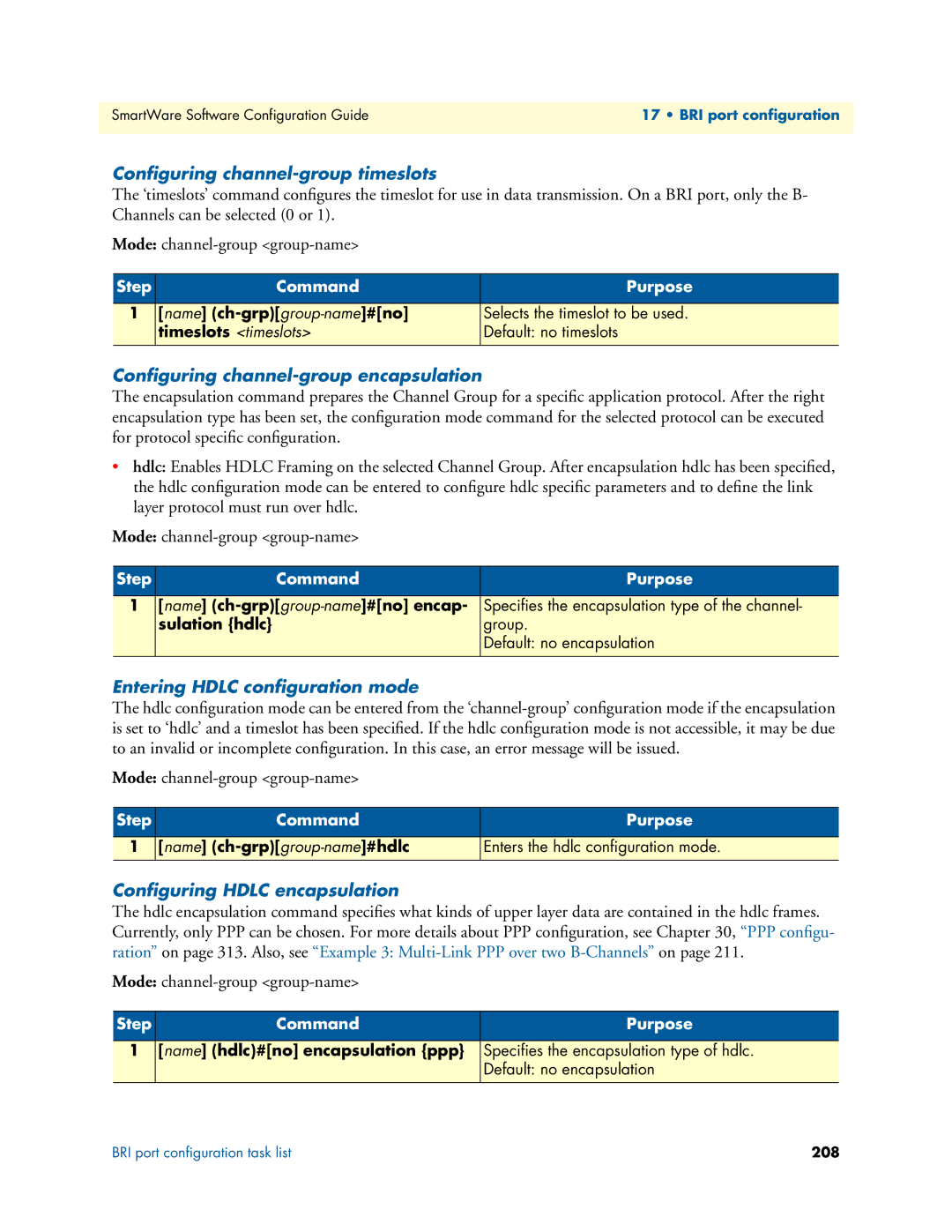
Configuring Channel-Group Timeslots
Configuring Channel-Group Encapsulation
Entering Hdlc Configuration Mode
Mode channel-group group
Mode hdlc
Configuring Hdlc CRC-Type
Configuring Hdlc Encapsulation
Default no encapsulation
PRI Debugging
PRI Configuration Examples
Example 2 RBS without a channel-group
Example 1 Isdn
Example 3 RBS with a channel-group
Example 4 Frame Relay without a channel-group
Example 6 PPP without a channel-group
Example 5 Framerelay with a channel-group
Example 7 PPP with a channel-group
BRI port configuration
BRI port configuration task list
Enable/Disable BRI port
Configuring BRI clock-mode
Configuring BRI Power-Feed
Feed Default disabled
Configuring BRI encapsulation
Creating a channel group
Name ch-grp group-name#no Selects the timeslot to be used
Default no timeslots
Timeslots timeslots
Name#no debug bri
BRI Debugging
Name#show port bri
Example 2 Isdn with manual clock/uni-side settings
Example 1 Isdn with auto clock/uni-side settings
BRI Configuration Examples
Example 3 Multi-Link PPP over two B-Channels
Isdn Overview
Isdn reference points
Isdn reference points
Isdn UNI Signaling
Possible SmartNode port configurations
215
Isdn Configuration Concept
Isdn Layering
Isdn configuration
Enter Q.921 configuration mode
Mode base-mode
Isdn configuration task list
Configuring Q.921 parameters
Enter Q.931 configuration mode
Mode q921
Configuring Q.921 encapsulation
Mode q931
Configuring Q.931 parameters
Nodeq931slot/port#signalling-rule
Nodeq931slot/port#no signalling-rule
Etsi
Pss1old
Configuring Q.931 encapsulation
Debugging Isdn
Face if-name
Control interface
Example being clock slave on uni network interface
Isdn Configuration Examples
Node#show port isdn slot port detail level
Assume the scenario as illustrated in figure
Example Qsig
Example PRI
RBS configuration
RBS configuration task list
Enter RBS configuration mode
Configuring RBS protocol
Mode rbs
Configuring RBS encapsulation
Debugging RBS
Noderbs#no encapsulation cc-rbs
RBS Configuration Examples
Example Configuring RBS Ground Start on a E1T1 port
229
DSL Port Configuration
Line Setup
Configuring PPPoE
Configuration Summary
Profile napt WAN
Using PVC channels in bridged Ethernet mode
Setting up permanent virtual circuits PVC
Using PVC channels with PPPoE
Troubleshooting DSL Connections
Diagnostics
PPPoE access
Link State
Basic IP routing configuration
Basic IP routing configuration task list
Routing tables
Static routing
Policy routing
Displaying IP route information see
Configuring static IP routes
Nodecfg#context ip router Enters the IP router Context
Adds a static route
Deleting static IP routes
Displaying IP route information
Configuring policy routing
0.0/0 172.16.32.2 Static
Examples
Basic static IP routing example
Changing the default UDP port range for RTP and Rtcp
RIP configuration
Routing protocol
RIP configuration task list
Enabling send RIP
Enabling an interface to receive RIP
Specifying the send RIP version
Specifying the receive RIP version
Example Enabling RIP learn host and default
Enabling RIP learning
Enabling RIP announcing
Specifying the default route metric
Enabling RIP auto summarization
Enabling RIP split-horizon processing
Enabling the poison reverse algorithm
Setting the RIP route expiry
3600 Default 180 seconds
Enabling holding down aged routes
Nodeif-ipname#rip route-expiry
Displaying RIP configuration of an IP interface
Displaying global RIP information
252
Access control list configuration
What access lists do
About access control lists
Why you should configure access lists
When to configure access lists
Features of access control lists
Access control list configuration task list
Mapping out the goals of the access control list
Nodepf-acl name#permit ip src src-wildcard any
Where the syntax is
Nodepf-acl name#permit icmp src src-wildcard any
Type type type type code code cos group
Nodepf-acl name#deny icmp src src-wildcard
Any host src dest dest-wildcard any host dest
Where the syntax is as following
Msg name
Type type
Code code
Nodepf-acl name#permit tcp udp sctp src src-wild
Card any host src eq port gt port lt port range
Port lt port range from to cos group cos-rtp group
Nodepf-acl name#deny tcp udp sctp src src
Eq port
Lt port
Gt port
Range from to
Where the syntax is
Displaying an access control list profile
Unbind an access control list profile from an interface
Debugging an access control list profile
Control list profile shall be debugged
Commands that have to be entered are listed below
Denying a specific subnet
Snmp configuration
Simple Network Management Protocol Snmp
Snmp basic commands
Snmp basic components
Snmp management information base MIB
Identification of a SmartNode via Snmp
Network management framework
Snmp tools
Setting basic system information
Snmp configuration task list
271
Setting access community information
Example Setting the system group objects
Ro rw Or read/write access
Setting allowed host information
Specifying the default Snmp trap target
Nodecfg#snmp host IP-address-of-SN security
Nodecfg#snmp target IP-address-of-SN
Using the AdventNet Snmp utilities
Displaying Snmp related information
Using the MibBrowser
AdventNet MibBrowser Settings Button on the Toolbar
Using the TrapViewer
AdventNet TrapViewer displaying received traps
TimeStamp
Enterprise
Generic Type
Specific Type
Standard Snmp version 1 traps
Snmp interface traps
281
Sntp client configuration
Sntp client configuration task list
Selecting Sntp time servers
Defining Sntp client operating mode
Unicast anycast multicast
Defining Sntp local UDP port
Enabling and disabling the Sntp client
Example Enabling the Sntp client operation
Example Disabling the Sntp client operation
Defining Sntp client poll interval
Defining Sntp client constant offset to GMT
Defining the Sntp client anycast address
Name #show clock local
Displays the local time, UTC and the offset of the local
Enabling and disabling local clock offset compensation
Example Enabling the Sntp client root delay compensation
Nodecfg#sntp-client anycast-address ip
Example Disabling the Sntp client root delay compensation
Showing Sntp client related information
Example Showing Sntp client related information
Debugging Sntp client operation
Nist Internet time service
Recommended public Sntp time servers
291
Dhcp configuration
Dhcp configuration
DHCP-client configuration tasks
Enable DHCP-client on an IP interface
DHCP-server and DHCP-client are illustrated in figure
Example Enable DHCP-client on an IP interface
‘configure’ configuration mode
Mode Any
Example Enable Dhcp debug monitor
Release or renew a Dhcp lease manually advanced
Get debug output from DHCP-client
DHCP-server configuration tasks
Configure DHCP-server profiles
Nodepf-dhcpsname#no default
Nodepf-dhcpsname#no netbios
Nodecfg#profile dhcp-server name
Nodepf-dhcpsname#network ip
Use DHCP-server profiles and enable the DHCP-server
Nodepf-dhcpsname#no bootfile boot
Nodepf-dhcpsname#no next-server
All ip-address
Define the Tftp server Option 66 for the DHCP-server
Define the bootfile Option 67 for the DHCP-server
Check DHCP-server configuration and status
Get debug output from the DHCP-server
Configure DHCP-relay
Create/Modify DHCP-Relay profile
Enable/Disable DHCP-Relay Agent
DNS configuration
Enabling the DNS resolver
DNS configuration task list
Server-ip-address
DNS relay diagram
Enabling the DNS relay
307
DynDNS configuration
DynDNS configuration task list
Creating a DynDNS account Configuring the DNS resolver
Configuring the DynDNS server
Configuring basic DynDNS settings
Word
Configuring advanced DynDNS settings optional
Mode DynDNS
Troubleshooting
Defining a mail exchanger for your hostname
312
PPP configuration
314
Creating an IP interface for PPP
PPP configuration task list
Nodeif-ipname#point-to-point
Nodeif-ipname# no tcp adjust-mss
Nodeif-ipname#ipaddress
Nodeif-ipname#ipaddress dhcp
Nodeif-ipname# ipaddress ip-address
Disable interface IP address auto-configuration from PPP
Creating a PPP subscriber
Nodeif-ipname#use profile napt name
Nodecfg # subscriber ppp name
Optional outboundinbound user password
Nodesubscrname# dial inout
Chap pap chappap
Nodesubscrname# no identification
Trigger forced reconnect of PPP sessions using a timer
Configuring a PPPoE session
Tor AC-Name
Case authentication is required
Configuring PPP over a Hdlc Link
Creating a PPP profile
Optional file
Default
Nodecfg #no profile ppp name
Nodepf-pppname#mtu min min max
Nodepf-pppname#mru min min max
Min max max default
Default
Configuring the local and remote PPP Mrru
Name pf-ppp profile# mrru min
Displaying PPP configuration information
Example Display PPP subscriber configuration information
Example Display a PPP profile
Debugging PPP
Nodecfg #show ppp links level
Nodecfg #show ppp networks level
Nodecfg #show pppoe name
Nodecfg #show port interface name
Example Display PPP link information
LCP
Example Display PPP network protocol information
Example Display PPPoE information
Without authentication, encapsulation multi, with Napt
With authentication, encapsulation PPPoE
Sample configurations
PPP over Ethernet PPPoE
Without authentication, numbered interface
With authentication, unnumbered interface
PPP over a Hdlc Link Serial Port
PPP over a Hdlc Link E1T1 Port
PPP Dial-up over Isdn
PPP Dialer
Following command creates a new PPP dialer Mode context cs
Dial-up and login information for a certain
Create a dialer
Create outbound destinations
Configure recovery strategy
Create inbound destinations
Case
Name if-dialerdialer#inbound
Name inboundprovider#local-e164
E164
Name inboundprovider#remote-e164
Example Dial-on demand feature
Debug dialer functionality
Dial-up
Dial-up on demand
Dial-up on monitor
Dial if possible, and never drop Mode context ip/interface
Dial-up nailed
CS context overview
CS context configuration components
CS context configuration task list
Planning the CS configuration
Remote office in an Enterprise network
Configuring general CS settings
Configuring the clock source
Mode Operator execution
Debugging the clock source
Configuring call routing
Selecting PCM law compression
Node sys#clock-sourceslot-number port-number
Reference clock
Creating and configuring CS interfaces
Specify call routing
Configuring dial tones
Configuring voice over IP parameters
Configuring Isdn ports
Configuring FXS ports
Configuring an H.323 VoIP connection
Configuring a SIP VoIP connection
Activating CS context configuration
Nodectx-csswitch#show call-router config detail
Node ctx-csswitch#debug call-router detail level
Nodectx-csswitch#show call-router status detail
Level
SmartNode in an Enterprise network
Planning the CS context
CS Configuration
First we set clock-source to Isdn port 2/3
Configuring general CS settings
Configuring call routing
354
Configuring VoIP settings
Because we need G.723 as codec we enable Dtmf relay
We want to use this profile on our H.323 interfaces
Configuring BRI ports
Configuring an H.323 VoIP connection
Next we configure call signaling
Activating the CS context configuration
Finally, activate the gateway and CS context
TAB-CALLED-NUMBER
Showing the running configuration
Configuration script for our application looks as follows
359
360
361
VPN configuration
Authentication
Encryption
Permanent IKE Tunnels
Transport and tunnel modes
Key management
VPN configuration task list
Creating an IPsec transformation profile
Example Create an IPsec transformation profile
Creating an IPsec policy profile
Procedure To create an IPsec policy profile Mode Configure
Creating/modifying an outgoing ACL profile for IPsec
Configuration of an IP interface and the IP router for IPsec
Displaying IPsec configuration information
Example Display IPsec transformation profiles
Example Display IPsec policy profiles
Debugging IPsec
Example IPsec Debug Output
Main differences between manual & IKE Ipsec configurations
Key management IKE
Creating an Ipsec transform profile
Creating an Isakmp transform profile
Creating an Isakmp Ipsec policy profile
Should be used. Do not specify a peer, if this pol
Icy shall be used for multiple peers in transport
Mode. The peer can either be an IP address or a
Creating/modifying an outgoing ACL profile for Ipsec
Configuration of an IP interface and the IP router for Ipsec
Policy matching
Sample configuration snippet
Use profile acl WANOut out
Debug ike error
Debug ike event
Enabling RTP encryption support
Encrypted Voice Performance considerations
Performance considerations
Mode Context ip /interface if-name
IPsec tunnel, DES encryption
SmartNode configuration
Cisco router configuration
379
380
CS interface configuration
CS interface configuration task list
CS interfaces on the CS context
Nodeif-typeif-name#…
Examples Create CS interfaces and delete another
Nodeif-typeif-name#exit
384
Configuring the interface mapping tables
Service service-name Nodeif- typeif-name #exit
Table table-name
Table in table-name
That shall be applied to all call properties
And/or
Specified direction
Incoming call passing an interface mapping table
Configuring the precall service tables
Call passing an input and an output mapping table
Supplementary service invocation commands
Number to command
Supplementary service invocation command
Repeat to add other special number map
Isdn interface configuration
Isdn interface configuration task list
Isdn interfaces on the CS context
Configuring Dtmf dialing optional
Configuring an alternate Pstn profile optional
Nodeif-isdn if-name#no use profile
Defines an alternate Pstn profile to be used for
Name if-isdn if-name# no call-waiting Disable call-waiting
Configuring ringback tone on Isdn user-side interfaces
Configuring call waiting optional
Disabling call-waiting on Isdn DSS1 network interfaces
Enabling Display Information Elements on Isdn Ports
Configuring Call-Hold on Isdn interfaces
Configuring date/time publishing to terminals optional
Sending the connected party number Colp optional
Defining the ‘network-type’ in Isdn interfaces
Home Office
Isdn Advice of Charge support
398
If there is no tariff information from the network for
All calls
Nodeif-isdnif- name# aoc-d automatic
If there is not charge information from the network
Isdn User Interface Connected to a PBX switch etc
Following table shows an overview of the AOC variants
Isdn Network Interface connected to phones
NoChargeAvailable
Mode interface isdn interface
Isdn DivertingLegInformation2 Facility
Transmit Direction
Receive Direction
Nodeif-isdn#caller-name early-alerting
Nodeif-isdn#caller-name
500
Outgoing Isdn call. This feature is disabled
By default
Nodeif-isdn#caller-name ignore
Absence
FXS interface configuration
FXS interface configuration task list
Configuring a subscriber number recommended
Mode Interface FXS
Configuring caller-ID presentation optional
Configuring flash hook processing optional
Nameif-fxsname#no subscriber
Configuring ringing-cadence optional
Configuring the Message Waiting Indication feature for FXS
Ing-indication stutter-dial-tone Through Stuttered Dial Tone
Mat etsi
Frequency-shift keying
Mat bell
FXS supplementary services description
Call hold Call transfer
Default enabled
Call hold
Call waiting
Tern
Call waiting reminder ring
Drop passive call
Drop active call
Call toggle
Conferencing
Call park
Nameif-fxsname#no drop-passive
Pattern
FXO interface configuration
FXO interfaces on the CS context
FXO services description
Creating an FXO interface
Deleting an FXO interface
Nodectx-csswitch#interface fxo name
Nodeif-fxo name #
FXO interface configuration task list
FXO off-hook on caller ID
Configuring when the digits are dialed optional
Nodectx-csswitch#interface fxo if-name
Nodeif-fxoif-name#
Nodeif-fxo if-name#
Figuration mode
Nodeif-fxoif-name#dial-after dial-tone timeout seconds
Nodeif-fxo if-name#
Nodeif-fxo if-name #ring-number count
Configuring how to detect a call has disconnected optional
Min min-time max max-time
Nodeif-fxo if-name#no connect-signal
Battery-reversal tax-pulse
Configuring the destination of the call
FXO Mute dialing
FXO interface examples
RBS interface configuration
RBS interface configuration task list
Creating/Deleting a RBS interface
Configuring an alternate Pstn profile
Name Face, the ‘no’ form deletes an existing one
Mode Interface RBS
Configuring additional disconnect signals
Configuring an alternate Tone-Set profile
Configuring B-Channel allocation strategy
Nodeif-rbsif-name#no dial-after dial- tone timeout seconds
Node#no debug ccrbs datapath error signaling
Configuring number of Rings before Off-Hook
Configuring ready to dial strategy
Node#show ccrbs call if-name detail level
Prints information about ongoing calls on
Selected interface
Node#show ccrbs interface if-name detail
Interface configuration
Interface configuration task list
Binding the interface to an H.323 gateway
Examples Define the IP address of the remote H.323 entity
Configuring an alternate VoIP profile optional
Configuring CLIP/CLIR support optional
Node if- h323 if-name #itc rx 3k1
Specifies the information transfer capability to
Node if- h323 if-name #itc tx 3k1
Enabling ‘early-proceeding’ on H.323 interfaces
Enabling the early call connect optional
Nameif-h323if-name#early-proceeding
Nameif-h323name#early-connect
Enabling the early call disconnect optional
Enabling the via address support optional
Nodeif-h323if-name# remoteport port
Configuring status inquiry settings optional
Ing connection should be established
AOC-D Support for H.323
Nodeif-h323if-name# no aoc-d
Mode context cs/interfce h.323 interface-name
Nodeif-h323if-name# no aoc-d emit
SIP interface configuration
SIP
SIP interface configuration task list
Binding the interface to a SIP gateway
Configure a remote host
Nodeif-sipif-name# no bind context
Sip-gateway gw-name
Using an alternate VoIP profile Optional
Configuring a local host Optional
Nodeif-sipif-name# no remote host
Nodeif-sipif-name# no local host
Using an alternate SIP profile Optional
Using an alternate Tone-Set profile Optional
Nodeif-sipif-name#use profile voip
Nodeif-sipif-name#use profile sip pro
Configuring address translation Optional
Configuring early call connect / disconnect Optional
Mapping call-control properties in SIP headers
Configuring Isdn Redirecting Number Tunneling Over SIP
Mapping SIP headers to call-control properties
Header
Updating caller address parameters
SIP Diversion Header
450
SIP Refer Transmission & Isdn Explicit Call Transfer support
452
AOC Over SIP Optional
Name if-sip interface#no aoc-d
Accept
Name if-sip interface#no aoc-d emit
Enabling the session timer Optional
Enabling the SIP penalty-box feature Optional
Default zero-ip
Configure the SIP hold method Optional
Call router configuration
Call router configuration
458
Direct call routing vs. advanced call routing
Call router configuration task list
Map out the goals for the call router
Configure address completion timeout
Enable advanced call routing on circuit interfaces
Configure general call router behavior
Example Configure address completion timeout
Address-completion timeout timeout
Digit-collection timeout timeout
Digit-collection terminating-char char
Procedure To configure number prefix Mode Context CS
Configure number prefix for Isdn number types
Example Configure number prefix
National-prefix prefix
Configure call routing tables
Create a routing table
Calling-e164
Called party number routing table
Example Called party number routing table
Regular Expressions
Symbol Description
Digit Collection
Digit Collection Variants
Example Digit collection of any number
Dialed Selected Description Number Entry
Calling party number routing table
Number type routing table
Numbering plan routing table
Name routing table
IP address routing table
Presentation Indicator Routing Table
URI routing table
Smith must be escaped with a backslash \, because
Dot . means ‘any character’ in a regular expression
Screening Indicator Routing Table
Information transfer capability routing table
478
Default Any other unhandled case Mode context cs
Time of day routing table
Day of Week Routing Table
Example Day of week routing table
Procedure To delete an entire routing table
Node ctx-cs switch #routing-table
Deleting routing tables
Resulting running-config is
Node ctx-cs switch #no routing-table
Example Remove an entire routing table
Configure mapping tables
Delete the routing table table-name
Type Description Input-Type Description Output-Type
Sets the display name of the called
Mapping table examples
Example Called and calling party manipulation mapping table
To E.164 Mapping Tables
Input-type to output-type table-name
Away the input-type and output-type
486
487
Custom SIP URIs from called-/calling-e164 properties
Other mapping tables
Deleting mapping tables
Node ctx-cs switch #mapping-table
Enter the mapping table from which you want to remove an
Example Remove an entire mapping table
Procedure To delete an entire mapping table Mode Context CS
Creating complex functions
Example Create a complex function
Deleting complex functions
Example Remove an entire complex function
Digit collection & sending-complete behavior
Sending-Complete
Ingress interface
Call-Router
323
True
Yes
123#
Egress Interface
Mode context cs / interface sip
Complete-indication clear
Creating call services
Creating a hunt group service
Hunt group service
Node ctx-cs switch #service hunt
Call dest-service service-name
Cause cause
Call dest-interface interface-name
Default Behavior Class Cause Hunt Description Group Service
Normal Event
No-user-responding Drop original call
Service or
Resource
Unavailable
Option Not
Implemented
Invalid Message
Protocol Error
Interworking
Creating a distribution group service
Distribution group service
Node ctx-cs switch #service distribu
Nodesvc-huntservice-name# route call
Dest-service service-name
With the first configured destinations
Distribution-Group Min-Concurrent setting
Call-router ‘limiter’ service
Priority service
‘Limiter’ service diagram
Priority service diagram
CS Bridge service-‘VoIP Leased Line’
Bridge
Bridge services diagram
Configuring the service second-dialtone
Configuration Example
Deleting call services
Activate the call router configuration
Test the call router configuration
Example Create and test a routing table
516
Call routing example network
518
CS context and call router elements
520
Configure partial rerouting
Mode context cs/interface sip
Enable push-back aaa service
Mode context cs/service aaa
Call reroute
Enable push-back bridge service
Enable push-back distribution-group service
Enable push-back hunt group service
Enable push-back limiter service
SIP call-router services
SIP conference-service
SIP conference-service configuration task list
Entering conference-service configuration mode
Name ctx-csswitch#no service sip
SIP location-service
Mode Service SIP conference
Configuring the conference server
Ference-server host-name port
SIP location-service configuration task list
Entering SIP location-service configuration mode
Binding a location service
Configuring the hunt timeout
Configuring multi-contact behavior
Seconds
Tone configuration
Tone-set profiles
Tone configuration task list
Configuring call-progress-tone profiles
Procedure To configure a tone-set profile Mode Configure
Configure tone-set profiles
Procedure To assign a tone-set profile to a Pstn interface
Enable tone-set profile
For which a tone indication can be provided
Show call-progress-tone and tone-set profiles
Example Show tone-set profile
Node#show profile call-progress-tone
Name Cific with name name
Following example shows how to display the tone-set profile
536
FXS port configuration
Shutdown and enable FXS ports
Configure country-specific FXS port parameters
Bind FXS ports to higher layer applications
Netherlands
Mode IC voice in system
Enter FXS port configuration mode
Other FXS port parameters
Nodeconfig#port fxs slot port
Example
FXO port configuration
Shutdown and enable FXO ports
Bind FXO ports to higher layer applications
Configure country specific FXO port parameters
Other FXO port parameters
Nodeconfig#port fxo slot port
Nodeprt-fxo slot/ port#use
Enter FXO port configuration mode
Gateway configuration
Gateway between IP and CS contexts
Mode Gateway H.323
Enable the gateway
Gateway configuration task list
Binding the gateway to an IP interface
Configure registration authentication service RAS Optional
Node gw-h323h323#gatekeeper-discov
Configure H.235 Security optional
Ery auto gkid
Procedure To enable H.235 security on H.323 gateway
235 configuration
\getcryptopassword h235-password mas
Word h235-password encrypted
Node gw-h323h323#h235security master
Node gw-h323h323#h235security pass
Default setting is
Command show h235-securityshows the current setting
Signaling message
Detail debug-level
Advanced configuration options optional
Enabling H.245 Tunneling
Enabling the fastconnect procedure
Enabling the early H.245 procedure
Nodegw-h323h323#h245-tunneling Enables H.245 tunneling
Nodegw-h323h323#faststart Enables the fastconnect procedure
Configuring the traffic class for H.323 signaling
Setting the response timeout
Nodegw-h323h323#call-signaling-port
Port Naling connections
Nal gateway
Setting the connect timeout
Istration
Nodecfg#debug gateway h323 error
Nodecfg#debug gateway h323 signaling
H323 status detail level
Nodecfg#debug gateway h323 tpktchan
Context SIP gateway overview
Routing Architecture
Enter configuration mode
Context SIP Gateway configuration task list
From-URI-Host equal Remote Request-URI-Host equal Local
Creating a context SIP gateway
Mode Context SIP Gateway
Mode Transport Interface
Creating a transport interface
Configuring the IP binding
Configuring a spoofed contact address
Binding location services
Enabling/disabling the context SIP gateway
Troubleshooting
Debug commands
Show status information
Node#show context sip-gateway gw
Configuration Examples
Example
Outbound Authentication
Inbound Authentication
Outbound Registration
569
Inbound Registration
B2B User Agent with Registered Clients
572
VoIP profile configuration
VoIP profile configuration
VoIP profile configuration task list
Creating a VoIP profile
Nodecfg#profile voip name
Nodepf-voip name#
Configure codecs
Procedure Remove a codec from the list Mode Profile VoIP
Mode Profile VoIP
Procedure Insert a codec at a specific position in the list
Configuring the transparent-clearmode codec
Mode VoIP name
Configuring the Cisco versions of the G.726 codecs
Defaultrtpsignaling
Configuring Dtmf relay
Configuring RTP payload types
Nodepf-voip pf-name#dtmf-relay
Configuring RTP payload type for transparent-clearmode
Configuring RTP payload type for Cisco NSE
Configuring Cisco NSE for Fax
Nodepf-voip name#rtp payload-type nse
Configuring the dejitter buffer advanced
Jitter and dejitter buffer
Procedure Configure the dejitter buffer
Adaptive
Max-delay
Dejitter buffer is allowed to introduce. This setting
Enabling/disabling filters advanced
Is valid for all modes
Configuring Fax transmission
Illustrates the difference between Fax relay and Fax bypass
Fax relay and Fax bypass
Nodepf-voipname#fax transmis
Sion bypass g711alaw64k
Nodepf-voipname#fax dejitter
Nodepf-voipname# fax transmis
Mode profile voip profile-name
Volume
CED retransmission
Retransmission number
No-Signal Retransmission
Mode profile voip pf-name
Method default v150-vbdnse Default default
Fax bypass method
Modem bypass method
Configuring modem transmission
Nodepf-voip name#modem trans
Mission bypass g711alaw64k
Configuring the traffic class for Voice and Fax data
Configuring IP-IP codec negotiation
Home office in an enterprise network
Home office in an enterprise network
Description
Show the configured profile
Home office with fax
Soft phone client gateway
595
Disable Dtmf relay Show the configured profile
Pstn profile configuration
Pstn profile configuration task list
Creating a Pstn profile
Configuring the echo canceller
Procedure Disable echo cancellation Mode Profile Pstn
Procedure Configure voice output gain
Configuring output gain
600
SIP profile configuration
Entering the configuration mode for a SIP profile
SIP profile configuration task list
Mapping from a SIP disconnect cause
Namecfg#no profile name name
Mapping to a SIP cause
Mapping from a SIP redirection reason
Mapping to a SIP redirection code
Q931-cause to sip-cause
Authentication Service
Authentication Service configuration task list
Creating an Authentication Service
Configuring a Realm
Configuring the authentication protocol
Creating credentials
Location Service
Location Service configuration task list
Creating a Location Service
Adding a domain
Domain Examples
Mode Identity
Creating an identity
Alias
Authentication outbound face
Bound
Mode Authentication outbound
Authentication inbound face
Nodeauthout#authenticate authentica
Nodeauthout#authenticate index
Mode Authentication inbound
Nodeauthin#authenticate authentica
Nodeauthin#authenticate index
Nodeauthin#no authenticate index
Mode Registration outbound
Registration outbound face
Noderegout#proxy host port
Strict-route
Port strict-route
Noderegout#proxy index down posi
Noderegin# no lifetime default sec
Registration inbound face
Nodeidentityname# no registration
Inbound
Mode Call outbound
Call outbound face
Nodecallout#proxy host port
Nodecallout#proxy index host
Mode Call inbound
Mode Call outbound
Call inbound face
Creating an identity group
Inheriting from an identity group to an identity
Configuring the Message Waiting Indication feature for SIP
Subscription
Mode Message inbound
Notification
Mode Message inbound
Message Waiting Indication through Call-Control
This configuration example, inheritance is used
VoIP debugging
Debugging strategy
Following command will disable the filter completely
Filtering debug monitor output
Verifying IP connectivity
Example Verify IP connectivity
Debugging call signaling
Debugging Isdn signaling
Unit#debug ccisdn signaling
Overview Isdn debug monitors
Verify an incoming call
Line
Verify an outgoing call
630
Verify Isdn layer 2 and 3 status
Isdn layer 2 and 3 can be verified using a show command
Debug isdn event slot port all layer2 layer3
Debugging FXS Signaling
Overview FXS debug monitors
Stops
For most verbose output
State to RINGING, that means it has accepted the call
Debugging H.323 Signaling
Overview H.323 debug monitors
635
636
637
Debugging SIP signaling
Using SmartWare’s internal call generator
Debugging voice data
No debug media-gate
Way dejitter
Way control detail level
Way switch
Way error
Way rtp
Way dsp
How to submit trouble reports to Patton
Check system logs
643
Appendix a Terms and definitions
SmartWare architecture terms and definitions
Also release
Pression
Ory
Buffer
Pots
Tftp
Appendix B Mode summary
Mode overview, 1
Mode Overview, 2
Mode Overview, 3
Appendix C Command summary
Ebnf syntax
New Configuration Commands
Show command history
Other
Show help
Appendix D Internetworking terms & acronyms
Abbreviations
Numeric
DSS1
MSN
SAR
Appendix E Used IP ports & available voice Codecs
Telnet
Used IP ports
Webserver
Available voice codecs