MGC Manager
Catalog No. DOC2066F Version
Page
Page
Table of Contents
Monitoring On Going Conferences
Operations Performed During On Going Conferences
Meeting Rooms and Entry Queues
IVR and Entry Queue Services
Table of Contents
VoicePlus Overview
About the MGC Manager User’s Guide VoicePlus Edition
VoicePlus Main Features
Security features
System Requirements
Prerequisites
VoicePlus Commands Shortcut Keys
Ctrl + C
Command Shortcut Key Function
Ctrl + N
Ctrl + O
Ctrl + U
Ctrl + R
Ctrl + T
Ctrl + M
F12
User’s Guide Conventions
F10
F11
VoicePlus Overview
To set the MGC Manager to Audio Look & Feel
Audio Look & Feel
Default Reservation Templates
Audio Only Conferences
Reservation Templates
Reservations in Database Window
Display the Reservations Database window
MGC Manager User’s Guide VoicePlus Edition
Undefined Dial-in Isdn Participants
Connecting to an On Going Conference
Undefined Dial-in H.323 Participants
VoicePlus Overview
Conference Scheduling Methods
About Conferences
Attended and Unattended Conferences
On Going Conferences
Reservations
Unattended Conference
Participants Queue
Conference Types
IVR and Entry Queue Services
MCU Configuration and Audio Only Conferences
Participant Roles
Participant Connection to Conference
Dial-in Participant
Dial-out Participant
Network
Direct Dial-In Access
Entry Queue Access
Dial-in connection via Entry Queue with Numeric ID
IVR Access
Standard with IVR Service Meeting Room with IVR Service
Conference Access for Dial-out Participants
To define an On Going Audio Only Conference
Defining New On Going Audio Conferences
MGC Manager User’s Guide VoicePlus Edition
Field/Option Description
General Properties
MCU
Entry Queue
Number, or any other required information
Properties and is also saved to the CDR file as part
Settings Parameters
Encryption
General Settings Basic
Undefined dial-in participants can connect only if
Between the VTX 1000 and the conference is
General Settings Advanced
Through the WebCommander
Media Settings Basic
Unit
Participants
To add participants to a conference
Conference Properties Participants
Click the Delete Participant button
Click the Add Participant button
Defined as well as undefined participants
To list participants from the database
To add participants from the User Template file
Recording
To enable recording for an On Going Conference
Completing the Conference Definition
Connection Type Conflict Criteria
Resolving Scheduling Conflicts
Participants Scheduling Conflicts Table
Participants Scheduling Conflicts table, select an action
To resolve the scheduling conflicts for participants
To view the On Going Conferences
Listing On Going Conferences
To schedule a new Reservation
Scheduling a New Reservation
Define the following parameters
Conference Properties Meet Me Per Conf dialog box appears
Conference Properties Settings dialog box appears
To define the recurrence parameters for the reservation
Defining Recurrent Reservations
Reservation Recurrence Settings
End After number of Occurrences Specify
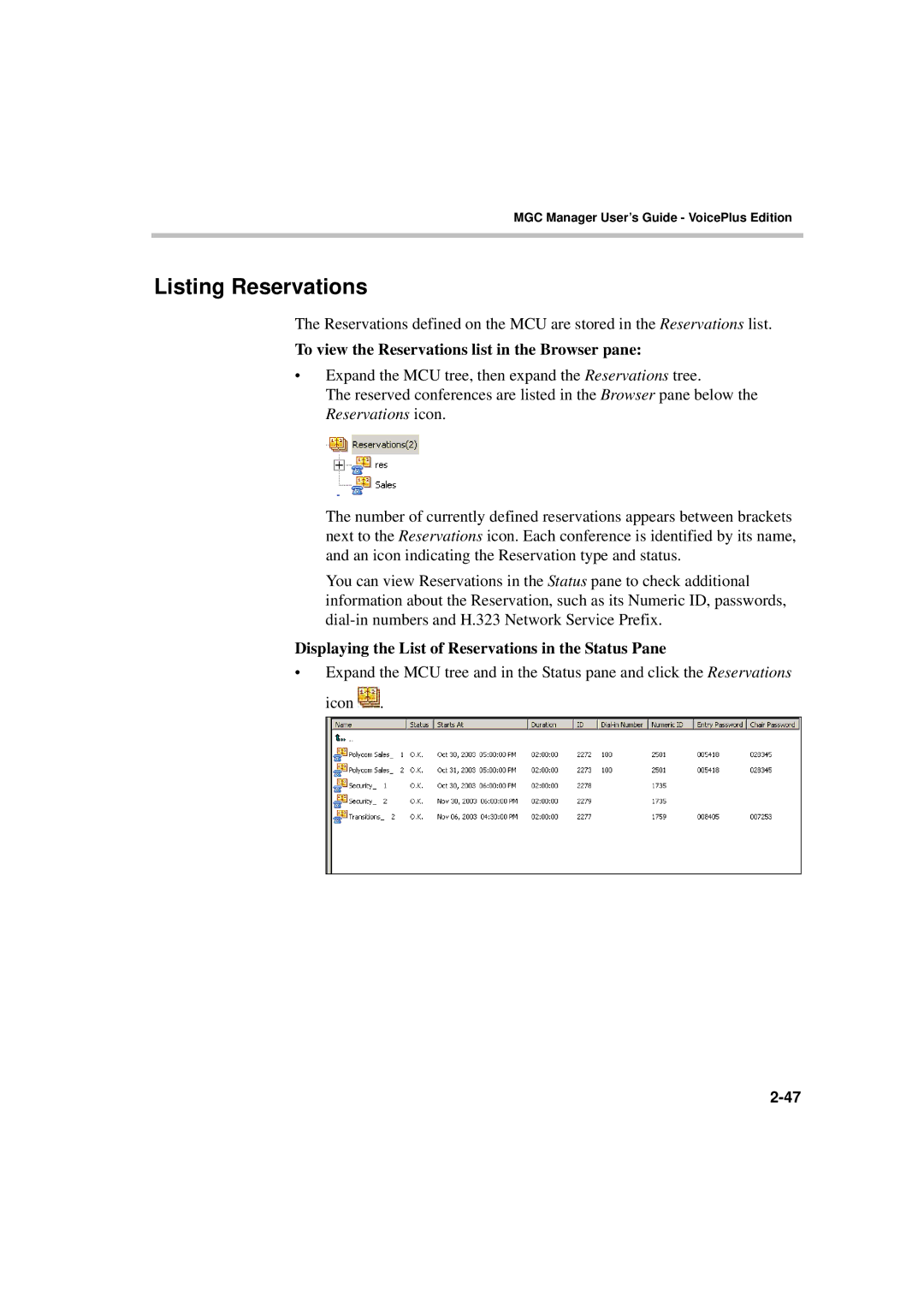
Listing Reservations
To view the Reservations list in the Browser pane
Displaying the List of Reservations in the Status Pane
End of Conference Reminder
To define the End of Conference Reminder
Conference End Time Alert dialog box opens
To define a new participant
Defining Participant Properties
Participant Properties Identification dialog box opens
ISDN/PSTN/T1-CAS Participant Definition
10 ISDN/PSTN/T1-CAS Properties and Identification Dialog Box
9SalesExtp345p222p
Audio at connection time is set to 5. One movement
VIP
Optional Click the Advanced tab
International Network Specific Subscriber
Abbreviated Taken from Service. These options
AGC
IP H.323 and SIP Participant Definition
SIP Only
Only
Defaults and loaded to the MGC Manager
VIP, to distinguish participants who require special
IP Participant Properties Advanced dialog box opens
Auto Gain Control AGC mechanism regulates
Participant for a Reservation template in the User
Dialing-in from an H.323 Endpoint
Simple Dial-in Using the IP Card Address
Advanced Dial-in
H.323 Participant Advanced Dial-in
Listing Participants
Monitoring On Going Conferences
General Monitoring
Listing On Going Conferences in the Status Pane
To view On Going Conferences in the Status pane
Click the On Going Conferences icon
Operator Conference the name
Column Name Description
General Conference and Participant Monitoring
Monitoring On Going Conferences
Column Icon Indication Description Name
Conference Indicators
Participant Indicators
Participant or a chairperson
Also displayed in the Status pane. The possible statuses
Resources currently installed
ISDN/T1
Audio Indicates whether the participants audio is connected
Information is cleared when the participant begins to speak
These statuses are primarily used in attended conferences
Participant’s Audio Status
Monitor Filter
Expand the On Going Conferences list
Participant Monitoring Filter dialog box opens
Filtering Option Description
5Monitored Participant Statuses
Secure Conference Mode
Automatic Monitoring of Conferences
To toggle between automatic and manual monitoring
Icon Indication Description
Audio Tones
Noisy Line Detection Mechanism and Automatic Muting
Conference Properties General dialog box opens
Participants Queue
Conference Level Monitoring
To view the parameters of an On Going Conference
Conference Properties Scheduler dialog box opens
You can view the following parameters
Conference Properties Ongoing State dialog box opens
Field/Option Description
Participant Level Monitoring
Participants Properties Identification dialog box opens
Monitoring ISDN/Telephone Participants
Isdn Participant Properties Identification
Participant Properties Connection Info1 dialog box opens
Isdn Network Service configuration
Participant Properties Connection Info2 dialog box opens
Attending
Resource Details
Participant Properties Resource Details dialog box opens
Net Resources
Participant Properties Disconnection Cause dialog box opens
Participant Hang Up The participant
Checking the Status of VoIP Participants
To monitor the status of VoIP participant
Participant’s Properties Identification dialog box appears
Name Indicates the participant’s name User Defined
Click the Connection Info1 tab
14 VoIP Participant Properties Connection Info1
Click the Connection Info2 tab
15 VoIP Participant Properties Connection Info2
Participant Properties H245 tab opens
16 VoIP Participant Properties H245
H.323 Participant Properties Disconnection Cause tab opens
Video
Operations Performed During On Going Conferences
Management Functions Overview
Attended Conferences
Unattended Conferences
Participant and Conference Level Operations
Participant Level Operations
Conference Level Operations
Operations Performed During On Going Conferences
Participant Level Operations
Making Dial-Out Connections
To establish a dial-out connection
To toggle between Connection Types
Changing Participant Connection Types Dial-In/Dial-Out
To disconnect a participant
Disconnecting Participants from Conferences
Naming Undefined Dial-in Participants
To delete a participant
To name a Meet Me dial-in participant
Right-click the participant icon, and then click Properties
Changing the Disconnected Participant’s Properties
Moving a Participant from one Conference to Another
To move participants using the right-click menu
Designating an Exclusive Speaker
To change a participant’s status to conference chairperson
Changing Participant’s Status to Conference Chairperson
To revert the chairperson’s status to regular participant
To designate a participant as a VIP
Designating a VIP Participant
To revert the VIP status to regular participant
Adjusting Participant’s Broadcasting and Listening Volume
Muting and Unmuting Participant’s Audio
To mute/un-mute participant’s audio
Using the participant right-click menu
Participants Properties Connection Info2 dialog box opens
From the Participant Properties dialog box
Enabling/Disabling Auto Gain Control AGC
Modifying the Participant’s User Defined Properties
Adding New Participants to a Conference
Conference Level Operations
From the Conference Properties dialog box
Using the Conference right-click menu
Participant Properties dialog box opens
From the Conference toolbar
Conference Properties Participants dialog box opens
MGC Manager User’s Guide VoicePlus Edition
Operations Performed During On Going Conferences
MGC Manager User’s Guide VoicePlus Edition
Muting Dial-In Participants Upon Connection
To activate the Mute Meet Me Parties feature
To cancel the Mute Meet Me Parties feature
Click Update Remark
Adding Remarks During an On Going Conference
To enter and save a remark during an On Going Conference
Locking and Unlocking a Conference
To lock and unlock an On Going Conference
Using the Conference toolbar
From the Conference Properties dialog box
Operations Performed During On Going Conferences
Controlling Q&A Queues with the Toolbar
Managing Question-and-Answer Sessions
Function Button Description
Q&A toolbar contains the following buttons
MGC Manager User’s Guide VoicePlus Edition
Operations Performed During On Going Conferences
To change the participant’s position in the Q&A queue
Changing Participant’s Position in Q&A Queue
Ending Participant Questions
To remove a participant from the Q&A queue
Removing Participants from the Q&A Queue
To end the Q&A session and clear the queue
Managing Voting Sessions
To manage a voting session conference
Conducting a Voting Session
Command buttons let you select optional operations
Choices
Click Start Voting
Voting Results Parameters
To view voting results
Viewing and Saving Voting Results
To save the voting results file
To view the voting results file
Placing a Conference On Hold
To place an On Going Conference On Hold
MGC Manager User’s Guide VoicePlus Edition
To modify the conference general parameters
Modifying Conference General Parameters
Changing the Conference Duration
To manually extend an On Going Conference
Open the Conference Properties dialog box
To manually terminate a conference manually
Ending a Conference before its Scheduled Termination Time
Rescheduling Conference Reservations
To reschedule a conference reservation
Reservation Properties dialog box opens
To delete a single recurring reservation
Deleting Recurring Reservations
Using the Recurrent Reservation right-click menu
Using the Reservations right-click menu
To delete all recurring reservations
To print details of a single conference
Printing Conference Data
MGC Manager User’s Guide VoicePlus Edition
Operations Performed During On Going Conferences
To print details of all On Going Conferences or Reservations
Dtmf Guidelines
Managing Conferences Using Dtmf Codes
Secure conference
New voting session
Enable Roll Call
Override Mute All But Me
Service Dtmf Codes dialog box. The same
Unmute and Return to Conference
Modifying Conference and Chairperson Passwords
Using Dtmf Codes in Cascading Conferences
User Action IVR Message
Request Dtmf Help Menu
Dialing Out to Invite Participants Invite Session
To invite participants to join the conference
Chairperson Initiated Blast Dial-out
Managing Secure Mode Conferences
Roll Call
Roll Call Guidelines
Code
Operation Default Description
Operations Performed During On Going Conferences
Meeting Rooms
Meeting Rooms and Entry Queues
Entry Queues
MGC Manager User’s Guide VoicePlus Edition
To define a new Meeting Room
Defining a New Audio Only Meeting Room
Click the Settings tab
Click the Meet Me Per Conf tab
Click the plus
Plus
To define Meet Me ISDN/T1-CAS Services
Option Description
Field/Option Parameter
To assign the H.323 Service Prefix to the conference
Listing Meeting Rooms
To view the Meeting Rooms list in the Browser pane
To view the Meeting Rooms list in the Status pane
Meeting Rooms and Entry Queues
To define a new Audio Only Entry Queue
Defining a New Audio Only Entry Queue
Entry Queue Properties dialog box opens
To automatically assign the Numeric ID
Ad Hoc Conferencing and External
Enabling Encryption for Entry Queues
To manually assign Dial-in numbers to the Entry Queue
To view the list of Entry Queues in the Status pane
Listing Entry Queues
Dialing in to an Entry Queue
To view the list of Entry Queues in the Browser pane
Participant
MGC Manager User’s Guide VoicePlus Edition
Meeting Rooms and Entry Queues
IVR and Entry Queue Services
Directly
Conference Access
IVR/Entry Queue Stages
Operations Performed Using IVR Services
Dtmf Enabled Action Permission
Using Roll Call
No Other Participants Indication
Using SilenceIT
Conference On Hold
Admittance during a Roll Call
Enabling SilenceIT
IVR Requirements
Hardware
Audio File Conversion
Expand the MCU Configuration tree
Defining IVR Software Module Properties
To define the IVR Properties
To download Audio Message files
Message Message Type Description Category
Conference when performing various operations, such as
Roll Call option is enabled for a conference
Been detected as noisy and has
MGC Manager User’s Guide VoicePlus Edition
Setting IVR Message Services
Defining a New IVR Message Service
To define a new IVR Message Service
IVR Service Properties Global
To determine if the system should request
MGC Manager User’s Guide VoicePlus Edition
IVR Service Properties Welcome Message
Select the appropriate audio files and options
Click Next Conference Password dialog box opens
IVR Service Properties Conference Password
Field/Option Description
Message Type Message Description
To end and cannot be extended
Anytime
Participant Menu
IVR Service Properties Operator Assistance
Click Next Roll Call dialog box opens
Roll Call Description Message
From the drop-down list, select the appropriate audio file
Roll Call Description Message
SilenceIT Description Message
Noise detection level and return to the conference
MGC Manager User’s Guide VoicePlus Edition
To list the IVR Message Services
Listing IVR Message Services
To select the default IVR Service
Setting an IVR Message Service as Default
To modify the properties of an IVR Service
Modifying IVR Message Service Properties
To assign an IVR Service to an Audio Only conference
Assigning IVR Services to Conferences
To set the new Entry Queue Message Service
Defining a New Entry Queue Message Service
IVR
Entry Queue Message Service dialog box opens
Option Description
12 IVR Properties Welcome Message
13 Entry Queue Properties Conference ID
ID or password
14 IVR Properties Operator Assistance Messages
Assigning Entry Queue Services to an Entry Queue
Connecting to a Conference from an Entry Queue
To view the status of the audio messages
Viewing the Audio Messages Status
Messages Occupancy pane shows
Expand the IVR Message Services tree
Printing IVR/DTMF Codes
To print the list of Dtmf codes
IVR and Entry Queue Services
Message Type Message Text File Name
Default IVR Prompts and Messages
PINRQST.ACA
NEWINVLD.ACA
SELFMUTE.ACA
LDRHP1A.ACA
PRTCHP.ACA
INVITHP.ACA
NAMERCRD.ACA
SLNRTMUT.ACA
IVR and Entry Queue Services
Attended Conferencing
Attended Conferencing
Entity Description
Requirements for an Attended Conference
Assistance
Wait for operator
To define an On Going Operator conference
Defining an Operator Conference
Conference Properties Settings dialog box opens
Conference Properties Participants dialog box opens
Attended Conferencing
Setting the Entry Queue to Attended Mode
Setting the Conference Connection to Attended Mode
Participants Queue Management
Listing Participants in the Participants Queue Window
To display the Participants Queue window
Column Description
From the conference to the Participants Queue or
Participants Queue Toolbar
Participant Queue Filter Toolbar
Button Function Description
To define Participants Queue filters in the Database
Using Participants Queue Filters
Participants Queue Filter dialog box opens
Click the Participants Queue Filter button
Dial-In Numbers
Participant Status in Participants Queue
Field/Option Description
Field/Option Description Actions
Filter Name
Public Filter Name
To use filters
To modify a filter
To delete a filter
To move a participant to the Operator conference
Attended Participants Dialog Box
Field/Option Description Attended Participant
Field/Option Description
Conferences
Operator
All Ongoing Meetings + 12h + MRs
Ongoing meetings + 12h reservations
Actions
VIP + Requested Help + Time Participants
Automatically moved to the Operator conference for
To connect a participant to his/her destination conference
Move To Home Conf
To move a participant to the Home conference
MGC Manager User’s Guide VoicePlus Edition
To place a participant On Hold
To end the Join state of the operator
To join a conference as operator
Browser, Status, and Monitor pane, On Going Conference list
Selecting the Participants to Manage
MGC Manager User’s Guide VoicePlus Edition
Moving a Participant to the Operator Conference
Performing Operations using the Right-Click Menu
Moving a Participant to the Home Conference
Using the To Home Conference option in the right-click menu
Using the Move option in the right-click menu
To place a participant on Hold in the Operator conference
Placing a Participant On Hold
MGC Manager User’s Guide VoicePlus Edition
Button Operation
Performing Operations Using the Participants Queue Toolbar
Performing Operations Using Shortcut Keys
To drag and drop a participant to the Home conference
Moving a Participant Interactively
Moving Multiple Participants to the Home Conference
To drag and drop a participant to the Operator conference
Using the Participants Queue toolbar
Attended Conferencing
Recording
System Setup
Recording
Recording System Setup Procedures
Conferencing MCU Setup
ReadiRecorder
ReadiRecorder to
Defining a Recording Link
Setting up Recording for Conferences
To define a new recording link
Isdn
URL ID
Alias and Recording Service Name The H.323
To define recording functions for an IVR Service
Defining Recording Functions in IVR Service
Default service
To enable recording for a conference
Enabling Recording for a Conference
Conference Properties Recording dialog box opens
Recording
To enable recording
Recording with MCU Version
Conference Properties- Participants dialog box opens
Recording
Recording and Playback Using Prairie Systems
From the Conferencing Service
From Prairie Systems
To define a dial-out recording port
Defining a Recording Port Participant
MGC Manager User’s Guide VoicePlus Edition
To record a conference
Participant Properties Advanced dialog box opens
To initiate a playback of a Prairie recording
To stop recording
SysConfig system.cfg dialog box opens
Modifying System.cfg
To modify the ReadiRecorder system.cfg
External DB
Audio Plus
Recording
General
Immediately, that is
Conferencing MCU system.cfg flags
Recording
Abbreviation Explanation Term
Appendix a Glossary
BAS
CAS
Procedures and describes network maintenance functions
LAN
Pots
WAN
Appendix a Glossary

 .
.