7
Configuring a 1x1 ATM Wide Area Network
|
| NOTE: For help on the configuration process, click the Help button on the | |||
|
| active dialog box or press the F1 key. |
|
| |
Gathering the IP |
| Before starting the configuration procedure in ConfigManager you | |||
Addresses |
| will need to gather the IP addresses for your network. The IP host | |||
|
| addresses and the completed UltraNet Edge Storage Router ATM WAN | |||
|
| Configuration Worksheet from Appendix J will be used in the | |||
|
| configuration process. The worksheet is referred to as the ATM WAN | |||
|
| Configuration Worksheet throughout the remainder of this chapter. | |||
|
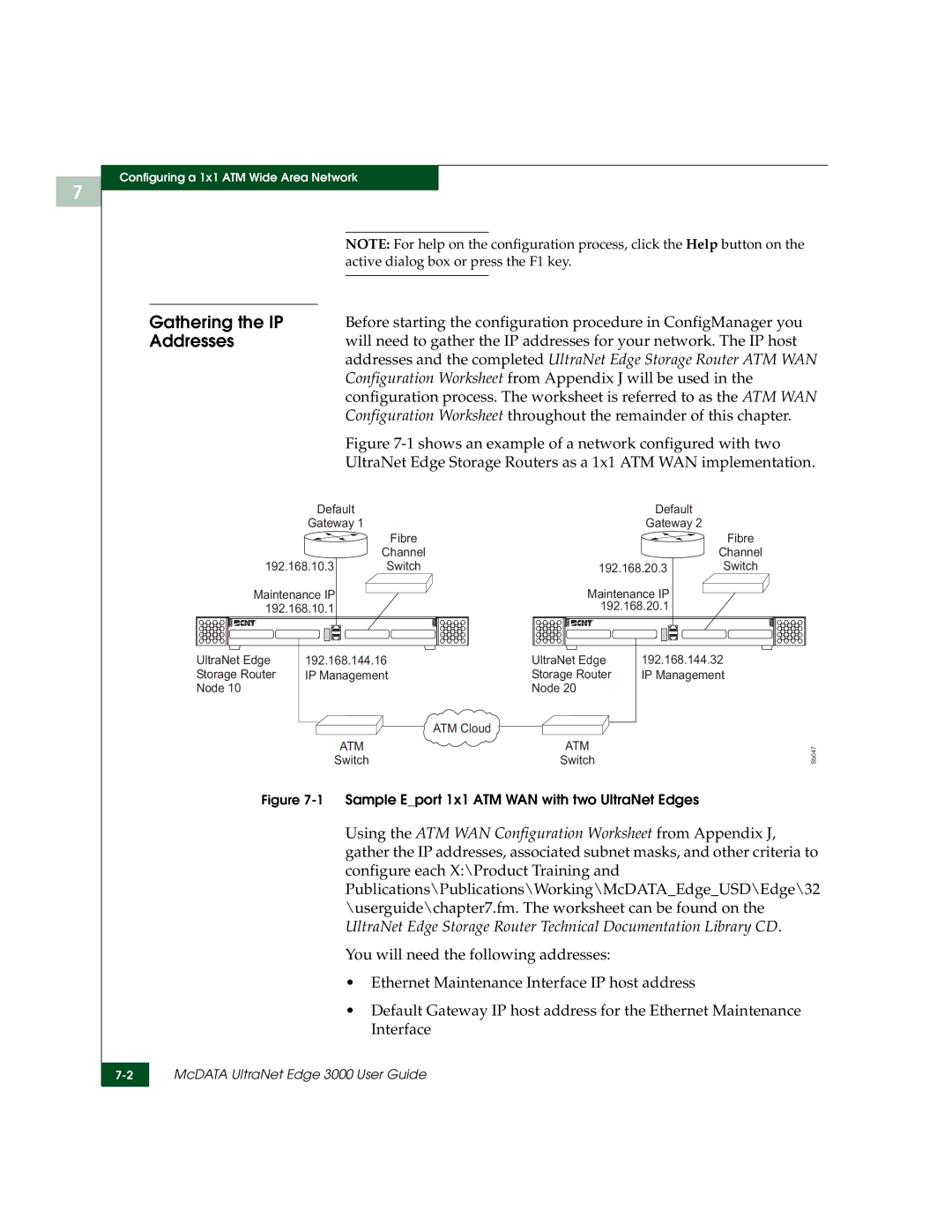
| Figure | |||
|
| UltraNet Edge Storage Routers as a 1x1 ATM WAN implementation. | |||
| Default |
| Default |
| |
| Gateway 1 |
| Gateway 2 |
| |
|
| Fibre |
|
| Fibre |
|
| Channel |
|
| Channel |
192.168.10.3 | Switch | 192.168.20.3 | Switch | ||
Maintenance IP |
| Maintenance IP |
| ||
192.168.10.1 |
| 192.168.20.1 |
| ||
UltraNet Edge | 192.168.144.16 | UltraNet Edge | 192.168.144.32 | ||
Storage Router | IP Management | Storage Router | IP Management | ||
Node 10 |
|
| Node 20 |
|
|
|
|
| ATM Cloud |
|
|
|
| ATM | ATM |
| Sb047 |
| Switch | Switch |
| ||
Figure 7-1 Sample E_port 1x1 ATM WAN with two UltraNet Edges
Using the ATM WAN Configuration Worksheet from Appendix J, gather the IP addresses, associated subnet masks, and other criteria to configure each X:\Product Training and Publications\Publications\Working\McDATA_Edge_USD\Edge\32 \userguide\chapter7.fm. The worksheet can be found on the UltraNet Edge Storage Router Technical Documentation Library CD.
You will need the following addresses:
•Ethernet Maintenance Interface IP host address
•Default Gateway IP host address for the Ethernet Maintenance Interface
McDATA UltraNet Edge 3000 User Guide | |
|
|