|
|
|
|
|
| Configuring Tape Device Extension |
| |
|
|
|
|
|
|
|
|
|
|
|
|
|
|
|
|
|
|
|
|
| Figure |
| ||||
|
|
| (UCM). |
| ||||
|
|
|
|
|
|
| ||
| Adding Nodes for |
| Use the following procedures to create a sample network map for a |
| ||||
| an Ethernet WAN |
| 1x1 10/100 Ethernet WAN configuration. This configuration will |
| ||||
| Configuration |
| have two nodes that extend one Fibre Channel device extension |
| ||||
|
|
| interface over one 10/100 Ethernet WAN. |
| ||||
|
|
| The procedure that follows is for a 1x1 configuration. |
| ||||
|
|
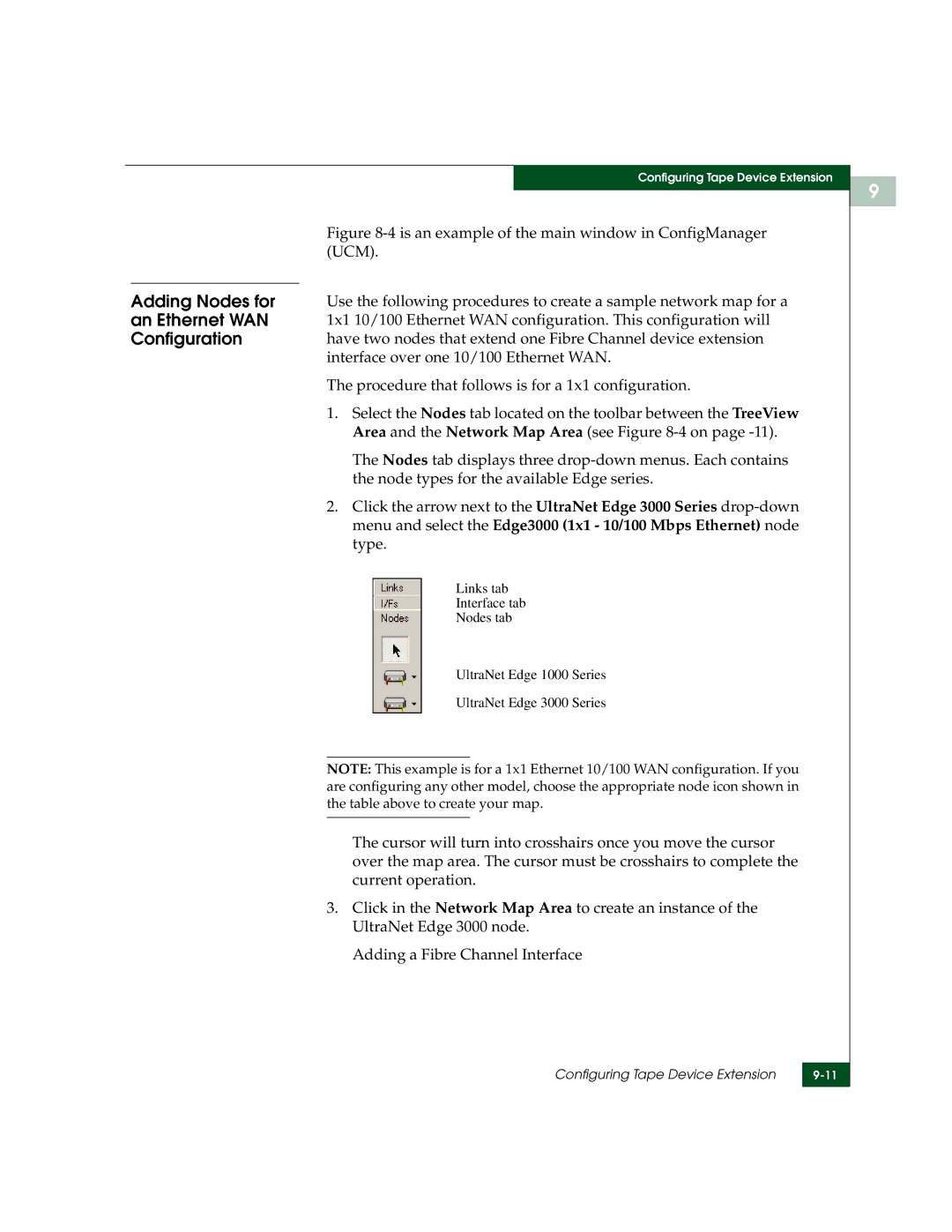
| 1. Select the Nodes tab located on the toolbar between the TreeView |
| ||||
|
|
| Area and the Network Map Area (see Figure |
| ||||
|
|
| The Nodes tab displays three |
| ||||
|
|
| the node types for the available Edge series. |
| ||||
|
|
| 2. Click the arrow next to the UltraNet Edge 3000 Series |
| ||||
|
|
| menu and select the Edge3000 (1x1 - 10/100 Mbps Ethernet) node |
| ||||
|
|
| type. |
| ||||
|
|
| Links tab |
| ||||
|
|
| Interface tab |
| ||||
|
|
| Nodes tab |
| ||||
|
|
| UltraNet Edge 1000 Series |
| ||||
|
|
| UltraNet Edge 3000 Series |
| ||||
|
|
|
|
|
|
| ||
|
|
| NOTE: This example is for a 1x1 Ethernet 10/100 WAN configuration. If you |
| ||||
|
|
| are configuring any other model, choose the appropriate node icon shown in |
| ||||
|
|
| the table above to create your map. |
| ||||
|
|
|
|
|
| |||
|
|
| The cursor will turn into crosshairs once you move the cursor |
| ||||
|
|
| over the map area. The cursor must be crosshairs to complete the |
| ||||
|
|
| current operation. |
| ||||
|
|
| 3. Click in the Network Map Area to create an instance of the |
| ||||
|
|
| UltraNet Edge 3000 node. |
| ||||
|
|
| Adding a Fibre Channel Interface |
| ||||
Configuring Tape Device Extension | |
|
|
9