Wireless LAN Mobility System
3CRWXR10095A, 3CRWX120695A, 3CRWX440095A
3Com Corporation 350 Campus Drive Marlborough, MA USA
Contents
Clear banner motd Clear history Clear prompt
Set system location
102
104
126 Display ip alias 127
174 Set summertime 177 Set system ip-address 179
180 Set timezone 181 Display dhcp-client 182
183 Display snmp community 186
187
245
MAP Access Point Commands by Usage
272 Clear radio-profile 274 Clear service-profile 275 276
Set user group 258 Set usergroup 259 Set web-aaa 260
267
318
STP Commands
Security ACL Commands by Usage 423 clear security acl
395
Set spantree portvlanpri 396 Set spantree priority 397
414
Commands by Usage 447
Display security acl hits 430 Display security acl info 431
432
448 Crypto certificate 449
500
503
525
525 Display rfdetect visible 526
528
530
Dir Display boot 547 Display config 548
549
561
Clear log trace 562 Clear trace
System LOG Commands
Register Your Product 607
Page
Conventions
List conventions that are used throughout this guide
„ Wireless LAN Switch Manager 3WXM Release Notes
„ Wireless LAN Switch and Controller Release Notes
Documentation
Comments
Pddtechpubscomments@3com.com
„ Document title
„ Document part number and revision on the title
Example
Overview
Set enablepass
Clear interface vlan-idip
Clear fdb dynamic port port-list vlan vlan-id
Text Entry
Conventions
MAC Address
Notation
Masks
Subnet Masks
Wildcard Masks
User Globs
Gives examples of user globs
MAC Address Globs
User Globs
WX1200# set port enable
Vlan Globs
Matching Order for Globs
„ a single port number. For example
Command-Line
WX1200# reset port
Editing
Operating systems
WX1200# display i Tab
Using CLI Help
At your access level, type the help command. For example
WX1200# display i?
Understanding Command Descriptions
Set ap dap name command has the following complete syntax
WX1200# display ip ?
WX1200# display ip telnet
Commands by
Disable
Syntax disable Defaults None
Usage
Enable
Quit
Set enablepass
Access Commands
System Service Commands
To located commands in this chapter based on their use
Banner with an empty banner by typing the following command
Clear banner motd
Clear history
„ display banner motd on
Clear prompt
Clear system
Display banner
Motd
Display
Base-information
„ clear banner motd on
Defaults None Access All
Display license
Display system
See Also „ set license on
Describes the fields of display system output
Display system output
Nvram size /SDRAM size percent of total
WX switch
„ Using CLI Help on
Help
Syntax help
Set auto-config
History
Syntax history
„ clear history on
Set auto-config
Enable the Dhcp client on Vlan
Enable the auto-config option
WX-1200#crypto generate key admin 1024 key pair generated
Common Name remoteswitch1@example.com
Save the configuration changes
„ Delimiting character that begins and ends the message
Syntax set banner motd text
Set confirm
See Also „ clear banner motd on „ display banner motd on
That might have a large impact on the network
Syntax set confirm on off
Set length
Examples To turn off these confirmation messages, type
WX4400# clear vlan red
WX4400# set confirm off
Installs an upgrade license, for managing more MAPs
Set license
See Also „ display license on
Set prompt
Syntax set prompt string
Set system contact Stores a contact name for the WX switch
Set system
Countrycode
Country Codes
Country Code
Country Codes
Ip-address
Mobility Domain
„ ip-addr- IP address, in dotted decimal notation
WX1200# set system country code CA
Syntax set system location string
Syntax set system name string
Set system name
System Service Commands
Port Commands
Locate commands in this chapter based on their use
That are using the MAP
Clear dap
Removes a Distributed MAP
„ set dap on
Clear port-group
„ name name Name of the port group
See Also „ set port-groupon „ display port-groupon
Syntax clear port-group name name
Clear port
Preference
Clear port name Removes the name assigned to a port
See Also „ display port status on „ set port name on
Clear port type
„ display port preference on
„ set port preference on
Port
Display port
Counters
Display port-groupShows port group information
WX1200 display port counters octets port
Syntax display port-group all name group-name
Describes the fields in the display port-group output
See Also „ clear port-groupon „ set port-groupon
Describes the fields in this display
Output for display port-group
Display port
Output for display port preference
WX4400# display port preference Port Preference
Syntax display port status port-list
Output for display port status
WX1200# display port status
Monitor port
See Also „ clear port type on
„ set port negotiation on
„ set port speed on
Key Controls for Monitor Port Counters Display
Output for monitor port counters
WX4400# monitor port counters
Correct length but contained an invalid
See Also „ display port counters on
Reset port
Set dap
Port Commands
Set dap
Following command removes Distributed MAP
Administratively disables or reenables a port
Syntax set port enable disable port-list
Set port
See Also „ reset port on
Configured together as a single logical link
Single logical link
With no spaces
Name or number in other CLI commands
Set port name
See Also „ clear port-groupon „ display port-groupon
Syntax set port port name name
Following command enables autonegotiation on port
Syntax set port negotiation port-listenable disable
WX1200# set port negotiation 3,5 disable
WX1200# set port negotiation 2 enable
Access points
Following command enables PoE on ports 4
See Also „ set port type ap on „ set port type wired-authon
Set port poe
Set port speed
Changes the speed of a port
Syntax set port preference port-listrj45
WX4400# set port preference 2 rj45
Set snmp profile command
Set port trap
Mp-352mp-372- MAP access point model
WX1200# set port trap 3-4 enable
„ poe enable disable Power over Ethernet PoE state
„ 11a 802.11a „ 11b 802.11b „ 11g 802.11g
„ radiotype 11a 11b 11g Radio type
Defaults All WX ports are network ports by default
MAP Access Port Defaults
WX1200# set port type ap 1-3,5 model ap3750 poe enable
WX1200# set port type ap 1-3,5 model ap8250 poe enable
Wired-auth
Before changing the port type from ap to wired-author from
Command
Set port type
Wired Authentication Port Details
Vlan membership
See Also „ clear port type on „ set port type ap on
Port Commands
Vlan Commands
Clear fdb
Deletes an entry from the forwarding database FDB
Syntax clear fdb perm static dynamic
Clear vlan
„ display fdb on
Port from the VLAN, make sure you specify the port number
Following command completely removes Vlan marigold
See Also „ set vlan port on „ display vlan config on
Display fdb
Displays entries in the forwarding database
WX4400# display fdb all
Describes the fields in the display fdb output
See Also „ clear fdb on
Output for display fdb
WX4400# display fdb
Agingtime
See Also „ set fdb agingtime on
Display roaming
Station
Describes the fields in the display
See Also „ display roaming vlan on
Output for display roaming station
Output for display roaming vlan
Syntax display roaming vlan
WX4400# display roaming vlan
See Also „ display vlan config on
Display tunnel
Output for display tunnel
Syntax display tunnel
Display vlan config
Output for display vlan config
Syntax display vlan config vlan-id
WX1200# display vlan config burgundy
Set fdb
Adds a permanent or static entry to the forwarding database
Syntax set fdb perm static
See Also „ clear fdb on „ display fdb on
Syntax set fdb agingtime vlan-idage seconds
Set vlan name
See Also „ display fdb agingtime on
Creates a Vlan and assigns a number and name to it
Syntax set vlan vlan-numname name
Set vlan port
Tag value to be the same but some other switches do
Set vlan
Tunnel-affinity
Adds ports 1 through 3 to the Vlan
See Also „ display roaming vlan on „ display vlan config on
IP Services Commands
To locate commands in this chapter based on their use
IP Services Commands by Usage
DNS
Access Enabled History Introduced in MSS Version
Clear interface
Removes an IP interface
Syntax clear interface vlan-idip
Clear ip alias
See Also „ display ip alias on
Syntax clear ip alias name
Clear ip dns domain Removes the default DNS domain name
„ ip-addr- IP address of a DNS server
Syntax clear ip dns domain
WX1200# clear ip dns domain
Default is an alias for IP address 0.0.0.0/0
Clear ip route
„ clear ip dns domain on
See Also „ display ip route on „ set ip route on
Defaults The default Telnet port number is
Telnet management traffic to its default
Removes an NTP server from a WX switch configuration
Clear ip telnet
Update-interval
Clear ntp
Clear snmp
Community
Syntax clear snmp community name comm-string
„ display snmp community on
Clear snmp profile
Clear snmp trap
Receiver
Clear snmp usm
See Also „ set snmp usm on „ display snmp usm on
Syntax clear summertime
Clear timezone
Use the address
Display arp
Usage All
Shows the ARP table
Syntax display arp ip-addr
„ set arp on
„ set arp agingtime on
Output for display arp
Shows the IP aliases configured on the wireless LAN switch
Display ip alias
See Also „ set interface on „ set interface status on
Output for display interface
Examples The following command displays the DNS information
Display ip dns
„ clear ip alias on
„ set ip alias on
Display ip https
Shows information about the Https management port
Output for display ip dns
Syntax display ip https
Output for display ip https
WX4400# display ip https
Display ip route
Shows the IP route table
Syntax display ip route destination
WX4400# display ip route
Output of display ip route
FieldDescription
Output for display ip telnet
Syntax display ip telnet
WX4400 display ip telnet
Examples To display NTP information for a WX switch, type
Display ntp
Shows NTP client information
Output for display ntp
„ set ntp server on „ set summertime on „ set timezone on
Configuration
Shows Snmp settings on a wireless LAN switch
Examples To display Snmp settings on a WX switch, type
Display snmp
Output of display snmp configuration
Defaults There is no summertime offset by default
Summertime
Syntax display summertime
WX1200# display summertime
WX1200# display timedate
Syntax display timezone
WX4400# display timezone
Defaults „ count
„ set timedate on „ set timezone on
Set arp
„ traceroute on
Following command disables ARP aging
See Also „ set arp agingtime on
Syntax set arp agingtime seconds
WX1200# set arp agingtime
Set interface
Syntax set interface vlan-idip dhcp-client enable disable
Dhcp-client
„ clear interface on
Configures the MSS Dhcp server
„ enable Enables the Dhcp server
„ disable Disables the Dhcp server
Defaults The Dhcp server is enabled by default on a new
See Also „ display dhcp-serveron
Syntax set interface vlan-idstatus up down
Aliases as shortcuts in CLI commands
Set ip alias
Set ip dns
See Also „ clear ip alias on „ display ip alias on
Syntax set ip dns domain name
WX1200# set ip dns domain example.com
Syntax set ip dns server ip-addrprimary secondary
WX switch is disabled
Syntax set ip https server enable disable
Syntax set ip route default ip-addr mask
Set ip route
Set ip route
Syntax set ip snmp server enable disable
WX4400# set ip snmp server enable
Set ip ssh
„ clear snmp notify target on
Secure Shell SSH management traffic
Absolute-timeout
„ set ip ssh absolute-timeouton
„ set ip ssh idle-timeouton
„ set ip ssh server on
Idle-timeout
Also disabled
Set ip ssh server
Maximum number of SSH sessions supported on a WX switch is
Set ip telnet
History -Introduced in MSS Version
Telnet management traffic
Syntax set ip telnet server enable disable
Enables or disables the NTP client on a wireless LAN switch
Configures a wireless LAN switch to use an NTP server
Set ntp
Set ntp server
RFC 1305, Network Time Protocol Version 3 Specification
Defaults The default NTP update interval is 64 seconds
Implementation and Analysis
NTP server
Set snmp
User. SNMPv3 does not use community strings
Set snmp community
Set snmp notify
Target
SNMPv3 with Informs
SNMPv3 with Traps
Usm trap user username
SNMPv2c with Informs
SNMPv2c with Traps
SNMPv1 with Traps
Success change accepted
„ notification-type- Any of the items in Table
Snmp notification types
Point
Snmp notification types
WX-1200#set snmp notify profile snmpprofrfdetect send
RFDetectRogueDisappearTraps success change accepted
Syntax set snmp protocol v1 v2c usm all enable disable
WX-1200# set snmp security encrypted success change accepted
Versions, use the set snmp community command to configure
Set snmp trap
Set snmp usm
Community strings
„ auth-type none md5 sha auth-pass-phrase string
IP Services Commands
WX-1200# set snmp usm securesnmpmgr1 snmp-engine-id
Auth-type sha auth-pass-phrase myauthpword
Encrypt-type 3des encrypt-pass-phrase mycryptpword
WX1200# set summertime PDT success change accepted
Following
WX4400# set interface taupe ip 10.10.20.20/24
Sets the time of day and date on the wireless LAN switch
Set timedate
Syntax set timedate date mmm dd yyyy time hhmmss
WX4400# set timedate date feb 29 2004 time 235800
It is enabled
Set timezone
WX1200# set timezone PST
Output for display dhcp-client
Syntax display dhcp-client
WX-1200# display dhcp-client
See Also „ set interface dhcp-clienton
Display dhcp-serverDisplays MSS Dhcp server information
Syntax display dhcp-server interface vlan-id verbose
WX-1200#display dhcp-server
Describe the fields in these displays
Output for display dhcp-server
Display dhcp-server
See Also „ set interface dhcp-serveron
Output for display dhcp-client verbose
Displays the configured Snmp community strings
Outpot for display snmp community
Syntax display snmp community
WX-1200#display snmp community
Displays Snmp statistics counters
Syntax display snmp counters
WX-1200#display snmp counters
Syntax display snmp notify profile
WX-1200#display snmp notify profile
See Also „ clear snmp profile on „ set snmp profile on
Syntax display snmp notify target
WX-1200#display snmp notification target
Output for display snmp notification target
User Name of the Snmp user EngineID
Output for display Snmp status
WX-1200#display snmp status
Switch has booted
„ display snmp notify target on „ display snmp usm on
Output for display snmp usm
WX-1200#display snmp usm USM users
See Also „ clear snmp usm on „ display snmp usm on
Telnet
Opens a Telnet client session with a remote device
WX4400# telnet
Defaults
„ dnf Disabled
Traceroute
See Also „ clear sessions on „ display sessions on
„ no-dns- Disabled „ port
„ queries „ size „ ttl
„ wait
Ctrl+C
Error messages for traceroute
„ ping on
Locate commands in this chapter based on their use
This chapter presents AAA commands alphabetically. Use to
AAA Commands by Usage
Display accounting statistics on
Syntax clear accounting admin dot1x user-glob
WX4400# clear accounting dot1x Nin
Clear authentication
Admin
Syntax clear authentication console user-glob
WX4400# clear authentication console Regina
ConsoleConsole
Syntax clear authentication dot1x ssid ssid-namewired
Clear authentication Removes a MAC authentication rule. mac
Syntax clear authentication last-resort ssid ssid-namewired
WX4400# clear authentication last-resort wired
Syntax clear authentication mac ssid ssid-namewired
Access Enabled History -Introduced in MSS
WX4400# clear authentication mac ssid thatcorp aabbcc
Syntax clear authentication proxy ssid ssid-nameuser-glob
See Also „ set authentication proxy on
„ on Clear authentication Removes a WebAAA rule. web
WX-1200#clear authentication proxy ssid mycorp
Syntax clear location policy rule-number
User who is authenticated by a MAC address
Clear mac-user
Radius server
Syntax clear mac-user mac-addr
WX switch, for a user who is authenticated by a MAC address
Group
ACL from the profile of a user at MAC address
For your Radius server
Clear
Mac-usergroup
Mac-usergroup attr
„ set mobility-profile mode on
Mobility-profile
Clear user
„ set mobility-profileon
Database on the WX switch, for a user with a password
Clear user attr
Nin
„ set user on
Clear user group
Clear usergroup
Usergroup
„ clear usergroup on
Syntax clear usergroup group-name attr attribute-name
Displays all current AAA settings
Secion added to indicate the state of the WebAAA feature
Display aaa
Time-Of-Day attribute from the group
Describes the fields that can appear in display aaa output
Display aaa Output
Display aaa Output
Stored in the local database on the WX switch
Display accounting
Statistics
Statistics output
Display accounting statistics
On an WX switch
Display location
Policy
„ clear location policy on
Admin console
Set accounting
Are sent
Server when the user roams
Accesses the switch using Telnet or Web Manager
Authenticated by
Authenticated by MAC authentication
Set accounting dot1x mac web
Set authentication
Set authentication admin
Through the switch’s console
Completing logon
Globs on
Following methods in priority order. MSS applies multiple
For more information, see Usage
Syntax set authentication dot1x ssid ssid-namewired
Set authentication dot1x
AAA Commands
Success change accepted
Syntax set authentication last-resort
235
Syntax set authentication mac
Set authentication mac
Proxy
WX-1200#set authentication proxy ssid mycorp ** srvrgrp1
Syntax set authentication web ssid ssid-namewired
AAA Commands
Set location policy
For details, see Vlan Globs on
Set location policy
WX4400# set location policy deny if user eq *.theirfirm.com
Set mac-user
Tempvendora into Vlan kiosk1
See Also „ clear mac-useron „ display aaa on
Authentication Attributes for Local Users
Authentication Attributes for Local Users
Filter-id outboundacl.out
YY/MM/DD-HHMM
Time-of-day
WX4400# set mac-user 010203040506 attr filter-id acl-03.in
See Also „ clear mac-user attr on „ display aaa on
Syntax set mac-usergroup
See Also „ clear mac-usergroup attr on „ display aaa on
Syntax set mobility-profile name name port none all
AAA Commands
Syntax set mobility-profile mode enable disable
„ set user attr on „ set usergroup on
Set user
Set user attr
29Jan04
„ clear user on
Orange
That exists in the local database on the WX switch
Set user group
„ clear user attr on
Server
Assigns authorization attributes for the group
To add a user to a group, user the command set user group
Set usergroup
Examples To disable WebAAA, type the following command
Syntax set web-aaa enable disable
Set web-aaa
To locate commands in this chapter based on their use
Mobility Domain Commands by Usage
Mobility-domain
Member
Display mobility-domain config
Displays the configuration of the Mobility Domain
Status
See Also „ set mobility-domain member on
Display mobility-domain Output
WX4400# display mobility-domain status
Command is rejected
Set
Syntax set mobility-domain member ip-addr
Mode member
Seed, this command overwrites that configuration
Seed-ip
192.168.1.8
Set mobility-domain mode seed domain-name
Syntax set mobility-domain mode seed domain-name
Mobility Domain Commands
Commands
Type Command Set ap dap radio auto-tune max-power on
Set ap dap radio auto-tunemin-client-rateon
Clear ap dap
Radio
Syntax clear ap port-listdap dap-num radio 1 2 all
Radio-Specific Parameters
WX1200# clear ap 3 radio
Syntax clear radio-profile name parameter
„ name Service profile name
Syntax clear service-profile name
See Also „ clear radio-profileon „ set radio-profile mode on
WX1200# display ap config
WX4400# display dap config
Output for display ap config
DAP
„ set port type ap on „ set ap dap bias on
WX1200# display ap counters
Output for display ap counters
Tkip Pkt Replays
See Also „ display sessions network on
Ccmp Pkt Replays
Output for display ap dap qos-stats
WX-1200#display dap qos-stats
Output of display ap etherstats
Syntax display ap dap etherstats port-listdap-num
WX4400# display dap etherstats
Access point groups
„ name Name of an MAP group or Distributed MAP group
Syntax display ap dap group name
„ set ap dap group on
Output for display ap group
WX1200# display ap group loadbalance1
MAP
WX4400# display dap status
Output for display ap status
WX1200# display ap status
Output for display ap status
Decide whether to change channel or power settings
Display auto-tune
Attributes
Syntax display auto-tune attributes
See Also „ display auto-tune neighbors on
Output for display auto-tune attributes
WX1200# display auto-tune attributes ap 2 radio
Neighbors
3Com radio can hear
Syntax display auto-tune neighbors
Ap map-numradio 1 2all
Output for display auto-tune neighbors
Display auto-tune Neighbors ap 2 radio
Display dap global command
Display dap
Connection
Output of display dap connection
Dap connection serial-id M9DE48B6EAD00
Syntax display dap global dap-numserial-id serial-ID
Output for display dap global
WX4400# display dap global
Unconfigured
But that are not configured on any WX switches
Longer appears in the command’s output
Network port is a member of a Vlan
Output for display dap unconfigured
Radio-profile
Displays radio profile information
Syntax display radio-profile name ?
WX4400# display radio-profile default
Output for display radio-profile
Tune Channel
Ssid
Service-profile
Displays service profile information
„ name Displays information about the named service profile
„ ? Displays a list of service profiles
Display service-profile
Other WPA parameters
Reset ap dap
Dap auto mode enable command
Usage lists the configurable template parameters and their
Listed in . The commands are listed in the See Also section
Configurable Template Parameters for Distributed MAPs
WX1200# set dap auto success change accepted
Syntax set dap auto mode enable disable
Radiotype
Template
„ Radio type „ 11a-802.11a „ 11b-802.11b „ 11g-802.11g
See Also „ set dap auto on
Syntax set ap port-listdap dap-numauto bias high low
See Also „ display ap dap config on
Blink enable disable
Syntax set dap num fingerprint hex
„ ap port-list- List of MAP access ports to add to the group
WX1200# set ap 4 group none success change accepted
Set ap dap name Changes an MAP name
„ antennatype ANT1060 ANT1120 ANT1180 internal
„ antennatype ANT5060 ANT5120 ANT5180 internal
Set ap dap radio auto-tune max-power
Radio 1 2 auto-tune max-power power-level
Set ap dap radio auto-tune max- retransmissions
Radio 1 2 auto-tune max-retransmissions retransmissions
Set ap dap radio auto-tune max- retransmissions
Set ap dap radio channel
Sets an MAP radio’s channel
Syntax set ap port-listdap dap-numradio 1
„ display ap dap config on
Set ap dap radio auto-tune min-client-rate
Radio 1 2 auto-tune min-client-rate rate
Examples
Set ap 6 radio 1 min-client-rate
Set ap dap radio mode
Enables or disables a radio on an MAP access point
Following command enables radio 2 on ports 1 through
Radio 1 2 mode enable disable
Defaults None
Set ap dap radio tx-power
Sets an MAP radio’s transmit power
Syntax set dap security require none optional
WX-1200#set dap security require
Upgrade-firmware
Set ap dap
Set radio-profile
11g-only
Set radio-profile auto-tune channel-config
Syntax set radio-profile name active-scan enable disable
Set radio-profile auto-tune channel-holddown
Syntax set radio-profile name auto-tune channel-holddown
Set radio-profile auto-tune channel-interval
Syntax set radio-profile name auto-tune channel-interval
Set radio-profile auto-tune power-backoff- timer
Syntax set radio-profile name auto-tune power-backoff-timer
Set radio-profile auto-tune power-config
WX4400# set radio-profile rp2 auto-tune power-backoff-timer
Set radio-profile auto-tune power-interval
Beacon-interval
Clients from being able to use rogue access points
„ rogue Configures radios to attack rogues only
Defaults Countermeasures are disabled by default
Following command disables countermeasures in radio profile
Syntax set radio-profile name dtim-interval interval
Syntax set radio-profile name frag-threshold threshold
Syntax set radio-profile name long-retry threshold
Syntax set radio-profile name max-rx-lifetime time
Syntax set radio-profile name max-tx-lifetime time
Mode
Set radio-profile mode
WX4400# set radio-profile rp1 mode enable
Syntax set radio-profile name
Syntax set radio-profile name service-profile name
Syntax set radio-profile name rts-threshold threshold
Defaults for Service Profile Parameters
Parameter Default Value To Default Value
Set radio-profile auth-psk command
349
Short-retry
Wmm
Syntax set service-profile Name auth-dot1x enable disable
WPA IE
Set service-profile auth-fallthru
Syntax set service-profile name auth-psk enable disable
Syntax set service-profile name beaconed enable disable
Set service-profile
Cipher-ccmp
Cipher-tkip
Use the set service-profile wep commands
Cipher-wep104
Cipher-wep40
Syntax set service-profile name psk-phrase passphrase
Syntax set service-profile name psk-raw hex
See Also „ set service-profilecipher-ccmpon
Syntax set service-profile name rsn-ie enable disable
Set service-profile auth-psk command
Syntax set service-profile name ssid-name ssid-name
See Also „ set service-profilessid-typeon
Syntax
See Also „ set service-profilessid-nameon
Syntax set service-profile name tkip-mc-time wait-time
Ssid managed by the service profile
Syntax set service-profile name web-aaa-form url
Web-aaa-form
WX4400# mkdir corpa-ssid success change accepted
Set service-profile wep active-multicast- index
„ copy on „ dir on
„ mkdir on
Set service-profile wep active-unicast- index
Syntax set service-profile name wep active-unicast-index num
Wep key-index
Syntax set service-profile name wpa-ie enable disable
STP Commands by
Table to locate commands in this chapter based on their use
STP Commands by Usage
STP root bridge in all VLANs on a WX switch
Clear spantree
Portcost
Syntax clear spantree portcost port-list
Portpri
Portvlancost
„ clear spantree portvlanpri on
„ set spantree portpri on
Portvlanpri
„ clear spantree portcost on
„ clear spantree portpri on
See Also „ display spantree statistics on
Spantree vlan default
Syntax display spantree
Output for display spantree
Root
Or disabled
Display spantree
Backbonefast
„ display spantree blockedports on
Blockedports
„ set spantree backbonefast on
See Also „ display spantree on
Portfast
For one or more network ports
See Also „ set spantree portfast on
Output for display spantree portfast
Port’s VLANs
„ port-list- List of ports
Syntax display spantree portvlancost port-list
Syntax display spantree statistics
WX4400# display spantree statistics
Topology change Timer value Hold timer
Output for display spantree statistics
Vlan Vlan ID
Configpending
Switch is the root or is attempting to become the root
See Also „ clear spantree statistics on
Syntax display spantree uplinkfast vlan vlan-id
Set spantree
„ set spantree uplinkfast on
Examples The following command enables STP on all VLANs
Configured on a WX switch
Following command disables STP on Vlan burgundy
An indirect link
Fwddelay
„ display spantree backbonefast on
Issues a topology change message
Maxage
VLANs to 4 seconds
„ all Changes the maximum age on all VLANs
Type. lists the defaults for STP port path cost
STP Port Path Cost Defaults
Path to the STP root bridge
65,535. STP selects lower-cost paths over higher-cost paths
Portvlancost command
See Also „ display spantree portfast on
Syntax set spantree portpri port-listpriority value
Bridge for a specific Vlan on a wireless LAN switch
„ all Changes the cost on all VLANs
Type. See on
To 20 in Vlan mauve
Path to the STP root bridge, on one Vlan or all VLANs
Ports
Highest priority through 255 lowest priority
„ all Changes the priority on all VLANs
Priority
Uplinkfast
See Also „ display spantree uplinkfast on
Igmp Snooping Commands
Igmp Commands by Usage
Clear igmp statistics
Display igmp
See Also display igmp statistics on
TTL
Output for display igmp
TTL
Mrouter
Syntax display igmp mrouter vlan vlan-id
WX1200# display igmp Mrouter vlan orange
Defaults None Access Enabled
Only one querier
Syntax display igmp querier vlan vlan-id
WX1200# display igmp querier vlan default
Output for display igmp mrouter
WX1200# display igmp querier vlan orange
WX1200# display igmp querier vlan red
Receiver-table
„ set igmp querier on
See Also „ set igmp receiver on
Output for display igmp receiver-table
Igmp Receiver-table group 237.255.255.0/24
Shows Igmp statistics
„ vlan vlan-id Vlan name or number. If you do not specify a
Syntax display igmp statistics vlan vlan-id
WX1200# display igmp statistics vlan orange
Output of display igmp statistics
From the multicast routers in the subnet
Wireless LAN switch
See Also „ set igmp rv on
VLANs on a wireless LAN switch
VLAN, the timer change applies to all VLANs
Set igmp lmqi
From 1 through 65,535
Syntax set igmp mrouter port port-listenable disable
See Also „ display igmp statistics on
Enables or disables multicast router solicitation by a WX
Syntax set igmp mrsol enable disable vlan vlan-id
Set igmp mrsol
See Also „ set igmp mrsol mrsi on
Set igmp oqi
See Also „ set igmp mrsol on
All VLANs on a WX
Syntax set igmp oqi seconds vlan vlan-id
Set igmp
Proxy-report
„ set igmp lmqi on
„ set igmp qri on
Set igmp qi
Syntax set igmp qi seconds vlan vlan-id
Set igmp qri
VLANs on a WX
Group. You can specify a value from 1 through 65,535
Syntax set igmp querier enable disable vlan vlan-id
Syntax set igmp receiver port port-listenable disable
See Also „ display igmp querier on
Set igmp rv
Set igmp rv
Igmp Snooping Commands
Security ACL Commands
Security ACL
Syntax clear security acl acl-name all editbuffer-index
WX4400# commit security acl acl133 configuration accepted
Syntax clear security acl map acl-nameall vlan vlan-id
Syntax commit security acl acl-nameall
WX4400# commit security acl all
WX4400# display security acl
Syntax display security acl dscp
Examples The following command displays the table
See Also „ set security acl on
WX-1200#display security acl dscp
Syntax display security acl editbuffer
WX4400# display security acl editbuffer
Syntax display security acl hits
See Also „ hit-sample-rateon „ set security acl on
WX4400# display security acl hits
Syntax display security acl info acl-nameall editbuffer
Display security acl
Map
Security ACL is assigned
Syntax display security acl map acl-name
Resource-usage
ACL acl111 is mapped
Support for your Product on
WX4400# display security acl map acl111
WX4400# display security acl resource-usage
Output of display security acl resource-usage
Output of display security acl resource-usage
Hit-sample-rate
Packets filtered by the security ACL or hits
Syntax hit-sample-rate seconds
Syntax rollback security acl acl-nameall
Set security acl
Protocol, or IP, ICMP, TCP, or UDP packet information
By Icmp packets
By TCP packets
By UDP packets
„ ip „ tcp „ udp „ icmp
Security ACL Commands
Set security acl
WX4400# set security acl ip acl123 deny 192.168.2.11
Set security acl map
Security ACL Commands
To locate commands in this chapter based on their use
Cryptography Commands by Usage
Syntax crypto ca-certificate admin eap webaaa
Syntax crypto certificate admin eap webaaa
See Also „ display crypto ca-certificateon
Access Enabled History -Introduced in MSS Version
Syntax crypto generate key admin eap ssh webaaa 512 1024
See Also display crypto key ssh on
Syntax crypto generate request admin eap webaaa
WX4400# crypto generate request admin
Email Address admin@example.com
Syntax crypto generate self-signed admin eap webaaa
See Also „ crypto certificate on „ crypto generate key on
WX4400# crypto generate self-signed admin
Crypto otp
Crypto pkcs12
„ crypto pkcs12 on
See Also „ crypto otp on
WX4400# crypto otp eap hap9iN#ss
Display crypto
Ca-certificate
Pkcs #7 certificate
Display crypto ca-certificate Output
On the WX switch
Syntax display crypto certificate admin eap webaaa
Certificate
Describes the fields of the display
See Also crypto generate key on
Syntax display crypto key ssh
Cryptography Commands
Locate commands in this chapter based on their uses
Radius Commands by Usage
Clear radius
See Also „ display aaa on „ set radius client system-ipon
Syntax clear radius client system-ip
See Also „ set radius proxy client on
See Also „ set radius proxy port on
Syntax clear radius proxy client all
Syntax clear radius proxy port all
See Also „ display aaa on „ set radius server on
Syntax clear radius server server-name
Syntax clear server group group-nameload-balance
Set radius
„ set server group on
Set radius client
System-ip
„ clear radius server on
WX4400# set radius client system-ipsuccess change accepted
Set radius proxy
Port
„ clear radius proxy client on
To 32 characters long, with no spaces or tabs
Set radius server
WX1200# set server group shorebirds members heron egret
Load-balance group
„ group-name- Server group name of up to 32 characters
Sandpiper
Radius and Server Group Commands
On the switch
Commands on
802.1X Commands by Usage
Performance
Resets the Bonded Auth period to its default value
Clear dot1x
Bonded-period
See Also „ display dot1x on „ set dot1x bonded-periodon
Port-control
„ set dot1x max-reqon
Quiet-period
Reauth-max
Reauth-period
„ set dot1x reauth-maxon
See Also „ display dot1x on „ set dot1x reauth-periodon
„ set dot1x timeout auth-serveron
„ set dot1x timeout supplicant on
Auth-server
Supplicant
Tx-period
Display dot1x
„ set dot1x tx-periodon
WX1200# display dot1x config
WX4400# display dot1x clients
Type the following command to display 802.1X statistics
Explains the counters in the display dot1x stats output
WX4400# display dot1x stats
Port-control command
Set dot1x
Authcontrol
Authentication is enabled
Examples To enable per-port 802.1X authentication on wired
Authentication ports, type the following command
Machine to start reauthentication for the user
Syntax set dot1x key-tx enable disable
See Also „ display dot1x on „ clear dot1x bonded-periodon
See Also „ display dot1x on
See Also „ clear dot1x max-reqon „ display dot1x on
Authentication dot1X command
See Also „ display port status on „ display dot1x on
To a supplicant after a failed authentication
Syntax set dot1x reauth enable disable
Syntax set dot1x quiet-period seconds
Before the supplicant client becomes unauthorized
See Also „ display dot1x on „ clear dot1x reauth-maxon
Syntax set dot1x reauth-max number-of-attempts
Set dot1x timeout
Attempts reauthentication
Out a request to a Radius authentication server
See Also „ display dot1x on „ clear dot1x reauth-periodon
Out an authentication session with a supplicant client
Syntax set dot1x timeout supplicant seconds
Syntax set dot1x tx-period seconds
Syntax set dot1X wep-rekey enable disable
Wep-rekey
See Also „ display dot1x on „ clear dot1x tx-periodon
Broadcast and multicast encryption keys
Defaults The default is 1800 seconds 30 minutes
Wep-rekey-period
„ seconds Specify a value between 30 and 1,641,600 19 days
To 300 seconds
Clear sessions
Telnet sessions
Network
VLANs, or session ID
To clear session 9, type the following command
WX4400# clear sessions network mac-addr
WX1200# clear sessions network session-id
Display sessions
WX4400 display sessions admin
WX4400 display sessions console
WX4400 display sessions telnet
See Also „ clear sessions on
Display sessions telnet client Output
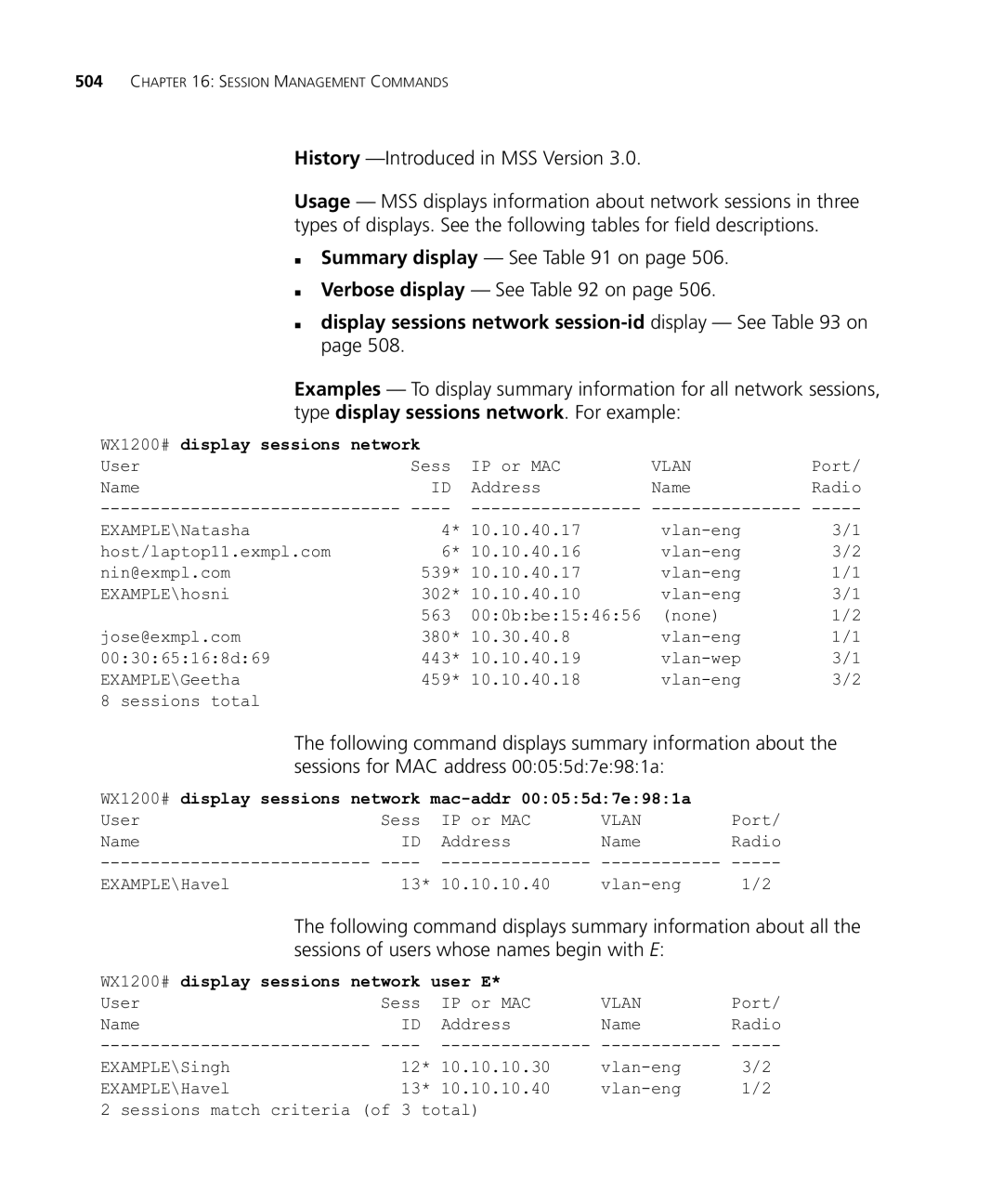
Syntax display sessions network
„ Summary display See on „ Verbose display See on
„ display sessions network session-id display See on
WX1200# display sessions network
WX1200# display sessions network mac-addr 00055d7e981a
WX1200# display sessions network verbose
WX1200# display sessions network session-id
Display sessions network summary Output
Additional display sessions network verbose Output
Time
802.1X protocol on a wired authentication port
Display sessions network session-id Output
See Also „ clear sessions network on
Session Management Commands
To locate the commands in this chapter based on their use
RF Detection Commands by Usage
Examples The following command clears MAC address
Clear rfdetect
Attack-list
Removes a MAC address from the attack list
Black-list
Countermeasures Mac Clear rfdetect
Ignore
Ssid-list
„ display rfdetect ignore on
„ set rfdetect ignore on
„ set rfdetect ssid-liston
Vendor-list
Display rfdetect
„ set rfdetect vendor-liston
„ display rfdetect vendor-liston
RF Detection Commands
Countermeasures
Mobility Domain
Domain
Display rfdetect countermeasures Output
Displays information about the APs detected by a WX switch
Data
Syntax display rfdetect data
Display rfdetect data Output
WX1200# display rfdetect data
Ignore list
Syntax display rfdetect ignore
WX4400# display rfdetect ignore Total number of entries
Bssid mac-addr Displays rogues that are using the specified
During RF detection scans
Syntax display rfdetect mobility-domain
WS1200# display rfdetect mobility-domain
Ssid 3Com-webaaa
WS1200# display rfdetect mobility-domain ssid 3Com-webaaa
Following command displays detailed information for a Bssid
Display rfdetect mobility-domain Output
WX1200# display rfdetect mobility-domain bssid 000b0e0004d1
Display rfdetect mobility-domain ssid or bssid Output
WX switch
„ display rfdetect data on
Displays the entries in the permitted Ssid list
„ clear rfdetect ssid-liston
Display ap dap status command
Visible
Display rfdetect visible Output
WX1200# display rfdetect visible Radio
Set rfdetect
Active-scan
Addresses of APs and clients
Configured. WX switches do not share attack lists
Examples The following command adds MAC address
Defaults The client black list is empty by default
Configured. WX switches do not share client black lists
Set rf detect
Countermeasures Mac Set rfdetect ignore
See Also „ display log buffer on
WX switches in a Mobility Domain
Signature
Examples The following command adds Ssid mycorp to the list
Only for the SSIDs that are on the list
Permitted SSIDs
Device’s OUI is in the permitted vendor list
Trailing 000000 value is required
Syntax display rfdetect attack-list
WX1200# display rfdetect attack-list
Displays the wireless clients detected by an WX switch
Clients
Syntax display rfdetect black-list
WX1200# display rfdetect black-list
Display rfdetect clients Output
WX1200# display rfdetect Clients
Display rfdetect clients mac Output
From the wired side of the network addressed to
File Management Commands
Dir command output
Locally on the switch
Tape archive tar format
„ tftp/ip-addr/filename- Name of the archive file to create
Syntax clear boot config
„ reset system on
Copy
Performs the following copy operations
„ Copies a file from a Tftp server to nonvolatile storage
WX4400# copy test-config new-config
WX4400# copy floorwx tftp//10.1.1.1/floorwx
File or the running configuration
Delete
Immediately deletes the specified file
Syntax delete url
Dir
Describes the fields in the dir output
„ copy on „ delete on
Output for dir
Display boot
Reboot and configured for use after the next reboot
Access Access
Describes the fields in the display boot output
Display config
Displays the configuration running on the WX switch
Syntax display config area area all
See Also „ load config on „ save config on
And, optionally, for any attached MAP access points
WX4400# display config area vlan
Display version
WX1200# display version
WX1200# display version details
Load config
Running configuration with the commands in the loaded file
Describes the fields in the display version output
Output for display version
Following command loads configuration file testconfig1
Syntax load config url
WX4400# load config
WX4400# load config testconfig1
Mkdir
Creates a new subdirectory in nonvolatile storage
Reset system
Restarts an WX switch and reboots the software
„ dir on „ rmdir on
Restore
Generate new key pairs and certificates on the switch
„ backup on
WX1200# restore system tftp/10.10.20.9/sysabak
Rmdir
Removes a subdirectory from nonvolatile storage
Save config
Saves the running configuration to a configuration file
Syntax save config filename
„ dir on „ mkdir on
Set boot
Configuration-file
Configuration
Testconfig1
Syntax set boot partition boot0 boot1
File Management Commands
Trace Commands
Deletes running trace commands and ends trace processes
Clear log trace
Clear trace
Deletes the log messages stored in the trace buffer
WX switch, or all possible trace options
Display trace
Syntax display trace all
WX4400# display trace
Authentication
Save trace
Set trace
Authorization
See Also „ clear trace on „ display trace on
Set trace dot1x
Set trace sm
Syntax set trace sm mac-addr mac-address port port-num
Trace Commands
Snoop Commands
Clear snoop
Clear snoop map
„ display snoop info on
Set snoop
„ set snoop map on
„ display snoop on
„ display snoop map on
Chapter Snoop Commands
WX1200# set snoop snoop1 observer 10.10.30.2 snap-length
Set snoop map
Filter
Radio 1 of the MAP
Radio 2 of the MAP. This option does not apply to
Set snoop mode
To an MAP radio and enable the filter
Enable stop-afternum-pkts- Enables the snoop filter
All snoop filters
Display snoop map command
For all snoop filters configured on a WX switch
Display snoop
Displays the MAP radio mapping for all snoop filters
Display snoop info Shows the configured snoop filters
See Also „ clear snoop on
Syntax display snoop filter-name
WX1200# display snoop info snoop1
Snoop map snoop1
Examples display snoop stats filter-namedap-numradio
Snoop1
Display snoop stats Output
Snoop stats snoop1
Chapter Snoop Commands
Clear log
Syntax clear log buffer server ip-addr
See Also „ clear log trace on
You can view event messages archived in the buffer
Log buffer facility ?
WX4400# display log buffer facility AAA
„ display log config on
Log config
„ clear log on
„ set log on „ clear log on
Syntax display log trace +-/number-of-messages
Set log
Storage
„ console Sets log parameters for console sessions
Address in dotted decimal notation
„ trace Sets log parameters for trace files
See Also
See Also „ display log config on
Set log trace
Mbytes
System LOG Commands
Boot Prompt Commands
Boot Prompt
Autoboot
Boot
„ BT=type Boot type
„ DEV=device Location of the system image file
„ FN=filename System image filename
„ change on „ display on
Change
Syntax change
Create
Syntax create
Usage When you type the delete command, the next-lower
Examples To remove the currently active boot profile, type
Profiles, see display on
Syntax delete
Diag
Syntax diag
Syntax display Defaults None
Output of display command
„ change on „ create on „ delete on „ next on
Fver
For an individual command
„ command-name- Boot prompt command
Displays a list of the boot prompt commands
„ ls on
Next
Syntax next
Reset
Resets a WX switch’s hardware
Syntax reset
Command at the boot prompt
„ on Enables the poweron test flag
„ OFF Disables the poweron test flag
Defaults The poweron test flag is disabled by default
Test
Dir or fver command
Type the following command at the boot prompt
Version
Syntax version
Services
Register Your
Product
Purchase
Access Software
Troubleshoot
Online
Downloads
Contact Us
Country Telephone Number
Latsupportanc@3com.com
Index
Delete 544, 597 diag Dir 545, 598 disable 33 display
Index
Index
Index
Traceroute Version